Search Archive

Z1 -> Z2 Upgraded, but features changed?

By jwhagen · Aug 22, 2007in Problems/Troubleshooting💬 7 posts👁️ 1,466 views
Posted Aug 22, 2007 · 15:21 UTC#1

:?: I have installed the Z2 image on my Z1 and have noticed a few changes in the operation of the unit. I was wondering if anyone else noticed this...


1. The Nav Voice now mixes with the XM audio, instead of muting the XM audio when giving me the next NAV instructions. Can the mute be enabled when the instructions are given by the NAV unit? When the two mix, its very hard to understand the NAV commands.


2. When driving with the map on, I can see "crumbs" on the NAV map, showing where I have been (looks like little dots, spaced apart). They even show up the next day on the route I took yesterday (for instance going to/from work). Didn't have this on the Z1 software.


Thanks!


John
Posted Aug 22, 2007 · 15:55 UTC#2

Both can be changed using menu options:


1 Touch [Mute Set] in the System Settings menu.

Each touch of [Mute Set] changes the settings as follows:

• Guide/Tel/VR — The volume is muted or attenuated according to the following conditions

— When the navigation outputs the guidance voice.

— When you use a cellular phone via Bluetooth technology (dialing, talking, incoming call).

— When the voice recognition mode is activated.

• Tel/VR — The volume is muted or attenuated according to the following conditions

— When you use a cellular phone via Bluetooth technology (dialing, talking, incoming call).

— When the voice recognition mode is activated.

• Off — The volume does not change

❒ Operation returns to normal when the correspond action is ended.

❒ The navigation voice guidance itself cannot be attenuated or muted. If you want to mute the navigation guidance voice temporarily, use on the navigation map screen.


2 Touch [Map] in the navigation menu, then touch [Displayed Info].

The Displayed Info screen appears.

Tracking Display

You can trace locations that you have already passed with white dots on the route.

On (Always): Displays tracking for all journeys.

On (This journey): Displays tracking dots but erases them when the navigation system is turned off (when turning off the engine of your vehicle).

Off*: Does not display tracking dots.

Posted Aug 22, 2007 · 17:14 UTC#3

Outstanding, thanks so much for the assistance.


John

Posted Aug 23, 2007 · 04:36 UTC#4

Crumb feature was originally on the Z1 as well.


What about the new features? Did you try them out?


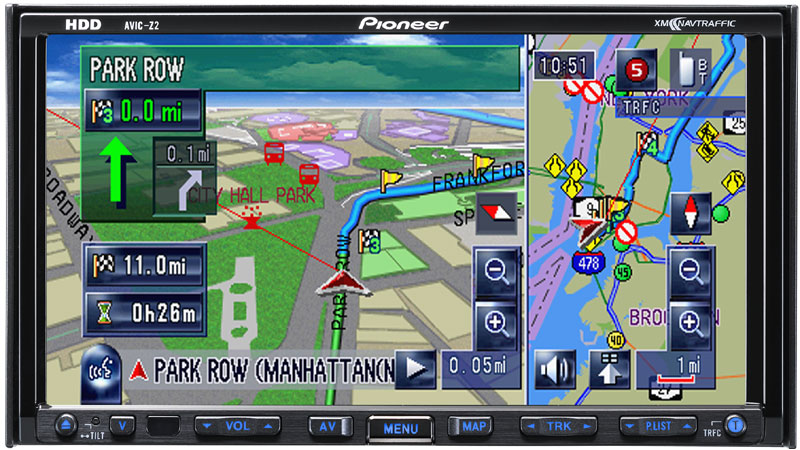
1) Route outline changes color from blue to green when you drive pass it.


*EDIT= I'm wondering if this color change is only on z1/z2 owners with XM Nav Traffic?

Can someone confirm?


2) You can now use Voice activation to dial out from Phonebook entries.


Example "Call John"


3) New 3D POI Icons


Here is pic that shows the route guidance outline on the road goes from blue to green when your position arrow drives over it to indicate progress.


423070352AVIC-Z2_withscreen_Lrg.jpg

Posted Aug 23, 2007 · 11:02 UTC#5

I don't remember seeing the crumbs on the Z1, maybe because it was defaulted off and the Z2 was defaulted on.


No, I haven't tried the new features yet. I have been busy with other stuff and should be able to do a good shakedown of the Z2 over the weekend.


Thanks for the tips!


John

Posted Oct 02, 2007 · 16:00 UTC#6

Where did you get the Z2 image and how did you get it installed on the Z1?


Thanks


:?: I have installed the Z2 image on my Z1 and have noticed a few changes in the operation of the unit. I was wondering if anyone else noticed this...


1. The Nav Voice now mixes with the XM audio, instead of muting the XM audio when giving me the next NAV instructions. Can the mute be enabled when the instructions are given by the NAV unit? When the two mix, its very hard to understand the NAV commands.


2. When driving with the map on, I can see "crumbs" on the NAV map, showing where I have been (looks like little dots, spaced apart). They even show up the next day on the route I took yesterday (for instance going to/from work). Didn't have this on the Z1 software.


Thanks!


John

Posted Oct 02, 2007 · 16:38 UTC#7

Do some light reading in the Z1/2 Hacks/Mods section


Where did you get the Z2 image and how did you get it installed on the Z1?


Thanks