Trying to size a picture for my screen. Anyone know the perfect size to get that edge to edge look?
Posted Feb 18, 2015 · 02:51 UTC#1
Trying to size a picture for my screen. Anyone know the perfect size to get that edge to edge look?
pioneer website states 800x480
Thanks
That's the effective pixel resolution.
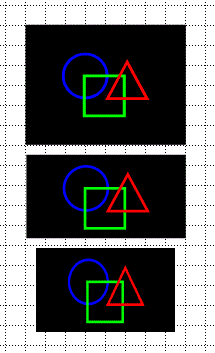
However note the effective display area is 156.6mm × 81.6mm, which is approximately a 1.92:1 aspect ratio, while 800 × 480 is approximately 1.67:1. What that means is the image is stretched horizontally when displayed. If you want objects to appear at their true aspect ratio (especially objects such as a circle or square), you'll have to take what amounts to a 921×480 image and horizontally squeeze it into one that's 800×480.
ok......thanks
Pioneer did some really goofy things with how that display works on the NEX line. It's an utter mess.
Glad this thread is here.
I have plenty of 4:3 pictures obviously. I just want to load one of them as a splash picture upon bootup, but up until now, the 4:3 picture would be ever so slightly stretched out left to right.
So based on what I've read above, I need to crop the picture to be a 1.61:1 aspect ratio. Then my pics shouldn't looked stretched out sideways, correct?
(I think you meant 1.67:1)
It's a bit more complex than that if you want the picture displayed at it's true aspect ratio.
Let me try to explain it like this...
Starting with a 4:3 image of known pixels dimensions we'll call W and H (for width and height respectively (seems reasonable  )...
)...
W ÷ 156.6 × 86.6 = H'
...where H' represents the image height after cropping (round to nearest whole number, as you cannot have a decimal pixel).
Now compress (aka shrink, compact, etc.) the image horizontally to...
W ÷ 156.6 × 86.6 ÷ 480 ×800 = W'
...where W' represents the pixel width of the image after horizontally compressing (again, round to nearest whole number, as you cannot have a decimal pixel).
You now have a properly sized image... but there's a good chance you do not have an 800×480 pixel image... so you'll have to render/resample to 800×480 dimensions.
The picture below demonstrates 1) what you start with, 2) cropped, and 3) horizontally compressed. Bottom image will appear on the HU screen at the same aspect ratio as the middle image.