Search Archive

Can the RGB Input/Output be used with a USB adapter at the end?

By EvgaGaming · Jun 26, 2015in NEX Series💬 24 posts👁️ 5,913 views
Posted Jun 26, 2015 · 05:25 UTC#1

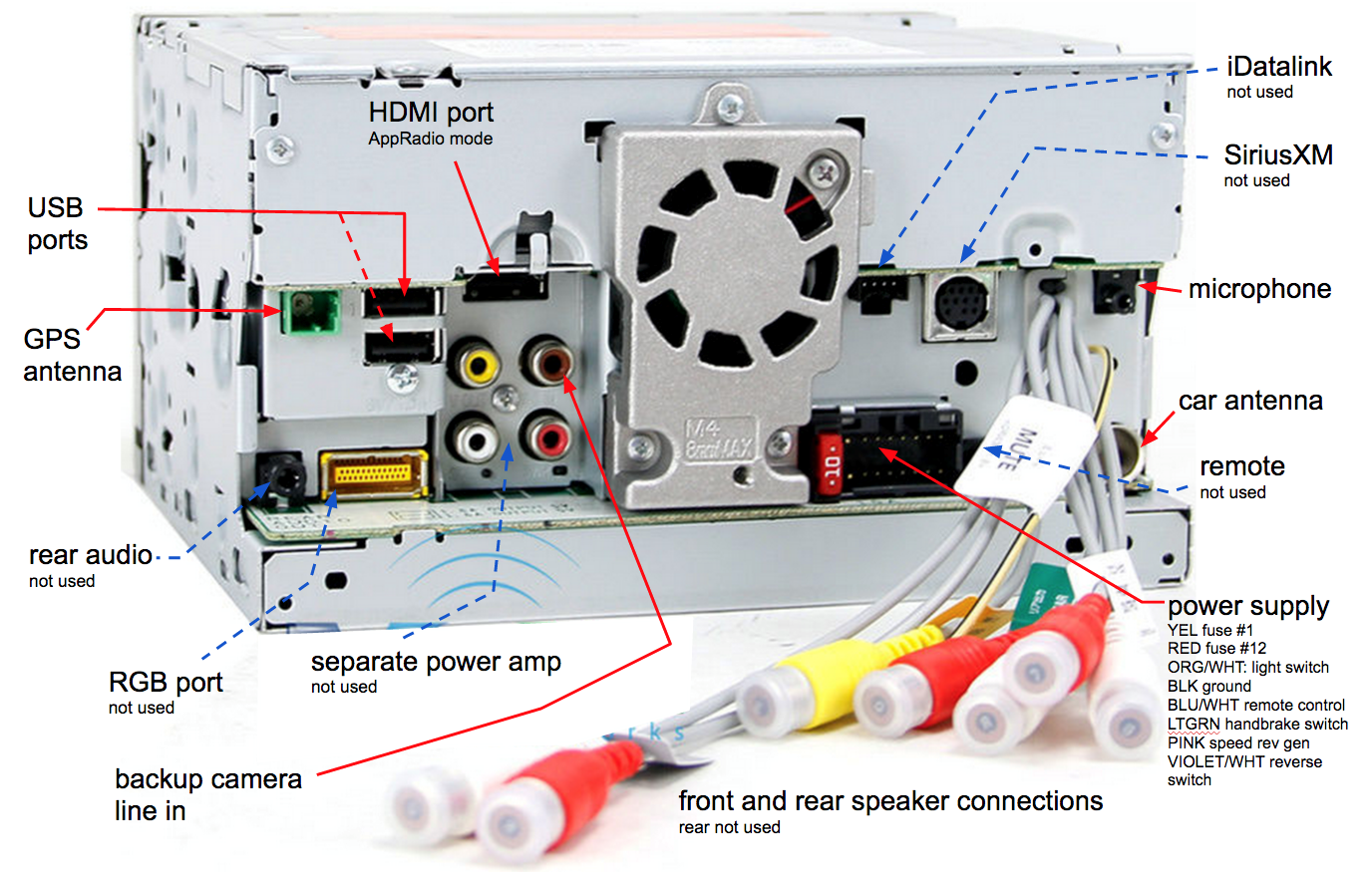
My AVIC 8000NEX features a yellow RGB input/output on the back panel (see attached diagrams).  Is it possible to get an adapter and use the RGB input/output to:


1) Listen to music from a USB thumb drive?


2) Charge devices?


If the answer is no, then what can the RGB be used for?

post-116300-0-28073900-1435296234_thumb.jpg

8100NEX Back Panel.bmp

Posted Jun 26, 2015 · 14:03 UTC#3

Hey thanks for the link.  Any other ideas on what I can use this RGB connection for?

Posted Jun 26, 2015 · 14:10 UTC#4

Besides wanting to know what other options are available for the RGB connectionl, I ahd another question:


1)  Does anyone know if the RGB connection is tied to the A/V icon that is available when you go to the menu of available options from the home screen.  Right now the A/V connection is greyed out and unusable, but will it become availabl once I plug somethin ginto the RGB input?

Posted Jun 26, 2015 · 15:30 UTC#5

No, the non navigation head units use this port for the AVIC-U260 navigation add-on module.

Edited Jun 27, 2015 by joemamma1954
Posted Jun 27, 2015 · 01:17 UTC#6

Thanks Joemamma1954 for your reply.  I just had one more question:


Does anyone know if the RGB connection is tied to the A/V icon that is available when you go to the menu of available options from the home screen.  Right now the A/V connection is greyed out and unusable, but will it become availabl once I plug somethin ginto the RGB input?

Posted Jun 27, 2015 · 01:31 UTC#7

No, a/v input is RCA inputs, AUX is 3.5 input. Both have to be turned on in settings to light up.

Posted Jun 27, 2015 · 01:32 UTC#8

AUX uses RCA to 3.5 adapter.

Posted Jun 30, 2015 · 13:02 UTC#9

Joemamma (and anyone else who would like to contribute),


1) From the picture/diagrams I uploaded in the thread above, where are the RCS inputs located (specific location and color)?  I'd like to put them to use?


2) Also, once I locate these RCA inputs, what are some cool things I can install and do to utilize the A/V settings?

Posted Jun 30, 2015 · 22:55 UTC#10

The RCA input for the A/V input are red, white and yellow, bundled with the 4 speaker outputs on the right side of the rear. there are 7 RCA cords that come out, 4 (2 red, 2 white) are for hooking up to optional amplifier, then there is red, white and yellow that are for A/V input. They should be marked. 

There are several options, I have digital TV tuner on mine. Anything that puts out audio and video and runs on 12 volts can be hooked up to this. 

Posted Jul 01, 2015 · 00:20 UTC#11

The RCA input for the A/V input are red, white and yellow, bundled with the 4 speaker outputs on the right side of the rear. there are 7 RCA cords that come out, 4 (2 red, 2 white) are for hooking up to optional amplifier, then there is red, white and yellow that are for A/V input. They should be marked. 

There are several options, I have digital TV tuner on mine. Anything that puts out audio and video and runs on 12 volts can be hooked up to this. 


Can i ask which digital tv tuner?  can it be used for a passenger while in motion? I like to take weekend road trips and it would be nice if my GF could watch her shows while travelling.  I heard digital tuners were horrible at receiving signals while in motion, but that was years ago. I can hope technology has gotten better :)  Thanks!

Posted Jul 01, 2015 · 01:43 UTC#12

The one i use is

BOYO VT-MHC ATSC and ASTC M/H Tuner Combo Vehicle TV Tuner, To answer your question about motion, with the antenna that comes with it, the signal is in and out while moving. I have purchased Digital TV Antenna with amplifier, but have yet to install it. I only watch it when i am parked and waiting for something or someone. I will try to get antenna installed and get back to you.
Posted Jul 01, 2015 · 12:38 UTC#13

Joemamma:


1) I actually pulled out my head unit the other night and discovered that I already have a front camera installed to the yellow RCA cable.  With this front camera already installed to the yellow RCA cable, why is my A/V menu option greyed out when I go to the HOME screen menu?  The camera works absolutely fine.


2) So based on what you mentioned above, if the device only requires 12 volts power, there is no additional power source that needs to be attached?


3) Can you please provide some screen shots of your tv tuner in action?

Posted Jul 01, 2015 · 21:29 UTC#14

A/V has to enabled.input/output settings-AV input to ON.

Posted Jul 01, 2015 · 21:30 UTC#15

Will post screen shots this evening from computer.

Posted Jul 01, 2015 · 22:33 UTC#16
2) So based on what you mentioned above, if the device only requires 12 volts power, there is no additional power source that needs to be attached?


The RCA A/V connection does not supply power to any attached device. You still need to power the device (camera in your case) seperatly.

Edited Jul 02, 2015 by 493008
Posted Jul 01, 2015 · 22:51 UTC#17

Sorry, I did not mean to imply that they supplied power. I meant for example, Apple TV runs on 110, there are some android mini-pc boxes that run on 12 volts, but most utilize HDMI. But like you already have front camera, I have seen mini-dvr cameras that can be hooked up to RCA via adapter cables. Not a whole lot of things come to mind. I have a rooted android mini-PC that I have hooked up before, with appradio unchained, but using hotspot, it seems real slow. I have better luck mirroring iPhone 6 and playing YouTube and the like. Only problem there is HDMI will not mirror to headrest monitors, and only play video for the toddlers while driving.

Posted Jul 01, 2015 · 23:55 UTC#18

screen shots of digital tv tuner as requested :


last shot is of remote control receiver, since unit is hidden.


post-116197-0-73995300-1435794781_thumb.jpgpost-116197-0-11389300-1435794784_thumb.jpgpost-116197-0-00787600-1435794788_thumb.jpgpost-116197-0-31658100-1435794791_thumb.jpg


This is in 03 Land Rover Discovery 2. I had to modify the dash fascia to install it since it came with a single din or should i say 1.5 din opening.

Edited Jul 01, 2015 by joemamma1954
Posted Jul 02, 2015 · 00:03 UTC#19

A/V has to enabled.input/output settings-AV input to ON.

How do I "enable.input/output settings-AV input to ON.?"

Posted Jul 02, 2015 · 01:01 UTC#20

screen shots of digital tv tuner as requested :


last shot is of remote control receiver, since unit is hidden.


attachicon.gifIMG_3885.JPGattachicon.gifIMG_3888.JPGattachicon.gifIMG_3889.JPGattachicon.gifIMG_3892.JPG


This is in 03 Land Rover Discovery 2. I had to modify the dash fascia to install it since it came with a single din or should i say 1.5 din opening.


Thanks for the info and the pics!  I am definitely looking into doing the same setup.


I already have a Chromecast plugged into the HDMI and I use my phone as a hotspot so I can watch Netflix and such while she goes in to shop lol

Posted Jul 02, 2015 · 01:49 UTC#21

How do I "enable.input/output settings-AV input to ON.?"

Touch the gears in top right corner to get to settings

Touch the The tools icon below the star icon

Touch The input/output setting

This screen will show smartphone, Aux, and A/V (on or off)

Make sure they are on, default is off

Posted Jul 02, 2015 · 10:42 UTC#22

Thanks for the info and the pics!  I am definitely looking into doing the same setup.


I already have a Chromecast plugged into the HDMI and I use my phone as a hotspot so I can watch Netflix and such while she goes in to shop lol


Thanks for the info and the pics!  I am definitely looking into doing the same setup.


I already have a Chromecast plugged into the HDMI and I use my phone as a hotspot so I can watch Netflix and such while she goes in to shop lol

Man that's awesome.  How do you like your Chromecast?

Posted Jul 02, 2015 · 10:45 UTC#23

Touch the gears in top right corner to get to settings

Touch the The tools icon below the star icon

Touch The input/output setting

This screen will show smartphone, Aux, and A/V (on or off)

Make sure they are on, default is off

Joe it worked, thanks a ton!  Now the video input from my front bumper camera i showing whenever I hit the A/V icon.  I do have  a question however.  So when yo ugo into the Gears menu and select Input/Output Setting --> A/V, the selections are (i) off, (ii) source and (iii) camera.  Prior to this post I had A/V set on "camera" instead of "source."  Why was the A/V selectoin greyed out on the main infotainment menu despite me having a camera attached to the RCA cables?

Posted Jul 03, 2015 · 00:10 UTC#24

Man that's awesome.  How do you like your Chromecast?


its pretty cool to have a Chromecast in a vehicle.  I've had Chromecasts in my home since they were released about two years ago.     My regular phone is the wireless hotspot for data, and i bought a brand new Moto G for $25 from Best Buy to use as a Chromecast remote. Now I can do Netflix, Hulu, HBO2Go, etc