Search Archive

Carplay and Appradio - Question on getting this working

By rolandfernwood · Aug 13, 2015in NEX Series💬 18 posts👁️ 7,129 views
Posted Aug 13, 2015 · 17:35 UTC#1

Hey all - 


I recently installed a 4000NEX into my 2013 VW Golf and have, at this point, only installed the USB cable in order to utilize Carplay.


I'm interested in adding the HDMI cable in order to enable the Appradio and Mixtrax functionality and I have 2 questions regarding this:


1) Adding the HDMI cable using the Apple Lightning Digital AV Adapter - does this impact the Carplay functionality at all?


and, more importantly


2) Does anyone know of a way to connect the male end of a lightning cable to the male end of a USB cable? The setup in my car is a USB port that I installed (pics below) and I plugged the usb cable into the back of the NEX (the green plug goes into the underside of the USB port) to get carplay working.  However,  in order to connect the AV Adapter to the USB port I installed I'll need to bridge the gap between the lightning connector on the AV Adapter and USB cable pictured below.


I think I would need something like a female lightning to female usb cable/adapter, but I'm not sure this exists.


Thanks in advance...
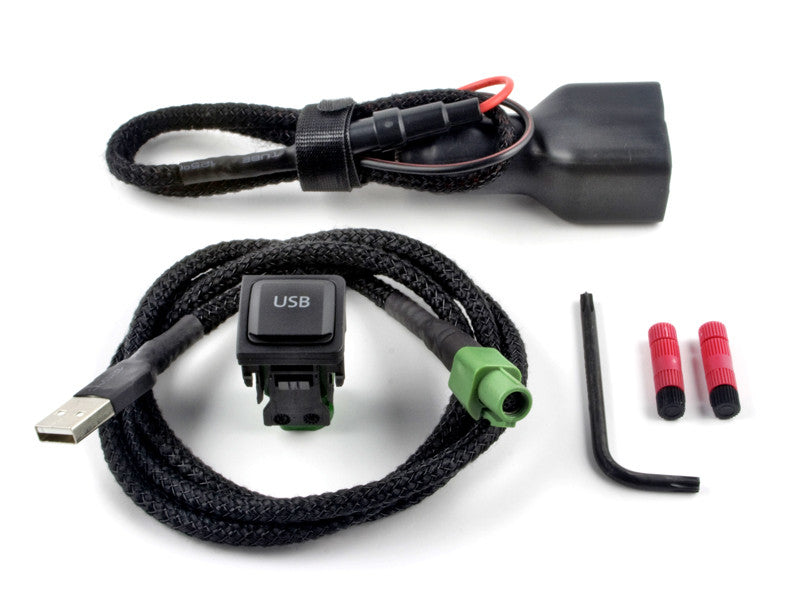
usb_charger_kit_1024x1024.jpg?v=14219340

installed_open_grande.jpg?v=1421934072

Posted Aug 13, 2015 · 21:38 UTC#2

the a/v adapter plugs into your phone, your usb end of your lightning cable plugs into your usb outlet then the lightning end plugs into you a/v adapter, right beside your HDMI. You cannot have CarPlay and Appradio hooked up at the same time. Carplay hooks up by lightning cable only.  Smartphone settings has to be set to usb and CarPlay enabled. AppRadio uses A/V adapter for audio and video and connects by bluetooth, and smartphone setting has to be set to digital adapter. If you are using the A/V adapter, usb1 will only be used to charge the phone, and cannot be used as an input source, it will say "not compatible device". 

Posted Aug 14, 2015 · 02:07 UTC#3

Hey all - 


I recently installed a 4000NEX into my 2013 VW Golf and have, at this point, only installed the USB cable in order to utilize Carplay.


I'm interested in adding the HDMI cable in order to enable the Appradio and Mixtrax functionality and I have 2 questions regarding this:


1) Adding the HDMI cable using the Apple Lightning Digital AV Adapter - does this impact the Carplay functionality at all?


and, more importantly


2) Does anyone know of a way to connect the male end of a lightning cable to the male end of a USB cable? The setup in my car is a USB port that I installed (pics below) and I plugged the usb cable into the back of the NEX (the green plug goes into the underside of the USB port) to get carplay working.  However,  in order to connect the AV Adapter to the USB port I installed I'll need to bridge the gap between the lightning connector on the AV Adapter and USB cable pictured below.


I think I would need something like a female lightning to female usb cable/adapter, but I'm not sure this exists.


Thanks in advance...
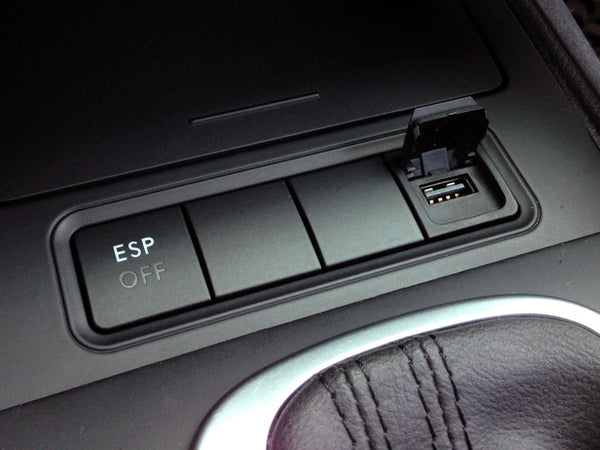
 

Where did you order this part, what is it called? Looks neat and OEM, interesting.

Edited Aug 14, 2015 by herbert68
Posted Aug 14, 2015 · 13:55 UTC#4

Where did you order this part, what is it called? Looks neat and OEM, interesting.

Double Apex


http://www.doubleapex.co/

Posted Aug 14, 2015 · 13:56 UTC#5

the a/v adapter plugs into your phone, your usb end of your lightning cable plugs into your usb outlet then the lightning end plugs into you a/v adapter, right beside your HDMI. You cannot have CarPlay and Appradio hooked up at the same time. Carplay hooks up by lightning cable only.  Smartphone settings has to be set to usb and CarPlay enabled. AppRadio uses A/V adapter for audio and video and connects by bluetooth, and smartphone setting has to be set to digital adapter. If you are using the A/V adapter, usb1 will only be used to charge the phone, and cannot be used as an input source, it will say "not compatible device". 

So much for my hope to have one plug do both CarPlay and Appradio

Posted Aug 14, 2015 · 19:14 UTC#6

the a/v adapter plugs into your phone, your usb end of your lightning cable plugs into your usb outlet then the lightning end plugs into you a/v adapter, right beside your HDMI. You cannot have CarPlay and Appradio hooked up at the same time. Carplay hooks up by lightning cable only.  Smartphone settings has to be set to usb and CarPlay enabled. AppRadio uses A/V adapter for audio and video and connects by bluetooth, and smartphone setting has to be set to digital adapter. If you are using the A/V adapter, usb1 will only be used to charge the phone, and cannot be used as an input source, it will say "not compatible device". 

Quote: "AppRadio uses A/V adapter for audio and video and connects by Bluetooth"


I always thought AppRadio had to be hardwired into USB 1?  Can you please explain this?

Posted Aug 14, 2015 · 21:49 UTC#7

Quote: "AppRadio uses A/V adapter for audio and video and connects by Bluetooth"


I always thought AppRadio had to be hardwired into USB 1?  Can you please explain this?


Below are excerpts from the AppRadio forum when everyone was figuring out the new lightning cable debacle. I was happy that Pioneer worked out a solution, but it was (still is) a clunky way to do it. 


Q: why can't I just use a lightning to 30 pin connector to use my appradio 2?

A: the lightning to 30 pin connector does not provide a video output necessary for appradio apps to work. It only provides USB data, power, and analog audio out.


Q: why does it need Bluetooth to control my phone?

A: because the lightning AV adaptor does not provide the appradio 2 with a usb data connection. The lightning port on the AV adaptor is solely for power.


Q: How long does it take to connect via Bluetooth?

A: About 30 seconds.

Posted Aug 14, 2015 · 22:59 UTC#8

Quote: "AppRadio uses A/V adapter for audio and video and connects by Bluetooth"


I always thought AppRadio had to be hardwired into USB 1?  Can you please explain this?

what rockthebeef said.

AppRadio controls the phone thru bluetooth, and receives the audio and video thru HDMI. Using this setup, I do not use usb1 for charging, I just plug into car charger, since it is only charging anyway, and it leaves usb1 open for other input,i.e. Thumbnail drive, solid state drive.

At the moment this is the only way to receive video from phone.

CarPlay, at the moment, only receives audio, txt. the only video of any kind you get is maps. Apple does not allow video, because the dangers affiliated with drawing attention from the driver while driving. Phone is connected by usb only and not BT in CarPlay mode.

Again, in my case, I plug in iPhone to usb1 and disable CarPlay, so it is in iPod mode, making all my music available from iTunes match thru music app and  have Pandora available. Phone calls are handled thru BT. Since I have AVIC-U260 add on Navigation module, that is what i use for navi.

Posted Aug 15, 2015 · 00:03 UTC#9

what rockthebeef said.

AppRadio controls the phone thru bluetooth, and receives the audio and video thru HDMI. Using this setup, I do not use usb1 for charging, I just plug into car charger, since it is only charging anyway, and it leaves usb1 open for other input,i.e. Thumbnail drive, solid state drive.

At the moment this is the only way to receive video from phone.

CarPlay, at the moment, only receives audio, txt. the only video of any kind you get is maps. Apple does not allow video, because the dangers affiliated with drawing attention from the driver while driving. Phone is connected by usb only and not BT in CarPlay mode.

Again, in my case, I plug in iPhone to usb1 and disable CarPlay, so it is in iPod mode, making all my music available from iTunes match thru music app and  have Pandora available. Phone calls are handled thru BT. Since I have AVIC-U260 add on Navigation module, that is what i use for navi.

JoeMamma:


So what you're telling me, if I wanted to connect my android phone to AppRadio, I don't even need to connect it to USB-1?

Posted Aug 15, 2015 · 00:07 UTC#10

Below are excerpts from the AppRadio forum when everyone was figuring out the new lightning cable debacle. I was happy that Pioneer worked out a solution, but it was (still is) a clunky way to do it. 


Q: why can't I just use a lightning to 30 pin connector to use my appradio 2?

A: the lightning to 30 pin connector does not provide a video output necessary for appradio apps to work. It only provides USB data, power, and analog audio out.


Q: why does it need Bluetooth to control my phone?

A: because the lightning AV adaptor does not provide the appradio 2 with a usb data connection. The lightning port on the AV adaptor is solely for power.


Q: How long does it take to connect via Bluetooth?

A: About 30 seconds.

Thanks for the insight.

Posted Aug 15, 2015 · 01:09 UTC#11

JoeMamma:


So what you're telling me, if I wanted to connect my android phone to AppRadio, I don't even need to connect it to USB-1?

That is correct. (android uses usb2,( but that is irrelevant). When using an a/v adapter, whether it is iPhone or Android, the usb is only charging phone, therefore it can be connected to either usb on head unit or charger. If you do connect it to head unit, it will not be an available input, so why not just connect it to a charger( i installed a double usb charging port for that purpose) and leave the head unit usb available for other use. I have two options available at all times, the a/v adapter is there hooked up to hdmi and lightning to charging port with 6" lightning cable, and have regular lightning cable hooked up to usb1 right beside it. I normally just have iPhone hooked up to usb1, but on occasion, if i want to check out AppRadio, I just switch cables and smartphone setting.

Posted Aug 15, 2015 · 02:36 UTC#12

That is correct. (android uses usb2,( but that is irrelevant). When using an a/v adapter, whether it is iPhone or Android, the usb is only charging phone, therefore it can be connected to either usb on head unit or charger. If you do connect it to head unit, it will not be an available input, so why not just connect it to a charger( i installed a double usb charging port for that purpose) and leave the head unit usb available for other use. I have two options available at all times, the a/v adapter is there hooked up to hdmi and lightning to charging port with 6" lightning cable, and have regular lightning cable hooked up to usb1 right beside it. I normally just have iPhone hooked up to usb1, but on occasion, if i want to check out AppRadio, I just switch cables and smartphone setting.

If that is the case, then why does Pioneer make it necessary within their instructions to dedicate USB-1 to AppRadio if in the long run, it doesn't even matter?

Posted Aug 15, 2015 · 03:33 UTC#13

If that is the case, then why does Pioneer make it necessary within their instructions to dedicate USB-1 to AppRadio if in the long run, it doesn't even matter?

I can't speak for Pioneer, only from experience. When I first purchased mine, and bought the a/v adapter, hooked it up, thinking I could use app radio, and still have access to iPhone as input(using usb1), but It would say "not compatible usb device". So I went to Apple forum and found out the a/v adapter uses the lightning cable to charge only, therefore I decided to try just plugging into charger, and everything worked great. I just looked over the manual, and it said, for iPhone use usb1 with apple A/V adapter, for Android use usb2 with MHL adapter.  I also think Pioneer is showing their option for hooking up the adapters. Doesn't mean there are not other options. 

Posted Sep 20, 2015 · 21:37 UTC#14

So, it would be possible to connect IPhone lightening cable to USB1, a USB HDD to USB2, and power the HDMI a/v adapter from a separately installed USB port, and have all three available by making the proper setting changes on the deck?

Posted Sep 22, 2015 · 23:21 UTC#15

So, it would be possible to connect IPhone lightening cable to USB1, a USB HDD to USB2, and power the HDMI a/v adapter from a separately installed USB port, and have all three available by making the proper setting changes on the deSo your

So your setup would go:


1) USB 1 - Apple Lightning

2) USB 2 - HDD


The AVIC NEX series only has 2 USB ports.  Both of these ports are taken up by your suggested configuration above.  So where would this "separately installed USB port come from?"

Posted Sep 28, 2015 · 18:03 UTC#16

Hi,


I'm a new owner of a Nex8000 and i install it in my highlander 2013 limited. So everything working find but i really don't know how it possible to use appradio? How can i connect the phone? I try caplay with my iPhine 6S but the sound is realy poor vs bluetooth! So can i use appradio via bluetooth or it's necessairy to connect by usb or HDMI? I have the two usb cable and a HDMI connect to the unit and ready to use. At this time, i use the usb 1 for media.


Tanks!!

Posted Sep 28, 2015 · 18:22 UTC#17

That's strange... I haven't found the sound of CarPlay to be of less quality than over bluetooth. Sometimes Bluetooth can be a little louder, but volume and sound quality are different things.


If you want to try AppRadio mode, it uses both Bluetooth and HDMI simultaneously. You'll need an Apple digital-HDMI adapter too. 


In case you don't have your original documentation, these should help a lot.


Installation manual: http://www.pioneerelectronics.com/StaticFiles/Manuals/Car/AVIC-8000NEX_InstallationManual011014.pdf


Operation Manual: http://www.pioneerelectronics.com/StaticFiles/Manuals/Car/AVIC-8000NEX_OperationManual030714.pdf

Edited Sep 28, 2015 by rockthebeef
Posted Sep 28, 2015 · 18:39 UTC#18

Tank you very much!! I will purchase the Apple digital-HDMI adapter and try de AppRadio mode :)


For the CarPlay, the sound is like a low quality mp3 and when i use the bluetooth the sound is grate, louder and very much clear then with CarPlay. For exemple, if i use SiriEyesFree the sound is clear and good quality and by the CarPlay the sound is low and with some digital distortion. So this thing boring me because i buy this unit to use CarPlay with my phone.


Tank again :)