Search Archive

X930BT - Desperately Need HELP!!!

By Louis13 · Jan 14, 2016in Problems/Troubleshooting💬 16 posts👁️ 4,508 views
Posted Jan 14, 2016 · 21:02 UTC#1

The battery went dead in my little brothers cars and he didn't have the password for his AVIC X930BT so he downloaded a hack file to an SD card and inserted it in the unit and I don't know what else. Now the screen just has a FORD OVAL LOGO in the middle of the screen and says PIONEER underneath that. Nothing happens when you press any of the buttons or anything. I have been doing some research online and saw something about a test mode? Before I do anything, I want to see if someone could advise me how to proceed
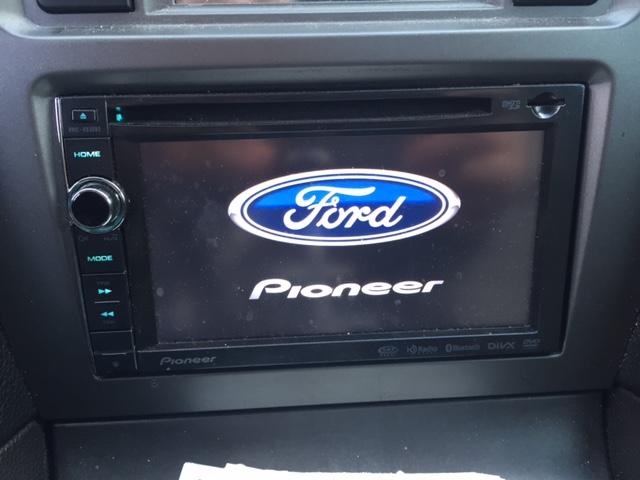
post-134936-0-54650400-1452805323_thumb.jpg

Posted Jan 14, 2016 · 22:53 UTC#2

Let me guess: The "hack file" was Condi's HackMode?  So now the unit is screwed up.... welcome to the club.


Good luck getting the unit back in working condition.

Posted Jan 14, 2016 · 22:56 UTC#3

It may have been...I didn't do it. Can I still run test mode?

Posted Jan 14, 2016 · 22:57 UTC#4

A little Windows box popped up on the screen that said "enter hack mode"...that's all I know

Posted Jan 14, 2016 · 23:11 UTC#5

It may have been...I didn't do it. Can I still run test mode?

Yes. Search for supertestmode.

You have my sympathy but I no longer contribute my time helping victims of this Trojan. It happens (across X.Z, and F series forums) a couple times a week. There's already enough threads that:

  • attempt to explain how to undo the damage done by Condi's infamous hackmode.
  • unlock lost passwords

Still don't understand why someone would set a password. They are probably the only ones who will get locked-out. And it won't prevent your headunit from being stolen.

Edited Jan 14, 2016 by RonS
Posted Jan 14, 2016 · 23:19 UTC#6

I found super test mode and saved it to an SD card. It is a zip file. Do I need to do anything before plugging the ST card into the unit? I don't really understand how to get test mode to actually run

Posted Jan 15, 2016 · 01:37 UTC#7

I can't figure out in this forum how to get the supertestmode.key to run. When I put the SD card in the radio nothing happens? Do the files need to be extracted from the zip file on the SD card?


I get it that nobody wants to be bothered with this anymore but I didn't install the hack and I'm stuck trying to fix it so would appreciate any help I could get

Posted Jan 15, 2016 · 18:25 UTC#8

I got test mode working and recovered password thanks to BlakeStone's help and using IAmSuperBleeder's detailed description and pics...I was following the part about coping the AV1.exe file and pasting it to the SD card in order to change the name of the file on the PC but how to you paste it on the SD card??? I tried it a few ways and it appears that the paste function is grayed out when I go into SD under file maintenance?

Posted Jan 15, 2016 · 19:36 UTC#9

I was following the part about coping the AV1.exe file and pasting it to the SD card in order to change the name of the file on the PC but how to you paste it on the SD card??? I tried it a few ways and it appears that the paste function is grayed out when I go into SD under file maintenance?

Testmode is not very intuitive. I am guessing here but it sounds like the AV1.exe file was not correctly selected.  Try this. In testmode:

navigate to the folder where AV1.exe is on the HU

  1. scroll down until AV1.exe is highlighted.
  2. press the right trk arrow button until "Copy" is highlighted.  Note that "Paste" is grayed.
  3. press "Mode" to select it,  Note that there is a "+" next to AV1.exe and  "Paste" is no longer grayed.
  4. scroll up to the top and hightlight ".."
  5. press trk > multiple times until "Enter" is highlighted
  6. press Mode until you are at the highest level of the directory structure.
  7. now navigate into the SD folder to where you want the file to be written
  8. press Trk > until "Paste" is highlighted
  9. press Mode
Edited Jan 15, 2016 by RonS
Posted Jan 15, 2016 · 19:39 UTC#10

Thanks...thought I did it that way but will give it a try again when I get home

Posted Jan 15, 2016 · 22:56 UTC#11


Testmode is not very intuitive. I am guessing here but it sounds like the AV1.exe file was not correctly selected. Try this. In testmode:

navigate to the folder where AV1.exe is on the HU

  • scroll down until AV1.exe is highlighted.
  • press the right trk arrow button until "Copy" is highlighted. Note that "Paste" is grayed.
  • press "Mode" to select it, Note that there is a "+" next to AV1.exe and "Paste" is no longer grayed.
  • scroll up to the top and hightlight ".."
  • press trk > multiple times until "Enter" is highlighted
  • press Mode until you are at the highest level of the directory structure.
  • now navigate into the SD folder to where you want the file to be written
  • press Trk > until "Paste" is highlighted
  • press Mode

Ron, accidentally I deleted the APL file out of PRG1... I copied the EPL file that was on PRG0 and pasted it in the other. Are they the same? Should I be OK? For some reason after doing what was described it is still not working

Posted Jan 16, 2016 · 01:19 UTC#12

Do you have any more bullets in your gun? You keep shooting yourself.

APL is more than just a file - I'ts a folder (directory). Basically - all the application software. If this unit had never been updated, then they are the same. If it has been update, it might not work. In that case, I'd recommend installing the 2015 upgrade. 


At what step in my instructions did you see failure? Did step 3 work as described above? Or are you saying that - due to deleting APL, you couldn't try?

Posted Jan 16, 2016 · 02:11 UTC#13

I was able to complete all the steps above...just nothing changed on my unit once done. I would have to say that nothing was ever updated on the unit. I just created a PRG.FLG file that I am saving to my SD card now and I'm going to load it to the User folder.


If this doesn't work, how can I do the 2015 upgrade?

Posted Jan 16, 2016 · 02:12 UTC#14

I deleted the APL folder by accident because after I copy/pasted the AV.EXE I hit mode not realizing that the track menu slid over and was highlighting DELETE instead of ENTER

Posted Jan 16, 2016 · 02:32 UTC#15

IT'S FIXED!!!!!!!!!!!! Creating the PRG.FLG file and pasting it to the USER file finished the job! Thanks everyone for the help...I really appreciate it!


Is there a way to remove the password all together even though I have it now?

Posted Jan 16, 2016 · 14:30 UTC#16

IT'S FIXED!!!!!!!!!!!! Creating the PRG.FLG file and pasting it to the USER file finished the job! Thanks everyone for the help...I really appreciate it!


Is there a way to remove the password all together even though I have it now?

Great. Yes, you can delete the current password. It's in the manual. If you don't have one - I recommend downloading it from Pioneer's web site.

AVIC X930BT manual see page 189

Edited Jan 16, 2016 by RonS