Search Archive

How to update maps

By AversionPictures · May 05, 2016in NEX Series💬 10 posts👁️ 2,095 views
Posted May 05, 2016 · 11:17 UTC#1

I'm sorry if this is already covered somewhere else, but I'm having a hard time finding it on here. Can someone please explain to me how to update my maps on my 8000NEX ? I'm not sure where to go in the settings and all of that. Thanks in advance ! -Colin

Posted May 05, 2016 · 12:57 UTC#2

Instructions are here:

https://pioneer.naviextras.com/shop/portal/p2howto-guide?guide=Toolbox


For those thinking of pointing to the manual like I was, this is all the manual says, and it is on the back cover, not mentioned in the table of contents or index, so very easy to miss:


To keep up to date with the latest navigational data, you can periodically update your navigation system. For further details, please visit:

http://pioneer.naviextras.com

Edited May 05, 2016 by 493008
Posted May 12, 2016 · 14:36 UTC#3

And just to confirm, this CANNOT be done with an SD card instead of a USB stick, correct? You must be using USB1 and a USB stick, you can't use an SD card at all??


Asking for myself as I don't want to take out my HU every time I'd like to update the maps. I'd prefer to use the SD card slot in front (NEX5000)

Posted May 12, 2016 · 16:43 UTC#4

And just to confirm, this CANNOT be done with an SD card instead of a USB stick, correct? You must be using USB1 and a USB stick, you can't use an SD card at all??


Asking for myself as I don't want to take out my HU every time I'd like to update the maps. I'd prefer to use the SD card slot in front (NEX5000)


Here is a thought, why not put an extension (I think it came with one) from the HU to your glovebox?  8)

Posted May 12, 2016 · 22:05 UTC#5

Here is a thought, why not put an extension (I think it came with one) from the HU to your glovebox?   8)


Good thought...but USB1 is currently occupied by my Lightning Cable for my iPhone. I suppose USB2 can't be used for map updates....


Now, if somebody made a female Lightning to Female USB adapter that would be cool...but it doesn't exist.  :(


And I was asking a question: can it be done with an SD card or not? 

Posted May 12, 2016 · 23:28 UTC#6

Good thought...but USB1 is currently occupied by my Lightning Cable for my iPhone. I suppose USB2 can't be used for map updates....


Now, if somebody made a female Lightning to Female USB adapter that would be cool...but it doesn't exist.   :(


And I was asking a question: can it be done with an SD card or not? 


Nope, has to be done with USB... USB2 is used for updates, I did it that way last time.

Posted May 13, 2016 · 01:30 UTC#7

Nope, has to be done with USB... USB2 is used for updates, I did it that way last time.


So Pioneer, in their vast intelligence, gave us a way to update the device...but only if you have access to the REAR of the device and/or put a cable in and leave it there. Oh and if you have a Lighting cable in USB1, you have to take it out and replace it...


Big time fail


Why not use an SD card then? It's right on the front for a reason, no??? I mean you can update the HU from the SD card slot, so why not allow the maps to update that way?


Idiotic IMHO...


So I'll have to install a short USB extension cable male/female and go from there I suppose. But what a bunch of asshats


Edited May 13, 2016 by BAFU
Posted May 13, 2016 · 02:41 UTC#8

So Pioneer, in their vast intelligence, gave us a way to update the device...but only if you have access to the REAR of the device and/or put a cable in and leave it there. Oh and if you have a Lighting cable in USB1, you have to take it out and replace it...


Big time fail


Why not use an SD card then? It's right on the front for a reason, no??? I mean you can update the HU from the SD card slot, so why not allow the maps to update that way?


Idiotic IMHO...


So I'll have to install a short USB extension cable male/female and go from there I suppose. But what a bunch of asshats
 

I misstyped, it's the USB1 port, I also was just reading that the SD card slot can be used, but I'm not sure how many of the devices actually support that...


BUT, that being said, they gave you a USB extension and you didn't use it?  I had mine put into the glovebox, making it easy to get to.  Take a little more space with the thunderbolt, but in the long run makes it easy to do updates.   8)

Edited May 13, 2016 by Multitask
Posted May 13, 2016 · 14:47 UTC#9

I misstyped, it's the USB1 port, I also was just reading that the SD card slot can be used, but I'm not sure how many of the devices actually support that...


BUT, that being said, they gave you a USB extension and you didn't use it?  I had mine put into the glovebox, making it easy to get to.  Take a little more space with the thunderbolt, but in the long run makes it easy to do updates.   8)


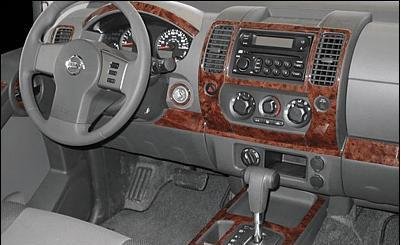
The Xterra has a real nice small (4" x 4") "box" right by the power ports (see attached v ugly pic, NOT MY CAR) where my Lightning cable comes out from my HU and where I keep my iPhone. Gonna have to see if I can cram a USB extension cable up in there along with my Lightning cable. Might not be possible...


But you did mention that a SD card can be used for map updates? Really? I use it for firmware updates all the time...pls can you confirm that the SD card will in fact be able to do the map updates? Thx!


41pmFJVjwoL.jpg

Edited May 13, 2016 by BAFU
Posted May 13, 2016 · 23:53 UTC#10

The Xterra has a real nice small (4" x 4") "box" right by the power ports (see attached v ugly pic, NOT MY CAR) where my Lightning cable comes out from my HU and where I keep my iPhone. Gonna have to see if I can cram a USB extension cable up in there along with my Lightning cable. Might not be possible...


But you did mention that a SD card can be used for map updates? Really? I use it for firmware updates all the time...pls can you confirm that the SD card will in fact be able to do the map updates? Thx!


41pmFJVjwoL.jpg


My post was about useing the USB2 for firmware updates, that was my error...  I'll double check on the SD card for Maps....   Presently I'm in a few emails with them about just getting the darn maps to DL from the naviextras.com site , it poops out after about 1/2 of the files...