Search Archive

AVIC Z130BT Tuner issue

By bluesteel731 · May 29, 2017in Problems/Troubleshooting💬 20 posts👁️ 6,782 views
Posted May 29, 2017 · 22:46 UTC#1

Hello everyone,


I have an issue with my Z130BT that I've owned since 2010 and have recently been having issues with the tuner menu,

the presets on the right side of the screen continuously scrolls only to stop at the last preset it was on and then it continues to scroll again stopping at the same preset.

it continues that until I shut off the vehicle, and even then its a hit and miss if it does it again upon starting with the HU powered down and powered back up.

Everything else works fine and has had the most up to date firmware on it as of a month ago though the problem existed before the update.

I was really hoping the update would fix it but nope...


Any idea whats causing that?

Posted May 30, 2017 · 00:11 UTC#2

Could be several things. I almost never use my radio, so you might need to look-up in the manual. Sounds like the tuner is seeking a frequency lock. There is a setting that affects tuner sensitivity. It might be accessed through the gear (settings) icon on the bottom of the FM screen.

Do you get any stations while it is seeking? Any sound from the radio?

Can you manually tune? I don't mean presets - there is a manual tune up/down.


Also could be a problem with the antenna. Is yours amplified? Could be the power or coax wire unplugged.

Or your tuner could be shot.

Before tearing it out, try a hard reset (disconnect battery) or a factory reset. You'll loose several settings.

Edited May 30, 2017 by RonS
Posted May 30, 2017 · 16:23 UTC#3

Hi RonS,


I radio had worked fine since 2010 up until a few months ago,


I can tune it manually but it'll just go back to what it was on within seconds,


I'll give the battery a disconnect and see if it changes anything.

Posted Jun 09, 2017 · 00:01 UTC#4

I have the same issue with mine. Still trying to figure out how to fix it. Disconnected my battery a few time and even replaced my battery, still the same. Bluesteel, if you ended up fixing yours please share how you did it. Thanks.

Posted Jun 09, 2017 · 14:50 UTC#5

There's not enough information here to begin to diagnose this. My first thought is that this is a signal issue. That could be caused by an antenna issue, or a sensitivity setting in the headunit.  If it isn't one or the other, its a hardware problem in the headunit.  That usually means sending it to a technician.


If you've got a manual, look at the FM tuner section. If don't have a manual, download one from Pioneer. 


First question I have is what station frequency does it keep returning to?  Is it 87.9 or 107.9? (assuming a US unit). That might indicate that the tuner could not find a frequency which it could lock onto. Those are the end points of this tuner's FM frequencies.


On the FM screen there is a signal strength indicator for the tuned station. Of course, if it is tuned to a non-existing station, there will be a poor (or none) signal strength. Unfortunately the manual doesn't show how to interpret this indicator, but the screen-shot does show what it should look like with a good signal.


On the bottom-left corner of the FM screen, touch the gears icon (Settings), then touch [Local] then touch [On]. Make note of the sensitivity level (1-4), then set it to 1. The higher the number the more filtering the tuner does (eliminating weak stations). Level 4 eliminates all but very strong stations.


Exit out of settings and try tuning to a station manually. Does it work better? If no change (or even only a little better), go back into the settings/Local and turn if Off. The try tuning again. If no (or only slight) improvement,  I'd next look at your antenna. You may need to remove the headunit to inspect the wiring.


It is possible the antenna connection is loose. If your antenna is in the window glass it is amplified and might be powered by the headunit (depending on how it was initially installed). The headunit's power wire (blue wire in the power harness) might of become disconnected. It is possible the installer used some other fused switched power source, So you'd need to check your wiring.  It is also possible that the antenna's ground wire is loose. Or maybe the antenna is faulty. I don't know how to diagnose this. A stereo shop might have instruments to test this.


If none of the above fixes or significantly changes the symptoms, it is likely that your hardware tuner is malfunctioning. If you are technical enough to service the unit yourself,  you likely wouldn't be here asking for help. So I'd recommend sending it for repair.

Edited Jun 09, 2017 by RonS
Posted Sep 17, 2017 · 15:56 UTC#6

Anyone ever find a fix for this??

Posted Sep 17, 2017 · 16:40 UTC#7

Anyone ever find a fix for this??

There is no magic pill - cure-all for this issue. It likely is an installation issue which will vary for each vehicle. Is your antenna in the windshield? Is the antenna amp power wire connected? Is your antenna grounded? I'm no expert on this stuff but those are the most likely issues beyond what I posted above.


While it could be a problem with your head unit, you need to eliminate everything else first. If you can't figure it out, take it to a car electronics specialty shop.

Posted Sep 18, 2017 · 09:35 UTC#8

This is not an installation problem. It is either a hardware or sodtware issue. Just wasn't sure what the OP did to fix their problem

Posted Dec 23, 2017 · 07:37 UTC#9

Hey everyone, problem still exists, battery disconnect for over an hour, I'll upload a video

Posted Dec 23, 2017 · 07:49 UTC#10
Posted Dec 23, 2017 · 08:22 UTC#11

Also this only happens once the vehicles been running for a while, turned off and turned back on. First thing in the morning or after a long while off it's fine, once you change the station or use another mode and then go back to the radio this starts.

Edited Dec 23, 2017 by bluesteel731
Posted Dec 23, 2017 · 15:21 UTC#12

Also this only happens once the vehicles been running for a while, turned off and turned back on. First thing in the morning or after a long while off it's fine, once you change the station or use another mode and then go back to the radio this starts.

So, that eliminates software and installation issues. The only thing left is hardware. Some component regarding the FM tuner is failing - possibly due to heat sensitivity. Seems the only resolution is the have it repaired.

Posted Dec 23, 2017 · 19:12 UTC#13

I'm in Vancouver BC Canada, sending it out seems expensive, there is a local shop, supposedly one of the best in town to deal with electronics, where would I have to send to if I decide to send it out? I think Toronto has a Pioneer repair center

Posted Dec 23, 2017 · 21:34 UTC#14

I'm in Vancouver BC Canada, sending it out seems expensive, there is a local shop, supposedly one of the best in town to deal with electronics, where would I have to send to if I decide to send it out? I think Toronto has a Pioneer repair center

I have no affiliation with Pioneer so I wouldn't know. I'm sure it is in their documentation or on their web site.

Posted Sep 13, 2018 · 09:19 UTC#15
On 12/23/2017 at 3:22 AM, bluesteel731 said:

Also this only happens once the vehicles been running for a while, turned off and turned back on. First thing in the morning or after a long while off it's fine, once you change the station or use another mode and then go back to the radio this starts.

Bluesteel,

I have had this exact issue for about 6 months. Did you ever find out what it was or get it fixed? I would love any advice you can offer.

Thanks,

Posted Jul 25, 2019 · 01:51 UTC#16

I’m having the same problem and wonder if anyone has come up with a solution?

Posted Aug 04, 2019 · 04:02 UTC#17

I've had the same issue for several years ... the radio came back once or twice for a few months, then eventually went out again for good.  

AM and FM both exhibit the same problem on my unit. which points me to the component that brings signal into the unit.   My Traffic tuner seems to work fine with the Nav unit, so that tells me the antenna on the car is fine.  

Today I pulled the unit from the car again since I would like to get it fixed one way or another ... first I tried removing the Traffic tuner from the signal chain and plugged the car antenna directly into the unit, no change, so the issue must be inside the unit.

Looking at the Service manual I found the "AV PCB" board on p272 that appears to have a simple two-prong connector for the antenna cable jack.   I've attached an image of that page from the manual.  I wonder if it's as simple as solder joints on that connector.  So before I send this off to a repair shop I figure I should take a better look at it in case it's something I can handle.

Next up, I will disassemble the unit using the instructions from the Service manual starting on page 149.   The instructions are actually pretty clear so I'm not thinking this will be very difficult or risky.  I will send an update when I make more progress.

Thanks. John


Screen Shot 2019-08-03 at 3.07.03 PM.png

Edited Aug 04, 2019 by JohnK
Posted Aug 05, 2019 · 00:50 UTC#18

Okay, I took the unit apart today.  

Actually much easier than I was expecting it to be ... please note the following:

* There are only two sizes of screw heads, Philips #1 and #0.  Use GOOD screwdrivers!  Many of the screws, especially the smaller ones, are in very tight, I almost stripped one, so a cheap philips screwdriver may not cut it here.

* To release the display from those first two screws at the bottom you have to separate the metal holding tabs a bit to get them off the posts that the screw goes into.  this is a tiny post that allows the screen to swivel against the holding tabs during the opening/closing action

* The unit is made of surprisingly few modules, and they are all connected by ribbon cables.  Take your time with the ribbon cables, there are three types of connectors that I ran across:

    - flip lock bar, flips up to release cable from holder

    - pull out bar, pull it out towards the ribbon about 1/8" to release the cable from holder

    - pull out, the ribbons with a hard blue plastic tab at the end of the cable ... these you just pull out

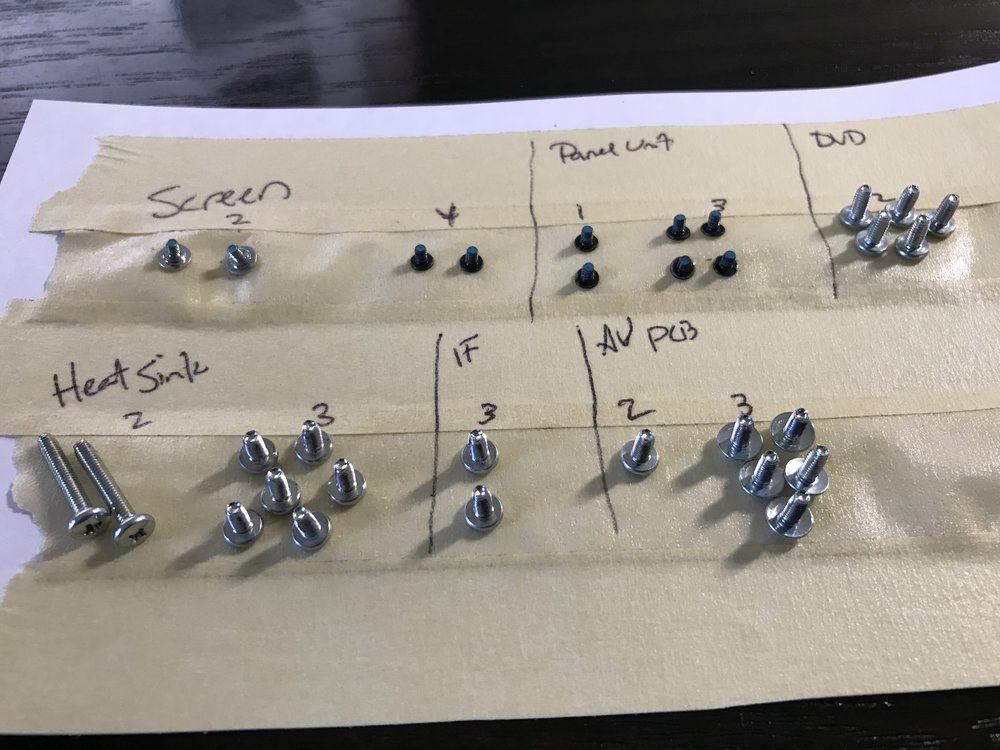
* I've attached a photo of all of the screws I removed to get to the AV PCB assembly.  Not a great many screws.  Fyi I made a makeshift adhesive screw holder by alternating masking tape strips face up/down on the paper ... works great.

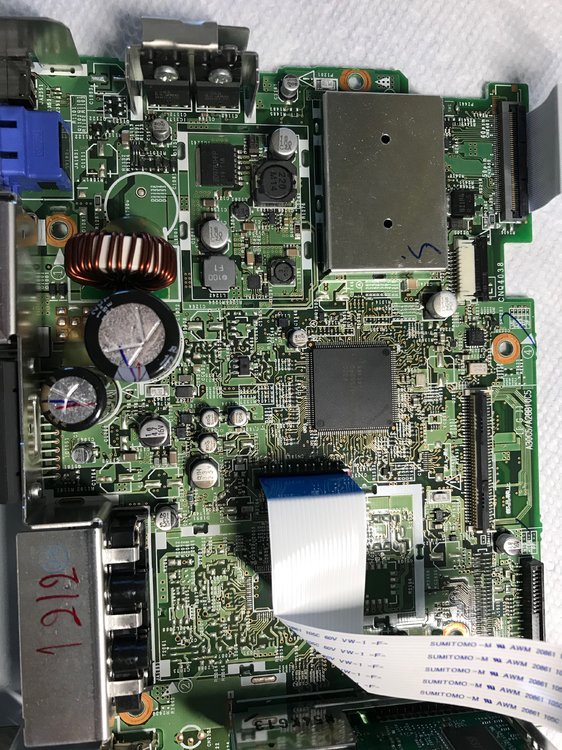
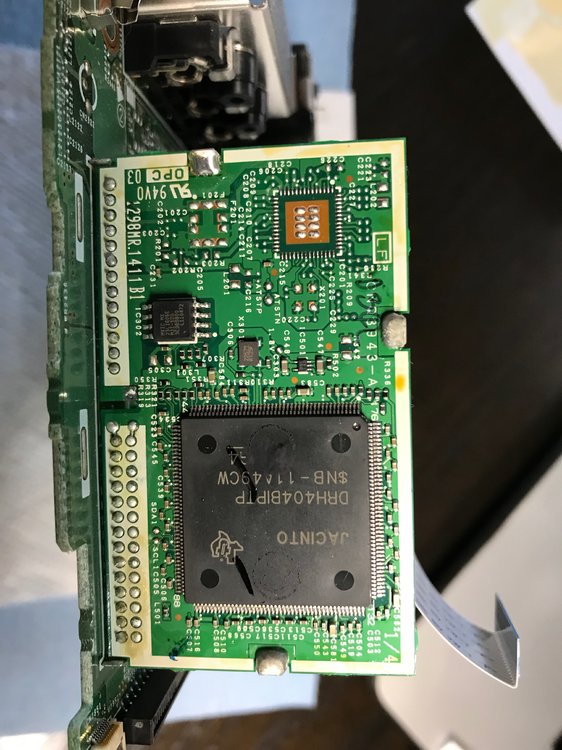
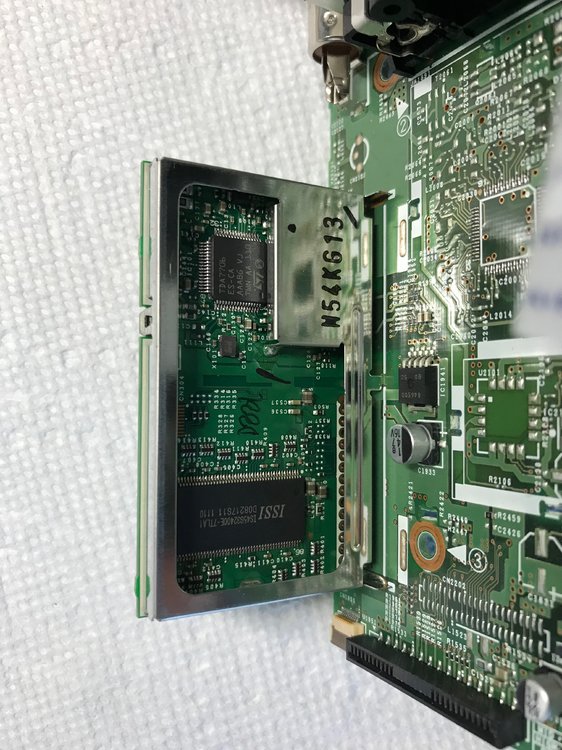
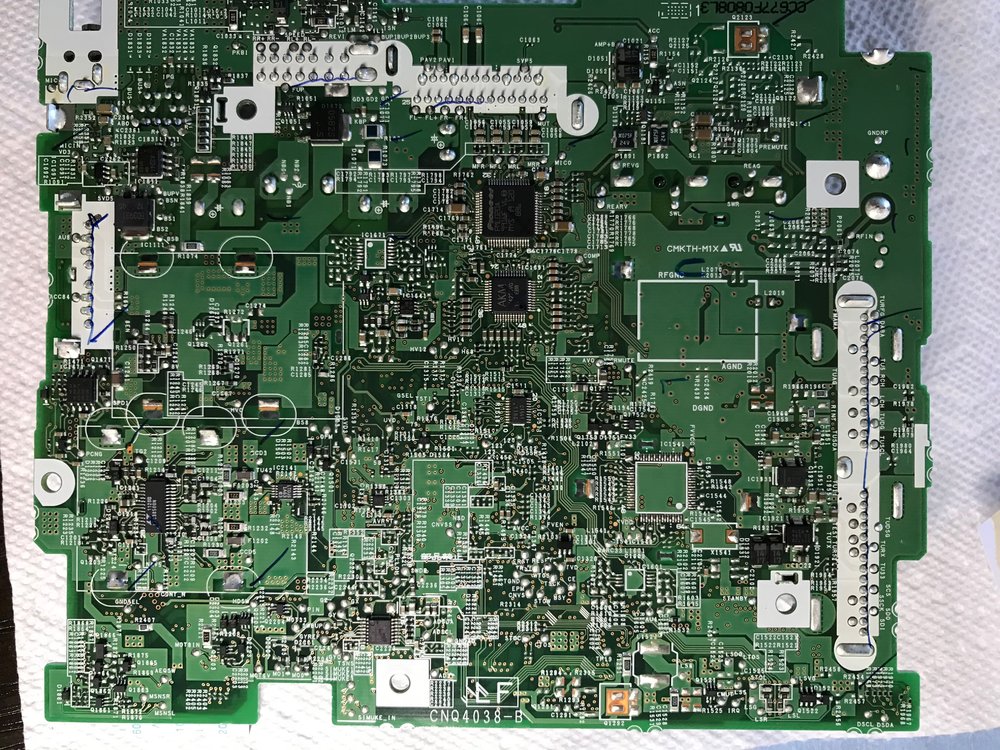
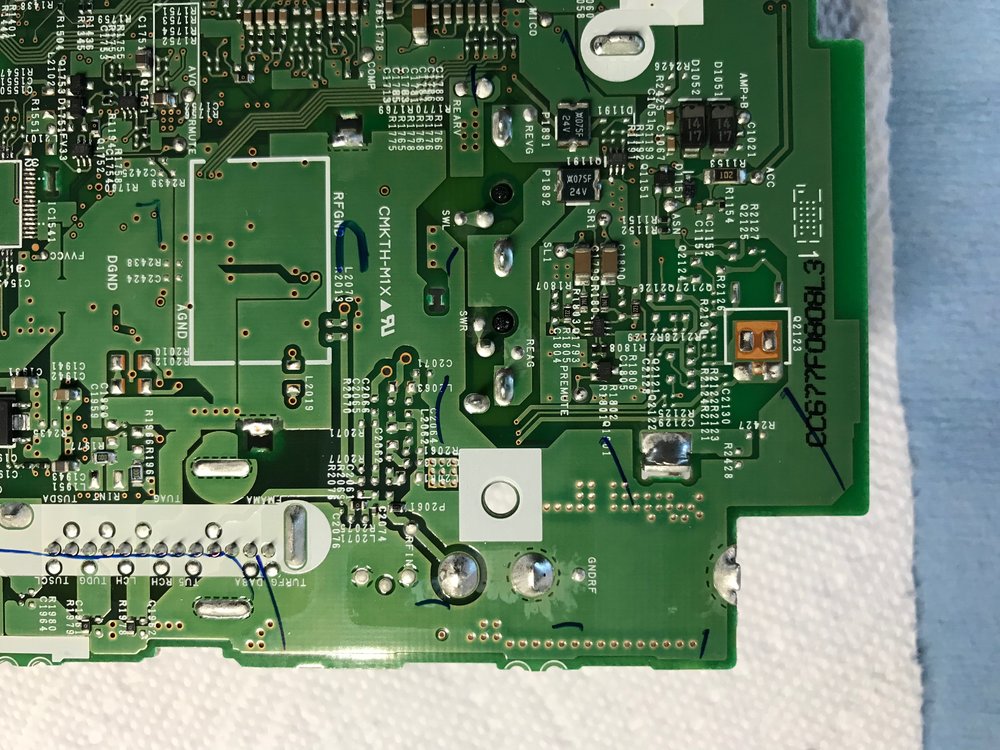
I could not see anything visually wrong with the AV PCB ... the antenna jack seems to be attached with large solid solder joints, no burn spots anywhere that I could see, nobulging capacitors.  I am posting a bunch of photos of the board, if anyone has a suggestion on what to inspect more closely let me know and I will look and/or post more photos.

Also, while I have the unit disassembled, if you have interest in what any of the other components look like let me know and I will be happy to take and post more pics.

Thanks.  John
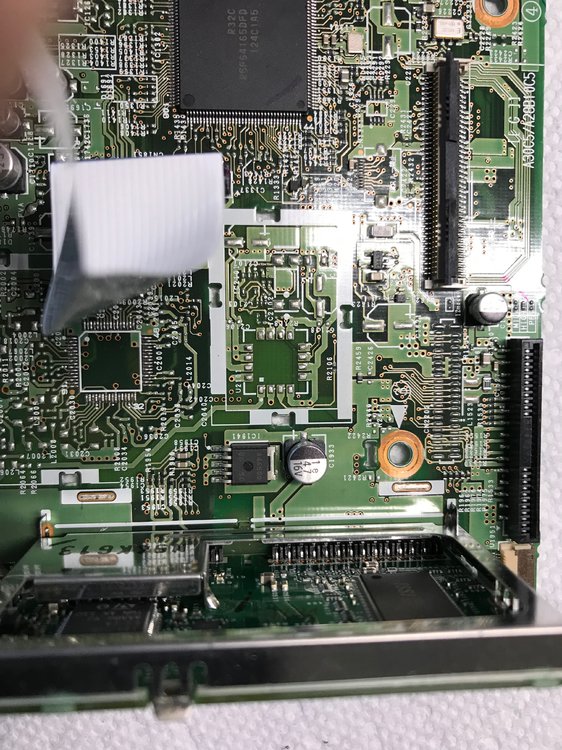
 

IMG_0029.jpeg

IMG_0028.jpeg

IMG_0030.jpeg

IMG_0031.jpeg

IMG_0032.jpeg

IMG_0033.jpeg

IMG_0034.jpeg

Posted Aug 09, 2019 · 11:00 UTC#19

More research is pointing me to the TDA7706 digital tuner chip that sits on the riser board ... if this chip is fried then it's beyond my electronics skills to replace something like this.  A shame, it looks like this is available from multiple sources on eBay for under $5.


IMG_0031.jpeg

Edited Aug 09, 2019 by JohnK
Posted Mar 03, 2020 · 05:55 UTC#20

Solved
The problem is in the Ic 1941, NJM2846DL3-05 voltage stabilizer 5V. It should be replaced because it reacts to heat and goes into protection.