Search Archive

All settings accessible except Bluetooth

By BluetoothCulprit69 · Jun 25, 2019in Problems/Troubleshooting💬 20 posts👁️ 8,084 views
Posted Jun 25, 2019 · 02:43 UTC#1

I have an AVIC-Z140BH. All the settings on my Pioneer were greyed out until I placed the parking brake wire on a piece of metal to ground it. Once I grounded it, all the settings were accessible except for Bluetooth settings as shown in the pic below. Do I need to ground the "MUTE" wire on the RCA cable AS WELL to be able to access bluetooth settings? All I care for is being able to connect my phone VIA bluetooth and nothing else. I hope the bluetooth module didn't go bad on the system. The service information screen says "Version 04.0000" if that helps.  Should I update the firmware? Thank you.

stereo.jpg

Edited Jun 25, 2019 by BluetoothCulprit69
Posted Jun 25, 2019 · 12:03 UTC#2

I have this same issue with x930BT.

Posted Jun 25, 2019 · 15:03 UTC#3

I followed the instructions in this video and it still did not work. I spliced the parking brake and mute wire and connected them both to ground and I can access all settings except bluetooth. 


Posted Jun 25, 2019 · 16:49 UTC#4

If you can play a DVD or enter a destination in the NAV, then the PB bypass is not your issue. You can also check the PB status by viewing Settings/Navi Settings/Connection Status.

If it shows the PB is On, then you have a hardware or firmware issue. There are some BT diagnostics in Testmode and I believe you can force-load BT firmware from TestMode. It is possible the BT module is defective. I remember someone years ago who had to replace it. That's all over my head, so I can't walk you through it. 

Edited Jun 25, 2019 by RonS
Posted Jun 25, 2019 · 18:09 UTC#5
1 hour ago, RonS said:

If you can play a DVD or enter a destination in the NAV, then the PB bypass is not your issue. You can also check the PB status by viewing Settings/Navi Settings/Connection Status.

If it shows the PB is On, then you have a hardware or firmware issue. There are some BT diagnostics in Testmode and I believe you can force-load BT firmware from TestMode. It is possible the BT module is defective. I remember someone years ago who had to replace it. That's all over my head, so I can't walk you through it. 

Thank you. Connection Status shows that the PB is on and I was able to play a DVD while the vehicle was in motion. I took a cruise and DVD played well. I can not update BT firmware because I can not access bluetooth settings so I'll see if Testmode works. I'll try and follow the sticky post about testmode. Which bluetooth firmware and software should I install? Service information says I have Version 04.0000

Posted Jun 25, 2019 · 19:13 UTC#6
2 hours ago, RonS said:

If you can play a DVD or enter a destination in the NAV, then the PB bypass is not your issue. You can also check the PB status by viewing Settings/Navi Settings/Connection Status.

If it shows the PB is On, then you have a hardware or firmware issue. There are some BT diagnostics in Testmode and I believe you can force-load BT firmware from TestMode. It is possible the BT module is defective. I remember someone years ago who had to replace it. That's all over my head, so I can't walk you through it. 

I downloaded a BT file from the pioneer website and tried to force write. I launched the supertestmode and Self check shows that bluetooth is connected. I went to forcewrite but shows that there is no BT firmware on the SD card and says I already have a BT firmware installed?

20190625_140819.jpg

20190625_140723.jpg

20190625_140834.jpg

screenshot.png

Posted Jun 25, 2019 · 19:22 UTC#7

Also, I am confused as to why the Service Information Screen says Bluetooth Firmware Version "------------" but Supertestmode displays 3.24.81

Posted Jun 25, 2019 · 21:26 UTC#8

I ran bluetooth tests during Supertestmode and was able to connect my android phone to the HU during supertestmode which may show that the BT module is still working. However when I start the HU normally (not through supertestmode) I still can't access the bluetooth settings. I'm beginning to think it has to do with the bluetooth firmware but I can't seem to force write and upgrade to 3.32 or downgrade to 3.22. Only way I can change firmware is through testmode since I can't access bluetooth settings. Supertestmode shows that I am currently running 3.24.81

Posted Jun 25, 2019 · 22:34 UTC#9
1 hour ago, BluetoothCulprit69 said:

I ran bluetooth tests during Supertestmode and was able to connect my android phone to the HU during supertestmode which may show that the BT module is still working. However when I start the HU normally (not through supertestmode) I still can't access the bluetooth settings. I'm beginning to think it has to do with the bluetooth firmware but I can't seem to force write and upgrade to 3.32 or downgrade to 3.22. Only way I can change firmware is through testmode since I can't access bluetooth settings. Supertestmode shows that I am currently running 3.24.81

Your photos show you are still running very old (4.x) maps/app firmware. Maybe try installing the latest (2017 v7.0) firmware and do a hard reset (disconnect battery). Then try updating BT through the settings menu.

BTW, is this a new install? If you bought the HU it might of been one reason it was for sale.

Edited Jun 25, 2019 by RonS
Posted Jun 25, 2019 · 23:09 UTC#10
31 minutes ago, RonS said:

Your photos show you are still running very old (4.x) maps/app firmware. Maybe try installing the latest (2017 v7.0) firmware and do a hard reset (disconnect battery). Then try updating BT through the settings menu.

BTW, is this a new install? If you bought the HU it might of been one reason it was for sale.

I install v7.0 onto my AVIC-Z140BH by following the instructions in this post? http://avic411.com/index.php?/topic/83512-2017-v7-uscan-update-available-for-z110120130140x920930940/& and then perform a hard reset by disconnecting the battery?

This unit was given to me by my brother I had a single din radio.


Posted Jun 26, 2019 · 00:44 UTC#11
1 hour ago, BluetoothCulprit69 said:

I install v7.0 onto my AVIC-Z140BH by following the instructions in this post? http://avic411.com/index.php?/topic/83512-2017-v7-uscan-update-available-for-z110120130140x920930940/& and then perform a hard reset by disconnecting the battery?

This unit was given to me by my brother I had a single din radio.


Yes, look at  this post and download the map update from the google drive link. First install the ShortFuse hack which diables the installation password validation. Read that thread's 1st post. Then Unzip the map and copy the files & directories to a FAT32 formatted SD.

Are you sure Bluetooth worked for your brother? 

Posted Jun 26, 2019 · 00:45 UTC#12
2 hours ago, RonS said:

Your photos show you are still running very old (4.x) maps/app firmware. Maybe try installing the latest (2017 v7.0) firmware and do a hard reset (disconnect battery). Then try updating BT through the settings menu.

BTW, is this a new install? If you bought the HU it might of been one reason it was for sale.

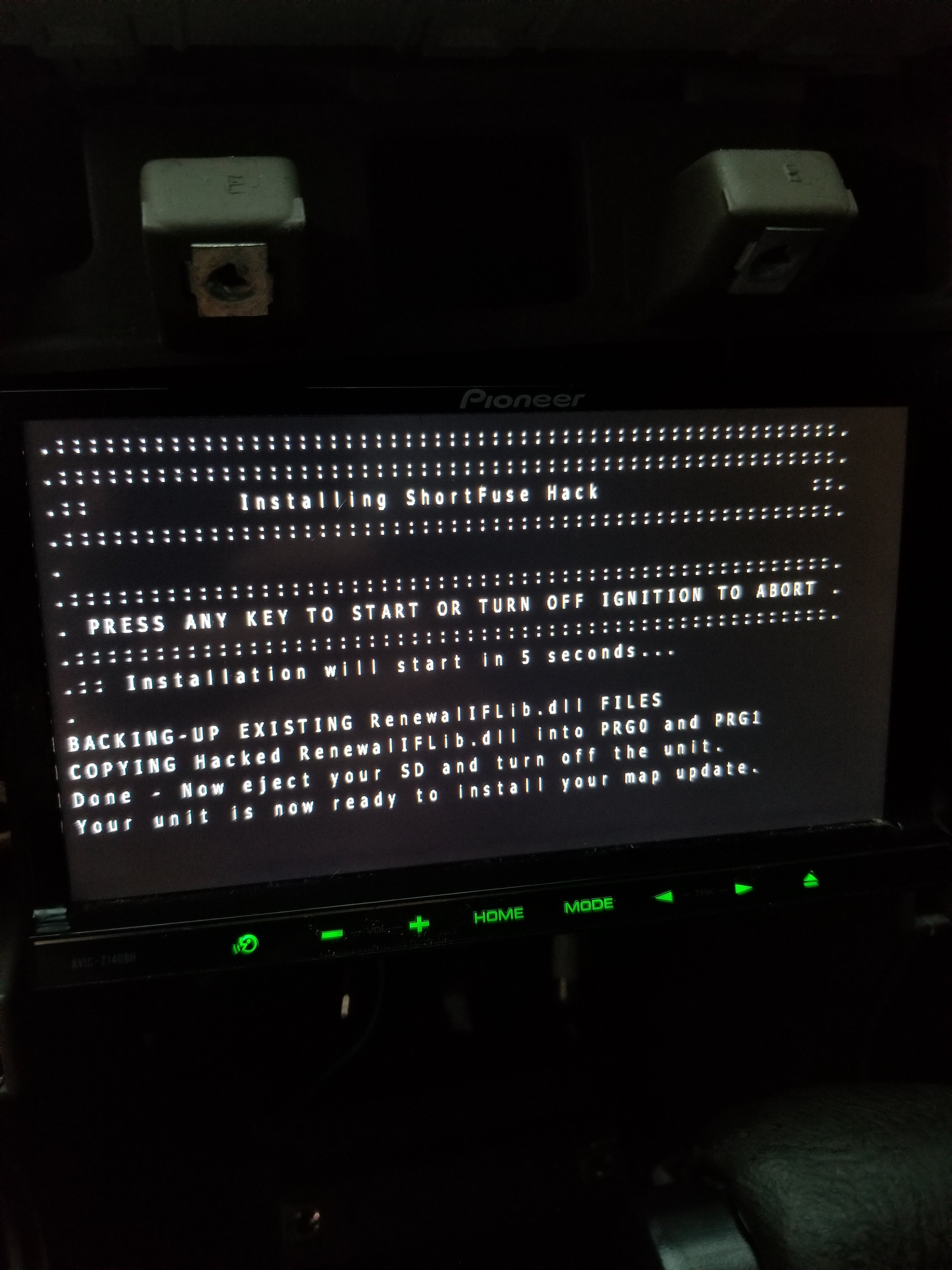
I ran the easy shortfuse hack script that you explained in this post http://avic411.com/index.php?/topic/83535-map-update-hack-using-shortfuse-method-z110-z140x920-x940/&tab=comments#comment-345382


 the one that has 3 or 4 files on it and once completed it said to restart the unit and insert the map SD card. I downloaded the v7.0 nav map which was 2.8gb  from nezfotnemom and extracted the files to my desktop then copy and pasted to the SD card. I placed the SD card into my HU and it then prompted me to enter the password. The keyboard seemed to be unresponsive and did not let me enter a password. as you can see the letters appear to be greyed out.

20190625_193251.jpg

Posted Jun 26, 2019 · 00:51 UTC#13


3 minutes ago, RonS said:

Yes, look at  this post and download the map update from the google drive link. First install the ShortFuse hack which diables the installation password validation. Read that thread's 1st post. Then Unzip the map and copy the files & directories to a FAT32 formatted SD.

Are you sure Bluetooth worked for your brother? 

 Honestly I am unsure if Bluetooth worked for my brother but I ran the Bluetooth tests in the Supertestmode and the HU did pair with my phone and worked. Just I can not get it to pair outside of supertestmode since I can't access bluetooth settings it's greyed out. I formatted an SD and ran the simplified shortfuse hack and at the end it displayed "Successful.Now place the SD card with the map update." I placed in the SD map card but still it prompted a password and keyboard was unresponsive

Posted Jun 26, 2019 · 01:23 UTC#14

I ran the Shortfuse easy script FOR A SE20190625_195538.thumb.jpg.72bfb5b8932ae48ea93719e0e875d0c3.jpgCOND TIME and this was the message it showed saying the card is ready to install the map updates. After running the script this is what appeared on the SD card hacked.dll and the renewflib.dll. I then reformatted the SD card and downloaded the v7 maps from the drive link (2.8gb) and extracted it to the SD card. I then plugged it into the head unit with the 3 files as shown. It prompted to update and when I clicked yes to begin update it then asked for a password in which the keyboard was unresponsive and I couldn't enter a password

pic.png

pione.png

Posted Jun 26, 2019 · 01:40 UTC#15
3 minutes ago, BluetoothCulprit69 said:

I ran the Shortfuse easy script FOR A SE
COND TIME and this was the message it showed saying the card is ready to install the map updates. After running the script this is what appeared on the SD card hacked.dll and the renewflib.dll. I then reformatted the SD card and downloaded the v7 maps from the drive link (2.8gb) and extracted it to the SD card. I then plugged it into the head unit with the 3 files as shown. It prompted to update and when I clicked yes to begin update it then asked for a password in which the keyboard was unresponsive and I couldn't enter a password

You might of read in that 2017 thread (or the Shortfuse thread), that the hack doesn't eliminate the password prompt during installation. It just shortcuts the password validation. You need to enter PASSWORDPASSWORD at the prompt. I have no idea why you can't enter anything with the touchscreen keyboard.

Don't rerun the ShortFuse hack. All the hack does is replace a couple files in the AVIC (after copying the original ones to the SD). Rerunning it just overwrites the original files on the SD with the ones you installed the 1st time. So this destroys the backup. Not necessarily a problem since the old files aren't needed. 

I won't be available any more tonight. 

Posted Jun 26, 2019 · 04:00 UTC#16
3 hours ago, RonS said:

You might of read in that 2017 thread (or the Shortfuse thread), that the hack doesn't eliminate the password prompt during installation. It just shortcuts the password validation. You need to enter PASSWORDPASSWORD at the prompt. I have no idea why you can't enter anything with the touchscreen keyboard.

Don't rerun the ShortFuse hack. All the hack does is replace a couple files in the AVIC (after copying the original ones to the SD). Rerunning it just overwrites the original files on the SD with the ones you installed the 1st time. So this destroys the backup. Not necessarily a problem since the old files aren't needed. 

I won't be available any more tonight. 

I backed up the original files to my desktop just incase. I guess I'll first try downloading the 2015 update then see if that works and then try the v7 2017 update. Thank you

Edited Jun 26, 2019 by BluetoothCulprit69
Posted Jun 26, 2019 · 14:58 UTC#17

I see a lot of these posts where Bluetooth is a problem.  I guess I was lucky that didn't happen to me, but it might be less about luck and more about what I did.

I read a ton of threads on this site before I was brave enough to do any of the updates.  One thing that I read about was that you can have bluetooth issues if you just update straight to the latest version. What I did, and I don't have bluetooth issues, is I went through a progression of updates.  What I read is that one of the newer updates didn't have one of the fixes that one of the previous updates had and that was the problem with going straight to the newest bluetooth version.  Something about the firmware updates only replace just what it needs to and some bits from a previous update were no longer getting updated.

My system also showed version "---------------------" for bluetooth when I first installed it in my vehicle.  It's been so long now, I don't remember where I started at but I think it might have been the bluetooth from maps version 2010 or 2012 or even older that I started with, and then I did several progressive updates 2010->2012->2013->2015 and there might have even been an intermediate version update in there somewhere. I don't think bluetooth has been updated since then.  2013 and 2015 might even be the same version.

Just for posterity:  The bluetooth upgrade doesn't happen with the map update, you have to go into the menu system to the bluetooth page and select to update from there, so leave the SD card in. Also, you can update straight to the latest maps and that doesn't affect bluetooth in any way and no need to downgrade to older maps when you use the older bluetooth versions.

Edited Jun 26, 2019 by BlakeStone
Posted Jun 26, 2019 · 15:17 UTC#18
18 minutes ago, BlakeStone said:

I see a lot of these posts where Bluetooth is a problem.  I guess I was lucky that didn't happen to me, but it might be less about luck and more about what I did.

I read a ton of threads on this site before I was brave enough to do any of the updates.  One thing that I read about was that you can have bluetooth issues if you just update straight to the latest version. What I did, and I don't have bluetooth issues, is I went through a progression of updates.  What I read is that one of the newer updates didn't have one of the fixes that one of the previous updates had and that was the problem with going straight to the newest bluetooth version.  Something about the firmware updates only replace just what it needs to and some bits from a previous update were no longer getting updated.

My system also showed version "---------------------" for bluetooth when I first installed it in my vehicle.  It's been so long now, I don't remember where I started at but I think it might have been the bluetooth from maps version 2010 or 2012 or even older that I started with, and then I did several progressive updates 2010->2012->2013->2015 and there might have even been an intermediate version update in there somewhere. I don't think bluetooth has been updated since then.  2013 and 2015 might even be the same version.

Just for posterity:  The bluetooth upgrade doesn't happen with the map update, you have to go into the menu system to the bluetooth page and select to update from there, so leave the SD card in. Also, you can update straight to the latest maps and that doesn't affect bluetooth in any way and no need to downgrade to older maps when you use the older bluetooth versions.

I'm currently downloading the 2015 firmware and will try to install it soon. I could've tried making the jump to v7 2017 update but for some reason the keyboard was greyed out so I couldn't type in the password for v7 2017 update. The back arrow was responsive just the keyboard was greyed out at that screen.

Posted Jun 26, 2019 · 16:30 UTC#19

20190626_112152.thumb.jpg.d0cb141577eccf3701f534b61c344d16.jpgI updated to 2015 maps v6 and it updated successfully! I can now access bluetooth settings and my phone connected and I was able to play audio. Now I do not want to go through the headache of updating to v7 2017 because I may ruin the bluetooth or brick my unit. Thank you all for the help!20190626_112225.thumb.jpg.9353b80069689f45a4b37c4944b854be.jpg

Posted Jun 26, 2019 · 20:16 UTC#20
3 hours ago, BluetoothCulprit69 said:

I updated to 2015 maps v6 and it updated successfully! I can now access bluetooth settings and my phone connected and I was able to play audio. Now I do not want to go through the headache of updating to v7 2017 because I may ruin the bluetooth or brick my unit. Thank you all for the help!

Great. There's no new features in 2017,  just more up-to-date maps (which might not be important in your area). I doubt you'll brick it, but sometimes weird things happen.