Search Archive

Bluetooth Volume

By YANKEES31 · Oct 06, 2007in Hacks/Mods💬 18 posts👁️ 3,264 views
Posted Oct 06, 2007 · 15:18 UTC#1

Does anyone know a way to increase the volume with the Bluetooth on the Z2. I have everything set to the highest level on the unit and the phone and it is still hard for me to hear. I have big mud tires on my truck so there is a little tire noise on the highway. There must be something that can be done to make the volume higher.


Thanks

Jared

Posted Oct 06, 2007 · 16:52 UTC#2

I turn my volume up before taking or placing a call I think it helps

Posted Oct 08, 2007 · 18:21 UTC#3
I turn my volume up before taking or placing a call I think it helps


I do the same thing, as it does help at times.


I'm not sure as to why the volume is so low. Alot of people have this issue, and I wish I understood it better. But it seems like it could be an easy fix. Else, I guess it could be the phone that's paired to it, but still, raising volume during a call should be a fairly easy task of the HU.


I guess I'll write Pioneer in hopes that they understand the issue.

http://www.pioneerelectronics.com/pna/v ... 85,00.html

Posted Oct 10, 2007 · 06:19 UTC#4

??? Mine is fine and is actually too loud, I had to turn it down a bit.


I really think its the type of phone you pair it up with.

Posted Oct 11, 2007 · 16:26 UTC#5

i'm almost sure it depends on the volume level your phone was at when you initially paired it.. i had a Z1 which i paired up with an iphone.. the volume on the iphone was full and so i had to keep the z1's volume around just 10-15%.. 20% even got pretty loud


then i updated to the z2 and paired it with the iphone again.. this time however, i kept the iphone volume level all the way down (around 10%)


after the pairing was complete.. i put the iphone's volume back all the way up.. BUT i also had to put the z2's volume all the way up to 85-90%


my point is.. try to do a reset of your unit and pair up your phone again with a higher level (maybe around 50%?).. see if that makes a difference.. if my guess about the way the volume works is correct, you should be able to get the same volume you're getting now but at a much lower percentage on the z1's unit.. (say around 50-60%) which will obviously enable you to put the volume higher


(sorry for the wordiness lol)

Posted Oct 11, 2007 · 19:16 UTC#6

If that is the solution, you would think that would be something a software patch could address as well.

Posted Oct 11, 2007 · 19:36 UTC#7

I never tried to pair with the HU's volume turned up. Only the Iphone's volume turned up.


Is it necessary to reset? or can you just unpair them? In case you couldn't tell, I hate hitting the reset button. :D

Posted Oct 11, 2007 · 20:23 UTC#8

i don't know about just unpairing.. you could try it and see if it works.. if not, then do the hard reset and it should definitely work


either way, it can't be a hardware/compatibility issue or anything like that since we're both using the same unit and the same phones

Posted Oct 11, 2007 · 20:34 UTC#9
either way, it can't be a hardware/compatibility issue or anything like that since we're both using the same unit and the same phones


Do you have the Pioneer IPod adapter by chance? And does it work for you with your Iphone?... :D


I will definetly give i a go when I get off work, and post my findings... :wink:


oh...and thanks :D

Posted Oct 11, 2007 · 20:54 UTC#10
either way, it can't be a hardware/compatibility issue or anything like that since we're both using the same unit and the same phones


Do you have the Pioneer IPod adapter by chance? And does it work for you with your Iphone?... :D


I will definetly give i a go when I get off work, and post my findings... :wink:


oh...and thanks :D


no problem


yea it works perfectly with the ipod adapter.. i don't use it much since i have most of my music on my regular ipod.. but when i did try it.. it worked great.. it just asks you if you want to go into airplane mode (just select no) and it'll be fine.. the unit will recognize the iphone just like any other ipod.. and the bluetooth part of it will work the same too


actually, using the iphone has one small advantage too.. when you're using an ipod, the unit just mutes your music when you get a phone call (or make one).. when you're using the iphone, it will fade out the music and put it on pause.. once you hang up, itll fade back in and resume where you left off.. it's a minor thing.. but just wanted to let you know in case it helps

Posted Oct 11, 2007 · 21:06 UTC#11

dangit....I guess I need to pull the unit and figure out what's up with mine. Mine appears to work just fine, but there is no sound.


Thanks again...

Posted Oct 11, 2007 · 21:54 UTC#12

before you pull the unit.. you might want to consider this..


i first tried my iphone when it was the Z1 and with the old firmware on the iphone and this did not work


it's working now but now it's the Z2 and the iphone has the latest firmware (the one where the purple itunes logo is now present)


i don't know which of these (if any) updates caused it to work.. but you may want to update your iphone firmware first and then try it

Posted Oct 11, 2007 · 23:47 UTC#13

Is there sound coming from a different ipod?


dangit....I guess I need to pull the unit and figure out what's up with mine. Mine appears to work just fine, but there is no sound.


Thanks again...

Posted Oct 12, 2007 · 15:37 UTC#14

I haven't got around to the re-pairing, to see if the BT volume was any better(I will tonight for sure)


as for the IPod adapter..I'm on the latest version of the IPhone's firmware(1.1.1) and my HU is a Z2 with the image for the bypass(D/L from here) It also has the freeze patch/firmware installed.


Although I know it's sad, but the sole person that I know that has an Ipod for sure, can't seem to find it. :roll:


Some people were having this same issue with their Nano's, which makes me think that it could possibly be my phone.

http://forums.ilounge.com/showthread.php?t=116570


But also, and being that others are having no issues, and being that I don't quit understand how the IPBus wires could be backwards as per this FAQ

14. I can control my XM/iPod adapter but I'm getting no sound, what gives?


You have your ipbus cables backwards, reverse them. If that doesn't work make sure your positive and ground wires to the XM unit are attached properly


makes me want to revisit the back of my Z2. I don't remember there being a way to get them backwards, and I do not have the XM module


I apprieciate you guys helping me out 8)


I apologize for stinking this thread up with IPhone stuff. Ducatiboy(or other mods) if you want, I can start another thread and you can move it over. Because I really have a long story to tell, as to what I'm trying to achieve. It's a long sob story about, my music being stolen(car stolen), and me trying to get those backups from a modded Xbox(WMA) to play on my Z2.(WMA or wrong bitrate) If I can get this to work, I may buy an Ipod just to keep in my truck.

Posted Oct 12, 2007 · 17:38 UTC#15

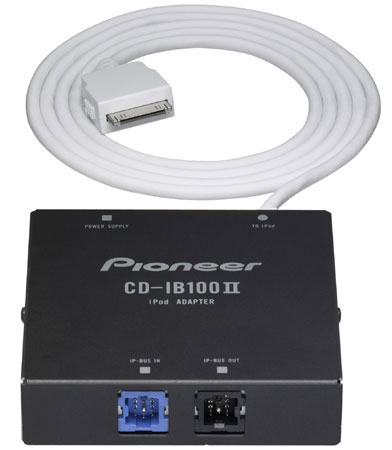
The reason I asked is because your symptoms describe having the P-bus cable wrong. Just find the little hideaway box for the ipod adaptor. Take the P-bus cable out of the hole its in, and move it to the other one right next to it

Posted Oct 12, 2007 · 18:15 UTC#16
The reason I asked is because your symptoms describe having the P-bus cable wrong. Just find the little hideaway box for the ipod adaptor. Take the P-bus cable out of the hole its in, and move it to the other one right next to it


wait...wait...wait....where the cables are wrong is on the adapter? If so, then cool, cause I have mine velcro'd under my center console, which is 4-6 screws to get to. Way mobetta than pulling the HU back out... :D:wink:


[edit]... I see now...it must have come packaged like that, and I guess I never thought to check it...it's the only excuse I can think of, cause I normally don't mess up inputs versus outputs.....but then again, I usually skip pass RTFM... :roll::oops:

307492523CD-IB100II_Angle_med.jpg

Posted Oct 15, 2007 · 14:49 UTC#17

Hey....you wouldn't believe it, when you hook your Ipod adapter up right, the shite actually works. :roll:


Surprisingly, being that I had to convert all 1098 tracks from WMA's, it sounds great. But I do have to max out the Avics volume to listen to it, I guess that could be from the conversions, as I have the Iphone EQ turned off, and the volume all the way up. But it's cool, because I don't even listen to music as loud as I use to. And really 40 is plenty loud enough for me.


I didn't get the chance to try the reset and volume pairing of my phone. I tried with just unpairing and re-pairing (both volumes maxxed), and I can't tell for sure if it made any difference at all. I'll have to try the reset deal.


Thanks again...you guys rock...

Posted Oct 15, 2007 · 19:02 UTC#18
:wink: