Search Archive

d3 boot up

By steve700xedge · Oct 21, 2007in Hacks/Mods💬 21 posts👁️ 5,378 views
Posted Oct 21, 2007 · 00:22 UTC#1

so I've changed the background screens and was wondering how to change the boot up screen meaning the black screen that says pioneer nav system starting right when the car is turned on, I have done numerous searches and can't seem to find exactly how to do it on a D3. Is it even possible all I seem to find is for D1 orD2

Posted Oct 21, 2007 · 17:03 UTC#2

it's not possible to change that screen

Posted Oct 21, 2007 · 17:20 UTC#3
it's not possible to change that screen


Yes it is, you change it the same way you change the other screens. Its call the splash screen.

Posted Oct 21, 2007 · 17:37 UTC#4

Its in the manual

Posted Oct 22, 2007 · 20:25 UTC#5

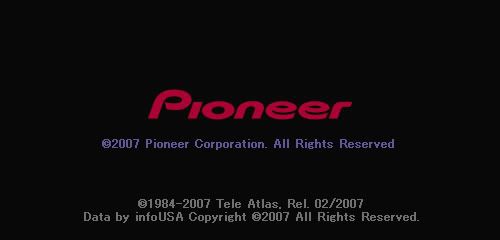
There are actually 3 different startup screens. The first is a completely black image, the second is the black background with PIONEER - copyright 2007 Pioneer Corporation etc. etc. screen, THEN the "splash" screen is loaded. The 3rd "splash" screen can be changed through the nav menu, selecting either one of the defaults off the disc or loading a new one from CDR. But you can also change the PIONEER screen.


You'll have to create a new Nav DVD (follow the thread on loading custom images on the D2 for instructions on creating the disc) with a different image file, and then resetting the unit so that it loaded the "program" from the disc again.


The file you need to change/replace is called BGOPEN. On the original disc you'll find this file in both PIM and JPG format, I replaced them both with my new image. It is located in the root\BG folder. Do NOT change the BGMAIN.pim or ORIGINAL.pim files, or your disc won't work.


If you want to go a step further, you can add any custom background files you might want to use later to the root\BG\PIM folder, making sure they are in PIM format. They can then be loaded from your new NAV disc rather than a separate CDR.
Posted Oct 22, 2007 · 20:59 UTC#6

yes thats the one, when first powered on it is completely black except for

the words at top that says starting up pioneer car navigation, this is the one in question so to be clear all I need to do is follow the directions for the d2 thats what I wanted to know and that it was possible thanks

Posted Oct 22, 2007 · 21:11 UTC#7

The all black screen with white "Pioneer Loading" at the top left, is a black image, with the words generated by the program. I believe this is the BGOPEN.PIM file, but every attempt to replace it resulted in unusable discs.


The screen after that, which looks like the one I've posted, is the one you can change using the directions above. But give it a shot, maybe you'll have better luck than I did. (please post back if you do)

BGOPEN.jpg

Posted Oct 22, 2007 · 21:18 UTC#8

The PIONEER logo on the startup splash screen is replacable through the nav menu as the other backgrounds are. I have replaced mine with no problems. No complicated steps nessesary.

Posted Oct 23, 2007 · 02:50 UTC#9
The all black screen with white "Pioneer Loading" at the top left, is a black image, with the words generated by the program. I believe this is the BGOPEN.PIM file, but every attempt to replace it resulted in unusable discs.


The screen after that, which looks like the one I've posted, is the one you can change using the directions above. But give it a shot, maybe you'll have better luck than I did. (please post back if you do)

BGOPEN.jpg


Does that come up every time the unit powers up? Because I don't ever recall seeing that image. I dunno... maybe I'm just busy doing other car related stuff while it's powering up.

Posted Oct 23, 2007 · 03:00 UTC#10

It does on mine. I get the all black screen with the white pioneer lettering, followed by the Pioneer logo, followed by the "splash" screen I chose through the nav menu.

Posted Oct 25, 2007 · 00:27 UTC#11

hifi

i've changed the screen you posted its the one before that, itsall black and says starting up pioneer navigation at the top left. I've tried posting pics but it always says tring to upload empty file how do we post pics on this website i've checked faq and it says the same way any other forum but I can't get it to work

Posted Oct 25, 2007 · 00:30 UTC#12
Its in the manual

no its not

Posted Oct 25, 2007 · 01:00 UTC#13

Just too lazy to look, or what? Its on page 66


no its not

Posted Oct 25, 2007 · 02:45 UTC#14
Just too lazy to look, or what? Its on page 66


no its not

look at my original post and I ask about the start up screen not the backgrounds jacka$$ whos lazy I've looked and it says nothing about it in the manual that is what this post was all about so if you don't know the answer shut the fffffck up

Posted Oct 25, 2007 · 03:06 UTC#15
Just too lazy to look, or what? Its on page 66


no its not

look at my original post and I ask about the start up screen not the backgrounds jacka$$ whos lazy I've looked and it says nothing about it in the manual that is what this post was all about so if you don't know the answer shut the fffffck up


It is in the manual!!! and where do you get off insulting senior members like that. Your original post was asking how to change the PIONEER splash screen and it is in the manual. He and I know what were talking about and your not going to get much help around here talking trash like that.

_________________

Posted Oct 25, 2007 · 03:12 UTC#16

Right here!!!

post-2925-12872753203758_thumb.jpg

Posted Oct 25, 2007 · 04:55 UTC#17

The original poster is not trying to change the splash screen, but rather the black screen with some text only that reads "Now loading Pioneer navigation" or something to that effect right before the splash screen comes on. I can't make excuses for his language, but he is right in that what he wants to do is not in the manual.


Now, to the original poster, as was stated in this thread already, no you can't change it and please remember that you are less likely to get help when you start namecalling. If you spent more time explaining that you are not referring to the splash screen (as your first post was a little unclear and obviously misunderstood) and less with the know-it-all "no it's not"-type answers, we could move on, as your question was already answered correctly the first time.

Posted Oct 25, 2007 · 23:15 UTC#18
Right here!!!


just look at the posts he is the one who started trash talk by calling me lazy

and if you would actually have read my posts, I have changed the background screens which includes the splash screen. I am talking about the screen that comes up as soon as it is powered up. now neither of you have actually helped what I have been asking, the poster above actually gets what I'm talking about. so maybe not all units has this message BUT I HAVE CHANGED THE BACKROUND AND THE SPLASH AND FOLLOWED WHAT OIT SAID IN THE BOOK BUT IT DOES NOTHING FOR THE SCREEN THAT SAYS "STARTING UP PIONEER CAR NAVIGATION" then it goes to splash screen and then to background screen for audio, ipod etc, and I also changed the screen for the navigation background so don't even go there, and how is my original post not clear I asked about the boot up screen and said I have already changed the backgrounds, and someone had replied it was possible the same way as a d1 or d2 so if I have attitude it is with people not actually reading my questions and but assuming they know the answers by only reading replys by others

Posted Oct 25, 2007 · 23:29 UTC#19

Hmmm... Questioning if someone had looked in the manual, which most are too lazy to do vs. telling someone to shut the fuck up. See if you get much help on this board with that attitude. In this thread and your other one

Posted Oct 25, 2007 · 23:46 UTC#20
so I've changed the background screens and was wondering how to change the boot up screen meaning the black screen that says pioneer nav system starting right when the car is turned on, I have done numerous searches and can't seem to find exactly how to do it on a D3. Is it even possible all I seem to find is for D1 orD2

if this was actually read you would have seen that I did research and if I changed the background obviously I found page 66 maybe I have over reacted but I have been around message boards long enough to know to research possible solutions on my own first but I guess since I'm new on this one someone with over 2000 posts is right because of seniority. simple enough original questions how silly of me for asking since I just bought my unit!

Posted Oct 26, 2007 · 07:42 UTC#21
it's not possible to change that screen


ha, i was right...