Search Archive

service manual

By TonyFlow420 · Oct 24, 2007in Hacks/Mods💬 17 posts👁️ 3,234 views
Posted Oct 24, 2007 · 02:04 UTC#1

i was worndering have any of u guys read the Z1 service manual it showes a service screen thats in windows mobile i think you might be able to close it and go from there? also im not even sure if they were sposed to sell the Z1 service manual becaseon there website it ses ur not elgiable to buy this product ,but i bought one on the phone i think the girl might have messed up. anyways maby u guy can use some of the info from it.

Posted Oct 24, 2007 · 17:33 UTC#2

Post the manual

Posted Oct 24, 2007 · 19:14 UTC#3

absolutely, post it for all. :D

Posted Oct 25, 2007 · 04:51 UTC#4

which part its 254 pages long it has every wire dig plus exploed views part numbers and how to do every test but ull need an osillasope.

Posted Oct 25, 2007 · 05:05 UTC#5

Is there any parts of it that talk about the software? or how to access the firmware? that would probably be the biggest help..


how much did you pay for it BTW?

Posted Oct 25, 2007 · 14:36 UTC#6

There isn't a PDF download? Most of the service manuals I've found on other brands/models(amps...etc) are usually available through a PDF download. Like this one....

https://www.manualsparadise.com/ShowPro ... =M87426175


[edit]Were you given a customer ID?

Posted Oct 25, 2007 · 14:56 UTC#7

if I remember correctly, the Z2 service manual in pdf format was posted here on the forum not that long ago. It consisted pretty much of Z1 service manual plus small addendum that reflects differences from Z1.

Posted Nov 06, 2007 · 00:26 UTC#8

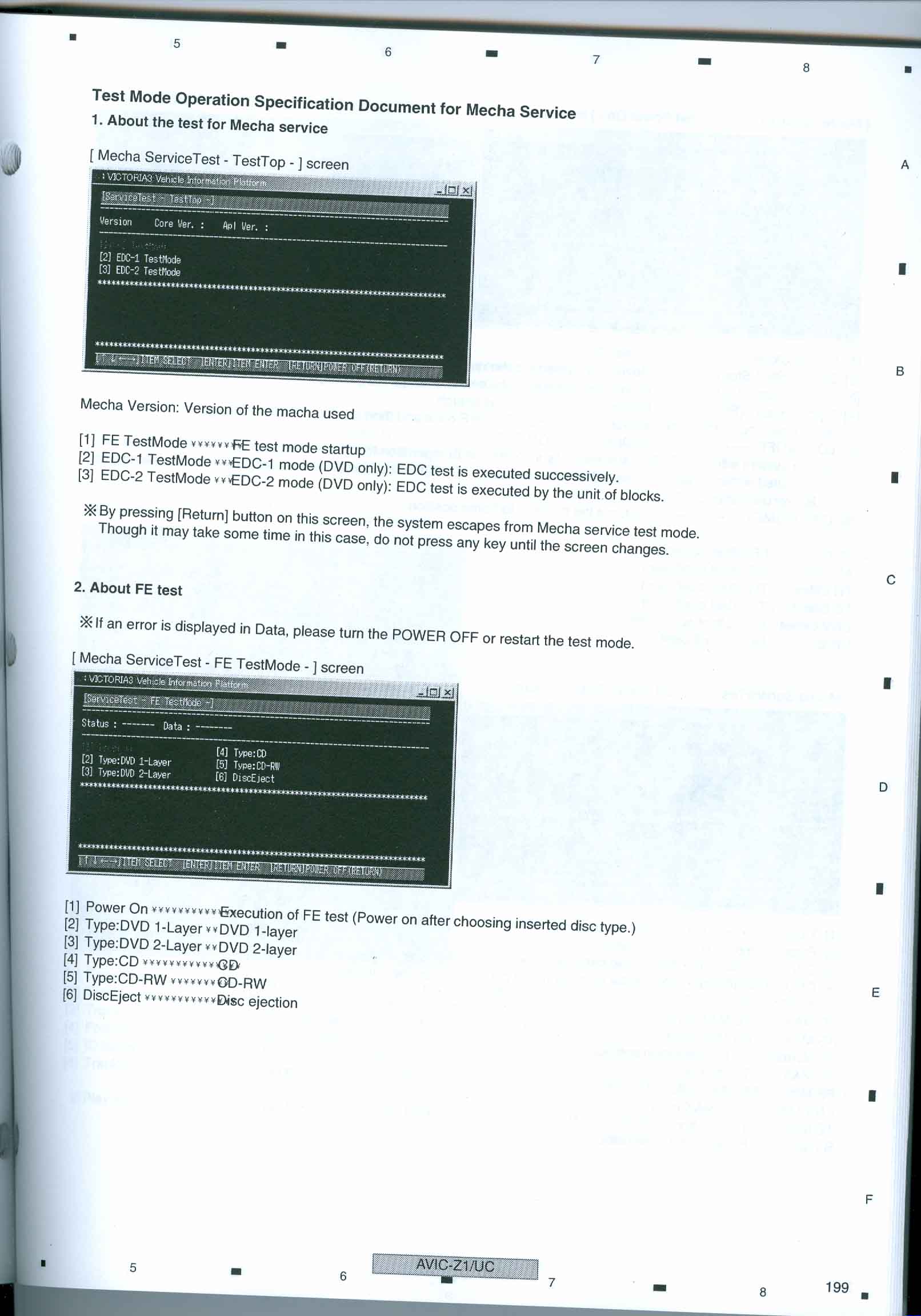
this is the most intrasting part.


(mecha service test )


first u must go into the service screen


1.press the reset and eject buttons simultaneously while battery, acc ON


2. release only the reset button


3. release the eject button when the password input screen is displayed


4. input the password ( [p.list up] [p.list up] [p.list down] [p.list down]

[trfc(ta/news)]


now hit the page keys to go to the testmode menu number 5 on the list should be servmecha when u pull up this test screen it will be in a window from windows im hopeing u can just click the x in the conner and close it.


oya this service manul cost $110.00

post-2752-12872753219954_thumb.jpg

post-2752-12872753224449_thumb.jpg

Posted Nov 06, 2007 · 00:29 UTC#9

can you post the rest ?

Posted Nov 06, 2007 · 03:23 UTC#10

right about now, I would love to figure out how you can install a new HDD...


I called Pioneer about a replacement HDD, only to be told that I would have to send the unit into a service center. And that a new HDD is not available from the parts department....


So what do the service centers do? Pressing a sequence of buttons would definitely be cheaper than paying to unlock a drive...

Posted Nov 06, 2007 · 03:56 UTC#11

im sure the drives come preloaded

Posted Nov 06, 2007 · 04:32 UTC#12
im sure the drives come preloaded

but unlocked right? or is there a way to clear out/rewrite the eeprom?


this is one of the places I have become the most confused with this unit....if you disable the lock and have it run fine, then that would mean that you can run any drive, regardless if it supports drive lock or not....right? Of course, considering the resets with most other drives...

Posted Nov 06, 2007 · 16:43 UTC#13

Wow....the service manual has already been posted....go figure.... :?

(z1-z2 upgrade stickie)


now, I need to figure a way to solder in and flash a mod-chip to dual boot WM6....

Posted Nov 06, 2007 · 18:54 UTC#14

i couldn't find the manual posted in the upgrade sticky, just an upgrade manual. if you send me the manual, or even a copy, i'll pdf it, and post for all :D

Posted Nov 06, 2007 · 19:10 UTC#15
i couldn't find the manual posted in the upgrade sticky, just an upgrade manual. if you send me the manual, or even a copy, i'll pdf it, and post for all :D

it's already .pdf format.....just right click your start menu>explore> paste ftp://leech:[email protected]/ in the address > then drag and drop the Z2 manual to your desktop..

Posted Nov 06, 2007 · 19:30 UTC#16

I just uploaded it to my server....


(right-click, save as)33.5mb

http://flemdawg.com/AVIC-Z2_Manual.pdf


The FTP should be faster though...

Posted Nov 06, 2007 · 19:31 UTC#17

alredy on my desktop :)