Search Archive

CD-UB100 - USB Adapter on Z2

By gmcmurry · Oct 25, 2007in Problems/Troubleshooting💬 10 posts👁️ 3,899 views
Posted Oct 25, 2007 · 13:39 UTC#1

My Z2 installation in my 2003 Expedition is almost complete.


I purchased just about everything I could including the CD-UB100 USB Adapter.


I was really looking forward to hooking up a usb drive and keeping a bunch of music on the system. BUT - Two Big Problems.


1. Not enough power to run the Western Digital USB2 drive.

2. If I use a "thumb drive", which works, the Z2 does not read out any of the file or folder names. Just numbers.


Does anyone know if there is some way that the files need to be listed on the drive so the titles and folders can be browsed with the Z2? I was hoping that it would work like it does when you use a CD with MP3s in folders.


Greg
Posted Oct 25, 2007 · 14:35 UTC#2

No, there is no interface when using this adapter on that unit.

Posted Oct 26, 2007 · 04:09 UTC#3
No, there is no interface when using this adapter on that unit.


Isn't that nice.... How hard would it have been....


Thanks for the help.


Greg

Posted Mar 16, 2008 · 02:58 UTC#4

Wondering if you can help me with something...


I have an 03 expy and am looking for the vss wire and reverse wire. Can you tell me what color and where the nearest/easiest attachment point is?

Posted Mar 16, 2008 · 16:01 UTC#5

There is a lot of confusing information about the 03 Expedition out there. Apparently there are a few versions around so the information I have may not be the same for your SUV.


Do you have the Eddie Baur with the factory NAV already installed? If so, I can probably help.


However I did get everything working except for the sub woofer. That I still need to work out.


THERE ARE NO PLUG KITS that work for everything. You will need to use a plug kit from a different year for some lines and cut wires for everything else.


Everything does appear at the old NAV Radio connectors. Backup, Tach, Speakers, Power, Etc.


Greg

Posted Mar 16, 2008 · 16:10 UTC#6

Well thankfully I have the most basic radio (1 cd and cassette) so the wiring harness is simpler. I got a plug from best buy and it works fine. Then I modified the stock bracket (drilled 2 holes each side) and used it for the avic d3 and that works fine as well. I am just stuck on the last 2 wires right now (vss, reverse).

Posted Mar 16, 2008 · 16:42 UTC#7

This may or may not be the same for your model but take a look.


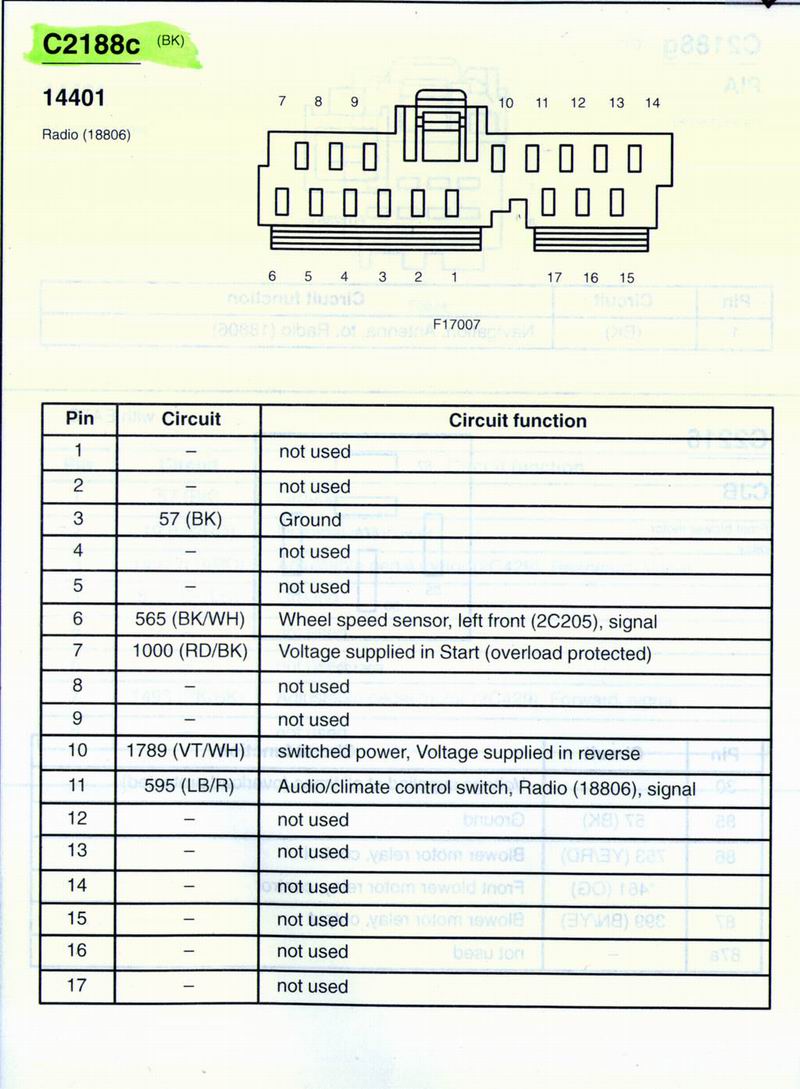
Ford_2003_Expedition_C2188c.jpg


If you have an unused connector that looks like this, it may be right for you.


On the Eddie Baur with Factory Navigation, this is connector C2188c. It is located right behind the Factory Nav/Radio. Yours is probably different.


Pin 5 is the Tach

Pin 10 is Reverse

Pin 11 is control I am using for steering wheel controls


If this is not correct, let me know and I will see if my manual has your setup in it. Maybe it is different.


Greg

Posted Mar 16, 2008 · 17:15 UTC#8

Almost there. I have connector 290b in the wiring diagram. This has 3 rows of pins and the gray/black is the VSS.


Unfortunately the reverse isn't also there. That is the only one I have to find. Any ideas where that may be? I know the electrochromatic mirror has to have a reverse wire because of it lighting up in reverse. Where that wire comes from and a convenient place to tap in beats me. Hopefully someone will clue me in so I can finish today.

Posted Mar 16, 2008 · 18:35 UTC#9
1. Not enough power to run the Western Digital USB2 drive.
You'll have to get creative with power supplies ;). Even if you do get it running, there is no way to search or browse. You can only skip forward or backward tracks and/or folders. It's really only good for thumb drives because the amount of music you'd store on a HDD is unmanageable without a search feature.


2. If I use a "thumb drive", which works, the Z2 does not read out any of the file or folder names. Just numbers. ...Does anyone know if there is some way that the files need to be listed on the drive so the titles and folders can be browsed with the Z2? I was hoping that it would work like it does when you use a CD with MP3s in folders.

Answered here, along with a few other tips:

http://avic411.com/forum/viewtopic.php?t=13202