Search Archive
📌 Pinned

CD-iB100II Installation Tip

By skicrave · Jul 16, 2006in iPod/iPhone/iPad💬 25 posts👁️ 32,847 views
Posted Jul 16, 2006 · 18:52 UTC#1
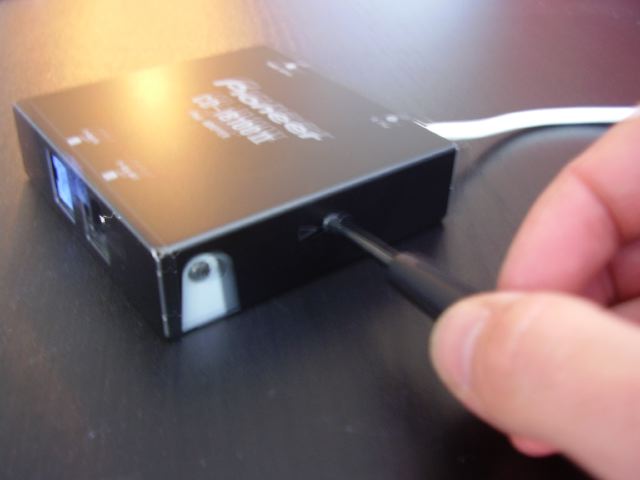
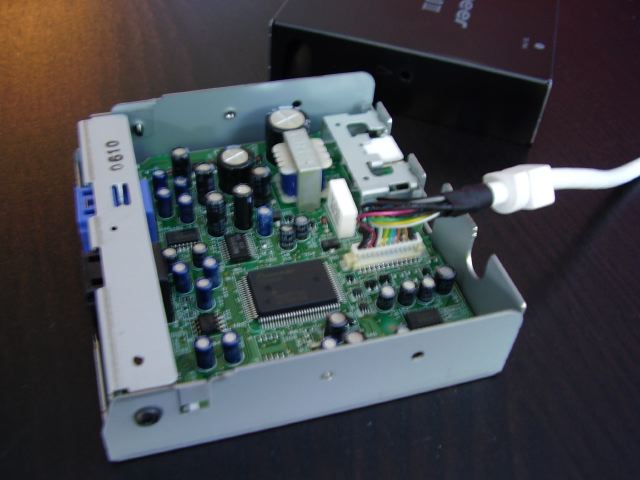
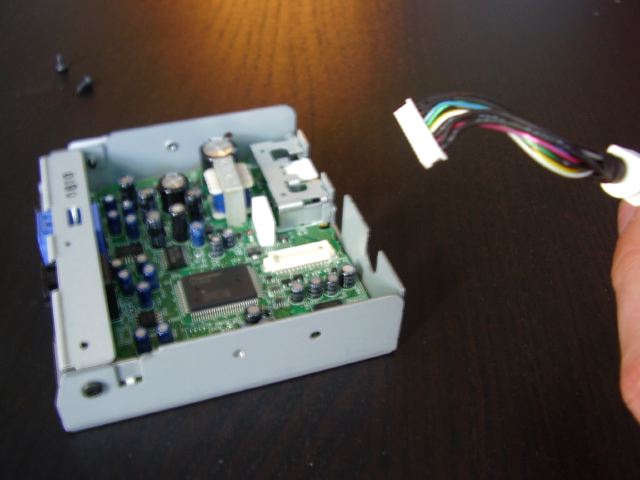
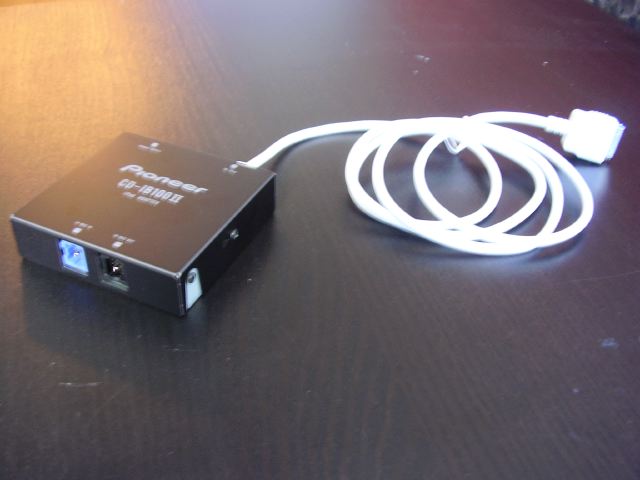
While running the cable to my glovebox last night I came across this little tip that may help out anyone else that wants to get the cleanest possible installation. I didn't want to cut a hole that as big enough for dock connector to get through, but I didn't see another option because the cable is molded into the interface box. Well, after playing around with it for a while, this is what I was able to come up with:
Attached Files (4)
P7150001.JPG
P7150001.JPG
P7150002.JPG
P7150002.JPG
P7150005.JPG
P7150005.JPG
P7150003.JPG
P7150003.JPG
Posted Jul 17, 2006 · 02:40 UTC#2
Nice idea!

I didn't quite do my install that way... I installed mine with the cable coming out into the "Arm Rest" in the center console
Posted Jul 17, 2006 · 18:53 UTC#3
Yeah, I wanted to install it like that, but I was worried about attracting more attention to the car. This way if I leave my iPod plugged in and I'm parked on the street somewhere it won't be visible.
Posted Jul 17, 2006 · 19:06 UTC#4
YUP, mine is INSIDE the armrest of the Mustang
Posted Jul 17, 2006 · 20:17 UTC#5
I didn't have that option because there was no way to get the cable into the armrest.
Posted Jul 21, 2006 · 15:11 UTC#6
This works on the older CD-IB100 also. I did this trick a few months ago to get the dock connector into the glove compartment of my wife's car.
Posted Jul 27, 2006 · 03:50 UTC#7
I brought the wire up through the back of a little cigarette ash tray spot. That way I can tuck the wire into the tray and close it...looks nice =]
Posted Aug 07, 2006 · 13:08 UTC#8
i have a 2003 e46 bmw and i bought a eurotray for the center console and just ran the wire into that, i keep the ipod in there...very clean installation
Posted Nov 08, 2006 · 16:17 UTC#9
I came across a web page that described how to remove the cover and cut a single wire in the harness of the CD-IB100 (II) to regain full access from the front panel of the iPOD. I can no longer find that web page (did not bookmark it!).

I received a free CD-IB100 (II) with my AVIC-D2 and it is useless with the stock interface and lack of iPOD control. I would be happy to void the warranty by the above method and just control the unit via the iPOD front end.

If anyone knows how to do this modification, please post.
Posted Nov 09, 2006 · 00:02 UTC#10
Pumori said:
I came across a web page that described how to remove the cover and cut a single wire in the harness of the CD-IB100 (II) to regain full access from the front panel of the iPOD. I can no longer find that web page (did not bookmark it!).

I received a free CD-IB100 (II) with my AVIC-D2 and it is useless with the stock interface and lack of iPOD control. I would be happy to void the warranty by the above method and just control the unit via the iPOD front end.

If anyone knows how to do this modification, please post.


You mean this? Ripped from another post on this forum.


Joined: 05 May 2006
Posts: 13
Location: Chicago
Posted: Wed Aug 09, 2006 3:45 pm Post subject:

--------------------------------------------------------------------------------

Here is another solution I found on Ilounge

For those of you who bought the Pioneer Ipod adapter and want control back of your Ipod when connected to the in car system, here is how you do it with out having to disconnect the Ipod from the dock connector to pick your music.

It will of course invalidate your warranty on the adapter but you will have control. Open up the Ipod adapter box, just two Phillips screws, you should see a connector that has all the wires going to it from the white cables coming into the box from the Ipod. Carefully pull the connector upwards to disconnect it. In the middle there should be a blue wire, lift the little peg that holds the very small socket that the blue wire is connected to and it should now just pull out. Put a bit of electrical tape around it to stop it touching any thing and put the top back on the box. Of course you do this with the power off and pull the power connecter out of the Ipod adapter.

After reconnecting it all, you should now have full control of your Ipod to pick your music. The down side is you loose the auto stop and start when you turn the car ignition on and off.

Back to top
Posted Mar 04, 2007 · 09:53 UTC#11
here is how you do it without cutting any wires and without losing the auto start and stop:

Step #1) Turn on your car so that the radio is functioning.
Step #2) Keep the ipod unplugged from the radio, but keep the ipod in one hand and the radio connection in the other.
Step #3) Hold down the play button on the ipod, and before the ipod powers off plug it into the radio. You will know if you did this wrong if you plug the ipod into the radio and it powers back on immediately. This means that you shut it off before plugging it in. In order for this to work, you must hold down the play button and continue holding it until the ipod shuts off after it is plugged in.
Step #4) Turn the ipod back on. You’ll see the “Pioneer” screen, but if you give it a few seconds, and then press the menu button, you’ll notice that you can navigate the ipod windows just as you should have been able to normally.


It takes a couple tries to get the timing down, but it does work...I have pics to prove it in another thread
Posted Jan 29, 2008 · 01:07 UTC#12
pj818mbr, when I first got my Z2 i hated the ipod interface. And then I came across your post. It works great. It took me a couple of times to get it at first on my 80g. I have found that if you press the play button for one second then plug in the connector while holding the play button until the ipod shuts down, it works everytime. There has been a couple of times when it doesn't work, but all I have to do is reset the ipod or turn the ipod off plug in the connector, let the Z2 turn on the ipod, unplug and try again. You still get the auto pause and play, full function of the iPod thropugh the click wheel and Z2 and the track info.
Posted Jan 31, 2008 · 16:51 UTC#13
will this method shut off the ipod with the car? i want the "full" control of my ipod, but i don't want it to keep playing all day, lol.
Posted Jan 31, 2008 · 20:39 UTC#14
Yes, at least on mine it does. I have an 80g Ipod video. When I turn off my Z2 it pauses the ipod and eventually shuts down. When I turn on my Z2, it resume right where it left off.
Posted Feb 01, 2008 · 00:02 UTC#15
sweet thanks.
Posted May 01, 2008 · 18:47 UTC#16
hmm i have the ipod classic and i cant get it to work :(
Posted May 05, 2008 · 17:47 UTC#17
the itouchs and iphones are a bit tricky. i went from an old school 3rd gen ipod to my itouch. the itouch i have to first go to music, then hit my playlist or else if i just plug it in, it will play all the songs on my ipod in order. very annoying
Posted May 10, 2008 · 16:27 UTC#18
I used the "timing plug in" technique with my 5th gen video ipod and it worked great. I just bought an 80 gig 6th gen classic ipod, and I can't get it to work. Is my timing off? Or is it not possible with 6th gen? Do I need to cut wires?
Posted May 17, 2008 · 18:49 UTC#19
my 6th gen doesnt work either
Posted Jun 25, 2008 · 18:34 UTC#20
BADASS THANKS SO MUCH!!!!!


Looks like ill keep my 5ht gen tho!
Posted Jul 07, 2008 · 03:11 UTC#21
Might sound like an odd question, but does anyone know what connections/pins on the ipods dock the cables using?
Posted Nov 24, 2008 · 18:27 UTC#22
Hi,
Just wondering if you guys know if Pioneer is working on a new version of the CD-iB100II . I've been trying to get something for my ipod but i only heard 2 starts reviews about the interface being slow. I also looked at the cable whithout the interface, but i assimed you can't use the Avic interface with just the cable adapter, right?
Oh, i forgot to say, i owened an Avic-z1 upgraded to a Z3.
Any help or feedback will be great.
Thanks a lot,
Zeek
Posted Feb 21, 2009 · 03:13 UTC#23
does the CD-iB100II support video play i dont want to get it and not be able to play videos. or ill keep my external setup going
Posted Feb 21, 2009 · 07:13 UTC#24
No
Posted Dec 30, 2015 · 20:08 UTC#25

Hello, I have CD-IB100II connected to iPod Video 80 Gbytes of 5 generation and I can not see the videos in music videos comes only music that can be done? A cable must be cut to be you can see? for example to watch videos while driving must be the cable to the handbrake in the dough, You have to do something? Thank you