Search Archive

Does this look right?

By BuffaloSS · Feb 27, 2008in Problems/Troubleshooting💬 12 posts👁️ 2,737 views
Posted Feb 27, 2008 · 04:32 UTC#1

Here's the background on my new D3. Does this look right? All of the other screens, including DVD playback, are just fine...but this just looks bad:
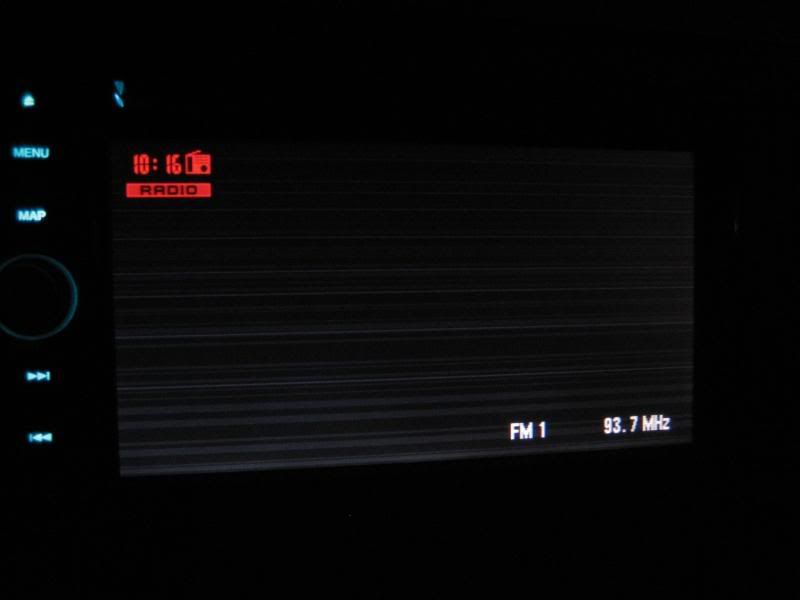
 

IMG_5098.jpg


And how the hell do you upload a new background on the D3? I see a stick for D1/2, but no love for the D3? I must be missing something here.

Posted Feb 27, 2008 · 04:35 UTC#2

Yes, that correct. You can change it to another background in the navigation menu. Instructions on making custom ones are in your manual

Posted Feb 27, 2008 · 05:55 UTC#3

OK, thanks...and I just noticed the "How to...backgrounds" section in the main forum index.

Posted Mar 01, 2008 · 23:17 UTC#4

Looks cool! :roll:

Posted Mar 01, 2008 · 23:56 UTC#5

it does not look bad, it just depends on ur mood.

Posted Mar 03, 2008 · 02:35 UTC#6

I only asked b/c it looks like the screen was takin a dump. I expected a plain black screen. All is well now that I've borrowed a few bg's from the forum. Thx.

Posted Mar 03, 2008 · 16:01 UTC#7

I recently had a customer come in complaining about this exact same thing. I told him that is just a "wallpaper" or "background", then showed him how to change it step by step. Even after the background had been changed, he REFUSED to believe me that there is nothing wrong with his D3. "Well you just can't see the lines now because it's not a totally black screen." ..... :roll: He leaves pissed, and there's nothing I can do about it other than tell him to read his owners manual. :x

Posted Mar 03, 2008 · 16:34 UTC#9

The Pioneer reverse feature screwup is worse yet IMO.... and the piss poor "troubleshooting" really tops it off....


Sorry, but somebody like that doesn't deserve to be near car electronics.

Posted Mar 03, 2008 · 18:06 UTC#10

That IS hilarious! I think I would have called T-support if I got the "bad" screen after the second unit. :?


I never even used the demo...now I need to check it out for that reverse camera view.


And lastly...I didn't notice an upload option for other backgrounds (on the D3 itself). Are they stored in the memory? I uploaded mine from a CD, but can't remember being able to get access to internal backgrounds.

Posted Mar 03, 2008 · 18:35 UTC#11

It's the same process as uploading custom ones, except you use the nav disk instead of your own custom images CD.


And the reverse thing that was talked about there had nothing to do with the D3. It was for older single DIN head units. The screen would alternate between a normal display, and reversing the colors, kind of like a photo negative. I had an old one that did that, it was a pain in the ass until I decided to read the manual and find out how to turn that off like a day later.

Posted Mar 04, 2008 · 03:46 UTC#12

Gotcha. This afternoon I toyed with the NAV disc. I saw them, thanks.


And I hear ya on the old HU's. I recall my Premier DEH850mp giving me fits with the display a few years ago.