Search Archive

Update Released!! For REAL!!

By fatherfork · Jul 21, 2008in Problems/Troubleshooting💬 95 posts👁️ 21,883 views
Page 3 of 4
Posted Jul 22, 2008 · 12:50 UTC#51
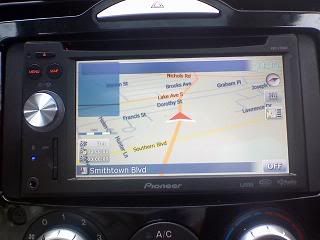
My pet peeve still isn't fixed, the blue overlay for the routing information on the map screen is still there even when there is no route. :(


Anyone know if there is a picture of this floating around on these forums already? I regularly drive around in NAV mode on my D3, with no route, and I want to see how bad this looks before I make a jump to the F90BT.


Or maybe someone can take a quick photo of this so I can see how annoying it is? Thanks!

Posted Jul 22, 2008 · 12:51 UTC#52

They also fixed the glitch when searching for POI's near the cursor or location when the system would run out of memory.... SWEET!!


However What irks me is that when you put your iPod into shuffle mode you have to navigate away from the now playing screen, and hit the mode button several times before it changes back to shuffle off.


I also lost my TTS too!!!

Posted Jul 22, 2008 · 13:04 UTC#53
Let me add something on the boot up time. 2 minutes is a major problem for some of you? I dont think you are supposed to jump into a car and go right away anyway the car needs a minute to warm up. It would be nice to have a super quick boot up time but its not a deal breaker.


Anything running any windows os runs slow and buggy anyway, its why i switched from pc to mac this january. vista is a complete joke compared to mac os.


You literally sit there for a few minutes in your car before pulling out? I don't really thinking "warming" your car up for a few minutes is really necessary for 95 degrees do you? Now if its winter out and your windows need to defrost, sure makes sense.


I have owned Magellan's that are based on windows ce, they have a low power stand by for instant on when you push the on button, if you don't use it for an extended period of time, sure it powers down completely. Boot up is about a minute.


So why can't they have some sort of low power standby, all main components are turned off, but the memory is still on, with the +12v? Have it switch off if its more then a few days or something, as to not run down the battery.


Also, if your sitting there on ACC, then turn your car on, yaay you get to wait for a COMPLETE from scratch boot up again.


Anyway, happy for you all.

Posted Jul 22, 2008 · 13:08 UTC#54

Updated last night.


1. Bluetooth is perfect (using Samsung sch-i760 smart phone)

2. Ipod is not cataloging. It tries and after a minute I get a message that it was unable to catalog the songs.

3. Songs are now in correct order on ipod and individual playlists can be shuffled correctly.

4. Much faster response time to touchscreen

5. Much more readable contrast

6. The voice recognition does not work at all for anything. ??


It is about an 8/10 for me. I'm OK with it, but still need to figure out the VR problem.

Posted Jul 22, 2008 · 13:09 UTC#55

Now that we know for sure the F series is running windows CE and we also know that the Nav software is iGO from MiTac. I wonder if this unit is capable of running Garmin Mobile XT in addition to or instead of iGO.

Posted Jul 22, 2008 · 13:53 UTC#56
My pet peeve still isn't fixed, the blue overlay for the routing information on the map screen is still there even when there is no route. :(


Anyone know if there is a picture of this floating around on these forums already? I regularly drive around in NAV mode on my D3, with no route, and I want to see how bad this looks before I make a jump to the F90BT.


Or maybe someone can take a quick photo of this so I can see how annoying it is? Thanks!


its basically 2 translucent boxes on the top of the screen, where the route specs go. problem is there still on the screen when no route is selected....im on break in an hour so if someone doesnt beat me to it between now and then ill be happy to take a picture of it.

Posted Jul 22, 2008 · 13:55 UTC#57
Now that we know for sure the F series is running windows CE and we also know that the Nav software is iGO from MiTac. I wonder if this unit is capable of running Garmin Mobile XT in addition to or instead of iGO.


so what does this mean for hacks? that someone with enough knowledge and experience can basically do anything to the unit??

Posted Jul 22, 2008 · 14:42 UTC#58
Now that we know for sure the F series is running windows CE and we also know that the Nav software is iGO from MiTac. I wonder if this unit is capable of running Garmin Mobile XT in addition to or instead of iGO.


so what does this mean for hacks? that someone with enough knowledge and experience can basically do anything to the unit??

It basically means that if you have the know-how, you can get any windows CE compatible software to run on the unit, provided the unit has enough resources to run it. You could probably even set it up to boot straight to windows if you wanted. Your options are limitless if you have to knowledge of how to do it. Hell, you could probably install a different operating system on there if you wanted to. Not really anything the average Joe should try, though. You could end up basically bricking your unit, and it wouldn't be covered by the warranty.

Posted Jul 22, 2008 · 15:00 UTC#59
Let me add something on the boot up time. 2 minutes is a major problem for some of you? I dont think you are supposed to jump into a car and go right away anyway the car needs a minute to warm up. It would be nice to have a super quick boot up time but its not a deal breaker.


Anything running any windows os runs slow and buggy anyway, its why i switched from pc to mac this january. vista is a complete joke compared to mac os.


You literally sit there for a few minutes in your car before pulling out? I don't really thinking "warming" your car up for a few minutes is really necessary for 95 degrees do you? Now if its winter out and your windows need to defrost, sure makes sense.


I have owned Magellan's that are based on windows ce, they have a low power stand by for instant on when you push the on button, if you don't use it for an extended period of time, sure it powers down completely. Boot up is about a minute.


So why can't they have some sort of low power standby, all main components are turned off, but the memory is still on, with the +12v? Have it switch off if its more then a few days or something, as to not run down the battery.


Also, if your sitting there on ACC, then turn your car on, yaay you get to wait for a COMPLETE from scratch boot up again.


Anyway, happy for you all.

Posted Jul 22, 2008 · 15:01 UTC#60
It basically means that if you have the know-how, you can get any windows CE compatible software to run on the unit, provided the unit has enough resources to run it. You could probably even set it up to boot straight to windows if you wanted. Your options are limitless if you have to knowledge of how to do it. Hell, you could probably install a different operating system on there if you wanted to. Not really anything the average Joe should try, though. You could end up basically bricking your unit, and it wouldn't be covered by the warranty.


thats awesome... lookin foward to see how creative this can get :twisted:

Posted Jul 22, 2008 · 15:15 UTC#61

I am a little confused by the voice dialing working for some and not others. I have the 'old' iPhone and as I said in my first post it does recognize a number to call when I speak the digits. It also will change source pretty accurately. I did suggest to the installer that they try and wire the unit to the built in mic I have for my Onstar. Not sure if that would help if we did it.


From reading I guess all the cool music controls are only for the iPod so I might have to get the cable after all. I did connect it with the standard iPhone cable and the unit indexed all my music very quickly.


Does anyone have any ideas why some are getting voice dialing to work and some aren't? I am going to try and delete and reload my contacts today. Can't think of anything else to try.

Posted Jul 22, 2008 · 15:25 UTC#62
My pet peeve still isn't fixed, the blue overlay for the routing information on the map screen is still there even when there is no route. :(


Anyone know if there is a picture of this floating around on these forums already? I regularly drive around in NAV mode on my D3, with no route, and I want to see how bad this looks before I make a jump to the F90BT.


Or maybe someone can take a quick photo of this so I can see how annoying it is? Thanks!


its basically 2 translucent boxes on the top of the screen, where the route specs go. problem is there still on the screen when no route is selected....im on break in an hour so if someone doesnt beat me to it between now and then ill be happy to take a picture of it.


Is it by chance what is being shown on page 23 in the owners manual, upper right corner picture?

Posted Jul 22, 2008 · 16:16 UTC#63

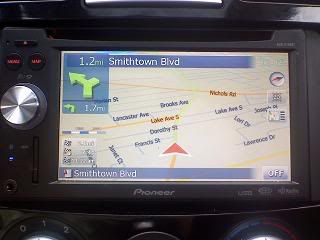
ok. these are the boxes that stay there:
 

boxes.jpg


this is what theyre for:


route.jpg


but something weird just happened. i was playing wit the ipod voice commands, and it played completely different artists from who i requested or itd say the arists i said and play someone else...examples:


i said "Play the artist Flogging Molly"

it said "Playing the artist Flaw"

what came on was a theme song to "Final Fantasy X"


i said "play Dropkick Murphy's"

it said "Playing the artist "Daughtry"

what came on was Daughtry


I said Play the artist 'System of a Down'

it said "playing the artist Sevendust

what came on what Seether


i tried SOAD again (thats a hard one to mess up)

it said playing the artist young jeezy

what came on was young buck


I said play the artist Godsmack

it said playing hr artist Godsmack

what came on was Gang Starr.


I said play the artist Disturbed

it said playing the artist disturbed

what came on was disturbed


any ideas on whats happening?

Posted Jul 22, 2008 · 16:27 UTC#64

UPDATE::: my bad, i added like 70 new songs and didnt turn VR bak on. yes, I fail... :oops:

Posted Jul 22, 2008 · 16:32 UTC#65
ok. these are the boxes that stay there:


boxes.jpg

Ok, thats what I found in the manual as well. Have to think about it some, those could get rather annoying, or I should maybe just get in the habit of not displaying the NAV screen when driving around town.

Posted Jul 22, 2008 · 16:48 UTC#66
ok. these are the boxes that stay there:


boxes.jpg

Ok, thats what I found in the manual as well. Have to think about it some, those could get rather annoying, or I should maybe just get in the habit of not displaying the NAV screen when driving around town.

Mine has never done that, and I haven't installed the update yet!

Posted Jul 22, 2008 · 16:58 UTC#67

u dont have those boxes???

Posted Jul 22, 2008 · 17:14 UTC#68

I've only ever used mine in 3D mode, maybe they don't show up in 2D?

Posted Jul 22, 2008 · 17:27 UTC#69
I've only ever used mine in 3D mode, maybe they don't show up in 2D?


On mine, the leftmost box went away when I was in 2d mode and didn't come back. Don't know why. Now that I've done the firmware update, both boxes are there in both 2d and 3d mode. :cry: That has to be the easiest bug fix ever, I don't know what was in the engineers minds when they let this go.

Posted Jul 22, 2008 · 17:45 UTC#70

On mine, the leftmost box went away when I was in 2d mode and didn't come back. Don't know why. Now that I've done the firmware update, both boxes are there in both 2d and 3d mode. :cry: That has to be the easiest bug fix ever, I don't know what was in the engineers minds when they let this go.


The navigation portion is written by a third party, iGo. Updating that portion may be more difficult for Pioneer. They may have to make a new contract or go through other administrative hassles.

Posted Jul 22, 2008 · 17:50 UTC#71
ok. these are the boxes that stay there:


boxes.jpg

Ok, thats what I found in the manual as well. Have to think about it some, those could get rather annoying, or I should maybe just get in the habit of not displaying the NAV screen when driving around town.

Mine has never done that, and I haven't installed the update yet!


Mine did that pre and post update. Its the least of the problems I am having. Still...

Posted Jul 22, 2008 · 21:41 UTC#73
Now that we know for sure the F series is running windows CE and we also know that the Nav software is iGO from MiTac. I wonder if this unit is capable of running Garmin Mobile XT in addition to or instead of iGO.


so what does this mean for hacks? that someone with enough knowledge and experience can basically do anything to the unit??


This problem started for me AFTER the update. I never had both of those boxes on the screen without a route before the upgrade. They were on the screen both trips since the update.


Everything else about the update seems like an improvement.


Dave

Posted Jul 22, 2008 · 21:47 UTC#74

My impressions of the update after playing with the interface for about 20 minutes:


Pros

- Screen is definitely brighter (and dimmer with headlights on)

- Voice prompts and beeps seem to be of better quality (less hiss/digitization), and can definitely be turned to a lower volume

- Interface might be slightly snappier after bootup

- Time is finally correct! (for now... sometimes it would be correct for days at a time and then lose its mind, pre update)


Cons/no change

- Bootup time is the same

- Damn gas stations are still all over the map, even when turned off in the menu

- Street/turn boxes are displayed on map with no route. This was not the case for me pre-update.

- Still no way to mute nav voice that I can find.

Posted Jul 22, 2008 · 21:48 UTC#75
Now that we know for sure the F series is running windows CE and we also know that the Nav software is iGO from MiTac. I wonder if this unit is capable of running Garmin Mobile XT in addition to or instead of iGO.


so what does this mean for hacks? that someone with enough knowledge and experience can basically do anything to the unit??


This problem started for me AFTER the update. I never had both of those boxes on the screen without a route before the upgrade. They were on the screen both trips since the update.


Everything else about the update seems like an improvement.


Dave


do you use 2d or 3d?

Page 3 of 4