Search Archive

Modding non-iGO screens

By SilverstoneJay · Nov 25, 2008in Hacks/Mods💬 20 posts👁️ 3,724 views
Posted Nov 25, 2008 · 00:39 UTC#1

I apologize if this has already been discussed but I have been reading and searching everywhere and can't seem to find anything about modding/hacking individual AV Source screens.


I want mess with the HD audio scource screen to see if I can get the presets labels to show up and/or to have preset buttons at the bottom of the "detail" screen for individual stations.


Seems easy enough in theory to add buttons that already exist, but I have no idea where to begin looking for editable code for these Pioneer screens.


That said, my guess is that the script for Pioneer screens are compiled unlike the iGo screens, which is why nobody has been trying/discussing things like that already.


However, if I've completely missed a topic on this or someone has an idea on where I could start, your help would be MUCH appreciated.


In case my rambling didn't make any sense, I made a quick 'n dirty image of what I'd like to do in addition to getting preset labels to show up for HD Radio. Thanks to Paradriod for having the AV screenshot I needed already posted (albiet in German) which I borrowed (hope you don't mind). Thanks!

post-21236-12872756325063_thumb.jpg

Posted Nov 25, 2008 · 08:14 UTC#2
I want mess with the HD audio scource screen to see if I can get the presets labels to show up and/or to have preset buttons at the bottom of the "detail" screen for individual stations.

It's very interest, and I need these preset buttons too. But I havn't any idea how to make it. :(

Posted Nov 25, 2008 · 15:59 UTC#3

Your assumption is correct, the software that controls that portion is a compiled executable, and so far no one has managed to make any modifications to it.


There are maybe two people that publicly post on this forum that have both the skill and tools to make those changes, so I wouldn't hold your breath.

Posted Nov 25, 2008 · 17:02 UTC#4

I have bigger finger and was thinking about a mod like this for the radio

hd_screen_301.jpg[/img]

Posted Nov 25, 2008 · 17:31 UTC#5

Every single AV screen on the F-Series needs to be reworked. They all waste tremendous amounts of real estate with redundant information, and they are all designed for use with a stylus, and not a finger.


I would be pretty embarrassed if I were Pioneer and this is the best I could do.

Posted Nov 25, 2008 · 20:52 UTC#6

I use the P.CH buttons to cycle through the presets :) That suffices for me .


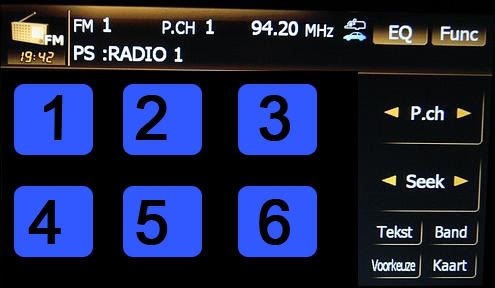
btw : it's flemish , not german (I live in Antwerp - Belgium)


All I did was change the colours to match my interior (see piccies)

post-22803-12872756343119_thumb.jpg

post-22803-12872756344904_thumb.jpg

Posted Nov 25, 2008 · 23:49 UTC#7

Very nice, that looks great in your Alfa!


I would rely on the preset scroll button, but it doesn't work correctly (at least for XM).


If you have the following presets:


9   20    30    50    60


and you're on channel 22 and push the preset up button it will go to channel 9 instead of 30. If you're on channel 22 and push down it will go to channel 60 instead of 20.

Posted Nov 26, 2008 · 00:53 UTC#8

skicrave: Thanks for clearing that up regarding the AV screens being in compiled executable. Also, I fully agree about all of the AV screens needing to be reworked.


paradriod: I apologize for completely botching the assumption there on the language. Clearly, I don't know my European tongues.


BTW, nice Alfa! Don't see too many of those in the States.


I also use the P.CH buttons for now, but it would be nice to skip past stations at times. Also, for the HD Radio source (not sure if that exists in Europe), the AVIC registers multiple clicks for that button fairly often. At a certain point, this gets frustrating enough that I go to the Preset list (which again for HD Radio doesn't have any labels) and no longer get the nice detail about the station/signal.

Posted Nov 26, 2008 · 01:12 UTC#9

Sure looks like a Peugeot to me... :)

Posted Nov 26, 2008 · 01:35 UTC#10
Sure looks like a Peugeot to me... :)

I was scratching my head when they said alfa too... lol Peugeot deffenitly!

Posted Nov 26, 2008 · 02:09 UTC#11

Paradriod, I dont think anyone mentioned it yet, but thats a clean ride and set up you got there.


awesome.

Posted Nov 26, 2008 · 06:31 UTC#12
Paradriod, I dont think anyone mentioned it yet, but thats a clean ride and set up you got there.


awesome.


TY :) It's a Peugeot 307CC (the grand-grand-randson of the car lieutenent Columbo drove ;) )


I use the ca.r.pi 161 steering wheel interface


Here in europe we don't have XM (or any other satradio) only FM and AM . There's DAB (Digital audio broadcast) but almost no one has it

We only have a few radio stations , we mostly stick to 1 radio station and a CD so the presets aren't often used anyway


In the .res files (these are zipped archives, you can unzip them ) you can change the layout of these screens in .pnd files .


I changed the colour in the image.res , I think the layouts are in main.res (not at home , have to check)


The layout files look a bit like xml files , but without line breaks . Some of the objects correspondent with the numbers given to the images .

Posted Nov 26, 2008 · 07:39 UTC#13
Paradriod, I dont think anyone mentioned it yet, but thats a clean ride and set up you got there.


awesome.


TY :) It's a Peugeot 307CC (the grand-grand-randson of the car lieutenent Columbo drove ;) )


I use the ca.r.pi 161 steering wheel interface


Here in europe we don't have XM (or any other satradio) only FM and AM . There's DAB (Digital audio broadcast) but almost no one has it

We only have a few radio stations , we mostly stick to 1 radio station and a CD so the presets aren't often used anyway


In the .res files (these are zipped archives, you can unzip them ) you can change the layout of these screens in .pnd files .


I changed the colour in the image.res , I think the layouts are in main.res (not at home , have to check)


The layout files look a bit like xml files , but without line breaks . Some of the objects correspondent with the numbers given to the images .


hey it looks great but does this only change the color or the buttons as well because I primarily speak english and those buttons are flemish. Also i was kind of looking to change them to a red color. thats possible with your attachment?

Posted Nov 26, 2008 · 07:50 UTC#14

I only changed the colour of the buttons . The dutch (not german) text on the buttons is standard when you choose dutch as general language (in Europe you can choose between 9 or 10 different languages)


I think US units only have 2 languages to choose from

Posted Nov 26, 2008 · 17:32 UTC#15
Paradriod, I dont think anyone mentioned it yet, but thats a clean ride and set up you got there.


awesome.


TY :) It's a Peugeot 307CC (the grand-grand-randson of the car lieutenent Columbo drove ;) )


I use the ca.r.pi 161 steering wheel interface


Here in europe we don't have XM (or any other satradio) only FM and AM . There's DAB (Digital audio broadcast) but almost no one has it

We only have a few radio stations , we mostly stick to 1 radio station and a CD so the presets aren't often used anyway


In the .res files (these are zipped archives, you can unzip them ) you can change the layout of these screens in .pnd files .


I changed the colour in the image.res , I think the layouts are in main.res (not at home , have to check)


The layout files look a bit like xml files , but without line breaks . Some of the objects correspondent with the numbers given to the images .


Awesome, I'm 0 for 2 (language and car). We don't get Peugeots in the US either.


If I understand you correctly, however, I think you're saying the layout, at the very least, could be modded by unzipping the .res files?

Posted Nov 26, 2008 · 17:44 UTC#16

Pretty much... PND files inside RES are pretty much straight XML files that describe how screen is laid out...

Posted Nov 26, 2008 · 17:45 UTC#17
Awesome, I'm 0 for 2 (language and car). We don't get Peugeots in the US either.


If I understand you correctly, however, I think you're saying the layout, at the very least, could be modded by unzipping the .res files?


As of now it's only a theory. If you want to change the colors only, like shown in the pictures above, that's all in the Image.res and some in the Data.zip (Navigation related images are in Data.zip)

Posted Feb 16, 2009 · 01:12 UTC#18

I would definately like to work on this. On the detail screen there is a vertical space that would perfectly hold buttons with the station number on them from top to bottom, just to the right of the detail pane.


I will be trying to figure this out, just need to know where to look. Which RES files are you referring to and what do you use to open the RES files?


Ceger

Posted Feb 16, 2009 · 01:28 UTC#19

I changed a lot of the porr pioneer's icon..take a look at my topic.


http://www.avic411.com/forum/viewtopic.php?t=21840


It's all in the image.res in APL folder. You need to unzip it change all you need and zip it back. I use 7zip, just compress as 7zp file.


All images should be BMP (windows type not OS2)


GUGA

Posted Feb 16, 2009 · 05:41 UTC#20
I changed a lot of the porr pioneer's icon..take a look at my topic.


http://www.avic411.com/forum/viewtopic.php?t=21840


It's all in the image.res in APL folder. You need to unzip it change all you need and zip it back. I use 7zip, just compress as 7zp file.


All images should be BMP (windows type not OS2)


GUGA


Thanks,


Ceger