Search Archive

AVIC-F Hardwire Bypass for Dummies

By Maverickster · Nov 26, 2008in Hacks/Mods💬 142 posts👁️ 82,859 views
Page 1 of 6
Posted Nov 26, 2008 · 13:37 UTC#1

Took me awhile to get this all figured out and I had to draw from multiple sources since the other hardwire bypass thread is littered with conflicting information and information on the software bypass which is irrelevant if you do the hardwire bypass. So, with credit to those whose pictures I'm using, here you go:


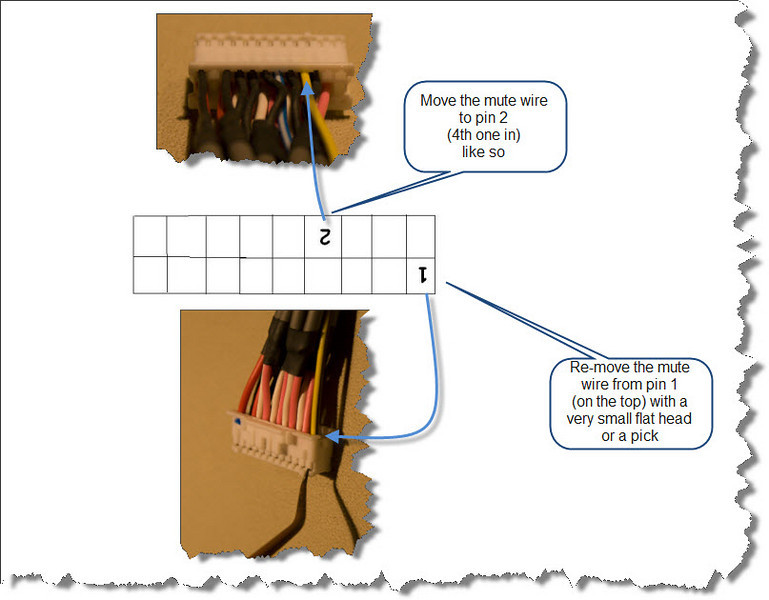
1. On the white harness (the Pioneer Installation Instructions refer to this as the “RCA Connectorâ€), find the mute wire (yellow/black). It is originally in the “1†position. Lift the plastic tab of where it is inserted into, pull the wire out, then place it into the “4†position on the bottom. It should now be in between 2 black wires.
 

3060519063_a59664387c_o_d.jpg

Before:

3060519091_851502c4cb_o_d.jpg

After:

3061355940_ff813917f5_o_d.jpg


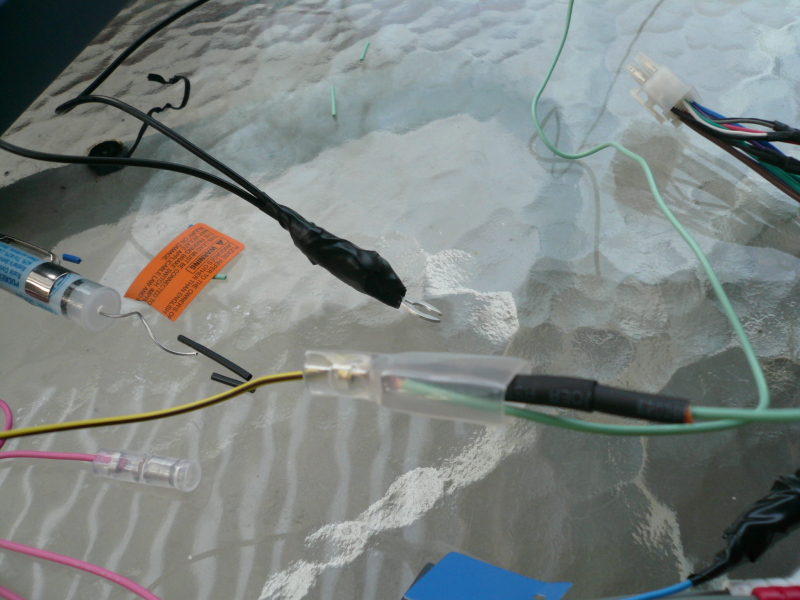
2. On the black harness (the Pioneer Installation Instructions refer to this as the “Power Cordâ€), find the parking brake wire (light green). Ground the newly placed mute wire (yellow/black) from the “RCA Connector†and the parking brake wire (light green) from the “Power Cordâ€. Some folks suggest grounding to something other than the main ground. Not sure why, but if that’s doable, you should. Some folks believe grounding onto the main ground of the radio is fine. The following pictures show this setup ground to the main ground. The first picture shows the parking brake wire (light green) and the mute wire (yellow/black) connected to a light green wire. The second picture shows that light green wire running to and spliced onto the main ground.
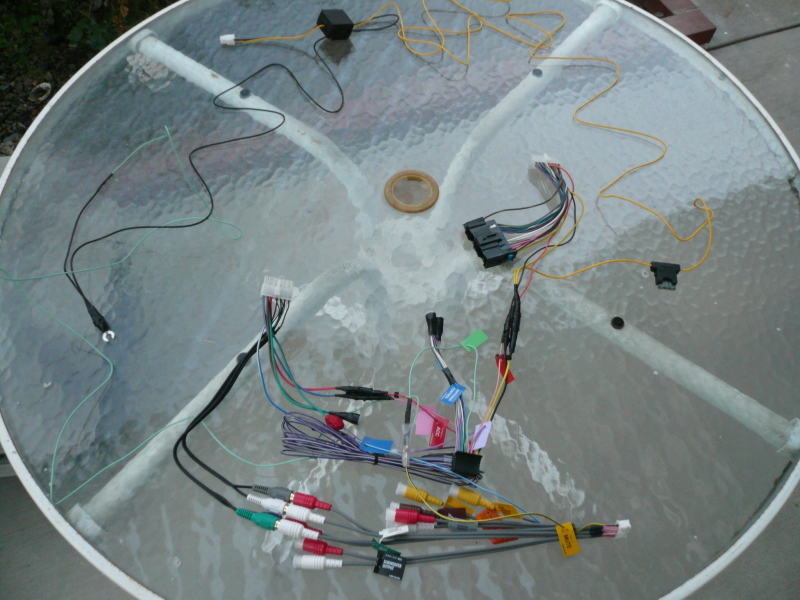
 

3061355678_a075acfd63_o_d.jpg


3060519037_dee86aa8bf_o_d.jpg


Voila!


NOTE: THIS IS THE PURE HARDWARE BYPASS. IF YOU DO THIS BYPASS, YOU DO NOT NEED TO DO THE SOFWARE BYPASS. PLEASE DO NOT ASK SOFTWARE BYPASS QUESTIONS IN THIS THREAD.

Posted Nov 26, 2008 · 14:06 UTC#2

Quite descriptive for such a simple task :lol::lol::lol: . At least no one will have an excuse for not being able to do it anymore

Posted Nov 26, 2008 · 14:32 UTC#3

Agreed, but I'm just trying to do you guys (i.e. the regulars here) a little favor.


Let's face it, the vast majority of "visitor traffic" here results from folks wanting to know how to do this bypass. The other hardware bypass thread had become cluttered with queries and answers on how to do it. Some of those answers give conflicting information which created confusion. The clutter and confusion in that thread is even worse as a consequence of A LOT of off-topic discussion of the alternative software bypass, which just added to the confusion. I'm a reasonably bright guy and have a basic level understanding of this stuff, and I was confused when I got done reading that thread.


So, in an effort to save you guys the hassle of having to deal with all of those "newb" questions which resulted from the confusion in that other thread, I started this one which lays out the hardware bypass in painstaking detail so as to try and have an answer to the "how do I do it" that no one could be confused by.


--Mav

Posted Nov 26, 2008 · 15:47 UTC#4

Aren't the exact same pictures posted here?

Posted Nov 26, 2008 · 15:50 UTC#5

not impressed with the black electrical tape hack job :evil:

Posted Nov 26, 2008 · 16:12 UTC#6
Aren't the exact same pictures posted here?


The 2 for Step 1 are the same. The 2 for Step 2 (which, frankly, was not adequately described in the other thread) are new.


--Mav

Posted Nov 26, 2008 · 16:13 UTC#7
not impressed with the black electrical tape hack job :evil:


Feel free to post your own alternative picture.


--Mav

Posted Nov 27, 2008 · 01:02 UTC#8

i wonder if this thread will extend to about 6 pages long like the other one as well.

Posted Nov 27, 2008 · 01:40 UTC#9

that last picture is kinda hard to see cause the light green wire gets lost in a jumble of wires and kinda blends with the table, but i think it goes off to the left, then connecting to the block with the yellow wire on top?

Posted Nov 28, 2008 · 01:34 UTC#10

im new here but i have a few questions, i attempted this wire bypass in my 08 Scion, i moved the mute wire just as it was said to the bottom 4th slot, then i connected it directly to the harness ground, then i also took the parking break wire and directly connected to the harness ground as well,...... the system says while im driving that i have inccorectly connected the parking brake wire please see instructions, any suggestions?

Posted Nov 28, 2008 · 02:10 UTC#11
im new here but i have a few questions, i attempted this wire bypass in my 08 Scion, i moved the mute wire just as it was said to the bottom 4th slot, then i connected it directly to the harness ground, then i also took the parking break wire and directly connected to the harness ground as well,...... the system says while im driving that i have inccorectly connected the parking brake wire please see instructions, any suggestions?


Make sure the pin is secured. They're a bit of a pain sometimes.

Posted Nov 28, 2008 · 03:07 UTC#12
that last picture is kinda hard to see cause the light green wire gets lost in a jumble of wires and kinda blends with the table, but i think it goes off to the left, then connecting to the block with the yellow wire on top?


Yeah, it's a little hard to see, but it's the only picture I could find anywhere that illustrated the whole bypass "finished". It goes off to the left, but it doesn't connect to the block with the yellow wire on the top. If you look on the left, you'll see the radio's ground with two black wires coming off of it. One of them is longer and runs towards the top of the table; the other is shorter and goes off to the left; that second one is connected to the other end of the light green wire. If you look close, you can see it and follow it all the way back to where the mute wire and brake wire are joined.

Posted Nov 28, 2008 · 11:23 UTC#13
im new here but i have a few questions, i attempted this wire bypass in my 08 Scion, i moved the mute wire just as it was said to the bottom 4th slot, then i connected it directly to the harness ground, then i also took the parking break wire and directly connected to the harness ground as well,...... the system says while im driving that i have inccorectly connected the parking brake wire please see instructions, any suggestions?


Make sure the pin is secured. They're a bit of a pain sometimes.


I deffinatly made sure the mute wire was secured, and still no cigar

Posted Nov 28, 2008 · 15:05 UTC#14
not impressed with the black electrical tape hack job :evil:


Feel free to post your own alternative picture.


--Mav


Never took pictures of my harnass when I installed; but I heatshrinked everything. Something about wads of electrical tape just makes baby jesus cry

Posted Nov 30, 2008 · 14:45 UTC#15

What i need to do with "pink (car seed signal input cable). I have 900bt. What is this cabel for?

Posted Nov 30, 2008 · 15:01 UTC#16
Something about wads of electrical tape just makes baby jesus cry


What else are babies good for :lol:


I deffinatly made sure the mute wire was secured, and still no cigar


How did you ground them to the wire? T-Taps? Cutting insulation back and wrapping the 2 wires around the exposed ground? Either your pin is not secured, in the wrong place, or your grounds are not connected good enough. Did you try hitting reset?

Posted Dec 02, 2008 · 04:43 UTC#17

Hmmmm....so the F900BT wiring harness has a pink wire that is for the "Car speed input signal"...which if I understand this correctly, that helps the GPS unit track you more accurate right?


My F700BT wiring harness does not have that pink wire...


I plan on upgrading and buying the F900BT this week....


It looks like I will have to use the wiring harness from the F900BT because it has the pink wire correct?


So I can't just use the same wiring harness from the F700BT because of the pink wire?


Does having the pink wire connected make that much of a difference?


Thanks!

Robert

Posted Dec 03, 2008 · 02:58 UTC#18
Hmmmm....so the F900BT wiring harness has a pink wire that is for the "Car speed input signal"...which if I understand this correctly, that helps the GPS unit track you more accurate right?


My F700BT wiring harness does not have that pink wire...


I plan on upgrading and buying the F900BT this week....


It looks like I will have to use the wiring harness from the F900BT because it has the pink wire correct?


So I can't just use the same wiring harness from the F700BT because of the pink wire?


Does having the pink wire connected make that much of a difference?


Thanks!

Robert


700 doesn't support VSS input. I have a 700 and the Nav works fine for me.

Posted Dec 06, 2008 · 07:28 UTC#19
Hmmmm....so the F900BT wiring harness has a pink wire that is for the "Car speed input signal"...which if I understand this correctly, that helps the GPS unit track you more accurate right?


My F700BT wiring harness does not have that pink wire...


Does having the pink wire connected make that much of a difference?


Thanks!

Robert


The pink wire is simply for when you loose satellite signals. The nav can then estimate your distance traveled by integrating your speed.


An example of why you might care is say you needed to make an exit after leaving a two mile long tunnel. Without the pink wire your nav wouldn't know you traveled two miles, since in a tunnel you can't pick up GPS signals. You exit the tunnel, and before the nav picks up the signal and figures out where you are, you already blew past your exit.


But if you had the pink wire properly connected, the nav would "know" you travelde those two miles in the tunnel.


Aside from this type of situation, the pink wire does nothing for you.


Best,


geosynch

Posted Dec 06, 2008 · 14:56 UTC#20

omg! this site is so awesome! thanks guys! i wuz gettin so confused eariler i got kinda scared to do this. ill try right now before i install the thing. awesome!@

Posted Dec 06, 2008 · 20:10 UTC#21

Thank you for the info on the bypass. Very clear and easy to follow.


John

Posted Dec 08, 2008 · 21:35 UTC#22

Ok i'm new to this, and have a question about the f900bt.


Is possible to put a on and off switch on the p-brake cable?


because in europe it's forbidden to drive and watch video or dvd.


So i was thinking to install a switch. if the Cops stop me i can turn dvd off.

Posted Dec 09, 2008 · 09:16 UTC#23

I jumped the green cable to the black ground wire on the unit. It works...but was that a bad idea?

Posted Dec 09, 2008 · 16:30 UTC#24
Hmmmm....so the F900BT wiring harness has a pink wire that is for the "Car speed input signal"...which if I understand this correctly, that helps the GPS unit track you more accurate right?


My F700BT wiring harness does not have that pink wire...


Does having the pink wire connected make that much of a difference?


Thanks!

Robert


The pink wire is simply for when you loose satellite signals. The nav can then estimate your distance traveled by integrating your speed.


An example of why you might care is say you needed to make an exit after leaving a two mile long tunnel. Without the pink wire your nav wouldn't know you traveled two miles, since in a tunnel you can't pick up GPS signals. You exit the tunnel, and before the nav picks up the signal and figures out where you are, you already blew past your exit.


But if you had the pink wire properly connected, the nav would "know" you travelde those two miles in the tunnel.


Aside from this type of situation, the pink wire does nothing for you.


Best,


geosynch


I agree with what you typed. BUT...in my car (Lincoln LS), there is no VSS wire, so...I never had the VSS wire hooked up (about two years) with my Avic D3. When going through a couple of tunnels in the Norfolk/Va Beach area, I noticed that the GPS/NAV still tracked the cars forward movement almost dead accurate, and when I came out of the tunnel, the exits were accurately..there.


Go figure.

Posted Dec 09, 2008 · 18:04 UTC#25

This is not true. The Lincoln LS does have a VSS wire. It comes from the ABS controller and on gen II it can be found behind the driver's side kick panel. You may have to go to the ABS controller itself for gen I. I forget the wire color off-hand, but I could look it up for you.

Page 1 of 6