Search Archive

F90BT in 2007 MkV GTI

By OmegaRed1723 · Dec 05, 2008in General💬 44 posts👁️ 12,420 views
Page 1 of 2
Posted Dec 05, 2008 · 04:40 UTC#1

Hi all! I thought I'd share my F90BT installation with everyone. Below is a list of my goals going into the project, with my overall reaction to the F90BT at the bottom. Thanks to my good friend Bill for installing this in 1/100th the time it would've taken me!


System Goals:

  • [*:pgfa8vt1]Upgrade factory head unit with in-dash navigation/bluetooth/Ipod control[*:pgfa8vt1]Upgrade front soundstage utilizing factory speaker location[*:pgfa8vt1]Add an SQ subwoofer in the rear hatch[*:pgfa8vt1]Retain stock look and 100% functionality of hatch area


Here's the bill of goods going into the new system:

  • [*:pgfa8vt1]Head Unit: Pioneer AVIC-F90BT[*:pgfa8vt1]Front Stage: Boston Acoustics Pro 6.53 three-way component speakers[*:pgfa8vt1]Rear Stage: Eliminated[*:pgfa8vt1]Subwoofer: JL Audio 13TW5-3[*:pgfa8vt1]Front Stage Amplification: JL Audio 300/2 v2[*:pgfa8vt1]Subwoofer Amplfication: JL Audio 500/1 v2[*:pgfa8vt1]Sound Dampening: Cascade Audio (various products)


Starting off in the front of the car.


2AWG power cable & fuse holder. Using stock battery for now:

BrandonsCar2008030.jpg


Wiring speaker cable through te molex into the doors. Power wire was run on the driver's side of the car:

BrandonsCar2008001.jpg

BrandonsCar2008005.jpg


Sound deadening and speakers installed in/on doors:

BrandonsCar2008002.jpg

BrandonsCar2008010.jpg


Backside of door panel (deadening was installed here too):

BrandonsCar2008007.jpg


Picture of dash vent (pic borrowed from vwvortex.com):

3pryingpiecetowardwwindshield.jpg


Dash vent removed for installation of GPS antenna. You can see the black antenna towards the center of the photo:

BrandonsCar2008018.jpg


Whole mess of PAC adapters for steering wheel control, etc.:

BrandonsCar2008015.jpg


Bluetooth mic installed in factory location (sounds great):
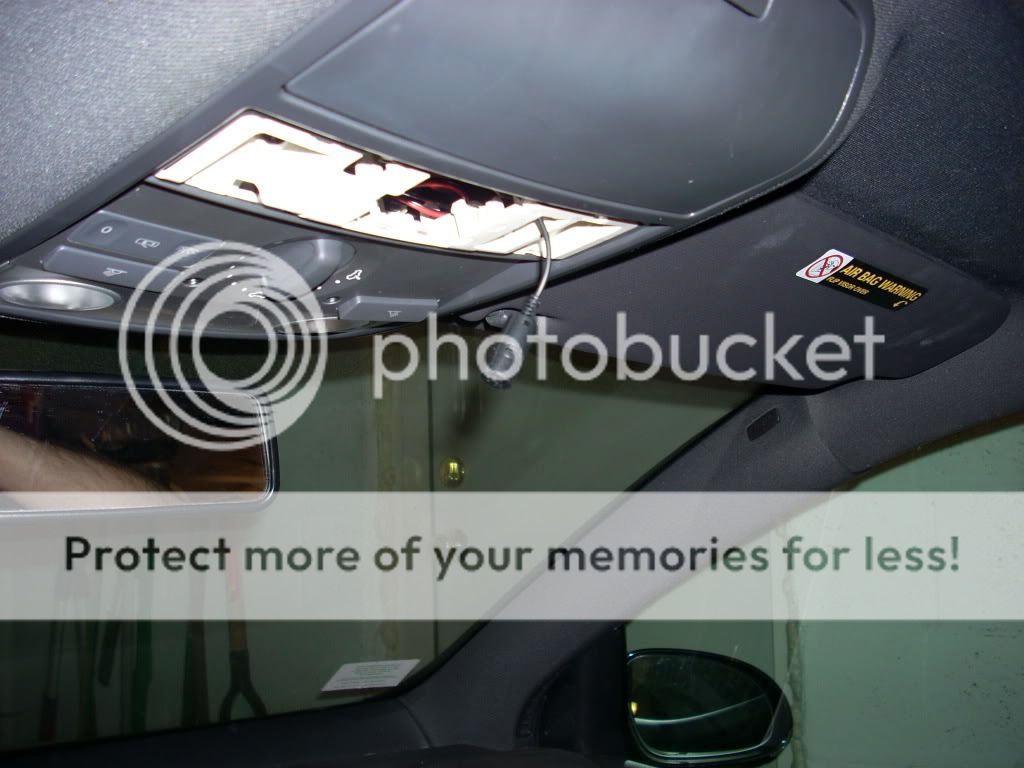
BrandonsCar2008020.jpg


And finally, the deck permanently installed:

BrandonsCar2008026.jpg


Now onto the rear of the car!


Here's the hatch with everything removed. Notice the gigantic hump VW decided to put in the middle of the spare tire well. This had a large impact over what I ended up using for the sub.

BrandonsCar2008003.jpg


Creating the sub box, amp & crossover mounts, as well as the cover for all the equipment.

BrandonsCar2008004.jpg


All the mounting platforms & sub box installed.

BrandonsCar2008011.jpg


Pics of the mockup and installation of the components:

BrandonsCar2008016.jpg

BrandonsCar2008031.jpg

BrandonsCar2008034.jpg


Finished hatch with cover installed:

BrandonsCar2008022.jpg

BrandonsCar2008025.jpg


And with the factory trunk liner on, it looks 100% stock!

BrandonsCar2008035.jpg


Overall impressions/thoughts


The F90-BT is a pretty versatile unit. I'd consider it a jack-of-all-trades, but master of none. After installing the 2.0 update, removing key beeps, adding a nav mute button, and performing the hardware bypass I feel like the unit does everything I expected it to.


The iPod interface is excellent, and a MILLION times better than the standard VW interface. I've had no dropout issues so far. Bluetooth is also very good; my iPhone 3g synched up immediately and contact transfer was painless. My reception is very good as well.


AM/FM reception is also improved with this unit, and other inputs (CD, iPod) sound better than stock as well. Overall sound quality of the unit is decent, but not exceptional. I knew there would be a tradeoff getting so many features in one unit; in this case overall sound quality isn't as good as some audio-only decks I've used in the past. But the breadth of features outweighs the slight deficiency in audio performance.

Posted Dec 05, 2008 · 05:52 UTC#2

nice install, what speaker wire did you use??? did you put any deander in the trunk??

Posted Dec 05, 2008 · 12:16 UTC#3

Thanks! Yes, there's a bunch of Cascade V-Max underneath all that. Surprisingly, the car had fewer rattles than I would have guessed so there wasn't a need for overkill on the deadening. Of course, I haven't listened from the outside yet :o


The speaker wire was Stinger HPM 16ga. Since the fronts are 3-ways anything larger than 16 wouldn't have fit through the Molex in the doors.

Posted Dec 05, 2008 · 13:11 UTC#4

I didn't care for your molex tomfoolery in the door speakers, but the trunk more than made up for it, nice work with the soldering too; good to see people still take their time taking care of that.

Posted Dec 05, 2008 · 13:51 UTC#5

Very nice. How's the SQ? I'm all for a clean front stage, but for non-comp and movies considered I enjoy a little rear fill (movies sound awesome on my stock system - after my install I prolly wasted 45 minutes getting caught up watching my test movie!). I'm looking at a very similar setup for my trunk - it's going to be either that or with the sub "backed into" a ski pass cutout my BMW has behind the rear seat - still contemplating... Again, nicely done!


One last word - microfiber :lol:

Posted Dec 06, 2008 · 01:30 UTC#6

I don't think the deck is geared towards audiophiles in the sense that it's lacking advanced EQ settings, time alignment, etc. My perception may also be a bit skewed because of the poor factory speaker locations in my car. There was only so much tuning we could do before saying, "It's not getting any better." For true SQ, the Eclipse AVN series is a better bet, but for the money the AVIC is above average.


I've never been a fan of rear fill, and since I drive by myself 90% of the time I don't foresee myself using the DVD function all that much. It's one of those toys you break out when you have friends in the car, and I could care less how they think it sounds....I'm the one who paid for it :D

Posted Dec 06, 2008 · 01:41 UTC#7

Don't your amps build up a lot of heat covered like that ?

Posted Dec 06, 2008 · 04:48 UTC#8
Don't your amps build up a lot of heat covered like that ?


Next to none. There is actually quite a bit of airflow on the rear side of the amps right underneath the heatsink fins. I played the system for over an hour this afternoon at highway volume and they were barely warm to the touch afterward. VERY impressed with the heat dissipation.

Posted Dec 07, 2008 · 21:31 UTC#9

Did you have to do any soldering? For what?


How do the steering wheel controls work? I've heard that you lose the right button functionality for switching tracks, is this true?


Thanks,

e39m5

Posted Dec 07, 2008 · 23:20 UTC#10

For the MkV, you need the following adapters from PAC:

  • C2R-VW
    SWI-CAN
    SWI-PS


This setup retains use of the volume +/- and the mute button on the left side of the steering wheel. You do lose all audio control on the right side of the steering wheel as well as radio information on the MFD.


No soldering was required to daisy chain these adapters.

Posted Dec 07, 2008 · 23:49 UTC#11

GTI owner here and that looks great! How long did it take your friend to do it? :P

Posted Dec 08, 2008 · 01:13 UTC#12

We worked a couple hours a day for 3 Saturdays and then he took the car for 3 days to finish everything. I'd say there's probably 25 hours into the car, not including tuning.

Posted Dec 08, 2008 · 01:36 UTC#13

How did you get the mic up there? IE: What did you snake it through?


And is the GPS working will in the dash vent location?


Thanks,

e39m5

Posted Dec 08, 2008 · 04:29 UTC#14

The mic wire was run up the passenger side A-pillar and across the headliner into place. There's plenty of length in the wire so it wasn't a huge deal.


The GPS antenna has excellent reception. That center vent grill is made of metal so we were concerned about interference, but it wasn't an issue at all.

Posted Dec 13, 2008 · 17:30 UTC#15

Hi Omega,


How did you hook up the antenna? I assume you used the Metra power antenna adapter, but what did you hook the blue wire up to?


Thanks

Posted Dec 14, 2008 · 00:25 UTC#16

very nice and clean

Posted Dec 17, 2008 · 21:27 UTC#17

Nice job!


I just bought the F700 and I am going to install it in a minivan. If there is a blue dot on the box does it mean that it has the latest firmware installed? Pioneer's website says that if the dot is orange then it has the latest installed.


I have posted in here because I noticed that you have a VW GTi and I am thinking about purchasing the Jetta not the S, but maybe the Wolfsburg or TDi model (I'm not a hatchback guy) or GLi if I can find one and I want to know if you tried to use the 10 speakers already there or was it easier to scrap that and do your own thing, which you did of course. If I like the 700 in my minivan then I will more than likely put one in the Jetta that I plan on getting since I only paid $436 for it threw amazon, which beats $1600 for the VW nav unit. I guess what I am asking is that would you do it again or would you have stuck with the factory stereo unit?


I just don't want to get into a situation that I got into with a Volvo S40 that a friend of mine own's, in that it was a total PIA trying to use that factory amp (its an older one and he did not want to put too much money into it).

Posted Dec 18, 2008 · 00:25 UTC#18

I'm still working out a few bugs, but I do like it.


I used the 2-pice AI 1017 install kit, and bonded the two pieces together, primed and sanded it (many times) and painted it flat black to match the rest of the dash.


I used the PAC-CAN, PAC-SWI, and the PAC C2R-VW wiring harness.


I put the bluetooth mic in the factory location, but since it seems to be directional, and the factory location points the mic at the shifter, I may pull it out of there and aim it at the driver (me).


The start-up time annoyed me, so I hooked up a timer relay to the dome lights, so when I unlock the car with the remote, or open the door, that sends a signal to the "ACC" wire, telling the Avic that the car is on. The time keeps the signal to the unit while I'm cranking the car, so that it does not have to restart, then. -- Much better.

post-24947-1287275652093_thumb.jpg

post-24947-12872756521889_thumb.jpg

Posted Dec 20, 2008 · 20:59 UTC#19


The start-up time annoyed me, so I hooked up a timer relay to the dome lights, so when I unlock the car with the remote, or open the door, that sends a signal to the "ACC" wire, telling the Avic that the car is on. The time keeps the signal to the unit while I'm cranking the car, so that it does not have to restart, then. -- Much better.


Woah woah woah. Explain how you did that? I'm putting a 700 in my GTI next week and I love that idea.

Posted Dec 23, 2008 · 01:57 UTC#20

BenF700BT—I didn't bother with the factory 10-speaker setup. My last car was an '08 Acura TL-S which had a really nice audio system, and after about a week in the VW I knew their "premium" stereo wasn't going to cut it. There is no reason, however, that you couldn't retain the factory speakers and only install the F700. You'll just need the PAC C2R-VW and the Metra 40-EU55 antenna adaptor.

Posted Dec 23, 2008 · 03:57 UTC#21

@Mostroad: Please elaborate, how can I get that set up?

Posted Jan 01, 2009 · 00:59 UTC#22

Nice pics, I think this is going to be the next upgrade for my GTI.


Regarding setup/programming of the PAC steering wheel modules, you pointed out that the right-side controls are lost; is it really not possible to use those controls with the head unit? I'm wondering because this guy programmed the right-side controls on his steering wheel:


http://www.youtube.com/watch?v=3_pP7Puoq0U


Interestingly, when he presses the MFD mode button, it changes both the MFD mode and HU source. I might be answering my own question here, but is it because the PAC modules run in parallel with the existing wheel controls (basically filling the gaps where OEM functionality is lost)?


If so, I can see why it's not practical to program those buttons. I'd hate to scroll through the MFD travel computer options and inadvertently change music tracks :)

Posted Jan 01, 2009 · 01:10 UTC#23

You can program it for both sets of buttons but the right side buttons will change the MFD too.


This is because the pac module sees the buttons but it doesn't show up to the car as an audio device being present. With the factory stereo you can switch the right side to audio then control the stereo. This disappears when you remove the factory stereo and the PAC module isn't able to put it back. So PAC sees all button presses on that side. I didn't bother programming mine because I use the mfd functions a lot and this would get really annoying.


My understanding is that PAC is working on a newer module which hopefully will be available soon that will give us the proper functionality of the right side buttons still there. IMHO it is still worth it for the PAC modules to have the volume control button and mute button working. On mine I also made the tel button skip forward since I couldn't use it to answer the phone on my F90. At least I can skip to the next track.

Posted Jan 01, 2009 · 22:11 UTC#24

A better solution than the PAC adapters can be found in the Connects2 Steering Wheel adapter (part # CTSVW002). It is better in several ways: 1) you only need to buy this one adapter (instead of the 2 that you need if you use the PAC adapters), as it provides the steering wheel controls plus the 12V switched power, the illumination signal, the reverse signal, and the speed signal; 2) this adapter is cheaper than either of the 2 PAC adapters; 3) this adapter enables the Audio screen in the MFD (it will say "Pioneer" in the MFD, actually) so all of your buttons work as they should.


Here is a picture of the adapter:


CONNECTS2-CTSST002.jpg

As you can see, it makes for a much cleaner installation than using the 2 PAC adapters does.


There are, however, two downsides to this adapter: 1) when listening to AM/FM, the right side buttons will perform the Seek function, instead of scrolling through your radio presets; and 2) it isn't readily available in the US - you must purchase it from overseas. I ordered mine from caraudiosecurity.com in the UK.


Another thing - Connects2 also makes a double-DIN faceplate that is a much better match (perfect match, really) than anything regularly sold here in the US.


Here are links to everything I ordered:


http://caraudiosecurity.com/shop/product/products_id/6852.html


http://caraudiosecurity.com/shop/product/products_id/8653.html


http://caraudiosecurity.com/shop/product/products_id/8692.html

Posted Jan 02, 2009 · 01:25 UTC#25

That looks pretty sweet. So is this adapter a complete replacement for the PAC equipment? Do you wire from this to the head unit for speaker wires, power, switched, etc?


The picture shows connectors and no bare wires so I am curious how you wire it to the F90 harness.


I am pretty tempted to redo mine even though its only a month old to get the other controls!

Page 1 of 2