Search Archive

Building visibility dependant on settings in the color schem

By N-S-E-W · Feb 08, 2009in Hacks/Mods💬 24 posts👁️ 3,920 views
Posted Feb 08, 2009 · 22:45 UTC#1

I had posted in another thread that I achieved my best luck in seeing the buildings using JohnCougar1 color scheme.


So I set out to try to figure why I that was. Most all the schemes had the samesettings in 3d section of the color.ini or color3d.ini files, but JohnCougar1 had this section not listed in the others:


;==============================================================

;HP specific clip planning

;--------------------------------------------------------------


[clip_planes]

; mode, lower bound, upper bound, lower value, upper Value

; mode: 0: by zoom level, 1: by number of cells, 2: by intersect value (0..45)

; values: 0.0 .. 1.0 * 1000 (= 0..1000)


faded_buildings_near = 0, 10, 200, 600, 600

faded_buildings_medium = 0, 10, 200, 650, 650

faded_buildings_far = 0, 10, 200, 750, 750


solid_buildings_near = 0, 95, 100, 1000,980

solid_buildings_medium = 0, 95, 100, 1000,980

solid_buildings_far = 0, 95, 100, 1000,980


landmark = 0 , 1, 50, 1000, 1000


road0 = 2, 0, 45, 1000, 1000

road1 = 2, 0, 45, 1000, 990

road2 = 2, 0, 45, 1000, 980

road3 = 2, 0, 45, 1000, 970

roadsign = 2, 0, 45, 1000, 950


;a ket reszletesebb terrain

terrain0 = 0, 30, 30, 750, 750

terrain1 = 0, 30, 30, 850, 850


;reszletes shapek. Mivel lassu, ezert ne vigyetek tulzasba.

shape0 = 2, 1, 10, 1000, 0


I've added this to the color.ini file or the color3d.ini file just under the other 3d settings in four other schemes.


Threw it in the nav and they all worked. If you're willing to take the time just add the above into your scheme files.


Let me know how it works for you.


P.S. Not all the schemes have a color3d.ini. If there is, be sure to add it to that file otherwise add it to color.ini.


The non modified color shemes are listed in this thread by Boris

http://www.avic411.com/forum/viewtopic.php?t=18175
post-24694-12872756927109_thumb.jpg

Posted Feb 11, 2009 · 02:01 UTC#2

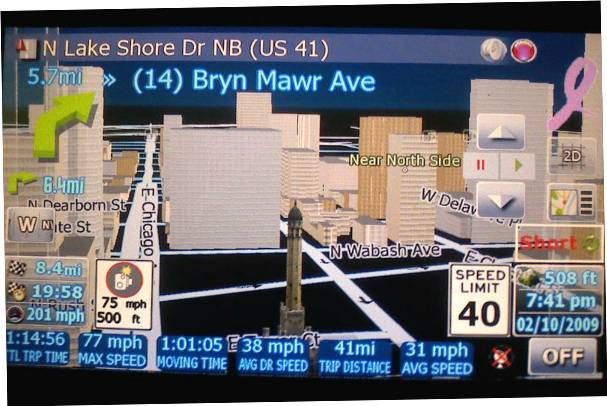
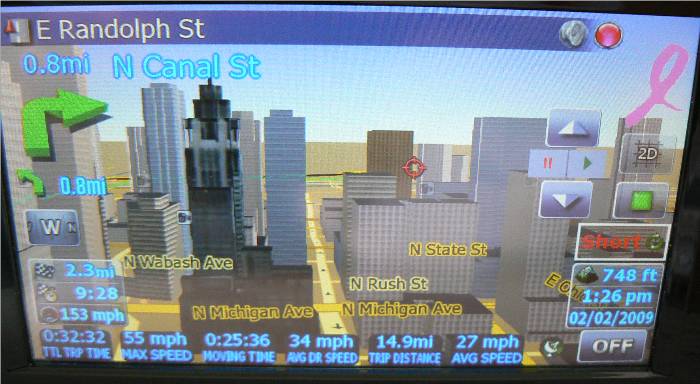
Here's one of the night schemes modified with code from above. It's the Monopoly night scheme. The tower in front and center is the only landmark. The rest are the buildings.


edit - I realized later on when I was changing the scheme that the night scheme in the picture is the modified Google night.

post-24694-12872757000443_thumb.jpg

Posted Feb 11, 2009 · 03:51 UTC#3

Very nice.


From what I understand from reading elsewhere, terrain lines are responsible for controlling how far away buildings are visible,although exact meaning of parameters isn't determined yet...

Posted Feb 11, 2009 · 04:29 UTC#4
Very nice.


From what I understand from reading elsewhere, terrain lines are responsible for controlling how far away buildings are visible,although exact meaning of parameters isn't determined yet...


Let's us know if we can tweak anything else. I really don't have a clue what all the values control.


One thing I noticed during simulation is that the image blurring on the top 1/4 part does not appear to be as bad as before. Start a simulate from Sedona, Az to Flagstaff, Az, there's lots of demographics in the route.

Posted Mar 06, 2009 · 13:59 UTC#5

Has anyone noticed issues with lakes after adding this code to their scheme files? I added this to every one of my schemes that didnt already have it, and all lakes now show up as green instead of blue (ex. real view day). Quite annoying to me.


Also, how are you guys getting so many buildings to show up? When I was in Chicago last weekend, I got maybe 3 buildings? I think John Hancock showed up, Soldier field, and the Field Museum. Granted I didnt drive down Michigan Ave, but I did make it down to North Ave, and figured I would see something, anything, but I didnt. And those buildings that did show up were while I drove up Lakeshore Dr.

Posted Mar 06, 2009 · 15:42 UTC#6

N-S-E-W, how fast were you driving!? Look at the mph readings on the pics lol

Posted Mar 06, 2009 · 16:28 UTC#7
Has anyone noticed issues with lakes after adding this code to their scheme files? I added this to every one of my schemes that didnt already have it, and all lakes now show up as green instead of blue (ex. real view day). Quite annoying to me.


Also, how are you guys getting so many buildings to show up? When I was in Chicago last weekend, I got maybe 3 buildings? I think John Hancock showed up, Soldier field, and the Field Museum. Granted I didnt drive down Michigan Ave, but I did make it down to North Ave, and figured I would see something, anything, but I didnt. And those buildings that did show up were while I drove up Lakeshore Dr.


You need to add building files to the system. Stock, it ships only with landmarks.


Also, water color can be changed in color scheme separately.

Posted Mar 06, 2009 · 16:39 UTC#8
You need to add building files to the system. Stock, it ships only with landmarks.


Also, water color can be changed in color scheme separately.


I'm pretty sure I added the building files back when I installed mikegedge's data.zip stuff. I'll check again, maybe I put it in the wrong spot.


I'll check the water color setting too, you mean it can be changed through the head unit right? Or do I need to edit in the color.ini file?


*edit* ok, i just re-installed the building files to the proper location. I had a set in there, but swapped them out, just in case there was an issue. Did a fly by to Belmont/Lakeshore intersection from MI, and again, only got about 4 buildings to show up. Could it be a license file issue? I know I installed the hacked ez-rider and new license file and everything else I was supposed to, but I cant guarantee that the original license file stayed, I may have removed it by accident, or put the new license in the wrong spot. But I've got no idea if that would cause this issue.

Posted Mar 06, 2009 · 18:36 UTC#9
I'm pretty sure I added the building files back when I installed mikegedge's data.zip stuff. I'll check again, maybe I put it in the wrong spot.


I'll check the water color setting too, you mean it can be changed through the head unit right? Or do I need to edit in the color.ini file?


*edit* ok, i just re-installed the building files to the proper location. I had a set in there, but swapped them out, just in case there was an issue. Did a fly by to Belmont/Lakeshore intersection from MI, and again, only got about 4 buildings to show up. Could it be a license file issue? I know I installed the hacked ez-rider and new license file and everything else I was supposed to, but I cant guarantee that the original license file stayed, I may have removed it by accident, or put the new license in the wrong spot. But I've got no idea if that would cause this issue.


Yes, you do need to edit the color.ini. Head Unit lets you change color schemes, but not individual settings inside.


For buildings... Almost forgot. You also need to turn them on. You could use my settingXXX.ui files from the progress report thread to be able to set them from Navi Settings screen, or just add this to SYS.TXT:

[debug]
...
enable_buildings=1
...

Posted Mar 06, 2009 · 18:43 UTC#10

Ok, I will work on the color.ini files this weekend. No time to get it done before I head over to the Windy City today. The SYS.TXT from mikegedge's package already has buildings enabled in it. So I'm just going to try driving with the John Cougar1 daytime scheme, as that one was the one working by default to start this thread off.


I double checked and I have 3 license files, "device", a Pioneer one, and then one I go from here, so I should be good to go there. Maybe things will work better this time around.

Posted Mar 06, 2009 · 19:17 UTC#11
Ok, I will work on the color.ini files this weekend. No time to get it done before I head over to the Windy City today. The SYS.TXT from mikegedge's package already has buildings enabled in it. So I'm just going to try driving with the John Cougar1 daytime scheme, as that one was the one working by default to start this thread off.


I double checked and I have 3 license files, "device", a Pioneer one, and then one I go from here, so I should be good to go there. Maybe things will work better this time around.


Hmmm... as long as you have the worldwide license and the SYS.TXT entry, you should see buildings. Are you sure you copied 3DC files to building directory, right next to 3DL's? There shouldn't really be anything else to getting them to show. Then it is just a matter of finding неру color scheme that gives you display you like and still shows street names properly...

Posted Mar 06, 2009 · 23:18 UTC#12

Yeah I have 26 3DL and 28 3DC files (or the other way around) and one for each for IL. I am now in chicago, and there were no new buildings showing up. Soldier Field, the museum, John Hancock, something small in Millenium Park, and there was one other building. Thats all that showed up as I drove up Lakeshore drive. Should I be able to see more or do I need to drive down Michigan Ave or someplace else?


Maybe the set of building files I am using is not correct, its obviously missing some states for both landmarks and buildings. But I wasnt too worried as it had Michigan and Illinois covered, but it seems that they are not working, at least on my unit (F90BT). I'm at a loss, because the license files are there, and the SYS.TXT entries are there, buildings are enabled in the GUI, and my schemes all have the entries from this thread's first post. :?

Posted Mar 06, 2009 · 23:43 UTC#13

how would we know if our DEM files/building files are updated?

Posted Mar 07, 2009 · 00:23 UTC#14
Yeah I have 26 3DL and 28 3DC files (or the other way around) and one for each for IL. I am now in chicago, and there were no new buildings showing up. Soldier Field, the museum, John Hancock, something small in Millenium Park, and there was one other building. Thats all that showed up as I drove up Lakeshore drive. Should I be able to see more or do I need to drive down Michigan Ave or someplace else?


Maybe the set of building files I am using is not correct, its obviously missing some states for both landmarks and buildings. But I wasnt too worried as it had Michigan and Illinois covered, but it seems that they are not working, at least on my unit (F90BT). I'm at a loss, because the license files are there, and the SYS.TXT entries are there, buildings are enabled in the GUI, and my schemes all have the entries from this thread's first post. :?


I had reported in another thread :


http://www.avic411.com/forum/viewtopic. ... c&start=60


that the Worldwide License did not work for me. I used the Asus license from the same sit I got ezrider hack. You did install the ezrider hack, didn't you. Info in link above.

Posted Mar 07, 2009 · 00:28 UTC#15
how would we know if our DEM files/building files are updated?


Maybe check the properties from the old and new file and see which is newer? Whatever you do don't totally dispose of the files you replace. You may need them if there's a problem and need to go back to the working files.

Posted Mar 07, 2009 · 02:31 UTC#16
Yeah I have 26 3DL and 28 3DC files (or the other way around) and one for each for IL. I am now in chicago, and there were no new buildings showing up. Soldier Field, the museum, John Hancock, something small in Millenium Park, and there was one other building. Thats all that showed up as I drove up Lakeshore drive. Should I be able to see more or do I need to drive down Michigan Ave or someplace else?


Maybe the set of building files I am using is not correct, its obviously missing some states for both landmarks and buildings. But I wasnt too worried as it had Michigan and Illinois covered, but it seems that they are not working, at least on my unit (F90BT). I'm at a loss, because the license files are there, and the SYS.TXT entries are there, buildings are enabled in the GUI, and my schemes all have the entries from this thread's first post. :?


What N-S-E-W said. May be try the attached one... AT least one of them should do :)


In Chicago youi should see buildings, generally, from Roscoe on the North to Chinatown South, and west to Damen or so...

license.rar

Posted Mar 07, 2009 · 03:32 UTC#17

Yeah I installed the hacked ezrider. Ill try one of those license files, and see what happens. Thanks for the help!

Posted Mar 08, 2009 · 07:34 UTC#18
Yeah I installed the hacked ezrider. Ill try one of those license files, and see what happens. Thanks for the help!


You can drop all of them in and let it sort them out :)

Posted Mar 08, 2009 · 22:36 UTC#19

After doing a little research about the 3d buildings working on some color schemes but not in other, i found out that the problem is actually not the color schemes but a missing file on the unit. luckily, people was able to get the 3d buildings to show up with some color schemes like "JohnCougar1" because this color scheme includes an additional section that configures the "clip_planes" settings for the HP units. the problem is actually that the file "clip_planes" is missing from our data.zip....


In short: uncompress and copy the content of the attached file to the folder /ui_pioneer/common inside of the data.zip.... and presto! you will have 3dbuilding for all color schemes :D

clip_planes.zip

Posted Mar 09, 2009 · 00:01 UTC#20
You can drop all of them in and let it sort them out :)


Well one of those worked! Thanks! Of course now it looks like I need to add yet another file, as was just posted above mine. :)

Posted Mar 09, 2009 · 00:30 UTC#21
You can drop all of them in and let it sort them out :)


Well one of those worked! Thanks! Of course now it looks like I need to add yet another file, as was just posted about mine. :)


You wont need to add what forbitel posted since you already converted your schemes. If you add additional schemes than it may be worth a try. I converted several of mine as well.

Posted Mar 09, 2009 · 00:36 UTC#22
After doing a little research about the 3d buildings working on some color schemes but not in other, i found out that the problem is actually not the color schemes but a missing file on the unit. luckily, people was able to get the 3d buildings to show up with some color schemes like "JohnCougar1" because this color scheme includes an additional section that configures the "clip_planes" settings for the HP units. the problem is actually that the file "clip_planes" is missing from our data.zip....


In short: uncompress and copy the content of the attached file to the folder /ui_pioneer/common inside of the data.zip.... and presto! you will have 3dbuilding for all color schemes :D


I noticed several of the settings in your file differ from what I posted from the JohnCougar1 scheme at the beginning of this thread. Do you know what the difference is?


Considering our units were only supposed to show landmarks, I guess the exemption of the clip planes file by Pioneer is not surprising. Looks like we have two ways to approach this.

Posted Mar 09, 2009 · 02:31 UTC#23

It's same thing... Forbitel's addition of a separate clip_planes file will override any settings in a scheme, if they are there, and add them if they are not.

Posted Mar 09, 2009 · 03:47 UTC#24
It's same thing... Forbitel's addition of a separate clip_planes file will override any settings in a scheme, if they are there, and add them if they are not.


I tried what forbitel posted to see the differences since I have schemes with both the JohnCougar1 added clip planes and others without. What I've noticed was that the clip planes.ini file did not override what's in the schemes with the added clip planes. From the view angle I use I was able to see buildings at a further distance with Cougar settings. What I wound up doing was create a clip planes ini file based on the Cougar settings and changed the values for roadsign to read roadsign = 0,1,50,0,1000. Boris pointed out to me that when zooming out past a certain point the roadsigns would not show and suggested the values above. So far, so good.


Try each of the differant clip planes in a ini file and choose the one that works the best for your set up.