Search Archive

Oops :( I broke my screen.

By zukgod1 · Feb 21, 2009in Problems/Troubleshooting💬 21 posts👁️ 9,168 views
Posted Feb 21, 2009 · 23:35 UTC#1

Can someone point me to a place to order a replacement screen please?


I've been out there for hours running all the GPS stuff, mic, XM ect and I'm sliding it in the dash finally ready to test it out and SNAP!!!


I think I may cry...


Any help right now will be greatly appreciated. I'm waisted and bummed.

Posted Feb 22, 2009 · 00:12 UTC#2

How the hell did you break the screen sliding it in!?


It's going to have to be sent in to Pioneer for repair...

Posted Feb 22, 2009 · 00:16 UTC#3

The palm of my hand pushed against it when i was pushing on the outer edges, thought i was carefull but resituated and shifted the pressure just enough.


no it will not have to go to Pioneer. replacement screens are available i just dont know where right now. ive seen it posted somewhere and i'm more than capable of replacing it.

Posted Feb 23, 2009 · 06:33 UTC#5

The hardware between all generations of the Z series is the same. So you could use a Z3 screen on a Z1 unit.

Posted Feb 23, 2009 · 17:34 UTC#6
The hardware between all generations of the Z series is the same. So you could use a Z3 screen on a Z1 unit.


Thanks :)

Posted Feb 24, 2009 · 03:43 UTC#8

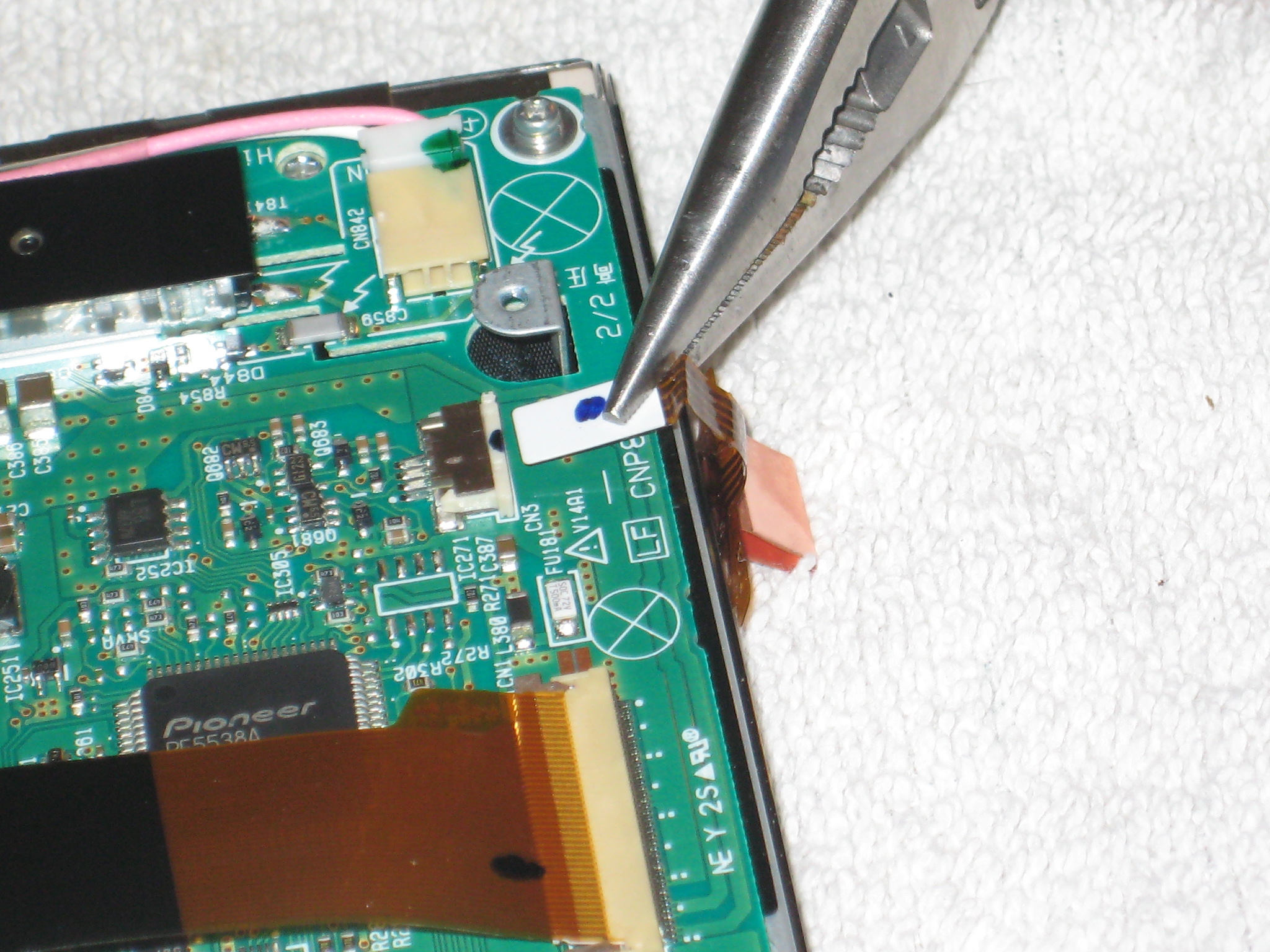
Turns out I broke the touch screen not the LCD.


I was VERY easy to remove as well.


I snapped a couple pics.


Looks like they are listed upside down. Start from the bottom.


And sorry they are so damn big.


post-14975-12872757171948_thumb.jpg

post-14975-12872757176902_thumb.jpg

post-14975-12872757181624_thumb.jpg

post-14975-12872757185918_thumb.jpg

post-14975-12872757190563_thumb.jpg

Posted Feb 24, 2009 · 12:55 UTC#10

Hahahahahahahaha damnnn man you did a number on that one.must have some big ass hands

Posted Feb 24, 2009 · 16:32 UTC#11

I cant tell ya the words that flew freely out of my mouth when that happened..


Good thing the kitchen window was shut or everyone in the fam would have heard that!!

Posted Feb 24, 2009 · 16:34 UTC#12

About the only thing I have going for me is as it's broken waiting for parts I decided to go ahead and get a Z3 drive :twisted:


"Um ya honey, that screen was only $175.00 instead of $300.00"

Touch screen was $53 and garrettoomeys driver was $110.00, SWEET!!!

Posted Feb 24, 2009 · 17:26 UTC#13

I bet I woulda been heated as hell If I broke my screen

Posted Mar 04, 2009 · 18:27 UTC#14

I was able to get the screen replaced.


Easy stuff it was.


Now I have something else but I think I'll start another thread on it.

Posted Apr 25, 2009 · 22:29 UTC#15

zukgod1-


Im lucky to run into your post as I broke my touch panel last week also (longer story than yours). Anyway, your pictures provide a high level on disassembling the Z2. Is there any possibility you could run through a quick step by step on the details? Im sure I could wing it....but any additional help would be great as a reference.


Thanks for the info on the part number. I just ordered today.

Posted Apr 25, 2009 · 23:02 UTC#16

Well I had a huge reply all typed up but not complete, hit he "Save" button and I have no damn clue where it "Saved" it to.


I'll send you a PM with my contact info and I can give you a quick walk through.

Posted Apr 25, 2009 · 23:08 UTC#17

Glad this post was of some use to someone.


As far as a step by step goes there wasn't much to it.


The screen has to be open.


Turn the unit over so you can access the little panel where the ribbon is, remove the cover and slide the ribbon out. I can't remember at the moment which side was easier to remove. I think I removed it from the head unit then removed the screen. There are 2 screws holding the screen on the sliding chassis so once the screws are removed and the ribbon is removed you can twist the assembly out, be careful of that little spring that wraps around the screw on the right.


Then just remove the screws from the housing you can use a small flat head to pry it apart. The insides are easy to disassemble once the case is taken apart. The touch screen just sits on the face of the LCD. the connection is removed then the touch panel can be replaced, reverse procedure for reassembly.

Posted Jul 08, 2013 · 04:54 UTC#18

can u remember how to put back the spring?? I can't get it in place thanks

Posted Aug 03, 2013 · 18:43 UTC#19

Turns out I broke the touch screen not the LCD.


I was VERY easy to remove as well.


I snapped a couple pics.


Looks like they are listed upside down. Start from the bottom.


And sorry they are so damn big.


attachicon.gifmisc_092_307.jpg

attachicon.gifmisc_091_838.jpg

attachicon.gifmisc_090_410.jpg

attachicon.gifmisc_089_419.jpg

attachicon.gifmisc_088_827.jpg

can u give me some pointers on taking this apart?

Posted Jul 10, 2014 · 16:33 UTC#21

Just curious if anyone has any detailed pics of the screen itself with the Pioneer board removed?

I occasionally find these with cracked screens and replacements are prohibitively expensive through Pioneer.  I wonder if these screens were manufactured by a different company (Sharp, AUO, LG, etc).