Search Archive

Questions on F90BT dimensions, ready to order.

By Pioneer4x4 · Apr 24, 2009in General💬 26 posts👁️ 2,527 views
Page 1 of 2
Posted Apr 24, 2009 · 02:19 UTC#1

I am planning on getting an AVIC F90BT to put in the new 2008 Kia Amanti I just got. It is a real nice car with lots of features, but about as bland a radio as possible, and no NAV. I also have a Chrysler RB1 Nav radio in my minivan and really like it even though it is very basic by 2009 standards.

I am VERY interested in accessing the WINCE and would love to put other apps in it/on it. I have read hundreds of posts on this site and think I know what I'm getting into fairly well.


I already ordered the Metra DoubleDin dash kit, antenna adapter, and wiring adapter. I want to see how well the dash kit matches before I blow the big $$ on the AVIC. Since the Amanti is not too common, and modded even less, I have not found one actual photo of any DD radio in one. My Metra Dash kit actually came today! It looks like it is made OK, but it is textured black plastic, not metallic gray specked like my dash. I might try painting it, but it might be OK as is. I have the W.A.F. to worry about (Wife Acceptance Factor).


The one thing I can't actually confirm is my actual depth available. Once the dash kit comes, I will take some good measurements to find out if an AVIC will fit.


Can someone give me the actual overall depth of the unit, and how much space is needed for the wiring? I know Pioneer states it is 6.5", but I might need more info.


This is a snippet of what a Crutchfield chat told me, (MAN ARE THEY EXPENSIVE!)


My question - "I was wondering why the Pioneer avic f700bt shows up as "Does Not Fit" for my 2008 Kia Amanti, but other "Double Din" sides units do."


Answer - "You have 7.029" of depth and the Pioneer is 7.056" deep."


1st who cares about .027" That is less than a credit card, 2nd, is the Pioneer that deep? 3rd, I need to verify what space I really have...


Thanks in advance for the info!

Posted Apr 27, 2009 · 15:29 UTC#2

Does anybody have the actual dimensions available? Or a photo of the side/top view?

Posted Apr 27, 2009 · 15:41 UTC#3

If you have 0.027" less space than required, that wouldn't be a big deal, except that you have to factor in enough room for the plugs, fan, and wires in the back. What's behind the factory radio in the kia? Wires? Metal bar? Airbox? You may be able to modify the dash to accomidate the Avic much nicer dependng on what's behind the radio.

Posted Apr 27, 2009 · 16:11 UTC#4

Thanks for the reply, I agree, .027" is nothing. But what really concerned me is how Crutchfield said "You have 7.029" of depth and the Pioneer is 7.056" deep."

But Pioneer said it is only 6.5" deep, so how deep is it really. I will be putting the dash kit in and measuring how much room I actually have.

Posted Apr 27, 2009 · 16:29 UTC#5

I wouldn't trust Crutchfield 100%. I've fit speakers and radios in certain vehicles that Crutchfield said would not fit.

Posted Apr 27, 2009 · 16:40 UTC#6
I wouldn't trust Crutchfield 100%.
I don't but that is the only source of info I could find for a 2008 Kia Amanti. 2004-2006 is a different beast, but I think 07-09 is the same dash.
Posted Apr 29, 2009 · 21:31 UTC#7

I pulled the 2 week old car apart today! Holy crap, what a pain, I thought I was going to have to pull the spare tire out next. Everything overlaps from the front to the rear, I had to start in the back seat and remove the rear panel of the center console, and work my way forward...

The Metra dash kit looks better than I thought it would, it might be OK as is. I seem to have a ton of depth space, from 7½" to close to 8" in some spots. I hit a new snag, on the top of the dash is a digital display that shows trip conputer, clock/calendar, and radio info. When I disconnected the factory radio, the display shows "No Conn" on the bottom line! I don't know if I can bypass it, or trick it yet. On the Amantis with base radio, they have a nice analog clock instead of the display. I might get that as a replacement for the whole thing.


So unless anyone can chime in with total depth dimensions of a F 700/90/900, I think I am good to go.

Posted May 04, 2009 · 18:09 UTC#8

i just mesured our f700 thats on display and its only over 7" if you mesure from the farthest point on the front (volume knob) to the farthest point on the rear cooling fan, its a hair over 6.75" from the front of the screen to the back of the cooling fan(the screen should stick out through the dash kit just a hair as well). the harness should not stick out too much further than the fan, the GPS antenna connection should stick out the most

Posted May 04, 2009 · 19:58 UTC#9

Thanks for the info, it sounds like I have plenty of room. I have the project on hold due to other issues in the Amanti. It has an external 3 line LCD display that will show an error if stock radio is disconnected. I might end up putting a full screen in there or get the base Amanti's analog clock to replace it.

Posted May 05, 2009 · 14:02 UTC#10

i would go with the analog clock myself, it just seems classier and i'm not a big fan of the small clock on the F-series

Posted Nov 23, 2009 · 07:53 UTC#11

Were you able to figure out how to trick the LCD display? Do you have any photos of the completed job?


Did you have the Infinity sound system? I'm really curious as to which harness I need to get.


Thanks!


Cry

Posted Nov 23, 2009 · 15:17 UTC#12

No not yet. THere is a set of dip switches that don't seem to affect it on the back of it.

Posted Nov 23, 2009 · 15:56 UTC#13

I was looking at the display on my drive in...I was thinking that a tasteful piece of cut plastic or metal could cover the bottom third of the display and look quite nice. Better than an error message.


I don't want to give up the display because I like being able to see my Distance To Empty, MPG, and Ambient.

Posted Nov 23, 2009 · 17:26 UTC#14
I was looking at the display on my drive in...I was thinking that a tasteful piece of cut plastic or metal could cover the bottom third of the display and look quite nice. Better than an error message.


I don't want to give up the display because I like being able to see my Distance To Empty, MPG, and Ambient.


If you need to paint the Metra bezel, Home Depot sells spray paint just for plastics, its tough and comes in many colors.


Go to your friendly Kia car dealer, talk to a tech, have him print out the radio and trip computer schematics pages from his station, scan and post them here or PM me, so I can read them clearly, and I should be able to tell you how to bypass it for you. I have gone to various dealer techs a few times for these reasons and have never been disappointed with their cooperation. Usually you have to talk to the service manager first. Its better if you can go in the early morning so you don't interrupt a job they are working on.


You need 7.0" of minimum depth for the F90BT, which is from the mid lip of the front panel, it is not to the face, which is another .25", and of course it doesnt include the knob! This is provided you use a 90 degree radio antenna adapter from Metra, they are $5-$7(Ebay) and come in 6", 12" and a longer length. The 7.0" will give you some room to bend your other cables out of the way too.

Posted Nov 23, 2009 · 18:40 UTC#15

kiatechinfo has all the diagrams I have been over them pretty good putting mine in. I think it is a bus signal that goes from the radio to the display, not a simple "Hey Im on" since it displays the track info and radio station... I have a scangauge II in my Amanti which shows all that info except ambient temp, so I was thinking of putting in the base Amanti analoge clock. There was a display on ebay recently. I actually thougth about buying it to hack up to disable the bottomline. I have also considered putting a seperate 5" display screen there for movie playback.

Posted Nov 23, 2009 · 19:41 UTC#16

You need 7.0" of minimum depth for the F90BT, which is from the mid lip of the front panel, it is not to the face, which is another .25", and of course it doesnt include the knob! This is provided you use a 90 degree radio antenna adapter from Metra, they are $5-$7(Ebay) and come in 6", 12" and a longer length. The 7.0" will give you some room to bend your other cables out of the way too.

The F90BT fits OK, the only problem I had was stuffing the TONS of wiring under and behind it. Maybe if you tore more apart, you could get behind/under it and pull more wiring down as someone inserted the radio. I actually removed 3 of the RCA audio jack pairs from one of the connectors just so there is less to cram in. I carefully removed the pins from the connector so they can be reinserted if needed later.there is plenty of free space up above for accessories. I put the HD radio receiver behind the display in question. I mounted the GPS antenna under the trianglular dash piece behind that (which I believe is the factory location for the Korean spec Amanti/Opirus gps antenna)

Also I used an antenna adapter from Kia-normal, then a y cable splitter into the hd radio and an extender to the F90. FM reception is better than factory but AM sucks. HD reception seems about what I would expect from reading other posts about HD range. I live in SW PA and the only flat places are football /baseball fields...

Posted Nov 23, 2009 · 20:06 UTC#17
kiatechinfo has all the diagrams I have been over them pretty good putting mine in. I think it is a bus signal that goes from the radio to the display, not a simple "Hey Im on" since it displays the track info and radio station... I have a scangauge II in my Amanti which shows all that info except ambient temp, so I was thinking of putting in the base Amanti analoge clock. There was a display on ebay recently. I actually thougth about buying it to hack up to disable the bottomline. I have also considered putting a seperate 5" display screen there for movie playback.


Oh you didn't mention the radio station info was output to this same display, so yes its bus data, is this the only information this part of the display handles? Is the a separate LCD display module, or is this radio information integrated into a larger display. Such as the mileage display maybe the top line and the radio info the bottom line but essentially on two separate LED/LCD modules...if so you could open the display up and cut the power trace to radio display module to blank it or remove it from its printed circuit mount.

There is another way to trick it but it involves engineering a device to hop on the bus and fool the Display into thinking the radio is connected.


So you can watch a DVD playback while NAVing...thats cool too..but maybe slightly dangerous.


If you put in the analog clock, do you lose the MPG info or do you mean that is available on the ScanGauge?


Is there such an option to order the car with a trip computer but not the radio?


You mentioned DIP switches...on the Display module I presume, the service manual would tell you what those did. You might have to put the display in a programming mode in order to read those DIP switches.

Posted Nov 23, 2009 · 20:14 UTC#18

You need 7.0" of minimum depth for the F90BT, which is from the mid lip of the front panel, it is not to the face, which is another .25", and of course it doesnt include the knob! This is provided you use a 90 degree radio antenna adapter from Metra, they are $5-$7(Ebay) and come in 6", 12" and a longer length. The 7.0" will give you some room to bend your other cables out of the way too.

The F90BT fits OK, the only problem I had was stuffing the TONS of wiring under and behind it. Maybe if you tore more apart, you could get behind/under it and pull more wiring down as someone inserted the radio. I actually removed 3 of the RCA audio jack pairs from one of the connectors just so there is less to cram in. I carefully removed the pins from the connector so they can be reinserted if needed later.there is plenty of free space up above for accessories. I put the HD radio receiver behind the display in question. I mounted the GPS antenna under the trianglular dash piece behind that (which I believe is the factory location for the Korean spec Amanti/Opirus gps antenna)

Also I used an antenna adapter from Kia-normal, then a y cable splitter into the hd radio and an extender to the F90. FM reception is better than factory but AM sucks. HD reception seems about what I would expect from reading other posts about HD range. I live in SW PA and the only flat places are football /baseball fields...


Try removing the Y splitter temporarily, and go direct into the F90BT forget the HD part, and see if the AM reception improves. Maybe the extension ant. cable is crappy so try bypassing that. I listen to AM all the time and reception is very good. You can check signal level on the F90 for a particular station for reference.

Posted Nov 23, 2009 · 20:50 UTC#19


Oh you didn't mention the radio station info was output to this same display, so yes its bus data, is this the only information this part of the display handles? Is the a separate LCD display module, or is this radio information integrated into a larger display. Such as the mileage display maybe the top line and the radio info the bottom line but essentially on two separate LED/LCD modules...if so you could open the display up and cut the power trace to radio display module to blank it or remove it from its printed circuit mount.

There is another way to trick it but it involves engineering a device to hop on the bus and fool the Display into thinking the radio is connected.


So you can watch a DVD playback while NAVing...thats cool too..but maybe slightly dangerous.


If you put in the analog clock, do you lose the MPG info or do you mean that is available on the ScanGauge?


Is there such an option to order the car with a trip computer but not the radio?


You mentioned DIP switches...on the Display module I presume, the service manual would tell you what those did. You might have to put the display in a programming mode in order to read those DIP switches.


Yes the radio itself has no display on it. The display unit at the top of the day has 3 lines One line is various trip functions, the other line is clock day date and the bottom line is radio. there was a back of about 8 dip switches on the back. I already have the mod in so the head unit will display a DVD ro whatever, but it is kinda low for the kids in the back to see it. I used it on a trip and I was able to totally ignore it when driving.


If you have analog clock and premium radio, you will have no display . And yes the scangauge has all functinos most trip computers can do. Plus I think the factory analog clock is kind of classy.

Posted Nov 23, 2009 · 20:51 UTC#20

Pioneer4x4:

Did you connect the steering wheel controls to your radio? If so, which kit did you use? Is there a noticeable lag? What did you do with the preset and mode buttons?


What were the part numbers for the harness pieces you bought?


ot1:

There is another way to trick it but it involves engineering a device to hop on the bus and fool the Display into thinking the radio is connected.

Is there a standard (de facto/de jure) bus protocol for these things? Does someone have a PIC programmed to control them? Do any aftermarket head-units put this kind of information out?


If you put in the analog clock, do you lose the MPG info or do you mean that is available on the ScanGauge?

If you don't have a scangauge type thing, then you lose the MPG etc information. You'd think that these days, the fancy head units would actually take the OBDII data.


Is there such an option to order the car with a trip computer but not the radio?

Not that I can tell. If you got the Leather Package you get Premium Sound Package (Infinity) and Trip Computer.

Posted Nov 23, 2009 · 21:29 UTC#21
Pioneer4x4:

Did you connect the steering wheel controls to your radio? If so, which kit did you use? Is there a noticeable lag? What did you do with the preset and mode buttons?


What were the part numbers for the harness pieces you bought?


I used the PAC SW1. I used preset for preset + and mode for mode/input.

Posted Nov 24, 2009 · 13:29 UTC#22

Pictures, we want to see pictures !

Posted Nov 24, 2009 · 14:02 UTC#23


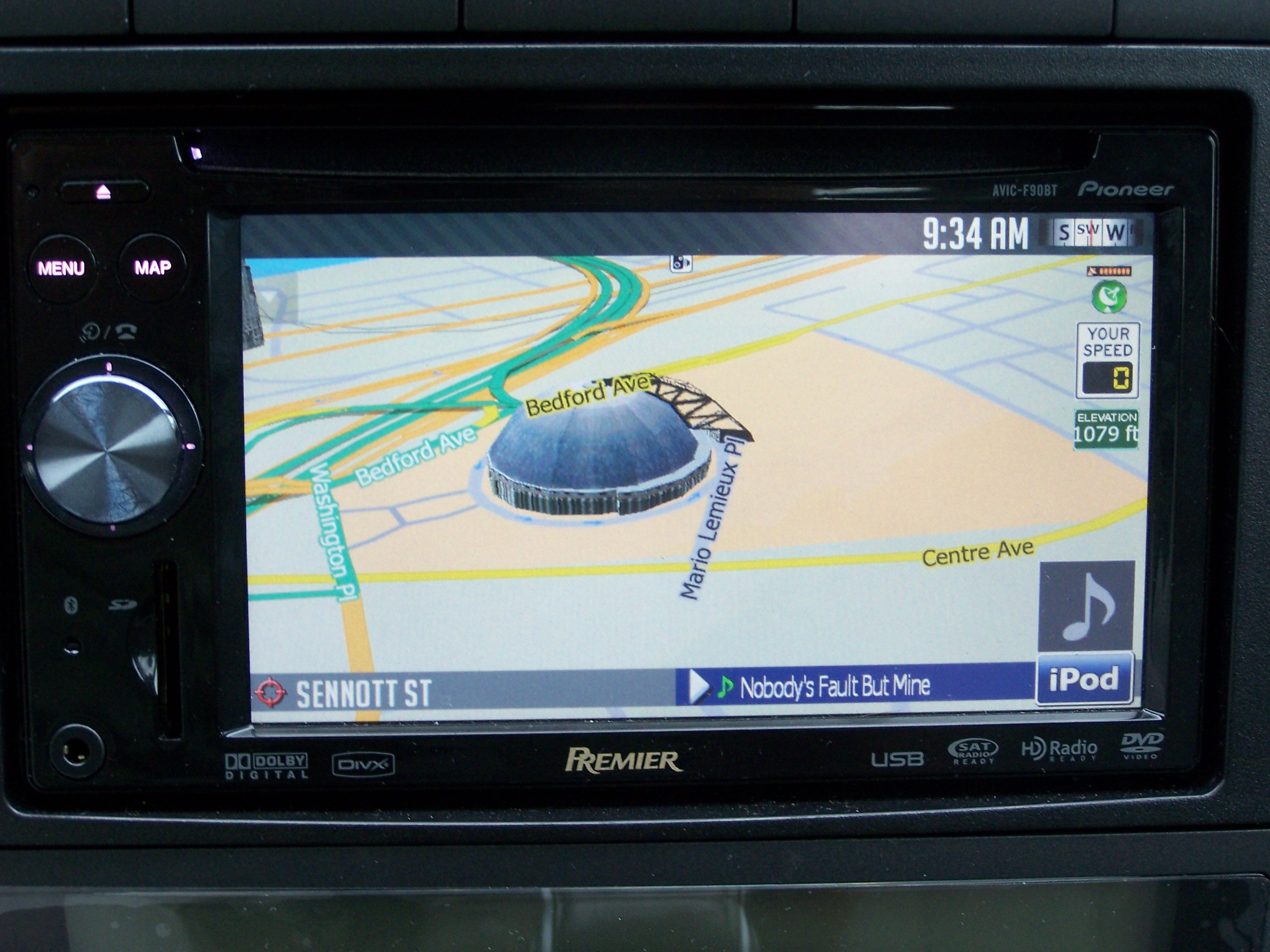
How does this look?

post-33008-12872760043504_thumb.jpg

Posted Nov 24, 2009 · 14:11 UTC#24

And of course this.

post-33008-12872760051042_thumb.jpg

Posted Nov 24, 2009 · 14:14 UTC#25

I need to take better pictures under better lighting so I don't get that horrible glare from the AVIC. Actually that is one complaint I have about it, it IS way too shiny.

Page 1 of 2