Im a fan of your work, i luv your hummer mod, iwas wondering if you can post me a orange h3 with your current mod, THANKS 
Posted Jun 17, 2009 · 21:15 UTC#26
Im a fan of your work, i luv your hummer mod, iwas wondering if you can post me a orange h3 with your current mod, THANKS
Great Work! Looks really good.
Is the trip meter something that people need to extend and add a button for - or is it something that already can be accessed via the modification?
Thanks again - I really enjoy this navigation layout.
~Ben
Great Work! Looks really good.
Is the trip meter something that people need to extend and add a button for - or is it something that already can be accessed via the modification?
Thanks again - I really enjoy this navigation layout.
~Ben
AFAIK it all ready, the link for it is in the navi settings
You are correct - it was user error. Must have missed it in the pervious posts that talked about that trip meter.
Really great modification - thanks to all that put so much time on it.
Great work! Thanks so much for this! I am now finally happy... If 3.0 isnt hackable, I am staying with this for sure!
This is a cool mod; the one I liked the most here. Thanks!
I found small bugs this morning, and I think I should report it.
During routing and the right side panel is hidden, exiting the map screen and return by pressing the "map" button, will make the information and buttons on the right panel show up but the frame still hiding. Similar problem with the left side panel if hidden, exit, then back by pressing the "map".
Great work!
hmmm,...very strange.I cannot reproduce this.
I hide right panel,..exit map(go to Ipod or something) then press "map" button(either one,..hardware mounted, and software button),..all looks good.
I hide all panels,..exit map(go to Ipod or something) then press "map" button(either one,..hardware mounted, and software button),..all looks good....this is in both modes,..with route navi,..and without.
Can you send me the steps to get to this issue?
Have you been experimenting with different mods prior?..if so...
...I recommend reverting back to stock setup(hopefully you have a backup of your stock setup)then adding the mod to see if this fixes it.
Thats what i did on my unit to ensure any lingering code from messing around wasnt still in there.I have no issues at all so far with my latest version.
hmmm,...very strange.I cannot reproduce this.I hide right panel,..exit map(go to Ipod or something) then press "map" button(either one,..hardware mounted, and software button),..all looks good.
I hide all panels,..exit map(go to Ipod or something) then press "map" button(either one,..hardware mounted, and software button),..all looks good....this is in both modes,..with route navi,..and without.
Can you send me the steps to get to this issue?
Have you been experimenting with different mods prior?..if so...
...I recommend reverting back to stock setup(hopefully you have a backup of your stock setup)then adding the mod to see if this fixes it.
Thats what i did on my unit to ensure any lingering code from messing around wasnt still in there.I have no issues at all so far with my latest version.
I have only minor mods on mine before this...bigger clock, hiding left side info panel when not in route. I did try Stanislavovish mod before this. But since I replaced the whole data.zip file, it should not have to do with his codes.
I did mention this happened when it was in routing. I will take some pictures for you later.
Hey coachpuff,
It is actually more specific; changing to radio or ipod doesn't seem to cause any problem. I will write it in button pressing steps.
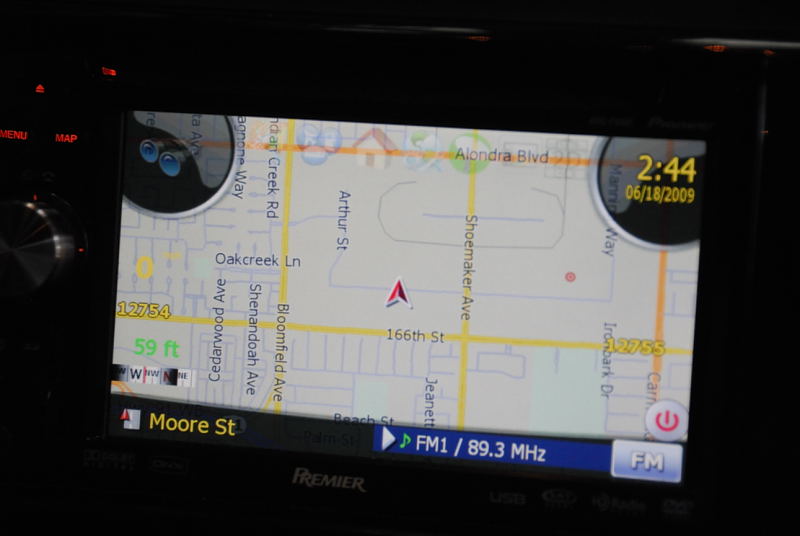
Put it into routing, hide right panel, press hard "menu", go into "Destination" menu, press hard "map" to return to the map. I got a screen like this:
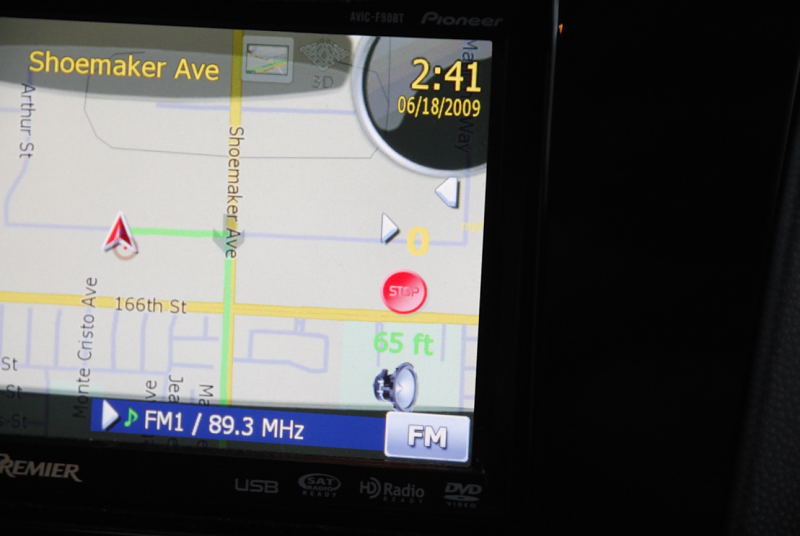
Then hide all panels, do the steps above, and when back to the map, cancel the route. I got a screen like this:
I applied this changes to my AVIC-F500BT and I no longer have voice guidance or TTS. This was working before and I have made sure that Samanta (TTS) is selected. I can play and hear music via speaker
I checked the SYS file and the look alike for the most part. Only thing which is different is the device id, I tried to change it and the unit got stuck at initializing navigation, I reverted back and it started to load again.
Any idea why I cant get the IGo voice to work? Is it a PATH issue in one of the files? The old and new paths to tts is listed as tts_nuance="\My Flash Disk\APL2\iGo\ScanSoft\RealSpeakSolo"
Thanks in advance!
I applied this changes to my AVIC-F500BT and I no longer have voice guidance or TTS. This was working before and I have made sure that Samanta (TTS) is selected. I can play and hear music via speaker
I checked the SYS file and the look alike for the most part. Only thing which is different is the device id, I tried to change it and the unit got stuck at initializing navigation, I reverted back and it started to load again.
Any idea why I cant get the IGo voice to work? Is it a PATH issue in one of the files? The old and new paths to tts is listed as tts_nuance="\My Flash Disk\APL2\iGo\ScanSoft\RealSpeakSolo"
Thanks in advance!
This is something I found out no long ago when I was modifying the TTS. When booting into "TESTMode", the testmode script copies files and folders in the MiTACAP folder on the SD, and replaces those on your AVIC. This is done every times when you boot from the SD.
One of the possible reason that you lost the TTS is because the TTS file in the MiTACAP folder on your SD is bad. So when you booted from it, the AVIC copied the bad file and replaced the good file on your unit. You might give it a check.
This is something I found out no long ago when I was modifying the TTS. When booting into "TESTMode", the testmode script copies files and folders in the MiTACAP folder on the SD, and replaces those on your AVIC. This is done every times when you boot from the SD.
One of the possible reason that you lost the TTS is because the TTS file in the MiTACAP folder on your SD is bad. So when you booted from it, the AVIC copied the bad file and replaced the good file on your unit. You might give it a check.
Thank you for the quick reply. I do not see a MiTACAP folder on my SD. Is it located under root folder or somewhere inside? I did a search, but did not find it.
BTW, I had booted several times in test mode and normal mode several times prior to applying these changes with same SD card. After making the changes to Stock IGo to have IGo8 skin, I do not have voice guidance (turn right etc) AND TTS (turn right on Elm street)
Also I am using the LeetLauncher on my SD card
Edit: I reverted the changes, TTS and voice guidance are working now. I still think, there is a missing link somewhere for F500
Thanickel-
Make sure the "Full Cockpit" settings are set to "Off" in the navi settings, and that should take care of your problem
Thanickel-
Make sure the "Full Cockpit" settings are set to "Off" in the navi settings, and that should take care of your problem
Thank you, setting full cockpit to Off did not help! Funny thing is when I set the Full Cockpit to ON all additional displays such as distance and time to destination disappeared and came back when it was set to Off. I do see two speaker icons on the screen and they display a small X on it when I tap, assuming the right side one turns ON and OFF the voice guidance and the left one turns ON and OFF the TTS
What all do I need to add to my current mod (CMH's) in order to get just the multi-planner?
Thanx!
Bud
What all do I need to add to my current mod (CMH's) in order to get just the multi-planner?
Thanx!
Bud
it only involves a couple of scripts, what i suggest is you start of by looking into stanislavovichs data.zip and in common/ui you'll see a multicalc.ui, then just trace everything that's in the script, if you need help let me know
Hi I like the mod, but there were some small isuesnwith the placing of the units etc. So I altered it in the navigatemap.ui. Now I'm trying to rezip this, but whatever I try i get the message "program database not found"from the avic, when i put back you're file it's ok again.
So basicly my question is how to zip, i used winrar, and 7zip, both diidn't work.
edit: the program i used messed the file up. Now it's working, replaced some thing to make it look even better. pictures soon.
This is a great mod - I've really enjoyed it (especially w/ the trip computer that others created and got rolled in).
Is this a mod that is going to be continued to add other features in - or is it where it's going to be (and others created).
Thanks,
Ben
I applied this changes to my AVIC-F500BT and I no longer have voice guidance or TTS. This was working before and I have made sure that Samanta (TTS) is selected. I can play and hear music via speaker
I checked the SYS file and the look alike for the most part. Only thing which is different is the device id, I tried to change it and the unit got stuck at initializing navigation, I reverted back and it started to load again.
Any idea why I cant get the IGo voice to work? Is it a PATH issue in one of the files? The old and new paths to tts is listed as tts_nuance="\My Flash Disk\APL2\iGo\ScanSoft\RealSpeakSolo"
Thanks in advance!
I figured out the issue. I had to keep my original sys.txt and everything strted working. Thank you for a great mod
I was looking at how to add the lane assist option back in (or am I missing it). When I go under map settings I don't see an option. opening the settings ui file - I noticed that some hacks have a vLaneInfo variable settings, but can't find the respective values.
Any ideas on how to add it back in and/or enable it?
(I assume it's more than just adding in the variable like this, right:)
Thanks,
Ben
I love this MOD best one I have seen so far, I loaded this up to my f700bt it went to the system starting and then it just keeps restarting, thought I followed the instructions can you tell me what I did wrong, really want to get this going
Thanks 
I love this MOD best one I have seen so far, I loaded this up to my f700bt it went to the system starting and then it just keeps restarting, thought I followed the instructions can you tell me what I did wrong, really want to get this going
Thanks
This is for 2.??? version and before. If you are trying to install it on an updated version 3.0 and after, it will not work. You do have your backup, right?
Thank you I do have a backup and change it back, will this be avaiable for later versions?