Search Archive

3.0 FW question - iPhone/iPod Blurry Album Art

By hvzero · Jul 22, 2009in General💬 41 posts👁️ 9,139 views
Page 1 of 2
Posted Jul 22, 2009 · 15:39 UTC#1

Hi guys,


I'm wondering does this firmware upgrade finally fix the blurry and pixelated album art when using the iphone or ipod? If not, was there another solution to the problem? It really defeats the purpose of showing the art if it looks so crappy. Thanks

Posted Jul 22, 2009 · 22:10 UTC#2
Hi guys,


I'm wondering does this firmware upgrade finally fix the blurry and pixelated album art when using the iphone or ipod? If not, was there another solution to the problem? It really defeats the purpose of showing the art if it looks so crappy. Thanks


Nope :(


I was also hoping that it would but I remain disappointed.

Posted Jul 24, 2009 · 07:40 UTC#3

I never had this issue on my 3G or my iPod nano 4th gen,..

Posted Jul 24, 2009 · 14:20 UTC#4

Has anyone been able to determine the root cause of this? This issue persists across multiple iPods/iPhones for me. I always just have iTunes automatically fetch album artwork for me and they all look like high-quality images on my Mac, but pixelated garbage on my F900BT.


I have tried reinstalling firmware on the AVIC, rebuilding iPods, reinstalling iPod firmware, stripping all of the cover art out of my library and downloading it all again, etc... Nothing has made a lick of a difference with this issue.


Some people have this problem and others don't. I have yet to see a determination made as to what causes this though. Maybe not everyone is using the same iPod/iPhone firmware? Still scratching my head on this one...

Posted Jul 24, 2009 · 15:32 UTC#5

I'm of the opinion that the people that say their album art ISN'T pixelated are folks that don't have as sharp an eye as those that DO think it's pixelated.


I have seen too many folks that have the same make/model iPod or iPhone as I do that say their art is sharp. I completely disagree. I have album art both from the iTunes store, off the internet at a very high resolution - no difference. The images ARE indeed nice on the Mac and DO look like poo on the AVIC - a bummer for sure, but not a deal breaker.


I don't think I've ever seen anyone post up any high quality images of what their screens look like with the "NON pixelated" album art; If I ever did, I would be the first to admit I am wrong, and that their must be SOME kind of workaround.


Cheers,

Kev

Posted Jul 24, 2009 · 15:35 UTC#6

i think that would depend too on the size of your album art, if your album art are like 500x500 then that would most likely be pixelated on the avic but if your album art is only 100x100 then it most probably look clearer, just my 2c

Posted Jul 24, 2009 · 16:29 UTC#7

I'm pretty sure that at the heart of the issue, it's that the AVICs are getting the thumbnail version of the art from the ipod/iphone and using that instead of the larger artwork.


I'm also fairly sure that the newer units such as the ipod touch and iphone exhibit this more then the older units, but I bet it's the way they use the thumbnails, older units did not use the thumbnail, newer units use it in the listing of albums/artists screens.

Posted Jul 24, 2009 · 16:51 UTC#8
I'm of the opinion that the people that say their album art ISN'T pixelated are folks that don't have as sharp an eye as those that DO think it's pixelated.


I have seen too many folks that have the same make/model iPod or iPhone as I do that say their art is sharp. I completely disagree. I have album art both from the iTunes store, off the internet at a very high resolution - no difference. The images ARE indeed nice on the Mac and DO look like poo on the AVIC - a bummer for sure, but not a deal breaker.


I don't think I've ever seen anyone post up any high quality images of what their screens look like with the "NON pixelated" album art; If I ever did, I would be the first to admit I am wrong, and that their must be SOME kind of workaround.


Cheers,

Kev


In my case I am sure its not my art. 99% of my album art is perfect. I went through it all and made sure it was in high res. Reason is that I like to put my iTunes into full screen cover flow when I have parties and if the art is low-res it looks like garbage. If it looks good in full screen cover flow mode on a 1900x1600 MacbookPro it sure as hell should look good on my F90.

Posted Jul 24, 2009 · 17:36 UTC#9
I'm pretty sure that at the heart of the issue, it's that the AVICs are getting the thumbnail version of the art from the ipod/iphone and using that instead of the larger artwork.


I'm also fairly sure that the newer units such as the ipod touch and iphone exhibit this more then the older units, but I bet it's the way they use the thumbnails, older units did not use the thumbnail, newer units use it in the listing of albums/artists screens.


Funny thing is, even when I view album art using the Remote app on my iPhone while scrolling through - they look sharper than they do on the AVIC. It definitely seems like a way that the AVIC is processing/reading those art files, but there is NO way they look anywhere near as good as they should


Heck, I even have a screen saver on my Mac that randomly shows all the album art work in my iTunes, and I can switch the settign to adjust how big they show ups (i.e., 4 on the screen, 10, 18, etc.) and when I have them really big (probably 5" x 5") they are crystal clear - and they look bad on the AVIC?


Definitely the way the unit is interpreting the art files.


Cheers,

Kevin

Posted Jul 24, 2009 · 17:44 UTC#10
I'm of the opinion that the people that say their album art ISN'T pixelated are folks that don't have as sharp an eye as those that DO think it's pixelated.


I have seen too many folks that have the same make/model iPod or iPhone as I do that say their art is sharp. I completely disagree. I have album art both from the iTunes store, off the internet at a very high resolution - no difference. The images ARE indeed nice on the Mac and DO look like poo on the AVIC - a bummer for sure, but not a deal breaker.


I don't think I've ever seen anyone post up any high quality images of what their screens look like with the "NON pixelated" album art; If I ever did, I would be the first to admit I am wrong, and that their must be SOME kind of workaround.


Cheers,

Kev


Yes Kev, that definitely occurred to me as well and it sounds like the most likely explanation at this point. "Blurry" and "clear" are all relative to whoever is viewing it and I think some people just have different opinions of what those terms mean.


Album art all looks sharp as ever in promotional materials, but that doesn't surprise me at all :-P

Posted Jul 25, 2009 · 16:31 UTC#11

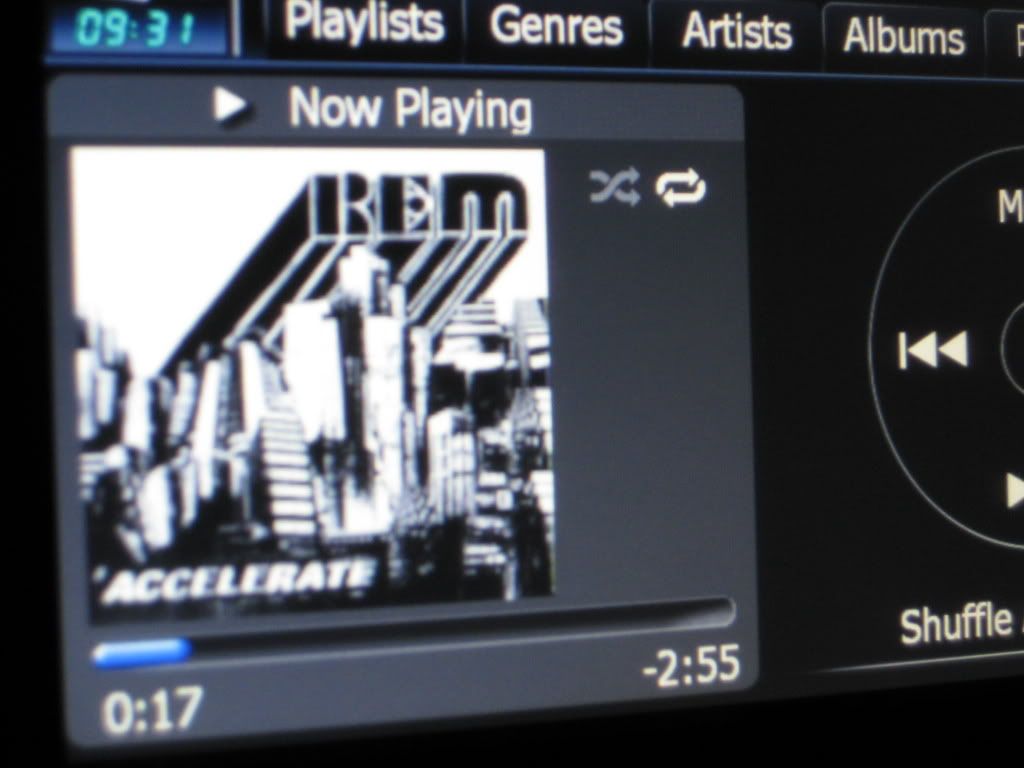
While I generally agree that one person's sharp is another's blurry/pixely, I can assure you that my artwork looks perfect on my AVIC F700BT, and I've actually SEEN the blurry/pixely artwork. My 1st gen iPod Nano had the pixely artwork, and my 4th gen Nano and all my iPhones (3G and 3GS) definitely do not with the SAME music/artwork. Here's a screenshot of NOT pixely artwork from my 4th gen nano. I think I'm qualified enough to distinguish between the two since I actually experienced both problems!


Of course, excuse the blur here since I focused badly, but you can see NO pixelation around the text, which is what some of you are experiencing. This particular artwork looked awful on my 1st gen nano with the words so stair-stepping/pixely.


IMG_0054.jpg

Posted Jul 26, 2009 · 01:12 UTC#12

I'm definately confused now. If you are getting this clear art on your iPhones, then it seems this problem has some sort of solution that we arent aware of yet.

Posted Jul 26, 2009 · 01:14 UTC#13
I'm definately confused now. If you are getting this clear art on your iPhones, then it seems this problem has some sort of solution that we arent aware of yet.


My iPhone has the blurry artwork issue. I used the iTunes "get album artwork" option to get most of my album art, maybe that's the cause?

Posted Jul 26, 2009 · 16:25 UTC#14

I used the get album artwork as well. The original iPhone might be the problem here. I never tested that, I only tested my original iPod nano, which had the bad artwork, and my latest gen nano, iPhone 3G and 3GS which all are fine.

Posted Jul 26, 2009 · 18:48 UTC#15
I used the get album artwork as well. The original iPhone might be the problem here. I never tested that, I only tested my original iPod nano, which had the bad artwork, and my latest gen nano, iPhone 3G and 3GS which all are fine.


I'm currently using a 3g, and im still getting the problem.

Posted Jul 26, 2009 · 19:44 UTC#16
I used the get album artwork as well. The original iPhone might be the problem here. I never tested that, I only tested my original iPod nano, which had the bad artwork, and my latest gen nano, iPhone 3G and 3GS which all are fine.


I'm currently using a 3g, and im still getting the problem.


I have no idea. All I can tell is it's not normal for the 3G. I'd try someone else's new-ish iPod if you know someone who has one....

Posted Jul 27, 2009 · 00:19 UTC#17

I had the problem with my first gen iPhone, and still have it with my 3GS iPhone.


My wife's iPod Nano (a 3rd gen) doesn't have this problem.


My artwork looks fine in iTunes and in coverflow on the iPhone.


If someone wants to see pictures of my pixellation I'll take some.

Posted Jul 27, 2009 · 01:22 UTC#18
I had the problem with my first gen iPhone, and still have it with my 3GS iPhone.

My wife's iPod Nano (a 3rd gen) doesn't have this problem.

My artwork looks fine in iTunes and in coverflow on the iPhone.

If someone wants to see pictures of my pixellation I'll take some.

That's because itunes and coverflow don't use the thumbnails that way, they use the higher res image, but the MP3 contains both a higher res and a thumbnail res image....

The more I see this discussed, the more I think it's the way the newer units that support thumbnails present the artwork to the AVIC.

Posted Jul 27, 2009 · 14:47 UTC#19

As a follow up, I went out and connected my new iPhone 3Gs to the AVIC just to see if perhaps my earlier iPhone and current iPod (5G w/video) models may have been ones that had the pixelated art, and this one would be better. . .


OMG! If it's possible, they look EVEN WORSE!! Unbelieveable!


Which really cracks me up, because that can only mean that the "bad album art" I have been seeing for the past year from my other units are actually the "good" art that others are saying they see! Wow!


Needless to say, the AVIC in no way, shape or form displays the iPod/iPhone album art anywhere NEAR the way it could/should be displayed. As I have said in past posts - it isn't a deal breaker for me, just a dissapointment.


Cheers,

Kev

Posted Jul 27, 2009 · 15:52 UTC#20
As a follow up, I went out and connected my new iPhone 3Gs to the AVIC just to see if perhaps my earlier iPhone and current iPod (5G w/video) models may have been ones that had the pixelated art, and this one would be better. . .


OMG! If it's possible, they look EVEN WORSE!! Unbelieveable!


Which really cracks me up, because that can only mean that the "bad album art" I have been seeing for the past year from my other units are actually the "good" art that others are saying they see! Wow!


Needless to say, the AVIC in no way, shape or form displays the iPod/iPhone album art anywhere NEAR the way it could/should be displayed. As I have said in past posts - it isn't a deal breaker for me, just a dissapointment.


Cheers,

Kev


Err no? It's quite possible that there are several bad types of images being displayed here. Maybe take a picture and show us both types? Like I said, my images look super sharp.

Posted Jul 27, 2009 · 16:00 UTC#21

WilliamG,


I'll go out there in just a bit and give a comparison shot or two - will post up in a little while (good suggestion)

Posted Jul 27, 2009 · 17:59 UTC#22

The following shots I just went out and took a little while ago. I have the shots in the following order:

1. Super sweet album art as viwed on my Mac screen in iTunes (and viewed at approximately 6" square, so pretty big)

2. Sweet album art from cover flow view as seen on my iPhone 3Gs (approx. the same size as the 2 images to follow)

3. Terrible album art (this is how the SAME album is viewed from my 5G (w/video) iPod (terrible, but still not as terrible as what follows)

4. Super terrible album art (this was the heinous image I saw when I viewed ablum art from my new iPhone 3Gs)


Images 2-4 were all at approximately 2" square (the shots from the AVIC were when you view the art slightly enlarged when you tap the image)


If I can view the SAME art in iTunes at around 6" in size, and from the iPhone at the same size (2" approx.) as the AVIC and have the mind-numbing difference in quality, pardon me if I call it PIXELATED! In my opinion, unless someone can give me a good reason, we should be able to see our album art on the AVIC just as sharply as I see it on my iPhone in cover flow size.


This is what those of us that say our album art is pixelated (and looks like shite) mean when we say it.


Cheers,

Kev

post-22860-12872758024239_thumb.jpg

post-22860-12872758025915_thumb.jpg

post-22860-12872758027816_thumb.jpg

post-22860-12872758029695_thumb.jpg

Posted Jul 27, 2009 · 18:24 UTC#23

Kev, wow great work here! I'd say those 4 screenshots are a pretty comprehensive description of the problem. There has got to be some ultra-obscure cause to all of this. I have managed to get nothing but pixelated artwork from the following devices:


1. 30GB 4th gen iPod Video

2. 120GB iPod Classic

3. 1st gen 16GB iPhone

4. 32GB iPhone 3G S


I am using Pioneer's iPod cable.


It seemed like a problem related to how the images are stored in the iTunes library, but now I am not so sure. I am reading reports of it occurring with the same files from the same library on different devices which blows that theory away.

Posted Jul 27, 2009 · 19:00 UTC#24

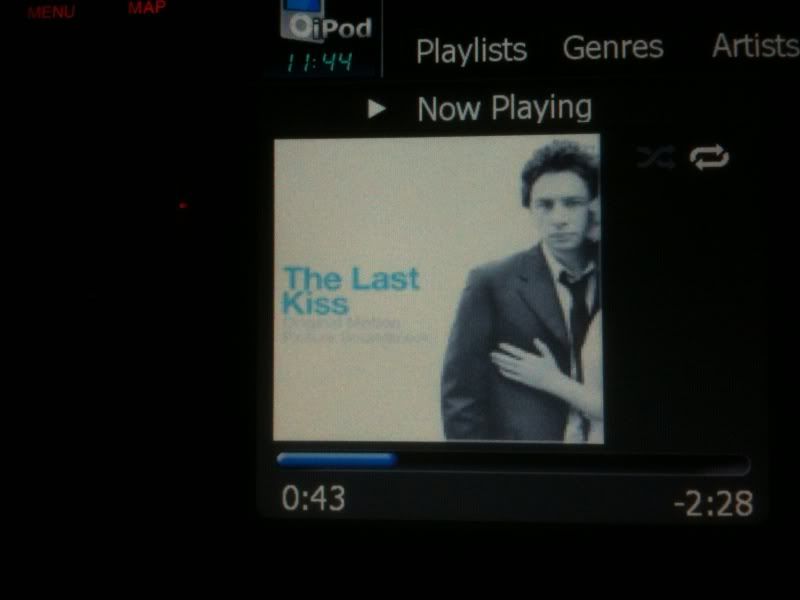
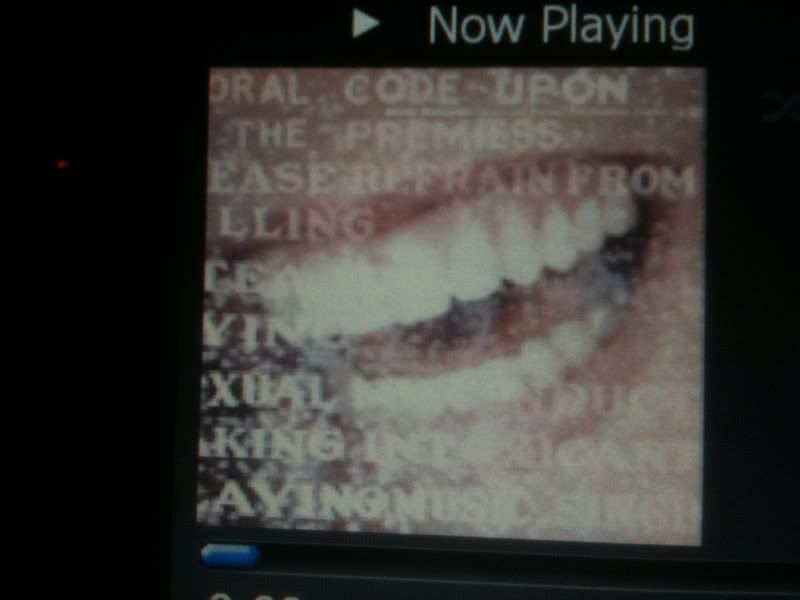
OK, update from me. I plugged in my iPhone 3GS for the first time and using the VERY SAME Ting Tings artwork, I had some bad pixely nastiness. I then plugged back in my 4th gen 16GB nano and used it, and there are really no issues. Here are some new pictures I just took, clearly showing NO issues with my 4th gen nano...


photo2-5.jpg


photo3-1.jpg


So, also clearly, there's something going on with some of the iPods/iPhone. I had the pixely nastiness terribly on my 1st gen nano as I mentioned earlier... I wonder why some models are troublesome and others aren't?

Posted Jul 27, 2009 · 19:09 UTC#25

Thanks William for taking the time to post images as well.


This is the sort of problem that really gets my brain working - there HAS to be some explanation to this. Whether it's pixel count, or source file origination - something! There has to be a logical explanation as to why album art that all looks pretty much the same on an iPhone or iPod can look anywhere from the same to different shades of junk on the AVIC!


I might go out and surf through a bunch of different album covers to see if there is any difference in them, but I've never noticed any that I can think of. I mean why would OLDER versions of the iPhone or iPods show that art any better than newer ones?


Odd, very odd.


Cheers,

Kev

Page 1 of 2