Search Archive

New Unit Theme by GUGA - Version 3.0 - Download it now!!!

By ggarcez · Jul 23, 2009in Hacks/Mods💬 39 posts👁️ 10,633 views
Page 1 of 2
Posted Jul 23, 2009 · 15:42 UTC#1

Hi Guys,


After the 3.0 update I think we really deserve a new theme!


Here's the download link, just unzip and copy the image.res file to the apl directory


Civic Theme - http://rapidshare.com/files/259636431/Image_GUGA_v3.zip

Generic Theme - http://rapidshare.com/files/259776345/I ... eneric.zip


I'm going on vacation for the next to weeks so I'm releasing it as a beta version of the GUGA THEME 3.0. If you find any bug in the theme let me know!


Hope you enjoy!!!!!


GUGA


!!!!PICTURES UPDATED!!!!
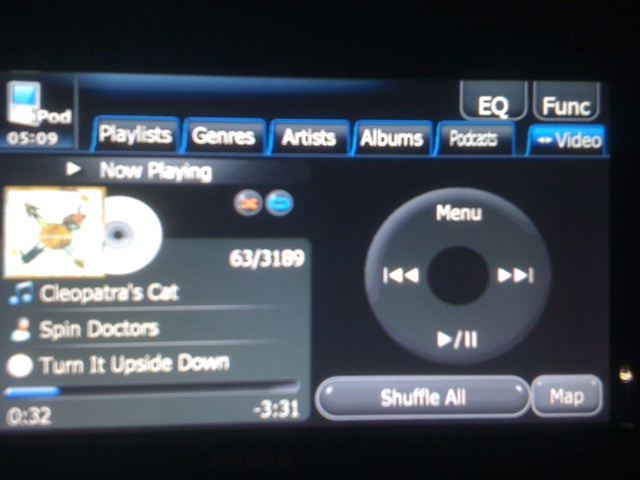
post-22095-12872758007776_thumb.jpg

post-22095-12872758008434_thumb.jpg

post-22095-12872758009063_thumb.jpg

post-22095-12872758009633_thumb.jpg

post-22095-12872758010273_thumb.jpg

post-22095-12872758010855_thumb.jpg

post-22095-12872758011461_thumb.jpg

post-22095-12872758012048_thumb.jpg

Posted Jul 23, 2009 · 15:53 UTC#2

Very nice Guga!

Keep us informed!

Posted Jul 23, 2009 · 20:26 UTC#3

Very excited, after updating to 3.0 the first mod I had to go looking for was your skin mod... it looks so much better then Pioneers boring stock ones. Look forward to seeing what you can do with 3.0!!!!

Posted Jul 23, 2009 · 23:10 UTC#4

That looks very good so far

Posted Jul 23, 2009 · 23:40 UTC#5

Looks great!

Posted Jul 23, 2009 · 23:46 UTC#6

Looks great indeed!!


What i'd like to see:

-Next adress button

-Speed limit sign

-TMC button


And off course mute guidance and stop route....


These are my wishes.....


Succes and thanks for the effort

Posted Jul 24, 2009 · 00:09 UTC#7

Is it possible to have a button on the Nav screen that "Calls Home" directly. It would be nice to be able to just hit one button as opposed to having to click menu --> phone --> call home.


Might just be me who needs this since I always seem to have to call the wife from the car. :oops::lol:


HR

Posted Jul 24, 2009 · 01:52 UTC#8

omg looks great!! but make a red one :mrgreen::mrgreen::mrgreen:

Posted Jul 24, 2009 · 03:48 UTC#9

We will also need to have the clock moved so it is visible when there are freeway boards on the map.

I would also like to see the sky, or should i say the horizon line like the cmh's mod had. weather or not you use the sky in the other post in the "install" thread or not is up to you. I just like that type of perspective on the nav screen

Posted Jul 24, 2009 · 17:58 UTC#10

Hmm, this looks great!


I once had a PNA with iGo preinstalled. It talks way to too much, just like my F700. Some german guys made a modded voice guidance, which was much better. Has anyone ideas about his topic?


This is in additon of a "mute" button very nice. No need for hearing instructions 3 or 4 times, e.G. in 800m turn left, in 500m turn left... in 300m turn left, now turn left.... I find this annoying.

Posted Jul 24, 2009 · 18:09 UTC#11

!!!!!THIS THEME DOESN'T UPDATE THE IGO SOFTWARE, IT MODS THE UNIT MAIN SOFTWARE!!!!!!

Posted Jul 24, 2009 · 19:42 UTC#12

not to rush you man, but any hope for an eta?

Posted Jul 24, 2009 · 20:24 UTC#13

I was uploading the file....


Download link at the first post.


GUGA

Posted Jul 24, 2009 · 21:23 UTC#14
I was uploading the file....


Download link at the first post.


GUGA


looks good bro, definitely a must have, i also like how you added a car image on the fader balance screen,

Posted Jul 24, 2009 · 22:14 UTC#15

Hey guga, Definately looks awesome but i would like the entire theme to flow throughout the system. Some of those buttons need to be changed from the data zip also so they are seen in the rest of the systems menu's. That would make it complete. Can u possibly change the buttons also i've included in the zip? Thanks, these are from the 800_480 folder in the data.zip.

800_480 buttons.zip

Posted Jul 25, 2009 · 00:02 UTC#16

this looks great compared to pioneer! too bad the car its in is not a newer civic =P i do own a 97 civic but the nav is in my 01 crv! Only been using it for about 2 months now. thanks guga for this! now i know where it gets its interface from. You have done a great job i plan to build mine up from yours (hope thats cool =P)... at least for my first one..

Posted Jul 25, 2009 · 03:12 UTC#17
Hey guga, Definately looks awesome but i would like the entire theme to flow throughout the system. Some of those buttons need to be changed from the data zip also so they are seen in the rest of the systems menu's. That would make it complete. Can u possibly change the buttons also i've included in the zip? Thanks, these are from the 800_480 folder in the data.zip.


Eurotuner,


With the oficial version of the 3.0 theme I will release a data.zip version too....but this will take a while...


GUGA

Posted Jul 25, 2009 · 03:13 UTC#18
this looks great compared to pioneer! too bad the car its in is not a newer civic =P i do own a 97 civic but the nav is in my 01 crv! Only been using it for about 2 months now. thanks guga for this! now i know where it gets its interface from. You have done a great job i plan to build mine up from yours (hope thats cool =P)... at least for my first one..


Ekrboy,


Fell free to use any image in you theme...no problems...


GUGA

Posted Jul 25, 2009 · 06:16 UTC#19

Hey I just want to say that this is an awesome theme. I love the button design. Would it be possible to upload an image.res file without the honda civic branding. Mainly just the "Civic" logo on the bottom of the main menu. Or if you could tell me how to change it that would be awesome too.


Thanks the for theme~Adam

Posted Jul 25, 2009 · 06:41 UTC#20

I've done a generic theme, changed:


- The CIVIC bottom logo to the pionner logo;

- The main menu Nav Logo with the iGo logo;


Download link - http://rapidshare.com/files/259776345/I ... eneric.zip


GUGA

post-22095-12872758012736_thumb.jpg

post-22095-12872758013079_thumb.jpg

Posted Jul 25, 2009 · 17:56 UTC#21

Guga

I noticed a small problem with the FM signal strength icon. The stock icon shows 0 to 5 bows and that works depending on the signal strength of the station.

When I use your Image.res (both versions), I only get the new icon with 0 bows. (by the way, you have 2 icons with 1 bow).

I replaced your 5 icons with the stock icons and it works again. I can't explain it since the filenames are the same.

746_32K_AV-121_32b_0.bmp - to _5. Nice Theme by the way.


mbk

Posted Jul 26, 2009 · 13:10 UTC#22

Thanks.

Posted Jul 26, 2009 · 15:04 UTC#23

hi guga was wondering if you can fix the caller id it use to have a black box and now is not theyre idodnt know if somethinf is missing thanks

Posted Jul 27, 2009 · 11:37 UTC#24
hi guga was wondering if you can fix the caller id it use to have a black box and now is not theyre idodnt know if somethinf is missing thanks


+1. The caller id box is missing and would be nice to have it back. I also noticed while using the system this weekend that the volume box is alittle hard to see during the day with the color being silver. Any chance you can change that to the blue color the eq comes up with when pressed? That would make things more visible. Besides that great job and definately added to the new 8.3 features. It's like having a new unit!

Posted Jul 27, 2009 · 15:22 UTC#25

great modyfication :)

Page 1 of 2