Search Archive

Urgghhh. No IR in front. I guess I cant use SWI-X or Rem.

By fe342185 · Jul 31, 2009in General💬 27 posts👁️ 3,598 views
Page 1 of 2
Posted Jul 31, 2009 · 05:57 UTC#1

Got it and testing on a bench power supply today and I purchased the CD-SR1 remote along with the SWI-X also. I was assuming I can program the SWI-X to learn the Voice command button since I had the button on my steering wheel. DEAD WRONG!!! It looks like Pioneer removed the IR port from the front panel unless I am just missing it.


I looked at the Pioneer site and no remote is listed in accessories. SWI-PS i guess unless there is someone here that knows of a way to translate the IR from the SWI-X to a mini plug so I can use the remote jack in the back.

Posted Aug 01, 2009 · 13:30 UTC#2

why are you using the SWI-X instead of the SWI-PS? In my opinion, the PS is much alot better, especially the newest version (the blue one) there's no delay like there was on the previous version.

Posted Aug 01, 2009 · 13:39 UTC#3

hey thanks for answering the question I posted regarding this for almost a month now. I have kids in the back so I control a great deal (answer phone, place call, change station, av, activate voice, etc) on my Z3 with the CD SR1. This is a deal breaker for me unfortunately. I will simply just stay with the Z3. Thanks again for answering this question.

Posted Aug 01, 2009 · 15:10 UTC#4

BMW has a button with a face talking on the wheel. I wanted to program the Voice command button onto this. I believe the SWI-PS is preprogrammed and I will not be able to make it learn the Voice command. Hopefully someone can prove my research wrong. Thanks. Looks like I am going to try to get the new SWI-PS for now.

Posted Aug 01, 2009 · 19:59 UTC#5

The X/F-series doesn't have IR either. They stopped doing that a while ago

Posted Aug 03, 2009 · 03:53 UTC#6
BMW has a button with a face talking on the wheel. I wanted to program the Voice command button onto this. I believe the SWI-PS is preprogrammed and I will not be able to make it learn the Voice command. Hopefully someone can prove my research wrong. Thanks. Looks like I am going to try to get the new SWI-PS for now.


the new SWI-PS (blue case) has the new BT phone and i thought the voice command in the programming


as for using IR when there is no Ir..you can do it just takes some engineering..(look into a home Ir repeaters/converters) it can be done just takes $$$$$$


if there is a will and cash there is a way!

Posted Aug 03, 2009 · 07:45 UTC#7

Below is the info from the PAC site. I am not sure hot to configure the voice recognition button.


Programming order for

SWI-PS N/A

1 Volume Up

2 Volume Down

3 Mute

4 Track Up/ Seek Up

5 Track Down/ Seek Down

6 Source

7 Preset Up/ Disc Up

8 Preset Down/ Disc Down

9 Band

Posted Aug 03, 2009 · 13:55 UTC#8

there is a updated programming list inside the packaging

i will look for one at the shop today and post it tonight

Posted Aug 05, 2009 · 16:46 UTC#9

Wholy %$@#$#$ hell SOB !!!!


This just shattered my day... I was so stoked about some of the new features and reviews, and then I had to come across this... I can't believe they did this... I struggled with the POS SWI-PS with my Z2 for years, then got fed up and got the SWI-X, programmed it with a VC1 and had perfection(VC, answer, and hangup functionality)... then they omit IR in the latest version... aarrgghhhh :evil:


Damnit!!! Damnit!!! Damnit!!!


Fix alot and break a little... Unfortunately this is a major deal breaker... I know it's a touchscreeen, meant to be touchd, but who the hell wants to reach up every time to skip a track, activate VC, or answer a phone call...


A freakin 5$ part.... :roll:


Idiots!!!

Posted Aug 05, 2009 · 18:11 UTC#10
Wholy %$@#$#$ hell SOB !!!!


This just shattered my day... I was so stoked about some of the new features and reviews, and then I had to come across this... I can't believe they did this... I struggled with the POS SWI-PS with my Z2 for years, then got fed up and got the SWI-X, programmed it with a VC1 and had perfection(VC, answer, and hangup functionality)... then they omit IR in the latest version... aarrgghhhh :evil:


Damnit!!! Damnit!!! Damnit!!!


Fix alot and break a little... Unfortunately this is a major deal breaker... I know it's a touchscreeen, meant to be touchd, but who the hell wants to reach up every time to skip a track, activate VC, or answer a phone call...


A freakin 5$ part.... :roll:


Idiots!!!


It's kinda like when the remote to the TV is lost, you end up watching the same channel, even though it sucks because who gets up to change the channel anymore!?!?!?

Posted Aug 06, 2009 · 02:13 UTC#11

how hard is it to mount the marine remote out of site in reach...or for the really brave disassemble one and do a custom bezel with your own buttons..


or even make it a WIRED remote and install it like the old add-on changer controllers


get creative....


here is the link to the instruction to program using BT hands free functions


http://www.pac-audio.com/PACProductData ... 072309.pdf


here is the programming list

follow the directions just like the vehicle specific directions tell you too

they just added a couple more codes


The SWI-PS must be programmed in the specific order shown below. If a function is not needed, it may be skipped.


1. Volume Up

2. Volume Down

3. Mute

4. Track Up/Seek Up

5. Track Down/Seek Down

6. Source

7. Preset Up/Disc Up

8. Preset Down/Disc Down

9. Band

10. Phone Status

11. Answer Call

12. End Call

Posted Aug 08, 2009 · 19:31 UTC#12
how hard is it to mount the marine remote out of site in reach...or for the really brave disassemble one and do a custom bezel with your own buttons..


or even make it a WIRED remote and install it like the old add-on changer controllers


get creative....


here is the link to the instruction to program using BT hands free functions


http://www.pac-audio.com/PACProductData ... 072309.pdf


here is the programming list

follow the directions just like the vehicle specific directions tell you too

they just added a couple more codes


The SWI-PS must be programmed in the specific order shown below. If a function is not needed, it may be skipped.


1. Volume Up

2. Volume Down

3. Mute

4. Track Up/Seek Up

5. Track Down/Seek Down

6. Source

7. Preset Up/Disc Up

8. Preset Down/Disc Down

9. Band

10. Phone Status

11. Answer Call

12. End Call


Cause that blows.... Not to mention that the SWI-PS sucks... It works only 90% of the time, and usually has it;'s own mind.... and does not have all the other features as the SWI-X(including VC).... Pioneer lost a loyal custmer here...

Posted Aug 08, 2009 · 19:36 UTC#13

Now if PAC wanted to make a learning programmable hardwired SWI-PS.... then it may change my mind...

But I'm willing to bet, that the functionality isn't even built into the Z110BT... ie Voice command...


I'll stick with my Z2-3 till they get their head out of their taters...


What a F'in joke....[/rant]


So damn close to perfection... :roll:

Posted Aug 10, 2009 · 23:00 UTC#14

I just installed mine last night and came on here to see what kind of remote I could use, this bites. I really like this unit, but lack of a remote has me missing my AVH6800. :(

Posted Aug 13, 2009 · 05:31 UTC#15

I just finished installing the AVIC-Z110BT in my truck. I used the PAC SWI-PS to retain the use of the steering wheel buttons. So far, they have worked flawlessly. I have vol +, vol -, track +, track -, and source. I might re-program the source button so that I can answer calls on the blue tooth.....hmmmm....

Posted Aug 13, 2009 · 20:22 UTC#16

Hmmm... you have a point...maybe there is a solution after all...


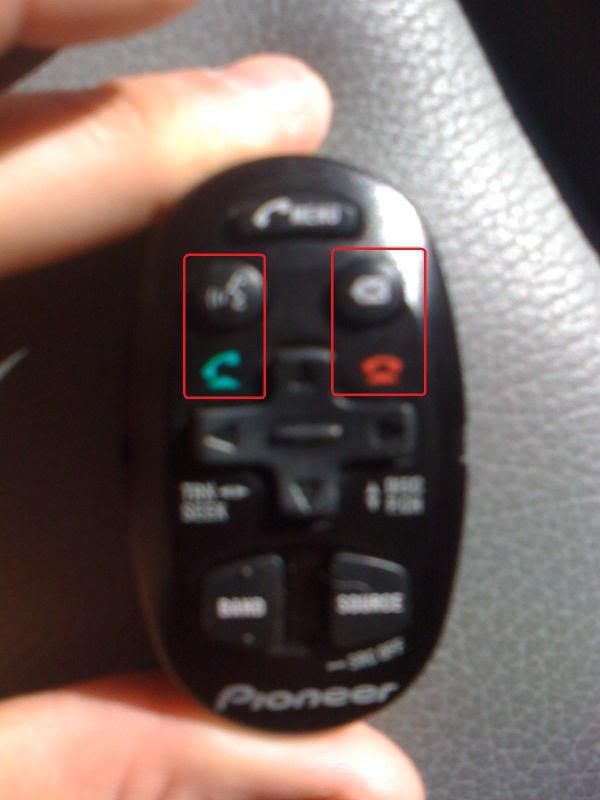
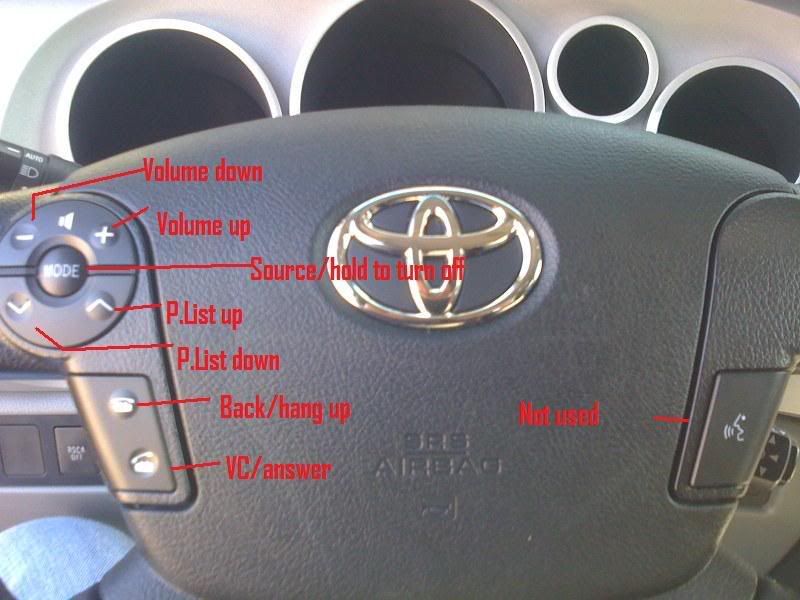
It just occured to me that the call answer and call hang-up may work exactly like the VC1... The VC1's buttons actually play two different roles depending on what's going on... i.e.. when not in a phone conversation, the answer button acts as the VC and the hangup acts like cancel... When you have an incoming call, answer is answer and hangup is hangup....


This is my current configuration wih the SWI-X and Z3...

IMG_0223_1.jpg

IMG_0218_1.jpg


Can anyone confim that the SWI-PS answer and hangup works like this... It'd be much appreiciated as I'm willing to give the SWIPS another try in order to upgrade to the 110BT...

Posted Aug 14, 2009 · 02:48 UTC#17

Installed the HU today but ran out of time for the SWIPS. I will let you know tomorrow. I am installing on a BMW X5 but it shouldnt make a difference.

Posted Aug 24, 2009 · 15:09 UTC#18
Installed the HU today but ran out of time for the SWIPS. I will let you know tomorrow. I am installing on a BMW X5 but it shouldnt make a difference.


Any luck with it yet?

Posted Aug 24, 2009 · 22:10 UTC#19

Installed... The Voice recognition button was not able to be programmed. I programmed one of my buttons to the "Answer Call" option on the SWI and it does work for that. It doe NOT work to trigger voice prompts though. Seek+/- works for ipod controls but not for preset. My car only has 2 buttons for tracks so it was assigned to seek +/- since I use the ipod more often. On radio mode it will go from freq to freq and not the presets. Kind of annoying but not so bad with HD radio since each radio station has multiple stations within it. The seek is used to go between each one.


i hope XM will work better with the current configurations.

Posted Aug 25, 2009 · 03:55 UTC#20
Installed... The Voice recognition button was not able to be programmed. I programmed one of my buttons to the "Answer Call" option on the SWI and it does work for that. It doe NOT work to trigger voice prompts though. Seek+/- works for ipod controls but not for preset. My car only has 2 buttons for tracks so it was assigned to seek +/- since I use the ipod more often. On radio mode it will go from freq to freq and not the presets. Kind of annoying but not so bad with HD radio since each radio station has multiple stations within it. The seek is used to go between each one.


i hope XM will work better with the current configurations.


Man... thanks a butt ton... That answers all my questions... Although it's an entire let down for me upgrading to the 110 from the Z3.... As it obviously does not have the function for VC built in, like the Z3 did with the VC1 remote... The code is obviously not there to accept that signal...


It could be that PAC doesn't know how to utilize VC for Pioneer.... But it looks to be more in Pioneer's court(they left it out)... Unfortunetly, I refuse to downgrade that feature...

Posted Aug 25, 2009 · 17:01 UTC#21

I contacted PAC a week or so ago on the VC control option with their modules. The guy I spoke to said it has been discussed by them as a possible future update to their modules.

Posted Aug 25, 2009 · 22:45 UTC#22

It's just sad that Pioneer left out the remote ir on their flagship model. They could have put the sensor in and let the consumer decide if they wanted one or not :mad:

Posted Aug 26, 2009 · 15:25 UTC#23
Seek+/- works for ipod controls but not for preset. My car only has 2 buttons for tracks so it was assigned to seek +/- since I use the ipod more often. On radio mode it will go from freq to freq and not the presets. Kind of annoying but not so bad with HD radio since each radio station has multiple stations within it. The seek is used to go between each one.


In that scenario, I would program the track down button on the steering wheel to P.List up and the track up button to Seek up... You could only go up, but at least that way you could skip through your FM presets and still be able to jump tracks on your IPod...


That's an issue that's been haunting me with my current setup... And I need to try to fix it, just haven't had time to tear my dash apart again... But because of that, I decided to program my track up/down buttons on my steering wheel to be P.List up/down... This works great for skipping through FM presets, and the music on my Z3 hard drive as I keep it set on random... Now, with an IPod, it doesn't work out so great.... P.list does nothing, as I put all of my music into one single playlist and just put my IPod into random mode... So to get to the next artist/song, I have to reach to the Z3 and hit the track up/down...


On my previous Chevy truck, I programmed track up/down to be track up/down on the steering wheel... I had an extra button(called Prog) that did nothing, so I programmed it to be P.List up... which worked out great... And although I do have an extra button in my new truck, it had an issue programming... For whatever reason it got confused with volume down.... Like I said, I need to tear my dash down and see if I can't find a way to program that last button....

Posted Aug 26, 2009 · 21:07 UTC#24
Seek+/- works for ipod controls but not for preset. My car only has 2 buttons for tracks so it was assigned to seek +/- since I use the ipod more often. On radio mode it will go from freq to freq and not the presets. Kind of annoying but not so bad with HD radio since each radio station has multiple stations within it. The seek is used to go between each one.


In that scenario, I would program the track down button on the steering wheel to P.List up and the track up button to Seek up... You could only go up, but at least that way you could skip through your FM presets and still be able to jump tracks on your IPod...


That's an issue that's been haunting me with my current setup... And I need to try to fix it, just haven't had time to tear my dash apart again... But because of that, I decided to program my track up/down buttons on my steering wheel to be P.List up/down... This works great for skipping through FM presets, and the music on my Z3 hard drive as I keep it set on random... Now, with an IPod, it doesn't work out so great.... P.list does nothing, as I put all of my music into one single playlist and just put my IPod into random mode... So to get to the next artist/song, I have to reach to the Z3 and hit the track up/down...


On my previous Chevy truck, I programmed track up/down to be track up/down on the steering wheel... I had an extra button(called Prog) that did nothing, so I programmed it to be P.List up... which worked out great... And although I do have an extra button in my new truck, it had an issue programming... For whatever reason it got confused with volume down.... Like I said, I need to tear my dash down and see if I can't find a way to program that last button....


Unfortunately I cannot set my extra button to preset up since this will change the current station playing when I turn the car on. For some strange reason when I start my BMW that button is pressed once on its own. I needed to program that button for a function that will not affect the current source.


My first attempt was to set it as the source button. Everytime I started the car it would go to thenext source. It was very annoying.

Posted Aug 26, 2009 · 21:20 UTC#25

I would suggest you power the swi-ps red acc to keysense, powering up just before the deck.

Page 1 of 2