This is my first stereo install and thanks to the wonders of the internet, I was able to find a lot of helpful information to help guide me through the process. There were moments of frustration when I put everything together and wires got loose or I forgot something and had to take apart the dash to redo everything. :banghead:
The purpose of this thread to condense all the information to one location for easier reference. Overall, it took me a few days to complete all the wiring by being very OCD. Now that I have the experience, it shouldn't take more than a few hours. Preparation is key, and having all the necessary parts will speed up the installation time.
1. Start by wiring up the aftermarket Scosche SU03B harness to wires for new headunit, so it can simply be a plug-n-play switch from OEM to the new AVIC-Z110BT. You can also do the bypass by moving the mute wire over one place to unlock the handbrake features like watching a DVD or using the navigation when the handbrake is down/off.
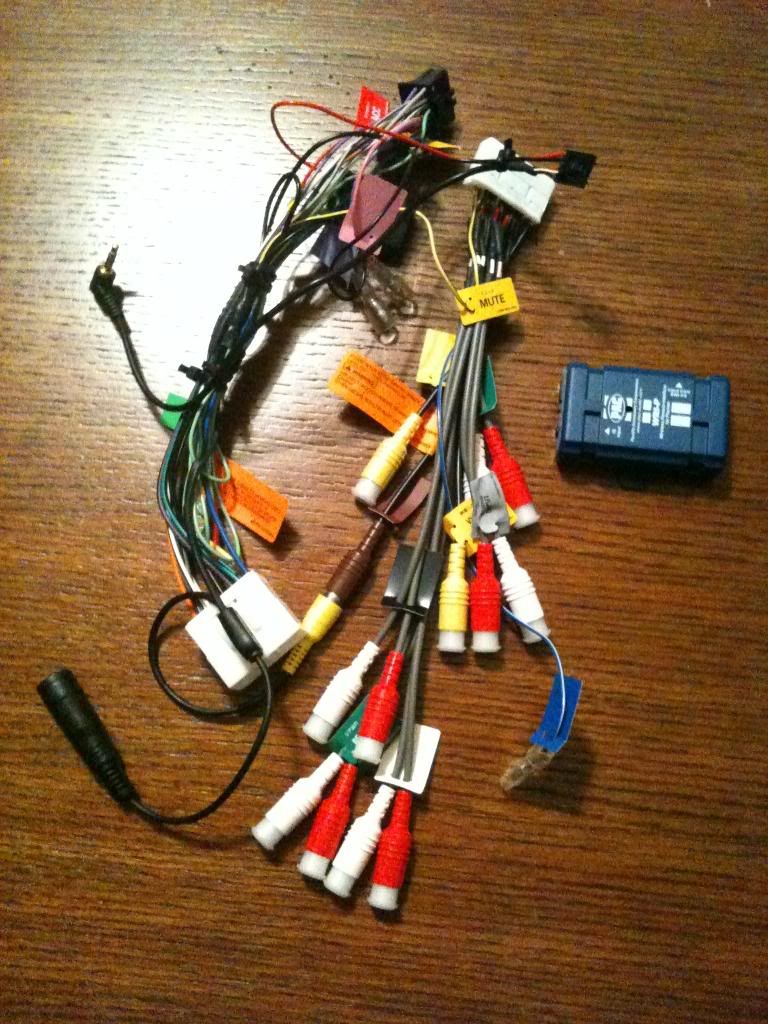
http://www.avic411.com/forum/viewtopic.php?f=57&t=25867
2. Once most of the prepartion is done with the wiring, and a quick read of the directions to get a general idea of how to install the new system. Follow the directions in the links below to take apart the dash.
http://homepage.mac.com/purduealum91/Saab92xRadioInstall/PhotoAlbum15.html
http://forums.nasioc.com/forums/showthread.php?t=1261005
http://avic411.com/forum/viewtopic.php?f=25&t=8699&p=57243#p57243
3. Others mount the GPS antenna under the clock pod, and the reception is not affected by being covered. I like the idea of mounting it here for the stealth factor, and since the dash is apart, it's also much easier to pop the clock out. It's lock in place by 4 plastic clips, 2 in front, and 2 on the side.
http://forums.nasioc.com/forums/showthread.php?t=1385926


4. Now the dash is apart, you're almost ready to install the new system. Carefully remove the OEM headunit and reuse the brackets with new flathead screws to mount the AVIC-Z110BT.


5. It's a good idea to finish all the wiring before connecting the headunit. I routed the ipod cable to the glovebox, will be easier to do if you take it off as well. Open the glovebox and you'll see it is held in place by 5 screws on top, 2 inside, 2 on the bottom, and 1 plastic twist screw on the side by doorjam.

6. While I was doing this install, I took the time to also hardwire the Valentine 1 to the auto-dimming rearview mirror wires by the moonroof. Helpful to have the hardwire kit from Valentine 1 which I purchased from their online store, but I guess you can also follow the instructions from the link below. Using vampire clips, I tapped into the yellow with red stripe for switch power, and black for ground
7. Remove the 3 blots holding the driver's sunvisor, and route the wires through headliner for Valentine 1 conceal display, and mic for handsfree talking.

8. Pop the A-pillar cover off by gently prying it off from the top. Read post #5 and 6 for more information in the link below. You basically have to yank it out.
http://www.scoobymods.com/mod-sti-type-ra-t3665.html
9. At this point, I turn my attention to mounting the license plate camera. If you're not installing a rearview camera, then you can skip these instructions. I wanted as stealth and OEM look as possible. Start by removing the ceiling interior panel, which you can gently pry to pop off. Forgot to take a pic of this one, but it's the long rectangular trim piece by the hatch opening. Just stick you head inside and turn to face up to the third brake light. Next remove the hatch interior trim. It's held in place by 3 clips at the bottom facing you when the hatch is open and you're standing facing the car as if you are loading some groceries. Carefully pop the 3 clips out and removing the black pin and white housing. The panel is held in place by 7-8 clips, see pic below, and read link for more information.
http://forums.nasioc.com/forums/showthread.php?t=1606356&highlight=remove+rear+panel+wagon

10. I fish the larger RCA plug through from the top to get inside the vehicle. Pics are worth a thousand words.

11. Then I sacrifice an old wire hanger attach to the beginning of the wire to help fish the rearview camera wires to where I need it through the metal door and plastic wire holder thingy. Just be patient and carefully push it through the metal door channel.


12. Remove the latch handle to slide wires through from license plate frame for rearview camera, and attach to the cable you just fish through with hanger.


13. Reinstall the interior trim panels, and careful to line up the clips before pushing with too much force. They could break easily from what I've read. Then finish by tucking the rearview camera wire into the roof headliner panels to the driver's A-pillar.


14. At the point, let's locate the reverse wire. Reverse wire is necessary to automatically switch to rear camera view when the gear to selected to R. Twist and pop out the plastic tap, and gently pry off the interior panel trim along the door jam. Remove another plastic twist cap, and see the shiny metal box which is the ECM. Remove 3 screws, and one 10mm nut for shiny cover. The ECM is held by another two 10mm nuts. DO NOT UNPLUG ANOTHER FROM THE ECM YET!! There are two brown with yellow stripe wires located beneath the carpet running by the door. Using a multimeter, have another person hold the car in reverse and test to see which brown with yellow stripe wires becomes 12+ when reverse gear is selected. The wire should go "dead" when car is back in neutral or drive. Vampire tap the brown with yellow stripe wire and connect the purple with black stripe wire to headunit harness.
15. Now disconnect the ground from the battery to turn car off. You'll need the VSS wire to help make the GPS more accurate if you happen to drive through a tunnel or dense urban jungle. Not required but highly recommended. For 2006 92x and WRX models, it's the green with yellow stripe wire located in B136 pin 13 of the ECM. Vampire tap it and connect the pink wire to headunit harness.


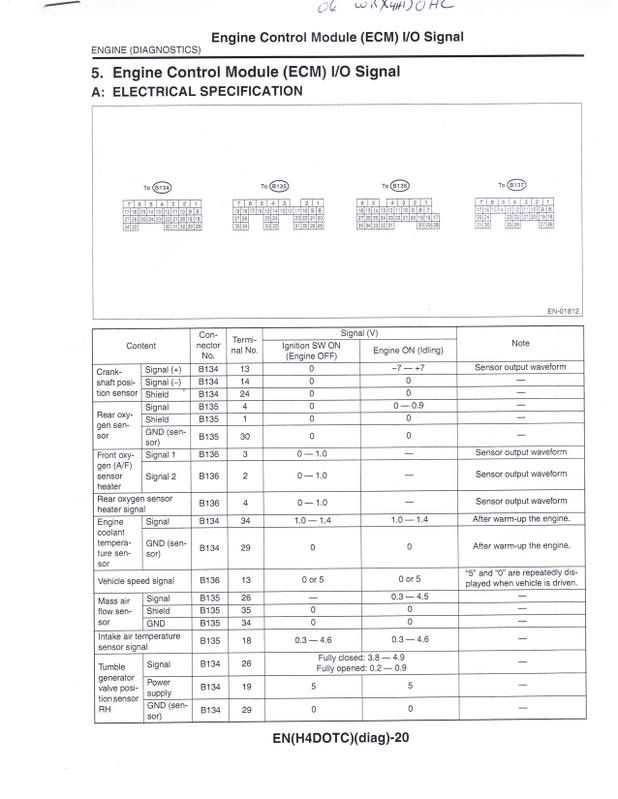
16. Connect your new headunit to all the wire harnesses and plug everything to its respective place. Reconnect the negative ground to battery and test your new headunit, by selecting reverse gear, play with GPS capabilities, etc. Don't drive, unless you like having everything apart and loose. Once you've confirm the connections are solid, reinstall the ECM with all the necessary screws and bolts. Tuck carpet back into place, and carefully slide interior door trim panel to lock.
17. Screw on the 6 screws to hold headunit securely. Make sure to reconnect the climate control plugs, and tighten 2 screws to hold the dash trim. Slide gear shifter back on by screwing it righty-tighty and slight everthing on.
18. I had fish the telephone wire from Valentine 1 to mount the concealed display in the ashtray. You will have to trim the opening slightly bigger and drill a hole in the ashtray to fit the wire through.

19. You're done! Enjoy your new headunit.
Again, I wanted as stealth and OEM install as possible, which I think I've accomplished. Here's a few more pics of the rear view camera in reverse gear mode.


Here's in rear view camera map mode.

I hope you found this helpful, and let me know what you think or if you need more help.
