I did finally get the video to playback on the 940. Using the Xvid codec and setting the resolution at 640x360, it works. It does not fill the screen, but at least it will play from the SD card. What a PITA!!!
Posted Mar 28, 2012 · 15:57 UTC#26
I did finally get the video to playback on the 940. Using the Xvid codec and setting the resolution at 640x360, it works. It does not fill the screen, but at least it will play from the SD card. What a PITA!!!
I spent quite a bit of time this morning trying different variations of MP4 video formats to get something working. I based my starting point off of bmw325ist's list. But I wanted the video to fill the screen. So here's what I did...
I downloaded Freemake.com's free video converter (http://www.freemake.com/free_video_converter/) It doesn't support drag-n-drop, but it will let you select a bunch of video files at once from the "add video" dialog. You can add a custom export profile. So I set one for MP4.
I kept testing 1 file that was fairly short and tried a bunch of different settings trying to get the best quality but still having it play normal. Here are the custom settings I ended with:
Video
Frame Size: Custom
Width: 512
Height: 288
Adjustment: Original
Codec: MPEG4
Frame Rate: Original
Bitrate type: Custom
Bitrate: 750 Kbps
Audio:
Codec: AAC
Channels: Original
Sample rate: Original
Bitrate: 240 Kbps
That produces video that fills the screen and plays smoothly. Hopefully, this helps out others trying to get this working on their units. I have a 920bt. These settings will probably work for the 940bt too and perhaps some other ones. The good news is you can tweak the settings from what I posted and get yours to work. At least the tool is free and seems to work pretty well (At least for my purposes. I haven't tried pulling from a DVD or anything. I've just been doing file conversions).
Good luck.
These are the settings I use and have 100% success with. DVDFab has failed me, HandBrake works great.
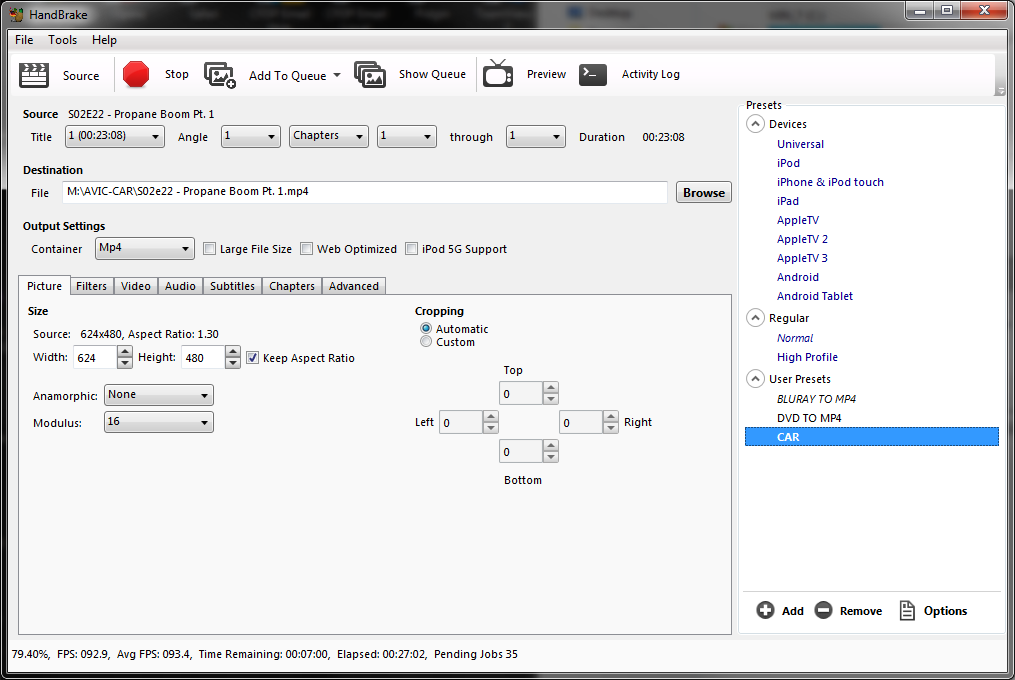
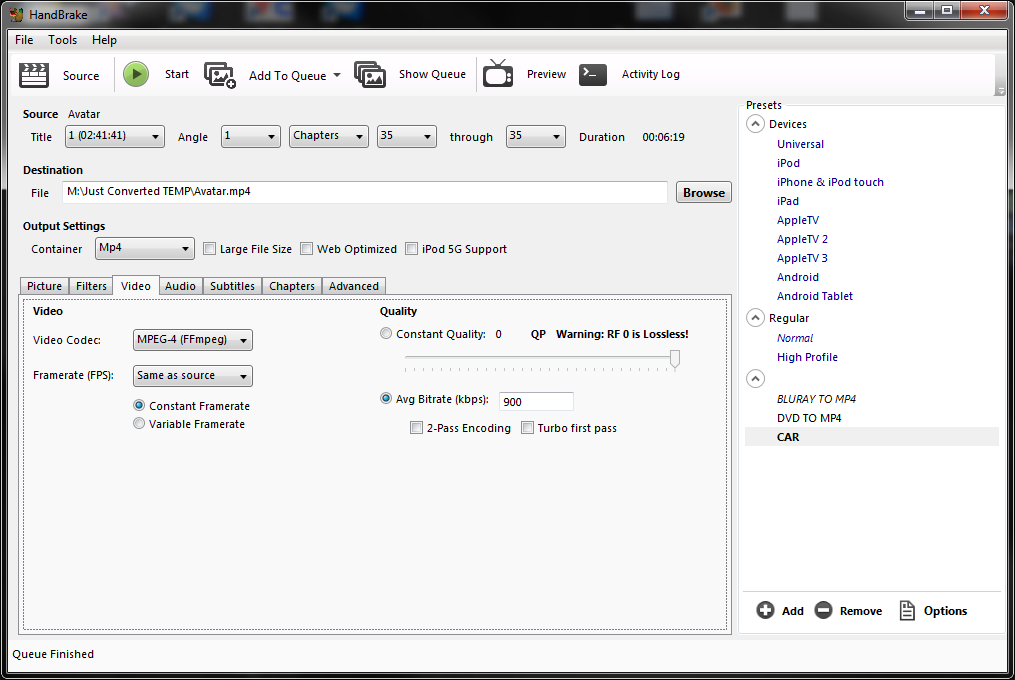
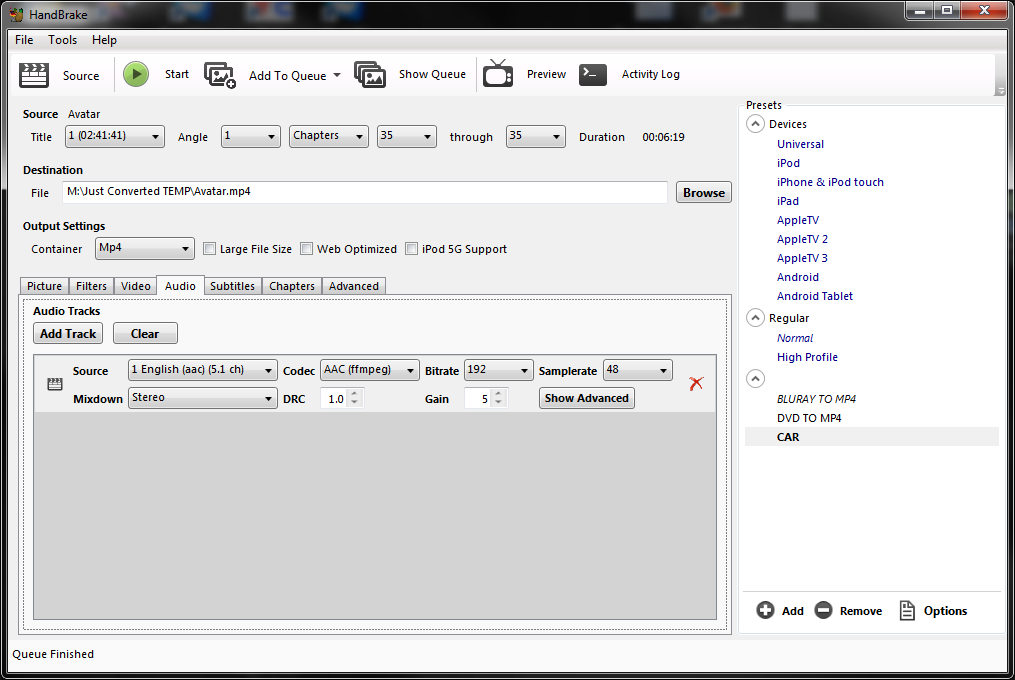
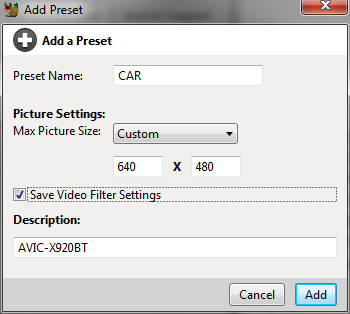
HandBrake version in the screenshots: 0.9.9.5530
On 6/13/2010 at 4:34 AM, bmw325ist said:I did a similar fight today. I used AVS Convertor and tried a whole slew of formats and also tested USB/SD and DVD-R medias. My tests are listed below, but the best format I've found was DivX 6 .avi format, 1500 kb video, 192 kb audio on a DVD-R. The results are on the left.
There is a cap on video bitrate like the manual says at 1000kb/s for the SD Card. This is NOT the case for the Data DVD-R. A regular dvd of up to 10.8 Mb/s can be played with the disc and the standard of 1500 kb/s works well with the DivX, but won't work with the SD. All the SD media at 640x480 was choppy (words didn't line up on the music videos) compared to the DVD-R. So use a data DVD-R if want smoothness and/or bitrate.
Back to SD conversion: most converters aren't exactly 1000kb/s, so you have to throttle back a little to get the output at as close to 1000 as possible without going over (that's why I used 995kb/s as the audio output). The native resolution of the screen is 800x480 but since that format is neither 4:3 or 16:9, there's no reason to try to get to that resolution, however, it does work. Also I noticed when playing from the SD, the smaller video resolutions do not auto scale up, but they do when playing from the DVD-R. Note: I used the x910bt for these tests. the z110bt should be the same.
I also wanted to mention that these specs might be different for the 120's because of the processor speed (This is why I'm going to the 120), it seems like the engine used for decompressing the USB/SD is much slower than the internal CD/DVD drive. I'll run the same tests on the z120bt when i get it next week
DVD-R/RW Media
Smooth - AVI - DivX - 320x240 @ 768kb/s Video - 192kb/s audio - 30 fps (fills screen)
Smooth - AVI - DivX - 640x480 @ 791kb/s Video - 192kb/s audio - 30 fps
Smooth - AVI - DivX - 640x480 @ 995kb/s Video - 192kb/s audio - 30 fps
Smooth - AVI - DivX - 640x480 @ 1500kb/s Video - 192kb/s audio - 30 fps
Unplayable - mov, mkv, mp4, .3gpp, other formats (i tried them)
USB / SD Media
Smooth - AVI - DivX - 320x240 @ 768kb/s Video - 192kb/s audio - 30 fps (does not fill screen)
Choppy - AVI - DivX - 640x480 @ 791kb/s Video - 192kb/s audio - 30 fps
Choppy - AVI - DivX - 640x480 @ 995kb/s Video - 192kb/s audio - 30 fps
Unplayable - AVI - DivX - 640x480 @ 1500kb/s Video - 192kb/s audio - 30 fps
Smooth - mp4 - MPEG4 - 320x240 @ 768kb/s Video - 192kb/s audio - 30 fps (does not fill screen)
Choppy - mp4 - MPEG4 - 640x480 @ 791kb/s Video - 192kb/s audio - 30 fps
Choppy - mp4 - MPEG4 - 640x480 @ 995kb/s Video - 192kb/s audio - 30 fps
Unplayable - mp4 - MPEG4 - 640x480 @ 1500kb/s Video - 192kb/s audio - 30 fps
Unplayable - mkv - H.264 - 640x480 @ 768kb/s Video - 192kb/s audio - 30 fps
Just to update, it works fine with MRZ-099. Did the conversion using Wondershare Video Converter with the said settings. Thank you sir for your help.
