Search Archive

2007 GMC Sierra 2500HD (Classic Body) AVIC-Z1 Install

By bajateam2 · Dec 28, 2006in General💬 39 posts👁️ 34,709 views
Page 1 of 2
Posted Dec 28, 2006 · 03:54 UTC#1

Hi all,


This site has been such an awesome resource for my install. I thought I’d give back by documenting my entire AVIC-Z1 Install on my 2007 GMC Sierra 2500HD (Classic Body Style) Truck.


During this install I utilized the existing XM Radio Antenna & Bracket.


Here’s a list of the components installed during the project:


Pioneer AVIC-Z1 $1,874.99

Pioneer CD-iB100ii Ipod Control Interface $49.99

Pioneer GEX-P10XMT XM NavTraffic Satellite Radio $159.99

Pioneer ND-BT1 Bluetooth Adapter for AVIC-Z1 $119.99

PAC SWI-PS - Pioneer and Sony Steering Wheel Radio Control Interface $69.99

Metra VT-GMRC-01 GM Class II D GM Class II Data bus Interface $39.99


I purchase these parts through Crutchfield. I said I’d never buy anything from them, due to their higher than normal prices, but my experience with them was wonderful. They gave me a discount on every item (but you have to ask for it). I highly recommend them. If you do purchase your AVIC through them, please use my referral code: p4xwv-87y17-17d6t. It will get both you and me a kick-back!


On to business:


This install was relatively simple once you established all the wiring points. Unfortunately the GM Radio Harness doesn’t supply the Vehicle Speed Sensor or Illumination leads, so I’ll show you where to find them (credit to the other awesome members will be given in the photos).


The following photos will illustrate the necessary steps for installing this bad boy…

Posted Dec 28, 2006 · 04:11 UTC#2

Removal:


First I recommend removing the dash panel, the kick panel under the steering wheel, and the instrument cluster. Also remove the storage pocket below the A/C vent, as this will make access much easier during the install.


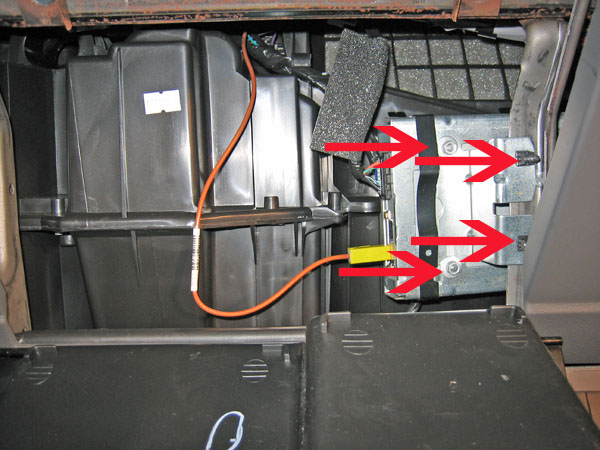
Now lower the glove box door. To do this, simply push the stop-limiter to the side when opening the door. You’ll notice the factory XM radio tuner behind the glove box.


Remove the tuner from the bracket first using a 7mm Socket. Once it’s loosened, removed it and start to unfasten the bracket from the vehicle. I’ll warn you now, that this step is a “bitch.†It took me about an hour, but it’s all worth it.


Once that’s out, go ahead and remove the factory stereo.

post-3109-12872751427421_thumb.jpg

post-3109-12872751428233_thumb.jpg

Posted Dec 28, 2006 · 04:52 UTC#3

Wire Preparation:


To connect the AVIC-Z1 to an easy illumination signal source, we’ll use a wire behind the light switch, so go ahead and remove the light switch module, and exposure the wiring harness behind it. Tap into the “brown/white†wire at the lower left pin of this connector (Thanks to silveradojeff for figuring this out).


The next wire we’ll tap into will be the vehicles speed sensor (VSS). This is located on the harness connect to the instrument cluster. Be careful, there are several “green/white†wires. We need to tap into the “green/white†associated with Pin A4.


The last critical wire is the vehicle’s “reverse†signal wire. The easiest access is located on a three wire harness below the driver’s side dash, refer to the photo (again, thanks to silveradojeff for figuring this out).

post-3109-12872751428803_thumb.jpg

post-3109-12872751429244_thumb.jpg

post-3109-12872751429821_thumb.jpg

post-3109-12872751430349_thumb.jpg

Posted Dec 28, 2006 · 05:00 UTC#4

Double DIN Preparation:


We’ll need to remove some plastic to fit the AVIC in the factory double DIN slot. Believe me, it won’t fit if you don’t remove this plastic…

post-3109-12872751430821_thumb.jpg

Posted Dec 28, 2006 · 05:13 UTC#5

Custom Bracket Fabrication:


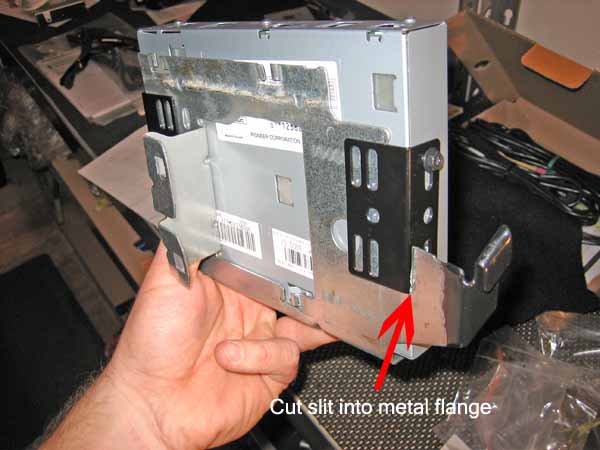
I really liked the location and bracket of the factory XM tuner. So instead of tossing it, I decided to “modify†it to fit the application. My intention was to use it to hold both the new XMNavTraffic & IPOD Adapter modules. Here’s how it developed.


First off if you had the patience to remove the factory bracket without destroying it, you’re off to a good start. The modification starts by removing the black clamps that secured the original XM tuner. Next, flatten the upper flange of the bracket so it looks like the next photo.


Then cut a slit into the modified bracket to accommodate the provided brackets. The idea is to hug the bracket. This works extremely well…

post-3109-12872751431274_thumb.jpg

post-3109-12872751431722_thumb.jpg

post-3109-12872751432157_thumb.jpg

Posted Dec 28, 2006 · 05:23 UTC#6

Attach the iPod Adapter to the XMNavTraffic Module:


This next step is fairly simple. I used the provided Velcro strips to tether the iPod Adapter to the XM Module.


Once this is done I suggesting attaching all the wiring, including the IP bus cables. BE SURE YOU DON’T CONNECT the red wire to either the XM or iPod modules, if you use an IP Bus cable it is not necessary to connect the red ignition wire. I’ve attached a photo of the finished product.


Lastly, attached the factory antenna connector to the XMNavTraffic Module. Be care to shave off the extra rib on the XM Module Male connector to accommodate to factory connector…

post-3109-12872751432587_thumb.jpg

post-3109-12872751433933_thumb.jpg

Posted Dec 28, 2006 · 05:29 UTC#7

Attach the Bluetooth Module:


This is definitely the simplest part of the entire installation. I recommend using Velcro to tether the Bluetooth module to the Heater Core enclosure below the center dash. No one will ever see it and it’s in perfect range of you cell phone. You can easily run the cable behind the dash and up behind the radio slot…

post-3109-12872751433024_thumb.jpg

Posted Dec 28, 2006 · 05:39 UTC#8

Wiring the PAC Steering Wheel Control Interface:


This part sucked since my 2007 GMC didn’t have the same connector described by PAC. I to experiment to eventually find the proper “light green†wire in the steering column. I had tapped into the “light green†wire that departs immediately from the steering wheel. Be careful when picking this wire, and be sure to refer to this document first: http://www.pac-audio.com/swixprogrammin ... les&ID=261

post-3109-12872751433494_thumb.jpg

Posted Dec 28, 2006 · 06:04 UTC#9

Metra Wiring Harness Preparation:


The Metra Wiring Harness is a very good harness. Here are a few tips I recommend when installing it:


First, THIS IS SUPER IMPORTANT, be sure to adjust the volume on the “factory chime replacement†break out box. I guarantee you the factor setting is TOO FREAKING LOUD! I almost had a heart attack when I first installed it. Lowering the volume involves cutting a circuit board lead (the instructions are provided in the installation guide), so be careful.


Second, use this opportunity to apply the Z1 Bypass described by Jason Hilton (http://www.sminntech.com/z1flash.html). I used the exact steps he describes, including utilizing the “cell phone mute wire†to ground out the specified pin. Thanks Jason, you rock!


Finally, I recommend connecting the common ground, ignition, and power wires from the installed components (PAC Controller, XM Module, iPod Adapter, etc.) to the Metra wire harness to avoid any ground loops.

Posted Dec 28, 2006 · 06:12 UTC#10

Bluetooth Microphone Installation:


The Bluetooth module isn’t the greatest hands-free kit in the world but it’s better than nothing. I installed the microphone onto my turn signal and it’s worked out well, refer to the photo.


Using a “System Volume†of 60-65% for Voice Volume has worked ok for avoiding the notorious echo problem…

post-3109-12872751434366_thumb.jpg

Posted Dec 28, 2006 · 06:13 UTC#11

Navigation Antenna Installation:


The metal area behind the double DIN slot offers a perfect shelf for the GPS antenna. The plastic dash above it does not affect the signal strength. In fact placing it on the metal shelf provides a superior ground…

post-3109-12872751434805_thumb.jpg

Posted Dec 28, 2006 · 06:29 UTC#12

Final Installation:


Make sure you’ve connected the following items (Check List):


Illumination Wire to Pioneer Wire Harness


VSS Wire to Pioneer Wire Harness


Reverse Signal Wire to Pioneer Wire Harness


Ground Wires (Black) from the PAC Steering Wheel Controller, XMNavTraffic, and iPod adapter modules to the Metra Wire Harness


Ignition Wires (Yellow) from the XMNavTraffic and iPod adapter modules to the Metra Wire Harness


Power Wire (Red) from the PAC Steering Wheel Controller


IP Bus Cable from XM & iPod Modules (daisy chained)


Bluetooth Cable directly to the AVIC


Microphone to Pioneer Wire Harness


PAC Steering Wheel Controller Output to Pioneer Wire Harness


Factor Radio Antenna to adapter, then to AVIC


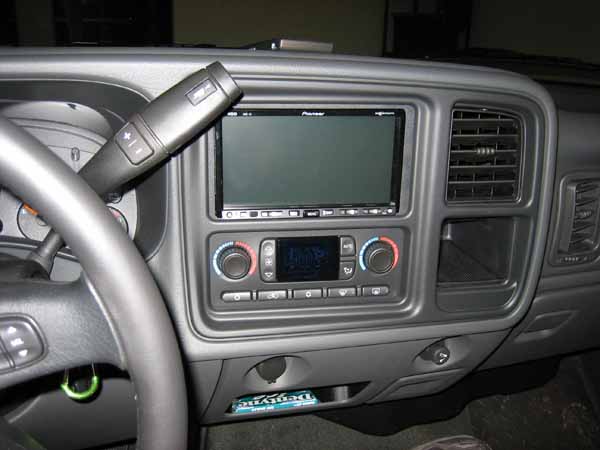
Once all these connections have been verified, I recommend reconnecting the batteries and verifying functionality of the AVIC-Z1. If everything works properly, carefully stuff the unit into the double DIN slot.

post-3109-12872751435254_thumb.jpg

Posted Dec 28, 2006 · 06:38 UTC#13

Final Comments:


Backup Camera

Originally I purchased the Pioneer Universal Camera. When I attempted to install it I realized how pointless and painful it was to install in on my “truck.†The camera doesn’t really offer any advantage for a truck for most applications. However, if often tow boats or trailers, it might be a good guide for lining up your trailer.


Bluetooth

The Bluetooth module hasn’t been as bad as everyone said it would be. Perhaps I have a later version, or maybe the location of my microphone AND volume combination works better than most. Either way it’s better than having no hands-free kit. I will experiment in the near future with DSP and phase shifting microphones to see if there is any improvement.


Other than those two areas, I’ve been extremely satisfied with this product and its install. Please feel free to post questions…


Take care,

Chris Castle

Posted Jan 04, 2007 · 01:34 UTC#14

Nice very detailed. By the way this setup will work on 2003 to the "07" classic body gm trucks, and suvs.

Posted Jan 04, 2007 · 23:08 UTC#15

That is correct sir. I had a 2004 Silverado before this, and it was nearly identical except for the steering wheel plug.

Posted Feb 05, 2007 · 22:39 UTC#16

Thank you for step by step instructions. I called Crutchfield to get a quote and referred your code. I am planning an install on a 2005 GMC Yukon 2500 which should be very similar to your truck. The rep said the steering wheel control unit would not work with the Z1 radio.

Did you get the same answer from them?

Does the PAC Steering Wheel control unit work in a GMC SUV wired for a BOSE system?


RBex

Posted Feb 05, 2007 · 23:08 UTC#17

Yes it does. The only ifference between your truck and his, is the bose system. Jus tmeans you need a different interface than the one he used.

Posted Feb 06, 2007 · 01:02 UTC#18

Called PAC and they informed me the same. Said I would need a CM1 OS2 BOSE part to keep the door chime and use of the subwoofer for the Z1. I didn't see this mentioned above. Any advice on how to do this?

Also was told no back seat controls for the Z1 if I use the Steering Wheel controller. If this is so I wonder if I could drop in the BOSE radio/CD in the rear controller space and let the passengers use headphones.

Thanks for the help

RBex

Posted Feb 06, 2007 · 03:27 UTC#19

Very impressive post. Nice organized work. Another example of quality interactions on a great site.


digxrayguy

Posted Feb 06, 2007 · 04:15 UTC#20
Called PAC and they informed me the same. Said I would need a CM1 OS2 BOSE part to keep the door chime and use of the subwoofer for the Z1. I didn't see this mentioned above. Any advice on how to do this?

Also was told no back seat controls for the Z1 if I use the Steering Wheel controller. If this is so I wonder if I could drop in the BOSE radio/CD in the rear controller space and let the passengers use headphones.

Thanks for the help

RBex


Not quite sure I'm understanding what you're asking here.

Posted Feb 20, 2007 · 03:05 UTC#21

what trim ring did you use? that doesnt look like the pioneer one, it seems a bit wider.

Posted Feb 21, 2007 · 17:10 UTC#22

From what I can see it looks like he used the trim ring from the gm double din kit. Could be wrong though.

Posted Aug 21, 2007 · 18:17 UTC#23

great write up!

Posted Sep 17, 2007 · 14:18 UTC#24

Thanks a bunch for this post. I was able to alot of the hard work before my stuff even showed up. Your post probably saved lives (he he).

Posted Sep 21, 2007 · 05:22 UTC#25

Here’s a list of the components installed during the project:


Pioneer AVIC-Z1 $1,874.99

Pioneer CD-iB100ii Ipod Control Interface $49.99

Pioneer GEX-P10XMT XM NavTraffic Satellite Radio $159.99

Pioneer ND-BT1 Bluetooth Adapter for AVIC-Z1 $119.99

PAC SWI-PS - Pioneer and Sony Steering Wheel Radio Control Interface $69.99

Metra VT-GMRC-01 GM Class II D GM Class II Data bus Interface $39.99


What parts do i need/change from the list if i have a bose/onstar? also, the referral code is invalid???

Page 1 of 2