Search Archive

How do I get back to this iPod screen?

By cpkdude · Jan 30, 2011in General💬 27 posts👁️ 3,916 views
Page 1 of 2
Posted Jan 30, 2011 · 17:04 UTC#1

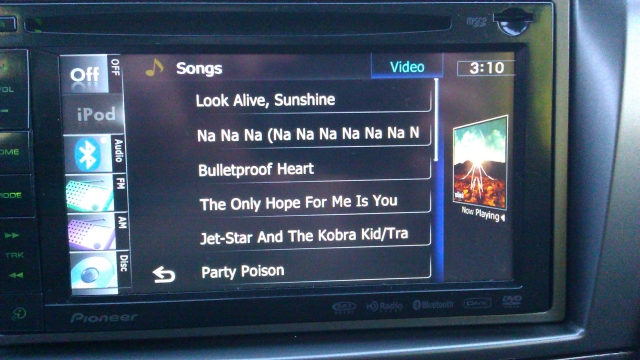
When you first select an album while in iPod mode, a screen comes up displaying ALL the songs on said album.


Once you pick a tune to start playing, I can't for the life of me find out how to get back to that screen again, save for the unbelievably cumbersome going back through the whole process again, aka "alphabetical/artist/album title/select album", which seems like poor interface navigation.


Is that the only way back to this screen (seen in picture), or am I missing a simple button press I couldn't find in the manual?
post-44279-0-45013100-1296406865_thumb.jpg

Posted Jan 30, 2011 · 17:11 UTC#2

You have to go back through the whole process.

Posted Jan 30, 2011 · 17:26 UTC#3

You have to go back through the whole process.


that's sad. Maybe the people you know close to the Pioneer software coding process could include a faster way to get to this screen in the new software update?

Posted Jan 30, 2011 · 17:39 UTC#4

what happens when you press the back button icon on the bottom?

Posted Jan 30, 2011 · 18:47 UTC#5

Actually rgarjr is right, I was mistaken. If you hit the back button (the one at the bottom center with the left facing arrow) it will return to the songs page. Once you power off the unit however, everything resets.

Posted Jan 30, 2011 · 23:03 UTC#6

Actually rgarjr is right, I was mistaken. If you hit the back button (the one at the bottom center with the left facing arrow) it will return to the songs page. Once you power off the unit however, everything resets.


there's no button "on-screen" that gets me back there. Do you mean the physical plastic button to the left of the screen? Once you LEAVE the page in the picture, there's no way I've found back (with a single button or icon press)

Posted Jan 31, 2011 · 03:47 UTC#7

What do you mean by "leave the page"?

Posted Jan 31, 2011 · 05:27 UTC#8

What do you mean by "leave the page"?


So, you have the page up that I pictured, then you select one of the songs from the list. After that point, I can't find a way to just "get back" to that song list without going thru the whole navigation menu system. That seems like an oversight in interface structure

Posted Jan 31, 2011 · 06:55 UTC#9

Post a pic of what your screen looks like after you select the song.

Posted Jan 31, 2011 · 07:14 UTC#10

Post a pic of what your screen looks like after you select the song.


After you select a song it goes to the standard ipod music page, ie artist/song/album with album art off to the right and the scrolling list of songs above and below the album art icon. the back arrow at the bottom doesn't take me back to the album song listing.

post-44279-0-75925500-1296458061_thumb.jpg

Edited Jan 31, 2011 by cpkdude
Posted Jan 31, 2011 · 08:05 UTC#11

You know you can press the name of the album/song/artist right?

Posted Jan 31, 2011 · 17:42 UTC#12

You know you can press the name of the album/song/artist right?


yes, but from any of those you still can't get back to the list of songs per album.


and, I couldn't make any entries on this forum from an iPad. Any ideas why - is this a Flash based system?

Posted Jan 31, 2011 · 20:02 UTC#13

The back button takes me back to the previous album on my unit.

Posted Jan 31, 2011 · 20:04 UTC#14

You know you can press the name of the album/song/artist right?


Jason are you sure? I believe the last time I tried that it didn't take me back to the artist or album playing. It took me to the all artist or all album list. I will need to check again to be sure.

Posted Jan 31, 2011 · 20:05 UTC#15

The back button takes me back to the previous album on my unit.


post a picture of which back button you mean if you can, and what the screen looks like when you get there.

Is it the same screen that I posted initially?

What version of software are you running - 2.03?

Posted Jan 31, 2011 · 20:06 UTC#16

Jason are you sure? I believe the last time I tried that it didn't take me back to the artist or album playing. It took me to the all artist or all album list. I will need to check again to be sure.


that's what mine does - it takes me to ALL songs, ALL albums, or ALL artists, filed alphabetically from 'A'

Posted Jan 31, 2011 · 20:59 UTC#17

Thats when hitting the ARTIST or ALBUM section. If you touch the left arrow symbol it should return you to the previous album from which you selected the song from.

Posted Jan 31, 2011 · 22:30 UTC#19

yes, but from any of those you still can't get back to the list of songs per album.


and, I couldn't make any entries on this forum from an iPad. Any ideas why - is this a Flash based system?


Ahh, I guess I missed that part. Yeah, clicking on the album/song will take you to all albums/songs.

Not sure why it's not working for you. It's not flash and it works fine on my iPad and iPhone.

Posted Jan 31, 2011 · 23:41 UTC#21

Yes.


hehe - maybe when I updated the iPad to dreaded 4.2 it's caused a new problem - I can't get a text cursor in the reply boxes, and hence, no virtual keyboard appears.


As far as the left arrow key and the album song list, so we all agree now that once you pick a song and start playing it, you're pretty much screwed to get back to that particular album's song list WITHOUT dancing through a few menus, correct? I just tried again in my car, and that screen only appears when you first pick the album from the album list.

If I pick a song, it starts to play, and I hit the "album" icon on the screen, I get taken back to ALL albums, NOT the one the song is playing from. And that's a little stupid.

Edited Jan 31, 2011 by cpkdude
Posted Feb 01, 2011 · 01:01 UTC#22

hehe - maybe when I updated the iPad to dreaded 4.2 it's caused a new problem - I can't get a text cursor in the reply boxes, and hence, no virtual keyboard appears.


Works fine for me, running 4.2 as well.

Photo Jan 31, 8 14 48 PM.jpg

Edited Feb 01, 2011 by JasonH
Posted Feb 01, 2011 · 02:42 UTC#23

Hit the arrow button not the ALBUM button. But yes, agreed if you hit the ARTIST, ALBUM, PLAYLIST buttons.

Posted Feb 01, 2011 · 03:24 UTC#24

Hit the arrow button not the ALBUM button. But yes, agreed if you hit the ARTIST, ALBUM, PLAYLIST buttons.


thanks, it doesn't matter if i hit the arrow, album, artist or song button - once the song has started playing there is no way back to the album's songlist screen without starting over

Posted Feb 01, 2011 · 03:24 UTC#25

Works fine for me, running 4.2 as well.


ok, thanks for the visual - i'll restart it once again and see if that clears things up

Page 1 of 2