Search Archive

start Windows Explorer at AppRadio (SPH-DA01)

By carver · Nov 15, 2011in AppRadio, AppRadio 2, AppRadio 3💬 36 posts👁️ 34,996 views
Page 1 of 2
Posted Nov 15, 2011 · 00:09 UTC#1

1) a small utility to run Windows Explorer instead of the standard shell on Pioneer AppRadio SPH-DA01.


need to unpack the attached file, put CE66Tool.exe in the root of the microSD card and turn on the device.

CE66Tool.rar


2) also, if anybody need, files from \windows folder

pioneer appradio v2.22 windows folder.rar


3) i also try unpack sample.dui with script and picture, but it so hard for me, so i share only then there. 

for see picture - you can open some big *.raw files from sample.dui in InfranView, as RAW,

set 800x480, offset 80 and 32 bit, and it show. for other picture - need other resolution (two first file byte)

so, i just share sample.dui, perl script and extracted parts inside link.

http://www.4shared.c...pledui_unp.html

Edited Nov 22, 2011 by carver
Posted Nov 15, 2011 · 14:21 UTC#2

Great news, let the hacking begin. Anyone try this yet?

Posted Nov 15, 2011 · 20:45 UTC#3

Yup. I've to confirm I just changed the wallpaper by starting Windows CE with the file posted above.. Then I opened WIndows Explorer and open Nand Memory. There you'll find all appradio system files structured like the updates.


As crakavelli says.. let's the hacking begin!!

Posted Nov 15, 2011 · 21:02 UTC#4

Awesome! thank you

Posted Nov 16, 2011 · 02:47 UTC#5

I've just gotten CE to boot up on mine... Kinda hard to press the buttons as they come up pretty tiny.... But shows promise.... I think I might dive thru the last update and see what can be found...

Posted Nov 16, 2011 · 04:25 UTC#6

Yup. I've to confirm I just changed the wallpaper by starting Windows CE with the file posted above.. Then I opened WIndows Explorer and open Nand Memory. There you'll find all appradio system files structured like the updates.


As crakavelli says.. let's the hacking begin!!


@xradeon I ready try It say there is no application associated with nx120_bg_2

Run the application first ,then open this file from whitin the application


Can you make tutorial how did you did?

Edited Nov 16, 2011 by Sciontc05
Posted Nov 16, 2011 · 08:26 UTC#7

Ok the easy way..


Copy that file to SD card, and open it with your pc, it's a bmp image.


Then edit it or save any image you want with the same name (nx120_bg_2 or nx120_bg_1 depending which one you want to replace) same size (800 x 480) and same file extension (BMP 24 Bits in paint).


Finally copy and replace one or both files on the Wallpaper directory in the nand.

Posted Nov 17, 2011 · 20:01 UTC#8

So what do we know now?


Appradio uses a AMD Alchemy CPU (MIPS)


What are the modding possibilities?

Posted Nov 18, 2011 · 14:35 UTC#9

Ok the easy way..


Copy that file to SD card, and open it with your pc, it's a bmp image.


Then edit it or save any image you want with the same name (nx120_bg_2 or nx120_bg_1 depending which one you want to replace) same size (800 x 480) and same file extension (BMP 24 Bits in paint).


Finally copy and replace one or both files on the Wallpaper directory in the nand.


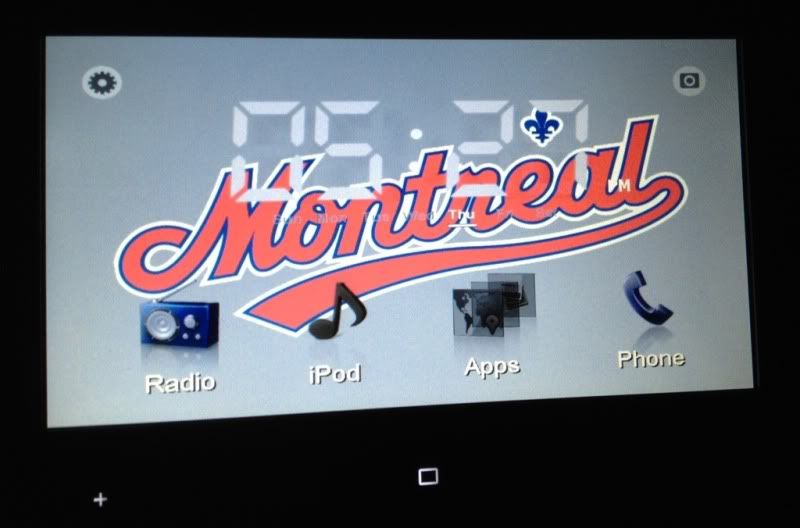
Thanks for the instructions! Tried it out last night and worked like a charm, see below. Used photoshop elements to open the original backgrounds and create my own. My custom background colors don't work with the rest of the elements so I'll have to work on some new ones :)


30187b19.jpg

Posted Nov 18, 2011 · 23:37 UTC#10

I came across a file called (when googling) pioneer appradio v2.2.2 CEOS files

I know nothing about programming etc, when extracted loads of files but i dont know how to run it. I've got CE5 Emulator but then i'm lost!

Posted Nov 19, 2011 · 01:19 UTC#11

djsri if you have a ce5 emu just put all nand files on a folder (or maybe you can use the ones you downloaded) and run cis.exe. I havn't tried that yet, but in Win CE in the HU if you execute that file it loads the appradio interface..

Posted Nov 19, 2011 · 01:21 UTC#12


Thanks for the instructions! Tried it out last night and worked like a charm, see below. Used photoshop elements to open the original backgrounds and create my own. My custom background colors don't work with the rest of the elements so I'll have to work on some new ones :)


Nice work rsquared!! Maybe we can create a thread for sharing our backgrounds..

Posted Nov 19, 2011 · 12:13 UTC#13

djsri if you have a ce5 emu just put all nand files on a folder (or maybe you can use the ones you downloaded) and run cis.exe. I havn't tried that yet, but in Win CE in the HU if you execute that file it loads the appradio interface..

Thanks for the reply, need help please

I run this command


"C:\Program Files (x86)\Microsoft Device Emulator\1.0\deviceemulator.exe" /video 800x480x16 /memsize 256 /c nk.bin /sharedfolder "F:\Avic F900BT Software\Avic_Emulator"


This is From when i was messing around with the F900BT


I downloaded the Nand files from the AppRadio (Ce66 folder and Ce66_BAK folder with other files in the root). How do i run the appradio files? do i need another .BIN file? because every time i run CIS.exe from the emulator i get (CIS is not a vaild windows CE application)


Cheers

Posted Nov 19, 2011 · 13:51 UTC#14


Thanks for the instructions! Tried it out last night and worked like a charm, see below. Used photoshop elements to open the original backgrounds and create my own. My custom background colors don't work with the rest of the elements so I'll have to work on some new ones :)


30187b19.jpg

Sweet wallpaper !


I noticed a specific folder for the font.. Has anyone tried to change that ? I guess next step would be icons as well.

Posted Nov 19, 2011 · 15:05 UTC#15

have you found the icons?

I think they are in sample.dui but i dont know how to extract them from that type of file extension.

Posted Nov 19, 2011 · 20:03 UTC#16

I downloaded the Nand files from the AppRadio (Ce66 folder and Ce66_BAK folder with other files in the root). How do i run the appradio files? do i need another .BIN file? because every time i run CIS.exe from the emulator i get (CIS is not a vaild windows CE application)

at this moment - MS Device emulator working only for ARM CPU.

Appradio used MIPS CPU, and no windows CE emulator for it.


sample.dui - is format from CE66 series of ForYou Ge, but no unpacker/packer for it at this moment also.

Posted Nov 19, 2011 · 22:44 UTC#17

Carver,


Many thanks for the top info. I'll stop trying then.

Posted Nov 19, 2011 · 23:46 UTC#18

i add files from \windows folder, with default registry, to first post.

Posted Nov 20, 2011 · 17:46 UTC#19

Interface files are on sample.dui, but no idea how to unpack it.. Also not to much to do on windows folder..

Posted Nov 20, 2011 · 19:31 UTC#20

I have the same problem with my scion tc and I dont know If the scion is powered anntena

Posted Nov 22, 2011 · 23:14 UTC#21

Interface files are on sample.dui, but no idea how to unpack it.. Also not to much to do on windows folder..

i try unpack sample.dui with script and picture, but it so hard for me, so i share only then there.

for see picture - you can open some big *.raw files from sample.dui in InfranView, as RAW,

set 800x480, offset 80 and 32 bit, and it show. for other picture - need other resolution (two first file byte)

so, i just share sample.dui, perl script and extracted parts inside link.
http://www.4shared.com/file/BE_zV8v9/pioneer_appradio_sampledui_unp.html

Edited Nov 22, 2011 by carver
Posted Nov 26, 2011 · 02:17 UTC#22

Guys, I need your help.


Today I was updating to 2.22 software version and on end of the process I reset and my radio now is starting the windows CE Instead of the appradio software. Windows CE start and reset after 3 seconds doing a loop. When I insert the memory card the sustem let me work on windows but I do not have any idea to run something on fhe folders to solve the problem. Anyone can help?

Posted Nov 26, 2011 · 10:03 UTC#23

You talking about the firmware update from pioneer? Can you not try re-flashing again?

You are booting the app radio up without the storage card in?

Posted Nov 26, 2011 · 10:22 UTC#24

Yes it is about the updating. When I reboot without the card the system always go to windows ce and it restart after 5 seconds doing a looping. I already copy all files from de card to nand memory, but I did not have any sucess on it. The main issue is becaiae I cant return it. I bought the radio there in EUA, and I brought the radio do Rio de Janeiro, where this stereo has not been released.

Posted Nov 27, 2011 · 06:02 UTC#25

Yes it is about the updating. When I reboot without the card the system always go to windows ce and it restart after 5 seconds doing a looping. I already copy all files from de card to nand memory, but I did not have any sucess on it. The main issue is becaiae I cant return it. I bought the radio there in EUA, and I brought the radio do Rio de Janeiro, where this stereo has not been released.


Cheers! Same here.. I'm from Mexico.. I think that you can get all files that goes in the Nand on the firmware update. There are only 2 extra files that I have on my nand that there aren't in the firmware update file. I've uploaded the zip with these two files here: http://www.paginasprodigy.com.mx/fidellopezzz/2files.zip


Try copying these two files on the nand too with all the firmware update zip content. Tell us if it works..

Page 1 of 2