If the unit boots up on the AV screen, you're going to get the warning screen when you switch to home/navi/phone screens. It's been that way forever and it's not going to change. It's not a "bug".
Posted May 10, 2012 · 03:38 UTC#26
If the unit boots up on the AV screen, you're going to get the warning screen when you switch to home/navi/phone screens. It's been that way forever and it's not going to change. It's not a "bug".
Assuming you're trying to select a different source, have you tried setting up sources in the short cut screen and hitting the MENU button instead?
If the unit boots up on the AV screen, you're going to get the warning screen when you switch to home/navi/phone screens. It's been that way forever and it's not going to change. It's not a "bug".
I may be wrong and I no longer have any of these units but I thought I remember it only displaying if you hit the navi symbol.
Nope, now I remember. You're right.
I may be wrong and I no longer have any of these units but I thought I remember it only displaying if you hit the navi symbol.
That is what would make sense.
I may be wrong and I no longer have any of these units but I thought I remember it only displaying if you hit the navi symbol.
Nah, if it boots on AV, pressing home or mode triggers the warning.
Which, since it makes absolutely no f'ing sense whatsoever, is a BUG. Doesn't matter to me if it's been copy/pasted for the entire Z series. It's still a bug, and I'm going to pursue it as such.
It's not just the Z series, it's every AVIC (including the D series). If the unit boots up on AV, switching modes triggers the warning.
Also, just hold down the home button if you want to turn the screen off.
Although #2 does sound like a legitimate bug, I can't investigate because I'm bypassed.
#3: I haven't seen anyone else have this issue.
Also, just hold down the home button if you want to turn the screen off.
Although #2 does sound like a legitimate bug, I can't investigate because I'm bypassed.
#3: I haven't seen anyone else have this issue.
Holding down Home does absolutely nothing on my unit. I'm not bypassed (yet).
And having a D3 unit for many years, I can assure you that I never had to press the Navi warning until I actually went to the Navi screen.
The D3 didn't have a home screen or a home button. You only had AV and Navi which were switched via the map button.
Switching from AV to Navi would trigger the warning on the D3.
Which, since it makes absolutely no f'ing sense whatsoever, is a BUG.
Dude! If they wrote it into the system on purpose to work that way its not a bug. Its by design and we have bitched louder then you about for at least 3 plus years so its not going to change. It doesn't have to make sense to be by design. It sucks but unfortunately thats the way it is. And if it does change because of popular demand, you wont see the change until the next unit is released.
I'm still not clear as to why it is necessary to click through the Navigation warning when going to the Home screen.
Please, gents, I don't want this thread to turn into a battle amongst ourselves. That is most certainly not my intent. If my language reads confrontational, please imagine it as being directed at the programmers, and not you.
I'll try to keep my tone a bit more civil, but my frustration with this is going to continue.
By design or not, this is still a stupid way to program the unit. I should only be forced to read the nanny screen when going to the Navi screen, end of story. Perhaps we don't call it a bug then. Let's just call it programmed stupidity and be done with it.
... I should only be forced to read the nanny screen when going to the Navi screen, end of story. Perhaps we don't call it a bug then. Let's just call it programmed stupidity and be done with it.
I don't mind the screen so much as the long delay I sometimes get - a blank screen for several seconds - then the Text screen, then the button which is grayed out (inactive) for a few seconds. Finally it turns blue - and I often have to press it a few times before it takes. All this while I'm tryin to drive and shift. Jeez.
I'm still not clear as to why it is necessary to click through the Navigation warning when going to the Home screen.
Gooder you don't have to understand it. It works that way because thats the way Pioneer decided it would work. And thats not the only example that will leave one's head scratching with these units. This kind of buffoonery is nothing new with them. I use to be you on this forum about 4-5 years ago so I know how you feel. There is one jack ass that works or worked there that I tried to have some issues addressed with that had me wanting to get my hands around his throat. You just have to get to a place with them that, if you are going to own their units, you have to learn to accept a certain amount of buffoonery while enjoying the good features and benefits that do make sense. Either that or move on to something much better as I have done. But at this point it does appear you are getting yourself a little to worked up and should take a deep breath. I don't think anyone on this forum thinks your screaming at us as opposed to just screaming out loud but you shouldn't let yourself get so worked up over a head unit. Check out the following vids as a little therapeutic time out.
http://avic411.com/index.php?/topic/34165-honda-civic-ipad-install-20/
By design or not, this is still a stupid way to program the unit. I should only be forced to read the nanny screen when going to the Navi screen, end of story. Perhaps we don't call it a bug then. Let's just call it programmed stupidity and be done with it.
I agree, but Pioneer is never going to. Also, I think "programmed stupidity" is my new favorite quote on here.
Also, I think "programmed stupidity" is my new favorite quote on here.
I know right! I thoroughly enjoyed that phrase as well.
Nah, if it boots on AV, pressing home or mode triggers the warning.
Which sucks.
You get used to it...
Perfect example of the tail wagging the dog.
I can not get the radio station info to display on my 140 either. We do not have HD radio in Canada but the old Bose HU showed the station and song info, I would have thought this new would have done that too. At the very least is there a way to program the name of the station manually. So far not too impressed with this HU.
I can not get the radio station info to display on my 140 either. We do not have HD radio in Canada but the old Bose HU showed the station and song info, I would have thought this new would have done that too. At the very least is there a way to program the name of the station manually. So far not too impressed with this HU.
It should show basic station name/song name under the frequency. It won't show the names on the preset screen, however.
It should show basic station name/song name under the frequency. It won't show the names on the preset screen, however.
I haven't had any luck with that either. I have stations coming in full reception and nothing. Is there a way to turn the station info on and off? Also the reception can't be the issue as I get all the traffic updates. I changed my antenna hook up and still nothing. Can someone post a screen shot of their Z140 showing the station and song info? I really don't understand why its not working, my 10 year pioneer HU had it.
I haven't had any luck with that either. I have stations coming in full reception and nothing. Is there a way to turn the station info on and off? Also the reception can't be the issue as I get all the traffic updates. I changed my antenna hook up and still nothing. Can someone post a screen shot of their Z140 showing the station and song info? I really don't understand why its not working, my 10 year pioneer HU had it.
I've seen station info like call sign on my FM/HD dial on the Z140. I never use the regular radio, so I can't comment on other than what I saw once for 10 seconds.
EDIT: Just went out to my car and messed around with it for 5 minutes.
Here is how it works. When you tune to a station if it's Non-HD one of two things happens
1. You see nothing under the display (say 94.7)
2. You see the Call Sign (for example I'd see WCSX under 94.7)
If the station is HD (and sometimes it has to be tuned to the frequency for 5 seconds) then the following happens
You see the Call Sign (for example I'd see WCSX HD1 under 94.7)
Now in HD mode you can his DISP and it will cycle between various displays. Most stations have Call Sign, Artist Name, Song Title as the options.
You LOSE RDS Data which is what you had on the previous unit (I have a Z110 with Z130 Software). Canadian stations ONLY have RDS, they use DAB not HD Radio for "Digital Radio." I know this as I get no info on the Z140 for 88.7 and 93.9 both Windsor, ON, Canada stations, but on my Z130 I get RDS info.
The HD Module is also why the presets all say CH1-CH6 not the frequency or Call Sign/RDS data like they do on the earlier models. It appears the HD Module has pluses and minuses.
Your no signal issue might be you have the Tuner in "HD Only" mode. If it can't find an HD signal it cuts the radio out. Keep it on "blended."
I've seen station info like call sign on my FM/HD dial on the Z140. I never use the regular radio, so I can't comment on other than what I saw once for 10 seconds.
EDIT: Just went out to my car and messed around with it for 5 minutes.
Here is how it works. When you tune to a station if it's Non-HD one of two things happens
1. You see nothing under the display (say 94.7)
2. You see the Call Sign (for example I'd see WCSX under 94.7)
If the station is HD (and sometimes it has to be tuned to the frequency for 5 seconds) then the following happens
You see the Call Sign (for example I'd see WCSX HD1 under 94.7)
Now in HD mode you can his DISP and it will cycle between various displays. Most stations have Call Sign, Artist Name, Song Title as the options.
You LOSE RDS Data which is what you had on the previous unit (I have a Z110 with Z130 Software). Canadian stations ONLY have RDS, they use DAB not HD Radio for "Digital Radio." I know this as I get no info on the Z140 for 88.7 and 93.9 both Windsor, ON, Canada stations, but on my Z130 I get RDS info.
The HD Module is also why the presets all say CH1-CH6 not the frequency or Call Sign/RDS data like they do on the earlier models. It appears the HD Module has pluses and minuses.
Your no signal issue might be you have the Tuner in "HD Only" mode. If it can't find an HD signal it cuts the radio out. Keep it on "blended."
Thanks for that. I have played with every setting and I have switched between analog and blended with no luck. I guess it must just be that the Z140 can't get the data through an analog station. Thats mighty disappointing. Thanks for the help though.
The 140 does the same thing. No RDS info. Kinda anyoing. special when you cant set preset names. Is the digital radio the external box? What happens if you remove that box and plug antenna right in the deck? Will RDS work that way? If so you could program your presets and get the RDS info? Just a thought.
Mike
I have a noticed a bug in the bluetooth when streaming audio. IT seems that the connection status always says connecting and never connected but it still stream fine. See picutre
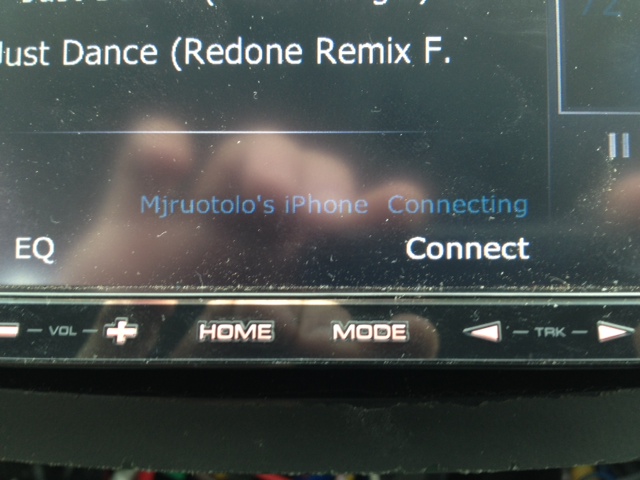
I have a noticed a bug in the bluetooth when streaming audio. IT seems that the connection status always says connecting and never connected but it still stream fine. See picutre
Is this repeatable?
I don't have an Iphone, but I will try it on my Android and see if this is the case on my setup as well. If it is, then we've found ourselves a bug.