Search Archive

AVIC-8000NEX before/after installation

By rso81 · Apr 01, 2014in NEX Series💬 42 posts👁️ 14,319 views
Page 1 of 2
Posted Apr 01, 2014 · 20:05 UTC#1

Hello,


My installation appointment is tomorrow! I will post pics of how the dash currently looks, prior to the upgrade to the almighty 8000NEX...


Behold the ugliness of all those buttons/knobs, and the retro CD-Changer on the glove box. Yes, that is in fact a cd changer, not a DVD changer...

post-113829-0-39724800-1396382582_thumb.jpg

post-113829-0-97330200-1396382609_thumb.jpg

post-113829-0-72363100-1396382619_thumb.jpg

Edited Apr 01, 2014 by rso81
Posted Apr 02, 2014 · 03:43 UTC#2

Nice . Cant wait. Ill be taking pics and videos of my whole install.

Posted Apr 02, 2014 · 14:35 UTC#3

Car's in the shop! I told them that if they can't get the steering wheel controls to work, put it back together, deal's off...otherwise proceed! They're using an interface module made by PAC Audio for Audi's, the RP4-AD11. Fingers crossed!

Posted Apr 02, 2014 · 15:15 UTC#4

We had some issues with the pac steering controls.  There is a new version of them that works better, but honestly I would ask them if they will install the Maestro part for you.

Posted Apr 02, 2014 · 15:35 UTC#5

Maestro won't work with Audi (yet). They have just verified buttons are working as they should, so I gave them the go-ahead.


In the future, should Maestro work with Audi after a firmware update....I'm changing!

Posted Apr 02, 2014 · 18:52 UTC#6

If you look the Maestro isn't compatible but their standard harness is..go here http://www.idatalink.com/ and select what Audi you have and it will show you what it can do. 

Posted Apr 02, 2014 · 21:37 UTC#7

Eh.....it's already moving forward. Oh well

Posted Apr 03, 2014 · 03:16 UTC#8

It's installed. Pics coming soon

Posted Apr 03, 2014 · 12:24 UTC#9

Here is the end result of yesterday's installation. It looks significantly better than Audi's stock nav radio (also a lot less buggy, believe it or not).


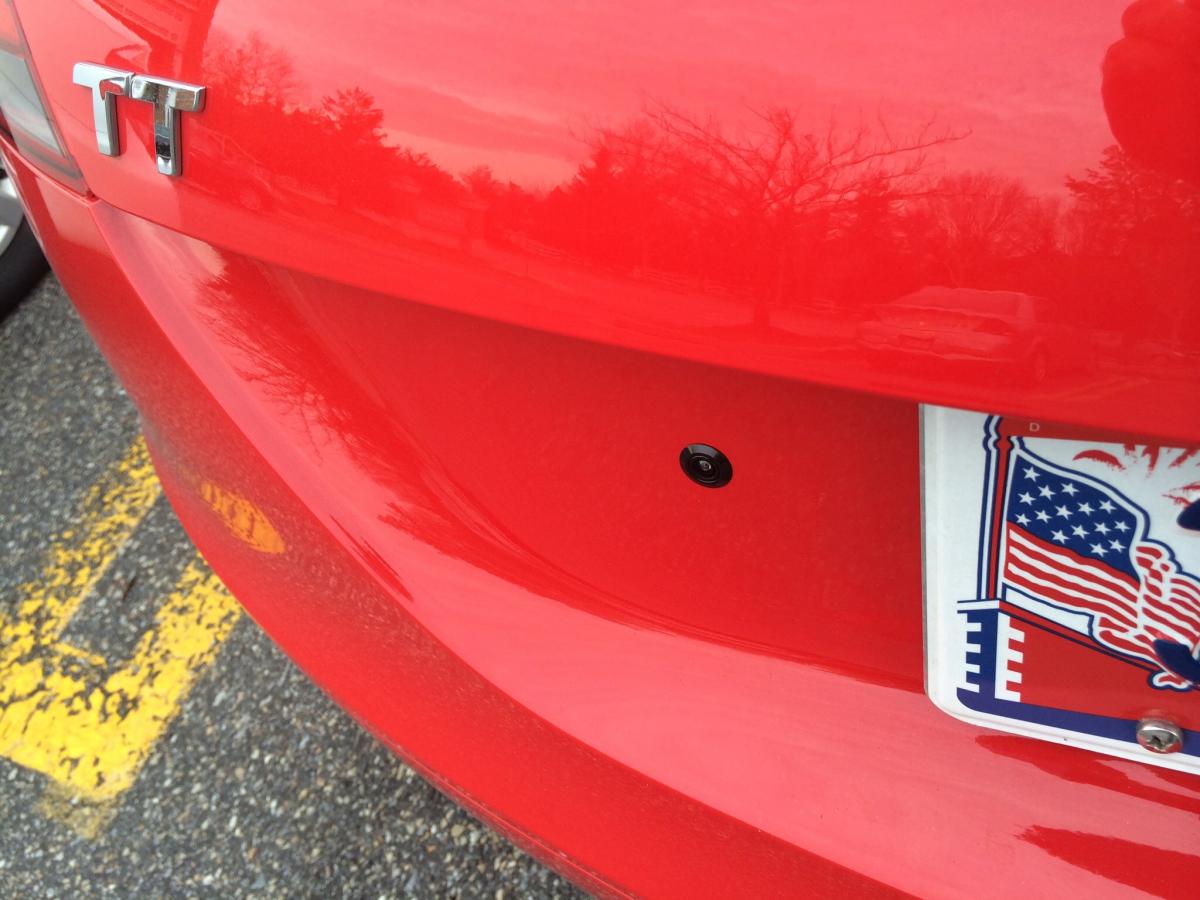
I also included a photo of the backup cam. Behold it's tininess!

post-113829-0-23480100-1396527752_thumb.jpg

post-113829-0-64367800-1396527769_thumb.jpg

Posted Apr 03, 2014 · 14:23 UTC#10

Nice!  I used to be an Audi man...TT traded for A6...and A6 for Q7 until the Q7 wasn't big enough to hold our growing family..When they make a Suburban like vehicle we'll be back!

Posted Apr 03, 2014 · 14:57 UTC#11

i just test drove the new A3 sedan. cant wait to see the s3 for america in a few months.


all the new cars coming out now have thier own dedicated navi system which will make upgrading in the future near impossible.

Edited Apr 03, 2014 by 949
Posted Apr 03, 2014 · 16:40 UTC#12

I KNOW, RIGHT?!?!?!?  That's the first thing I thought! 


And they use the same lame interface my TT had (obviously with a few upgrades here and there....such as BT Audio)

Posted Apr 03, 2014 · 17:08 UTC#13

What is the sat nav software is it running?


Koush

Posted Apr 03, 2014 · 18:17 UTC#14

I'm interested in finding that out too, but I thought Pioneer wrote their own software but used NavTeq maps.


Also... are you Koush from Cyanogenmod?

Posted Apr 03, 2014 · 19:55 UTC#15

Can't say that I know.


I am having some issues however, with the steering wheel control module.  There are some flaw here and there (nothing major), so I have to ask.....if I were to look into a Maestro SW module, how would I get that to work, if my car is not listed on their website?

Posted Apr 04, 2014 · 03:04 UTC#16

Ugh...the shop I took my car to...


They did a great job with the installation...GREAT job! But putting the pieces of my car back together??? Stuff be rattl'n! I have a follow up appointment on Monday. Not the worst thing in the world, but if they need to fix this.

Posted Apr 04, 2014 · 17:17 UTC#17

No, sorry I'm not that Koush.

Posted Apr 04, 2014 · 23:51 UTC#18

Ok all of you guys with the new units lets start seeing some Youtube vids of them in action.

Posted Apr 05, 2014 · 01:45 UTC#19

Well, I have the following five units on my work desk:


Pioneer AppRadio3 (SPH-DA110)

Pioneer AVIC-8000NEX

Kenwood DDX770

Kenwood DNX8901HD

Kenwood DNX891HD


I've been testing them with my colorimeter for maximum brightness (luminance).  I'm going to post some lengthy details soon, but preliminary results show the AVIC-8000NEX much, much, much brighter than anything else.  It's even brighter than my Google Nexus 5 smartphone.


I'll post lots of details and calibration reports on all these units soon.

Posted Apr 05, 2014 · 11:24 UTC#20

I plan on putting up a youtube vid of my 8000 radio in action tomorrow.  I work 12-14 hour shifts, so I'm pretty drained when I get home.  My FB friends have been asking for this as well.

Posted Apr 05, 2014 · 12:06 UTC#21

Please highlight the navigation. I'm interested to see if they have improved it from the piss poor navi they've been using over the last 4-5 years.

Posted Apr 05, 2014 · 14:45 UTC#22

My wife's Tucson has an AVIC-Z110BT, and I will definitely say that navigation has come a long way.  It is VERY VERY fast!  No lagging here!  I'm not going to be driving as I video record, so I am not sure how exactly you want me to showcase the nav capabilities.  I was just going to walk through various menus, unless you guys have better ideas?

Posted Apr 05, 2014 · 18:15 UTC#23

I was just going to walk through various menus, unless you guys have better ideas?

Thats what I had in mind. Show the different options and settings if you can as well as the actually navi graphics.

Posted Apr 05, 2014 · 18:18 UTC#24

Alright, will do.  Graphics are gorgeous by the way!

Posted Apr 05, 2014 · 18:19 UTC#25

It is horrible on the Z series IMO.

Page 1 of 2