Search Archive

8000nex - movie playback info needed !

By camar0rs · Apr 09, 2014in NEX Series💬 34 posts👁️ 7,039 views
Page 1 of 2
Posted Apr 09, 2014 · 00:08 UTC#1

So I have a Kenwood 9140 unit and have issues with video playback so I am going to get a new deck


Now I was likely set on the new 991HD coming out but then I saw comments on youtube and checked out the 8000nex....  the AR unchained looks great


As for the deck itself, how good is the playback of MKV and divx movies from USB and DVD+R ? 

How long does it take to load?

Would I just be better off playing via ARU and loading movie on phone? 


thanks!
Posted Apr 09, 2014 · 01:59 UTC#2

The info you seek is likely in the owners manual and can be downloaded from the Pioneer website. What you won't find in the manual is how limited the video support will be if using media other the iDevice or Andriod. I have no conformation of this but Pioneer units have been severely limited in this fashion sense units were even video capable. Its safe to say it will still be that way with the newer gen units currently available. But only conformation from users will verify for sure however. If you want to get a good idea of what I am referring to with past units do a search on this site for video issues with previous units.

Posted Apr 09, 2014 · 02:26 UTC#3

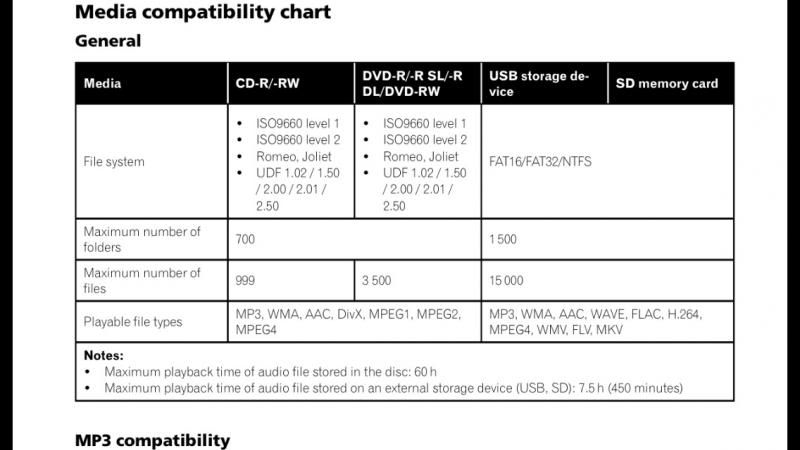
I'm using a 16gb sdcard. The unit does play MKV, MPEG4. And let me tell you it looks beautiful. I have lots of blu ray files. And it is crisp and looks amazing. I don't have to sit at my computer and convert to AVI.

Posted Apr 09, 2014 · 02:27 UTC#4

Load time is about 3-10 seconds. But once I hit SD SOURCE. it said "reading format" and few seconds later it was playing a movie.

Posted Apr 09, 2014 · 02:37 UTC#5

image-5.jpgimage-4.jpg

Posted Apr 09, 2014 · 03:39 UTC#6

drenyce311 thanks for the info!


 how bout USB thumb drives?

Posted Apr 09, 2014 · 05:10 UTC#7

Not yet.

Posted Apr 09, 2014 · 11:55 UTC#8

Im assuming you have not tried is what you are saying? (chart above shows will play)


usb load times is what has been killing me on the kenwood

Posted Apr 09, 2014 · 18:29 UTC#9

Yes. I have not tried it yet. I probably will try it tomorrow or by the end of the week. Hopefully some of the other owners can answer that question.

Posted Apr 09, 2014 · 19:36 UTC#10

drenyce311 thanks for the info!


 how bout USB thumb drives?

 I'm running a Kingston Patriot 32GB that is full and as Drencye said...it plays fine. Mostly XVID(AVI) and MKV format on the drive.

Posted Apr 09, 2014 · 19:43 UTC#11

thanks!

Posted Apr 09, 2014 · 19:53 UTC#12

 I'm running a Kingston Patriot 32GB that is full and as Drencye said...it plays fine. Mostly XVID(AVI) and MKV format on the drive.

Hows your load time?? The SD loads up in seconds

Posted Apr 09, 2014 · 19:59 UTC#13

Hows your load time?? The SD loads up in seconds

About the same...no more than 3-5 seconds.

Posted Apr 09, 2014 · 21:48 UTC#14

this is good news, that's for feedback.... I feel better now before I buy this unit

Posted Apr 11, 2014 · 12:26 UTC#15

i just posted a video on youtube of the radio and the response of the SD Card.
Posted Apr 11, 2014 · 15:19 UTC#16

Good shit, thanks for sharing Dre!

Posted Apr 16, 2014 · 04:24 UTC#17

I'm using a 16gb sdcard. The unit does play MKV, MPEG4. And let me tell you it looks beautiful. I have lots of blu ray files. And it is crisp and looks amazing. I don't have to sit at my computer and convert to AVI.

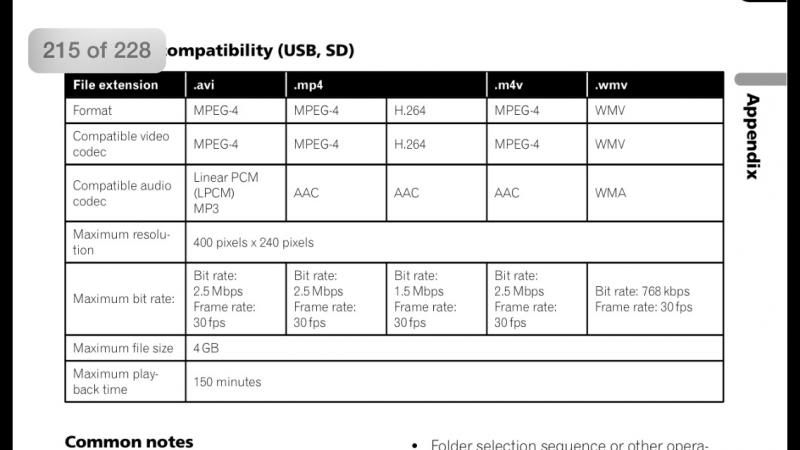
The max resolution for SD card video files is 400x240. Are you compressing the bluray files? Because I don't believe the 8000 can play 1080p SD card files.


I'm surprised that the low resolution files look beautiful. I have a Z150 and the 400x240 files (half the resolution of the screen) look similar to 480p content on a 1080p TV. Looks like the 8000 has the same video file low resolution requirement as the Z150. It was the first thing I looked for in the 8000's owners manual. Same file requirement as mine :(

Posted Apr 16, 2014 · 07:36 UTC#18

Nope there 1080p files. I'm assuming the unit is reducing it to play 480x420. But it looks beautiful. I didn't convert anything. I just drag and dropped.

Posted Apr 16, 2014 · 07:37 UTC#19

I play a DVD in the car and it looks like crap. But once I put in a movie from the sd whole different ball game

Posted Apr 16, 2014 · 07:38 UTC#20

Also the size of the files on the SD CARD range from 1.75gb - 5gb

Posted Apr 16, 2014 · 11:29 UTC#21

I've been able to successfully play both 720p (1280x720) and 1080p (1920x1080) and from the SD card.


The manual does say it can only play 480p or something like that, but it does support much, much higher resolution.  I bet it depends on the video bitrate though.

Posted Apr 16, 2014 · 13:30 UTC#22

So, what's the limitations as far as embedded audio? I download 1080p .mkv files that have DTS audio. Will the radio play DTS, down mix to stereo, or do I need to download different video files? I have the 4000 but I would assume the playback features as far as this is concerned would be the same.

Posted Apr 16, 2014 · 19:25 UTC#23

Should play fine. My only concern was when I brought the radio. That I would have to convert all these files I have. But I don't. Plays mkv files well

Posted Apr 17, 2014 · 00:25 UTC#24

Are you strictly using mkv as the file type for all your videos? I've never tried mkv files before but I've tried mp4 and avi, always got an error if they were above 400x240.


Of course this is on a Z150, but the requirements are identical to the 8000. I was thinking of upgrading just for the CarPlay capabilities later this year.

Edited Apr 17, 2014 by hitman80
Posted Apr 17, 2014 · 00:29 UTC#25

yes I am using MKV files. I added a few of them to the SD CARD to see if it would work and it did. I have both MKV and MP4 since itunes preffer MP4 format for apple TV.

Page 1 of 2