Search Archive

8000NEX Installed

By carfanatic · May 30, 2014in NEX Series💬 32 posts👁️ 5,153 views
Page 1 of 2
Posted May 30, 2014 · 17:49 UTC#1

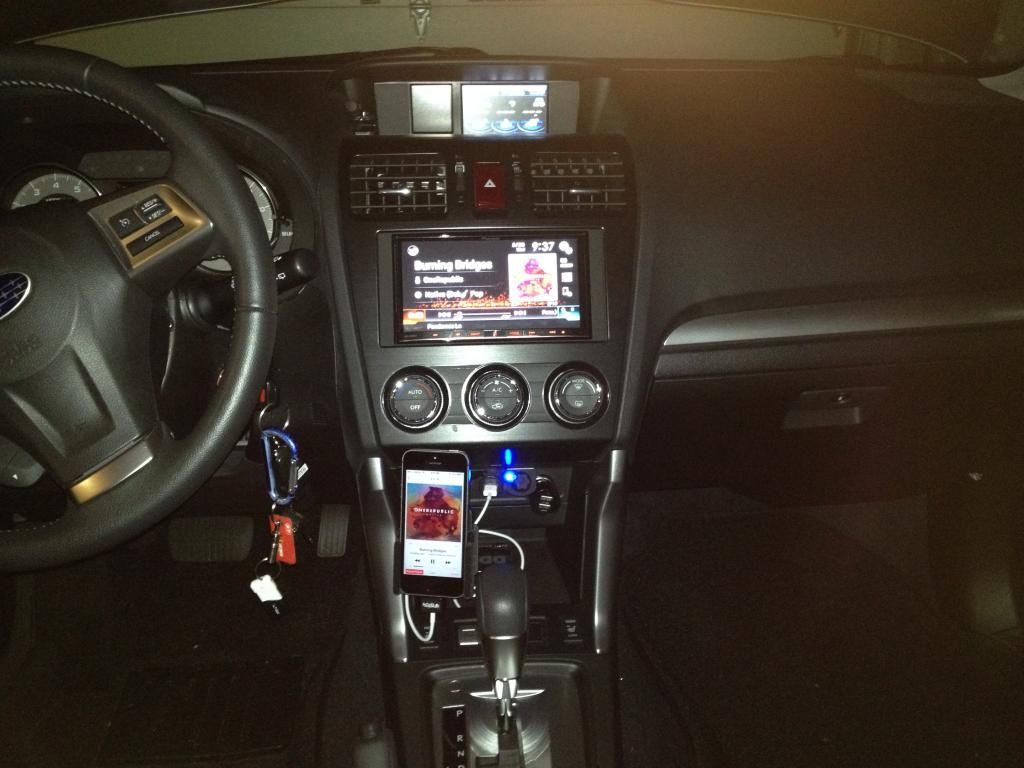
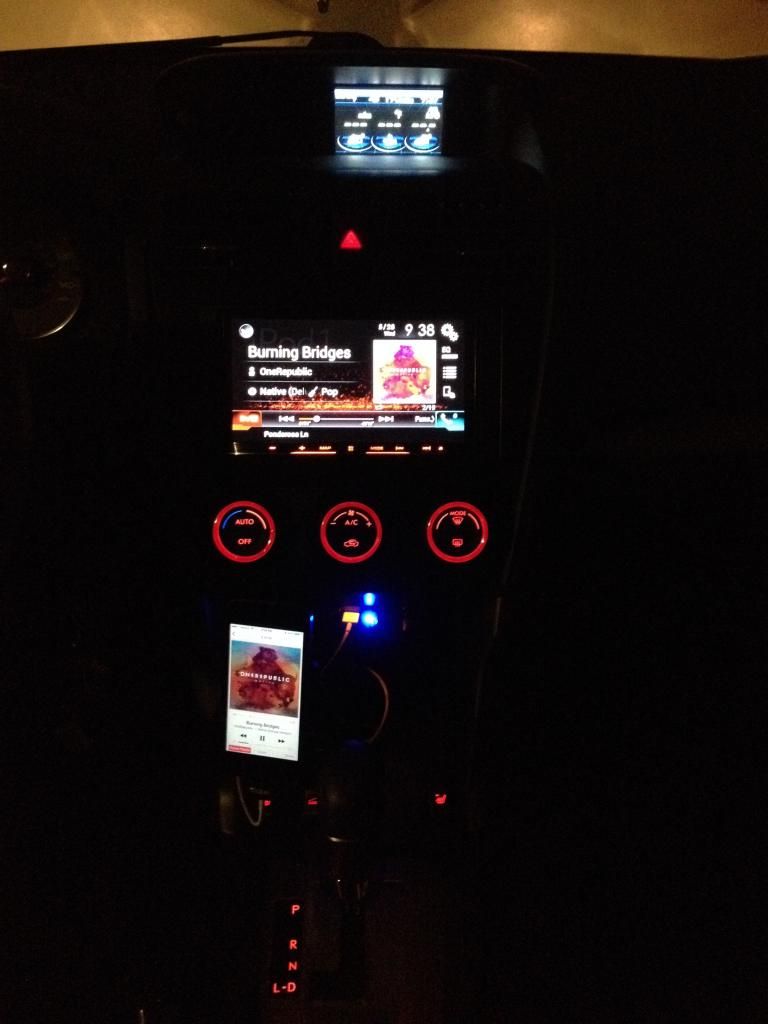
I finally got around to installing my 8000NEX in my Forester over the memorial weekend.  I did a full write up on the Forester forums: http://www.subaruforester.org/vbulletin/f77/pioneer-nex-powered-subwoofer-install-338858/


So far I'm liking it a lot.  I do have my VSS connected correctly and it shows up in the status screen but my map positioning seems to be off a bit.  Waiting till the 3D calibration status to complete and hopefully it resolves itself after putting on enough miles.


I did get a bit frustrated when using the navigation system coming home from work on Tuesday because it kept trying to put me on a back road.  Finally realized it was due to me leaving the default traffic setting of "Offer Detour if it Saves at Least" to 5 minutes.  The following day I increased that to 15 minutes and it left me on the highway. 


I'm using an iPhone5s with the unit.  If I remember correctly, I read a few posts awhile ago that you have to change smartphone settings from USB or bluetooth depending on actual connection.  I have that set to USB and I'm actually able to listen to my iPhone music via USB or bluetooth.  Comes in handy when I know I'm doing a quick 5-10 minute drive and don't have to bother taking my phone out of my pocket.
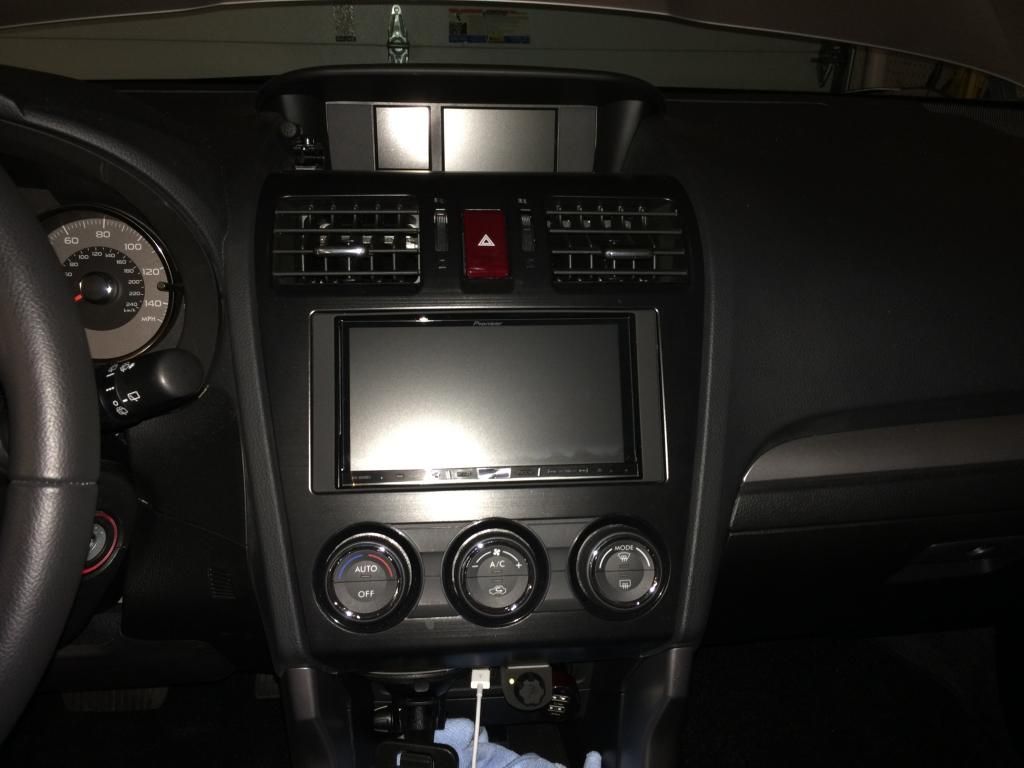
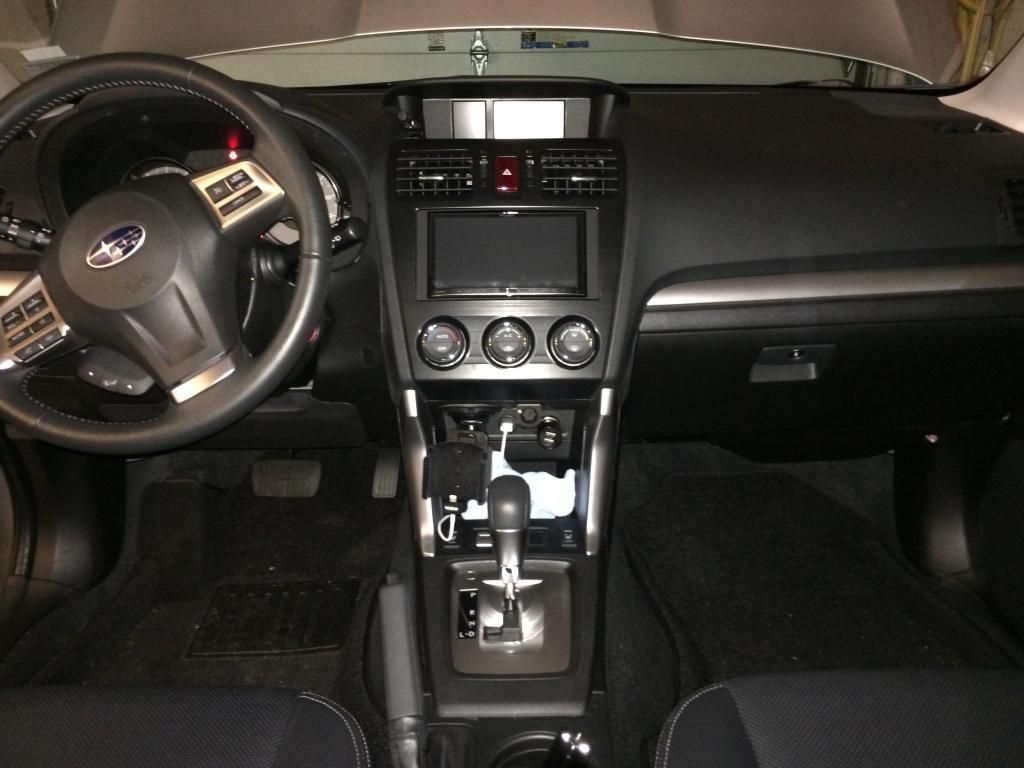
 

Final1_zps41ac7056.jpg


Final2_zps05165b9a.jpg


Final3_zps3442818e.jpg


Final5_zps1f9c3fa6.jpg


Posted May 30, 2014 · 18:51 UTC#2

Looks good. I like how well these units seem to integrate making them look OEM.


If you have you phone connection set to USB and you are connected with bluetooth then you can't use things like Pandora, aha, etc... You can still play music over bluetooth but you will only have play/pause control not full control.

Posted May 30, 2014 · 19:16 UTC#3

Looks good. I like how well these units seem to integrate making them look OEM.If you have you phone connection set to USB and you are connected with bluetooth then you can't use things like Pandora, aha, etc... You can still play music over bluetooth but you will only have play/pause control not full control.

Not true, I have mine set to USB and I play pandora all the time while my phone is connected for Bluetooth calls.

Posted May 31, 2014 · 07:48 UTC#4

But you have the phone connected to the USB cable right?


All I was saying is that if you the connection on the radio set to USB and then only connect through Bluetooth then you won't have pandora as an option. You can have the phone connected to USB and still make Bluetooth phone calls and such.

Posted May 31, 2014 · 11:08 UTC#5

When you set smartphone setting as USB, you can play pandora, you can also have the phone connected as Bluetooth and make and receive calls using Bluetooth.

Posted May 31, 2014 · 20:48 UTC#6

ericvic & tekki, thanks for the info.  I see what ericvic means with playing audio over Bluetooth while having the settings set to USB.  You don't have Pandora as an option.  If you set the smartphone audio settings as Bluetooth you can do Pandora over Bluetooth.   


Tekki, I'm also in Old Bridge, NJ.  One thing that is kind of odd with the navigation system is its handling of jughandles and U-turns.  On route 9 and route 18 it's mainly jughandles or U-turns to make a left but the navigation system keeps telling me to make left turns where turns aren't allowed.  Since I'm familiar with the area I ignore it and just take the jughandle or U-turn.  What concerns me is if I'm in an area I'm not familiar with and it tells me to make a left turn where a left turn isn't allowed.  Is there a setting to change this?  This is the first time I've seen this on a GPS system.  With other GPS systems I have used in the past (garmin nuvi's, Honda, Toyota, Infiniti, Mercedes-Benz) they have correctly told me to take a jughandle when left turns weren't allowed.

Edited May 31, 2014 by carfanatic
Posted Jun 01, 2014 · 10:35 UTC#8

ericvic & tekki, thanks for the info.  I see what ericvic means with playing audio over Bluetooth while having the settings set to USB.  You don't have Pandora as an option.  If you set the smartphone audio settings as Bluetooth you can do Pandora over Bluetooth.   


Tekki, I'm also in Old Bridge, NJ.  One thing that is kind of odd with the navigation system is its handling of jughandles and U-turns.  On route 9 and route 18 it's mainly jughandles or U-turns to make a left but the navigation system keeps telling me to make left turns where turns aren't allowed.  Since I'm familiar with the area I ignore it and just take the jughandle or U-turn.  What concerns me is if I'm in an area I'm not familiar with and it tells me to make a left turn where a left turn isn't allowed.  Is there a setting to change this?  This is the first time I've seen this on a GPS system.  With other GPS systems I have used in the past (garmin nuvi's, Honda, Toyota, Infiniti, Mercedes-Benz) they have correctly told me to take a jughandle when left turns weren't allowed.

Ya it happened to me with the jug handle once. I was hoping it was a glitch. I'll have to take a trip down 18, because if that's the case then pioneer needs to really address that.

Posted Jun 04, 2014 · 00:36 UTC#9

Ya it happened to me with the jug handle once. I was hoping it was a glitch. I'll have to take a trip down 18, because if that's the case then pioneer needs to really address that.


It looks like it handles jughandles ok.  It's when it comes to making a U-turn.  It tells you to make a LEFT turn.  However, the maps view has it correct and showing you have to exit right to make a U-turn.  On purpose, I passed the U-turn on Texas road and Robertsville Road (rt. 520) on route 9.  Sorry for the grainy picture as I was driving home from work and was the only one in the car.  Plus you know there are always cops on the median in that part of Marlboro.  I guess I didn't notice it the first time since I was in the AUDIO MODE view and not the map view and was just listening to the navigation voice prompts.  


U-turn_zps1193c092.jpg 

Posted Jun 04, 2014 · 01:25 UTC#10

I'm gonna be over that way tomorrow, I'll do a trip around and for shits and giggles I'll see if mine does the same too, cause that does suck.

Posted Jun 04, 2014 · 19:31 UTC#11

I have to say I am liking the look of the NAV the more I see it. I am confident in my Garmin, but the look of the Pioneer Nav looks very clean and modern.


Is this the Central NJ Pioneer Forum? LOL Who did your installs?

Posted Jun 04, 2014 · 19:49 UTC#12

I do like the Pioneer Navigation interface.  I was just a bit surprised about it telling me to turn left where a left turn wasn't allowed.  Haven't experienced that with garmins, Apple or google maps, nav systems on Honda, Toyota, Infiniti, Mercedes Benz.  I'm not really on the maps view when I have a destination programmed.  I just listen for the voice prompts.


:mrgreen: hahaha no this isn't the Central NJ Pioneer Forum.  Just so happened tekki and I live in the same town.  I did my own install on my car.  I posted a write-up of my install over on the SubaruForester forums linked on the first post of this thread.

Posted Jun 04, 2014 · 19:58 UTC#13

Guys can you clarify a little on the whole USB/Pandora thing? When I get my 4000 to take advatage of Car Play, I dont plan to use the Apple adapter/App Mode any longer. I do however want to avoid BT audio. Can the phone settings be set to USB or anything else to take advatage of audio over USB? Please only respond if you have tested this. Thanks.

Posted Jun 04, 2014 · 21:11 UTC#14

Guys can you clarify a little on the whole USB/Pandora thing? When I get my 4000 to take advatage of Car Play, I dont plan to use the Apple adapter/App Mode any longer. I do however want to avoid BT audio. Can the phone settings be set to USB or anything else to take advatage of audio over USB? Please only respond if you have tested this. Thanks.

If you have the connection set to USB and plug your phone in then your audio will go over USB and not Bluetooth. Phone calls will still go over Bluetooth though.

Posted Jun 04, 2014 · 21:14 UTC#15

What about Pandora?

Posted Jun 04, 2014 · 23:09 UTC#16

Pandora, aha, iPod, AvicSync will all go over the connection type you picked (USB or Bluetooth).


For instance I have mine setup for USB and I can only control Pandora on the HU if I have my phone connected to the USB cable. If my phone is not connected to the USB cable I can still pick Bluetooth Audio on the HU and play Pandora on my phone and the audio will go through the HU but I can't control Pandora from the HU. Technically I think you can play/pause Bluetooth Audio from the HU but you won't get full Pandora control. Hopefully I am not making this more confusing.

Posted Jun 05, 2014 · 00:39 UTC#17

:mrgreen: hahaha no this isn't the Central NJ Pioneer Forum.  Just so happened tekki and I live in the same town.  I did my own install on my car.  I posted a write-up of my install over on the SubaruForester forums linked on the first post of this thread.


Like the install pics. What did you use to fasten the USB to the tray after you drilled the hole? Looking to do similar for my installation but want to show the installer what I want done. Might have to steal your pic. Probably going to get it installed in EB. 

Posted Jun 05, 2014 · 03:42 UTC#18

Guys can you clarify a little on the whole USB/Pandora thing? When I get my 4000 to take advatage of Car Play, I dont plan to use the Apple adapter/App Mode any longer. I do however want to avoid BT audio. Can the phone settings be set to USB or anything else to take advatage of audio over USB? Please only respond if you have tested this. Thanks.


VBLUE42, ericvic is spot on with everything he said.  If you set it to USB you'll be able to listen to your music on your smartphone as well as control Pandora while connected via USB.  I think the confusion was when the settings are USB but you end up listening to bluetooth audio.  Since you are planning on avoiding BT audio, you'll be fine setting it to USB and controlling Pandora and smartphone music.  Here's the functions available when setting the Smartphone Connection to USB:


SmartPhoneUSB_zps80e36013.jpg

Posted Jun 05, 2014 · 03:46 UTC#19

Thank you.

Posted Jun 05, 2014 · 03:47 UTC#20

Like the install pics. What did you use to fasten the USB to the tray after you drilled the hole? Looking to do similar for my installation but want to show the installer what I want done. Might have to steal your pic. Probably going to get it installed in EB. 


Thanks.  I didn't repost it here since a good amount of the write-up was Forester specific.  No problem at all, you can use the picture  :mrgreen:


I got the idea from someone else here on AVIC411.  There are tabs on the sides of the USB connector.  Can't see it in my photos but If you look at the picture on Amazon (http://www.amazon.com/PAC-USBCBL-6-Feet-Mounting-Bracket/dp/B002MW6HRO/ref=sr_1_1?ie=UTF8&qid=1401939915&sr=8-1&keywords=PAC+USBCBL+6-Feet+USB+Cable+with+Mounting+Bracket) you'll see what I mean.  I just drilled a 3/4" hole and then threaded the USB extender through and the USB connector clicked into place.

Posted Jun 05, 2014 · 03:50 UTC#21

Thank you.


No problem.  Hopefully, like ericvic said, I didn't make it more confusing.   

Posted Jun 05, 2014 · 03:57 UTC#22

Nope. I pretty much already knew from my experience from previous units but some were claiming different on how it worked so I wanted to clarify from others that had the units.

Posted Jun 05, 2014 · 10:47 UTC#23

Connect WIRE USB

Smartphone setup select USB

You control, aha, pandora, smartphone music from HU


Smartphone setup select Bluetooth

And you control pandora, aha, smartphone music

You control from the phone

Posted Jun 05, 2014 · 10:54 UTC#24


It looks like it handles jughandles ok.  It's when it comes to making a U-turn.  It tells you to make a LEFT turn.  However, the maps view has it correct and showing you have to exit right to make a U-turn.  On purpose, I passed the U-turn on Texas road and Robertsville Road (rt. 520) on route 9.  Sorry for the grainy picture as I was driving home from work and was the only one in the car.  Plus you know there are always cops on the median in that part of Marlboro.  I guess I didn't notice it the first time since I was in the AUDIO MODE view and not the map view and was just listening to the navigation voice prompts.

So I went down 18 and Yes it happened to me as well same road, and it has happened with some other jug handles as well, I just never paid attention cause i don't really use the voice guidance much, too busy listening to music.

Edited Jun 05, 2014 by VBLUE42
Posted Jun 05, 2014 · 11:10 UTC#25

Another flaw I've found with navigation, it hasn't learned my route habits, and navigation is quirky. For me when I come down county road to go home all I have to do is make a left into 35 north, but the navigation tells me to make a right, go up to the next light, make a u-turn and go back north which is totally incorrect. I have left the navigation on about 10 times and it still has not learned the proper route. The navigation does take you some very awkward routes even if you change the settings. My Z2 was so much better in route selection. County road has been there for 30 years as Is the allows of turning there, so it's not a new road. My z2 picked the proper route.

Edited Jun 05, 2014 by tekki
Page 1 of 2