Search Archive

NEX: which one and why?

By DiuSee · Jul 02, 2014in NEX Series💬 36 posts👁️ 18,668 views
Page 1 of 2
Posted Jul 02, 2014 · 23:13 UTC#1

Hi guys


Long time lurker, first time poster. Been a fan of the AVIC series for a long time and loved my AVIC-D3. Unfortunately I had a break-in recently and the main thing that was missing was my AVIC-D3. So I want to replace it, however I would love to upgrade too while I'm at it. 


Looking at the Pioneer website and my local distributors in Ontario, Canada, I have noticed that most organisations are not carrying the AVIC-X950 and AVIC-Z150 anymore. This leads me to believe that Pioneer is about to discontinue those units to move onto the NEX units. 


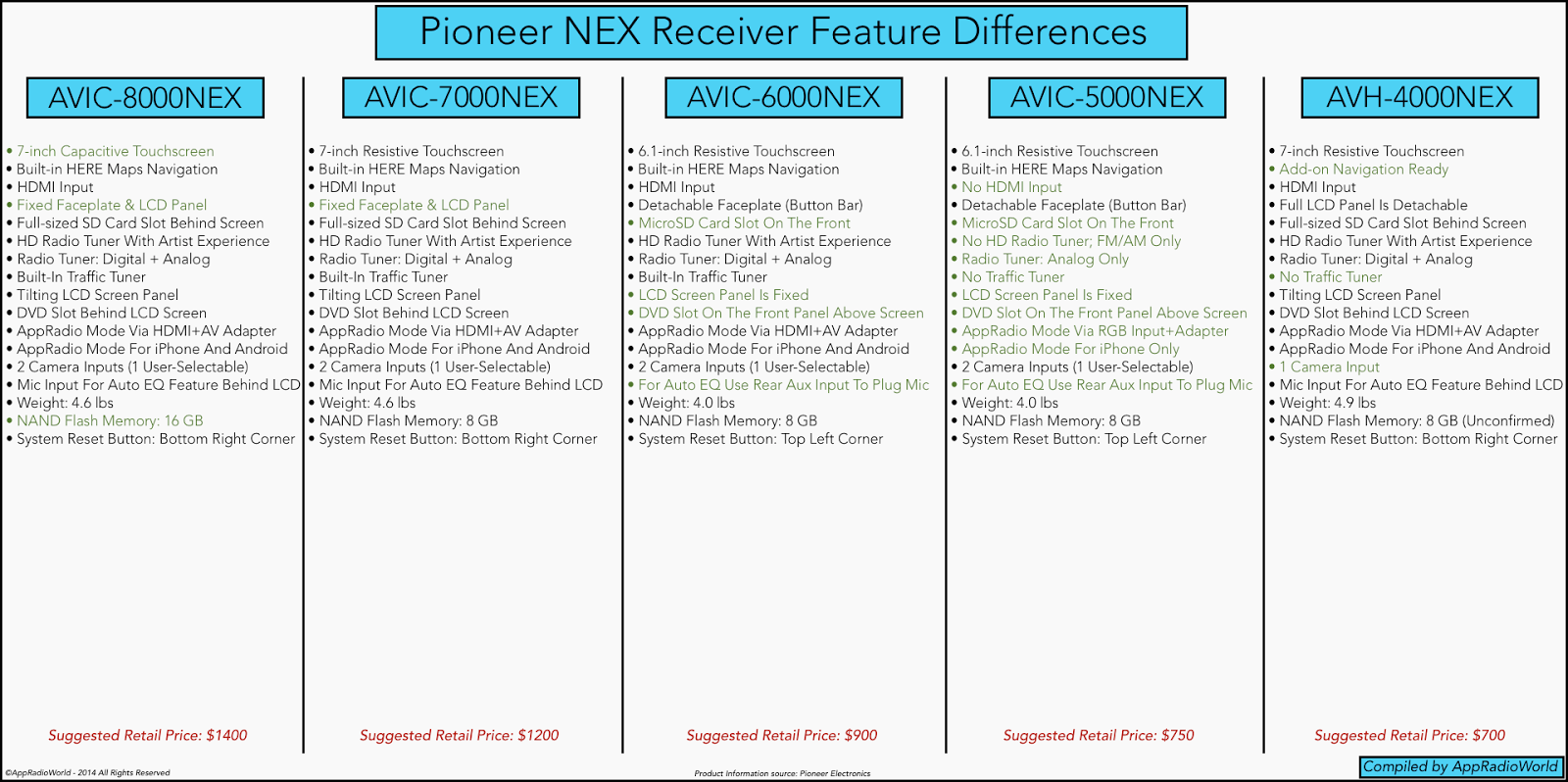
Which leads me into why I have posted here. While lurking in the NEX section, I have noticed that most of you have either a 4000NEX or a 8000NEX, but I don't really understand why you have chosen those head units and not the 5000NEX or 6000NEX or 7000NEX. While searching for more information about the NEX's, I did come across a link to appradioworld.com and found this picture comparing all the devices. By reading through that comparison, I felt that the 6000NEX would be a better choice for me as it is comparable to the D3. So this has gotten me curious as to what other advantages or disadvantages have I missed that would lead most of you to purchase either the "top-end (8000NEX)" or the "low-end (4000NEX)".


Please help me figure out the nitty gritty of these head units.


Thanks,

Hubert


Edit (for easy access of information):


4000 NEX

Pros:

Most economical

Removable Screen

Apple CarPlay ready

7" non-capacitive screen

Display is not as bright as 8000 NEX

Remote control

Utilises Full Size SD Card

Cons:

No Navigation - designed to be used with Apple CarPlay

Neither:

Optional Navigation with AVIC-U260 (opinion based pro or con - you will lose HDMI input for this)


5000 NEX

Pros:

Navigation included

Removable hard buttons

Apple CarPlay ready

Cons:

Loss of HDMI connector in the rear

More expensive than 4000 NEX

Less desirable design (subjective)

Hard buttons feel cheap (subjective)

Display is not as bright as 8000 NEX

Neither:

6.1" non-capacitive screen

Utilises MicroSD card


6000 NEX

Pros:

Navigation included

Removable hard buttons

HDMI included (compared to 5000 NEX)

Apple CarPlay ready

Cons:

Less desirable design (subjective)

Hard buttons feel cheap (subjective)

Display is not as bright as 8000 NEX

Neither:

Middle range device for a middle range price (Half way between 4000 NEX and 8000 NEX - CDN prices)

Utilises MicroSD card (up to 32 GB)


7000 NEX

Pros:

7" screen

Navigation included

Motorized screen

Utilises full size SD Card 

More desirable design (subjective)

Hard buttons has better tactile feel (subjective)

Apple CarPlay ready

Cons:

Non-capacitive screen (compared to 8000 NEX)

Price is set too high compared to 8000 NEX

No removable components for security

Display is not as bright as 8000 NEX


8000 NEX (Flagship model)

Pros:

7" Capacitive screen (allows for multi-touch for zooming and other functions)

Apple CarPlay Ready

More desirable design (subjective)

Hard buttons has better tactile feel (subjective)

Navigation included

Utilises full size SD card

Brightest screen available in the NEX line-up

Cons:

Most expensive

No removable components for security

Edited Jul 20, 2014 by DiuSee
Posted Jul 03, 2014 · 00:44 UTC#2

The 4000 is a 7000 without navigation. Many of us got nex head units for apple carplay, and as such have no use for built in navigation. The 4000 has a larger display than the 6000, the display is adjustable like the 7000 and 8000 and it's hundreds of dollars cheaper with all the features we actually care about included.


The only feature that is missing is the capacitive display. That you can only get with the 8000 so many users went big to get the capacitive experience. Also the display on the 8000 has been noted to be brighter and clearer than the one on the other head units. It's pioneer's top of the line unit and I guess you get what you pay for.


Price wise if you want navigation the 8000 can be had for almost the price of the 7000 and is a better unit. If you don't care about navigation the 4000 can be had for half the price of the 8000.

Edited Jul 03, 2014 by DP3343
Posted Jul 03, 2014 · 00:50 UTC#3

Honestly, that image pretty much details all the differences that I could see when I was originally looking.


I think the biggest difference between the 5/6000 and the 4/7/8000 is the former has a smaller screen.  The 4/7/8000 all have a 7" screen, and the other two have a 6" screen.  This also means the DVD slot and (micro)SD Card slot are hidden on the 7" models, which could be a plus or minus for you.  I don't ever use CDs, so I'd rather not see the disc slot all the time.  I do leave an SD card in, for backgrounds and such.  The 7" models support full-size SD cards (as well as micro via an adapter), which I have a bunch of just laying around, so that's another plus for me.


The 8000 is the only one a capacitive touch screen (like a smart phone, meaning you have to use it with bare skin, I think), while the other 4 have a resistive (meaning pressure makes it work).  While a capacitive screen is better for touch control, I would guess the 8000 might be hard to use with gloves, but I can't say for sure since I have a 4000.  Either way, I have no issue with mine yet, even with scrolling.


I also liked the removable screen on the 4000—it's the only model where you can remove the entire screen and take it with you.  This might be important if you travel a lot, and don't want to leave an expensive radio visible in hotel parking lots or airports.


All models except the 4000 have built-in maps.  If you want that, I'd get the 7000 or 8000 model.  Personally, I'm planning on using maps via CarPlay when I need them, so it wasn't that important to me.  (And I already have a dedicated GPS for longer trips, which is nice since you can keep your GPS visible while your radio is doing other stuff.)  Another important fact, since I didn't want to buy it from an unapproved online vendor, there was a huge cost jump from the 4000 to the 7000.  Buying from somewhere like Amazon might save you money in the short run, but you'll get no warranty from Pioneer.

Posted Jul 03, 2014 · 00:58 UTC#4

To go further. The 5000 can be had for nearly the same price as the 4000 but to get nav you lose the hdmi port which means you'll pay the difference in adapters to get any form of Appradio connectivity, and get a smaller display so that you can fit a cd drive on the face that you'll never use. All for a built in nav that has gotten mixed reviews on this site.


That second complaint is the case with the 6000. They just aren't good looking head units in my personal opinion. The removable buttons feel cheap, and the micro sd card slot sticking out looks rushed. The 4000,7000, and 8000 just are better put together. Better thought out.


Mind you nitpicking aside they all have the same specs down the board identical where it matters. All run the latest pioneer software. All will have carplay. Underneath they are running on the same processors, same everything.

Posted Jul 03, 2014 · 02:53 UTC#5

The two main reasons that I chose the 8000:


  1. Capacitive touchscreen:  I don't do much pinch / zooming, but the experience I had with the resistive touchscreen in AppRadio mode on my AVH-X8500BHS was so frustrating that I never wanted that experience again.  Then again, AppRadio mode itself was so frustrating that I never wanted to experience it again, but that's a topic for another thread.
  2. Apple Maps has been less than stellar to the point that I almost never use it, opting instead for Waze or Google Maps or anything else.  I wanted a navigation solution that I could put on the head unit's display without AppRadio mode, and which was better than Apple Maps.  (Yes, I just said that a Pioneer Navigation solution was better than something.  I dislike Apple Maps THAT much.)  But the Apple Maps shown on the CarPlay demonstrations at WWDC makes me wonder if I could've been happy with it after all.  (When was the last Apple Maps update?)

Assuming that Apple Maps is more robust, the best cost / benefit solution I can envision is the one that doesn't exist:  A 4000 with a capacitive touchscreen. YMMV . . . 

Posted Jul 03, 2014 · 03:02 UTC#6

@Sparky: As far as Apple maps goes, it's been getting nearly constant updates, especially lately.  Every day at 3AM EST, they have new changes.  I think the early problems got into some people's heads, while it has been a much better experience than Google Maps for me for the last year or so.


At the same time, the experience varies based on your location.  Where I am (Louisville, KY), I've never had serious problems with it.  I've used Siri to start up navigation in hands-free mode on my 4000 (no display, obviously, just voice) and it works fine for me.  It's pretty cool to use voice to say "get me directions to <some place>", and it pops up, lists off the likely results, asks you if it's correct, and starts up directions, all without touching anything.


Regarding the capacitive on the 8000, can you use it with gloves on?  If you can't, it would be a point of frustration for me in winter.  Even so, it probably wouldn't have been worth double the cost for the screen alone.  :-)

Posted Jul 03, 2014 · 03:13 UTC#7

The two main reasons that I chose the 8000:


  1. Capacitive touchscreen:  I don't do much pinch / zooming, but the experience I had with the resistive touchscreen in AppRadio mode on my AVH-X8500BHS was so frustrating that I never wanted that experience again.  Then again, AppRadio mode itself was so frustrating that I never wanted to experience it again, but that's a topic for another thread.
  2. Apple Maps has been less than stellar to the point that I almost never use it, opting instead for Waze or Google Maps or anything else.  I wanted a navigation solution that I could put on the head unit's display without AppRadio mode, and which was better than Apple Maps.  (Yes, I just said that a Pioneer Navigation solution was better than something.  I dislike Apple Maps THAT much.)  But the Apple Maps shown on the CarPlay demonstrations at WWDC makes me wonder if I could've been happy with it after all.  (When was the last Apple Maps update?)

Assuming that Apple Maps is more robust, the best cost / benefit solution I can envision is the one that doesn't exist:  A 4000 with a capacitive touchscreen. YMMV . . . 


Apple maps has been improving dramatically. It's fun to watch especially because their satellite images haven't caught up sometimes so the new directions for new roads are on forests if you have it showing in hybrid mode. Regardless all that matters is that the directions and the locations are sound, and Apple maps is handling that far better than at launch. 

Posted Jul 03, 2014 · 17:02 UTC#8

@Sparky: As far as Apple maps goes, it's been getting nearly constant updates, especially lately.  Every day at 3AM EST, they have new changes.  I think the early problems got into some people's heads, while it has been a much better experience than Google Maps for me for the last year or so.


At the same time, the experience varies based on your location.  Where I am (Louisville, KY), I've never had serious problems with it.  I've used Siri to start up navigation in hands-free mode on my 4000 (no display, obviously, just voice) and it works fine for me.  It's pretty cool to use voice to say "get me directions to <some place>", and it pops up, lists off the likely results, asks you if it's correct, and starts up directions, all without touching anything.


Regarding the capacitive on the 8000, can you use it with gloves on?  If you can't, it would be a point of frustration for me in winter.  Even so, it probably wouldn't have been worth double the cost for the screen alone.  :-)


Apple maps has been improving dramatically. It's fun to watch especially because their satellite images haven't caught up sometimes so the new directions for new roads are on forests if you have it showing in hybrid mode. Regardless all that matters is that the directions and the locations are sound, and Apple maps is handling that far better than at launch. 

So as not to threadjack the OP, I'll be brief in saying that I've avoided Apple Maps for some time now.  Sincerely, my respect to Apple if they've been making updates as often as the two of you say they have.  I was playing with it a little bit on my phone last night after reading both of your replies.  While I didn't ask it to plot me any routes, just the amount of 3-D architecture that I saw let me know that it wasn't the Apple Maps I knew and loathed.


As far as the capacitive touchscreen is concerned, I live in Southern California so gloved hands are seldom / never a concern for me.  I'm originally from Central Wisconsin though, so I know why you would ask.  "Good question though," I thought.  So I put on the mechanics gloves that I use for tinkering on my car on weekends and tried it out.  (Regular Craftsman, with the fake suede)  Surprisingly, the screen worked just as well as if I wasn't wearing any gloves at all.  I have no other gloves for comparison, but consider this at least one data point?


So if I knew then what I know now, would I have still bought the 8000 for the capacitive screen alone?  I got the 8000 off of ebay, and the current prices for a 4000 on ebay are roughly $250 - $300 less than what I paid for my 8000.  Whether or not that ends up being worth it depends upon how much swiping will be required of me during CarPlay.  Swipe a lot?  8000.  Swipe a little?  4000.  It's not like I'm going to yank out the 8000 for a 4000 at this point anyway, but consider it a little more feedback from those of us who have already made the plunge . . . 

Posted Jul 03, 2014 · 20:39 UTC#9

Thanks for testing that out!  Until CarPlay is released, it's hard to imagine how it's going to be used in a real-world situation, so it might be a wait-and-see situation if you are looking for a new unit and plan on using CarPlay.

Posted Jul 03, 2014 · 20:44 UTC#10

So as not to threadjack the OP, I'll be brief in saying that I've avoided Apple Maps for some time now.  Sincerely, my respect to Apple if they've been making updates as often as the two of you say they have.  I was playing with it a little bit on my phone last night after reading both of your replies.  While I didn't ask it to plot me any routes, just the amount of 3-D architecture that I saw let me know that it wasn't the Apple Maps I knew and loathed.


As far as the capacitive touchscreen is concerned, I live in Southern California so gloved hands are seldom / never a concern for me.  I'm originally from Central Wisconsin though, so I know why you would ask.  "Good question though," I thought.  So I put on the mechanics gloves that I use for tinkering on my car on weekends and tried it out.  (Regular Craftsman, with the fake suede)  Surprisingly, the screen worked just as well as if I wasn't wearing any gloves at all.  I have no other gloves for comparison, but consider this at least one data point?


So if I knew then what I know now, would I have still bought the 8000 for the capacitive screen alone?  I got the 8000 off of ebay, and the current prices for a 4000 on ebay are roughly $250 - $300 less than what I paid for my 8000.  Whether or not that ends up being worth it depends upon how much swiping will be required of me during CarPlay.  Swipe a lot?  8000.  Swipe a little?  4000.  It's not like I'm going to yank out the 8000 for a 4000 at this point anyway, but consider it a little more feedback from those of us who have already made the plunge . . . 


I'm just going to add that as far as swiping is concerned the 4000's resistive screen is actually pretty damn good. No it cannot do pinch to zoom, but I don't know if Apple maps will even allow that with Carplay. Apple has been taking a very cautious approach to how much access you have while using carplay, and I've never seen someone pinch to zoom in any of the demos. Then again, we never know. 


*Edit, and at best buy I played with the 5000 and it's just as good. It may be resistive, but it's a very high quality sensor. 

Edited Jul 03, 2014 by DP3343
Posted Jul 03, 2014 · 20:57 UTC#11

I got the 8000, one of the reasons being that I did actually want the inbuilt Nav. "Online" maps are no use if you can't get a data signal to download the section you are on. I may use Apple Maps with CarPlay, but if I'm not happy with it I have the inbuilt, or if I lose signal I can use the "offline" maps.


Also the capacitive screen is superb, I compared them side by side and the resistive screen looked very washed out and "plasticy" to the touch.

Posted Jul 03, 2014 · 21:34 UTC#12

I got the 8000, one of the reasons being that I did actually want the inbuilt Nav. "Online" maps are no use if you can't get a data signal to download the section you are on. I may use Apple Maps with CarPlay, but if I'm not happy with it I have the inbuilt, or if I lose signal I can use the "offline" maps.


Also the capacitive screen is superb, I compared them side by side and the resistive screen looked very washed out and "plasticy" to the touch.

Lol well the non capacitive displays are plastic so I'm not sure what else they could feel like. :-P

Posted Jul 04, 2014 · 02:52 UTC#13

I bought the 8000 because of the capacitive screen.


Other considerations, though not exclusive to the 8000:

- 13 band EQ

- dual USB

- large screen

Posted Jul 04, 2014 · 06:10 UTC#14

Thank you all so much for replying to my post. All of you have brought up very important points for the 8000 and for the 4000. You all have brought me to not only know but understand why you choose the way you did.


Also the discussion on Apple Maps has been very interesting, as my only experience with Apple Maps is when I used my friend's phone when it came out, and it was horrible. The last iPhone that I have personally owned was an iPhone 4, and I chose to leave the iPhone community because of the particular and overly restrictive design of the iOS. At that point, I decided to leave the iPhone community to join the Android community. Unfortunately I would need to wait for Android Auto to come to fruition before I am going to be able to use my phone as part of my stereo. Therefore, I will need a head unit with navigation. I appologise that I did not forewarn that I am an Android user, however the discussion in regards to Apple Maps and Apple CarPlay has been very informative and intriguing. 


Just to recap (the following information has been compiled with the consideration that the functionality of the 6000/7000/8000 NEX are exactly the same except for screen size and other differences listed):


4000 NEX

Pros:

Most economical

Removable Screen

Apple CarPlay ready

7" non-capacitive screen

Display is not as bright as 8000 NEX

Remote control

Utilises Full Size SD Card

Cons:

No Navigation - designed to be used with Apple CarPlay

Neither:

Optional Navigation with AVIC-U260 (opinion based pro or con - you will lose HDMI input for this)


5000 NEX

Pros:

Navigation included

Removable hard buttons

Apple CarPlay ready

Cons:

Loss of HDMI connector in the rear

More expensive than 4000 NEX

Less desirable design (subjective)

Hard buttons feel cheap (subjective)

Display is not as bright as 8000 NEX

Neither:

6.1" non-capacitive screen

Utilises MicroSD card


6000 NEX

Pros:

Navigation included

Removable hard buttons

HDMI included (compared to 5000 NEX)

Apple CarPlay ready

Cons:

Less desirable design (subjective)

Hard buttons feel cheap (subjective)

Display is not as bright as 8000 NEX

Neither:

Middle range device for a middle range price (Half way between 4000 NEX and 8000 NEX - CDN prices)

Utilises MicroSD card (up to 32 GB)


7000 NEX

Pros:

7" screen

Navigation included

Motorized screen

Utilises full size SD Card 

More desirable design (subjective)

Hard buttons has better tactile feel (subjective)

Apple CarPlay ready

Cons:

Non-capacitive screen (compared to 8000 NEX)

Price is set too high compared to 8000 NEX

No removable components for security

Display is not as bright as 8000 NEX


8000 NEX (Flagship model)

Pros:

7" Capacitive screen (allows for multi-touch for zooming and other functions)

Apple CarPlay Ready

More desirable design (subjective)

Hard buttons has better tactile feel (subjective)

Navigation included

Utilises full size SD card

Brightest screen available in the NEX line-up

Cons:

Most expensive

No removable components for security


Please feel free to correct me if I am incorrect about any of the information posted. If you can, please verify that I am correct in saying that the screens are not removable on the 8000 NEX, and if possible the 7000 NEX as well.


Once again, thank you all so much for your participation in this thread. Your input has been very informative and has provided me with the insight require to make an informed decision.

Edited Jul 20, 2014 by DiuSee
Posted Jul 04, 2014 · 06:24 UTC#15

The 8000 doesn't have a removable screen. Although after a discussion with my mobile audio store guys it seems that cat stereo theft isn't as big an issue as people think.


Most people who steal them want a quick sale, most people who buy units like this want the reassurance of warranty etc and are unlikely to buy a stolen one possible without wiring looms, GPS unit etc which are too much of a hassle to get out of the car if you're after a quick grab and run.


My wife had her car broken into the other week, they didn't even bother trying to get the quite expensive Kenwood out, they just rooted through the glovebox looking for satnav, iPods, phones etc. quick and portable and easy to sell.


$1000 stereos are not easy to sell

Posted Jul 04, 2014 · 17:40 UTC#16

Thank you all so much for replying to my post. All of you have brought up very important points for the 8000 and for the 4000. You all have brought me to not only know but understand why you choose the way you did.


Also the discussion on Apple Maps has been very interesting, as my only experience with Apple Maps is when I used my friend's phone when it came out, and it was horrible. The last iPhone that I have personally owned was an iPhone 4, and I chose to leave the iPhone community because of the particular and overly restrictive design of the iOS. At that point, I decided to leave the iPhone community to join the Android community. Unfortunately I would need to wait for Android Auto to come to fruition before I am going to be able to use my phone as part of my stereo. Therefore, I will need a head unit with navigation. I appologise that I did not forewarn that I am an Android user, however the discussion in regards to Apple Maps and Apple CarPlay has been very informative and intriguing.

Why didn't you say so? With Android there are some very valid observations as well. Definitely do not get the 5000. You need the hdmi port to comminicate well with your NEX for apps. There are rooted mods like appradio unchained for example that will mirror your screen on the device while giving you full control of your device via the touch screen. I do not know the exact specifics since I am not an android user, but there are cool tricks to be had.


I have been told that appradio mode works better on supported android phones because since Google is more open with their hardware android lets pioneer have better control. Although your mileage may vary. Regardless even if you didn't do that, waze is supported by appradio mode, which IMO is a far better mapping solution than what is in the radio.


All NEX units, including the 5000 support mirrorlink. This works like appradio mode, but unlike appradio mode that requires you plug hdmi in with a bunch of adapters and control the device via Bluetooth, mirrorlink works through a simple USB connection just like carplay. Check your phone to see if it supports mirrorlink connectivity.


Finally, Pioneer is a supported parnter for the google open automotive alliance. They haven't yet made any announcements about Android Auto, but when they do, I don't doubt that the NEX line will be supported. Just taking into account that Android auto will probably work in the same fashion as Carplay and Mirrorlink that phone capabilities are transferred to the car via a simple USB connection, and the NEX line can already do this.


Hope that helps. Regardless of what you choose, all the radios are pretty damn fantastic. Pioneer nailed the hardware for the NEX line.

Edited Jul 04, 2014 by DP3343
Posted Jul 04, 2014 · 17:45 UTC#17

The 8000 doesn't have a removable screen. Although after a discussion with my mobile audio store guys it seems that cat stereo theft isn't as big an issue as people think.

Most people who steal them want a quick sale, most people who buy units like this want the reassurance of warranty etc and are unlikely to buy a stolen one possible without wiring looms, GPS unit etc which are too much of a hassle to get out of the car if you're after a quick grab and run.

My wife had her car broken into the other week, they didn't even bother trying to get the quite expensive Kenwood out, they just rooted through the glovebox looking for satnav, iPods, phones etc. quick and portable and easy to sell.

$1000 stereos are not easy to sell

I like that the 4000 is removable with my Miata, because with a softtop convertible, the less attention it's attracting the better. Replacing a slashed top is a lot of money I don't want to spend.

Posted Jul 04, 2014 · 17:49 UTC#18

Is this a US thing? Slashed soft tops (both myself and my wife own soft tops) and stereo theft aren't really big issue in the UK.


It seems it's much easier to smash a window then slash a soft top if you really want to get into it, but my point still stands, expensive stereos which take a longer to remove then simple "pocketable" items aren't really the things thieves go for nowadays

Edited Jul 04, 2014 by MarketSqHero
Posted Jul 04, 2014 · 17:56 UTC#19

Is this a US thing? Slashed soft tops (both myself and my wife own soft tops) and stereo theft aren't really big issue in the UK.

It seems it's much easier to smash a window then slash a soft top if you really want to get into it, but my point still stands, expensive stereos which take a longer to remove then simple "pocketable" items aren't really the things thieves go for nowadays

I agree completely, I'm just saying better safe than sorry with the car I love. And to boot it is by miles cheaper than the 8000, which is the only other radio I would get personally.


Edit: and to clarify, no I've never had my car broken into, or been damaged by a would be attacker, but I prefer safe than sorry.

Edited Jul 04, 2014 by DP3343
Posted Jul 04, 2014 · 17:57 UTC#20

Another thought on the Inbuilt v CarPlay Nav which occurred on my 2 hour commute home today...


The inbuilt Nav uses traffic info which enables dynamic rerouting and works very well (I was rerouted a number of times due to traffic congestion and accidents enroute. Not sure this is something you'd get with CarPlay?


Also user customisable POIs, fuel prices etc


I know all these things can be provided by other 3rd party apps, but it's nice to have just the one interface with it all built in.

Posted Jul 04, 2014 · 18:01 UTC#21

Another thought on the Inbuilt v CarPlay Nav which occurred on my 2 hour commute home today...

The inbuilt Nav uses traffic info which enables dynamic rerouting and works very well (I was rerouted a number of times due to traffic congestion and accidents enroute. Not sure this is something you'd get with CarPlay?

Also user customisable POIs, fuel prices etc

I know all these things can be provided by other 3rd party apps, but it's nice to have just the one interface with it all built in.

Apple maps has live traffic data provided by Tom Tom and Inrix. Where I live in the us there is often only one road to get to anywhere, so the whole reroute thing based on traffic is not something I've ever actually been able to take advantage of, but yes apple maps supports that.


The gas prices thing is interesting. I own the 4000 for my Miata, so I have no experience with the built in Nav to have an opinion, but I plan on putting the 8000 in my Mazda 3 when the finances are more stable. I know I'll play with it when I do.

Posted Jul 04, 2014 · 18:56 UTC#22

Ah, interesting. I've never used Apple Maps for actual routing, usually it's just for when I want a quick check on where something is, or roughly how long it'll take while I'm sat in the house.


If you do a search for it there's a load of people questioning whether it actually works as it seems no-one has ever seen it offer to reroute!


I assume it uses a different system as the traffic info on the inbuilt uses the TMC traffic service in the UK which is sent over the FM airwaves using RDS.


http://en.m.wikipedia.org/wiki/Traffic_message_channel


I'm as equally anticipating AVICSYNC being released as much as CarPlay to see how it all links with the Nav

Edited Jul 04, 2014 by MarketSqHero
Posted Jul 04, 2014 · 20:23 UTC#23

Every single car navigation system that I have ever used is a pain in the rear to enter destination information in. City, street and number (seem backwards to me). As a developer myself, I can understand why the did it this way. Faster searches. Siri and Android voice uses a more nature language. So I just have to say the address naturally, and it routes. Apple maps has improved greatly over the last year and is on par (in my opinion) with Google maps for car navigation. I assume that CarPlay apps for gas prices and POI will mesh nicely with the base Apple maps. Plus, the maps on our phones are more up to date than the fixed databases on our head units.

Posted Jul 04, 2014 · 20:50 UTC#24

Hopefully, we will see. The one thing it can never solve is what happens when you're in the middle of nowhere without a mobile signal ;)


Siri won't talk to you and the map display is blank...

Edited Jul 04, 2014 by MarketSqHero
Posted Jul 04, 2014 · 20:57 UTC#25

Hopefully, we will see. The one thing it can never solve is what happens when you're in the middle of nowhere without a mobile signal ;)


Siri won't talk to you and the map display is blank...


This is why I have the Nav Free App in my phone, and I will never disconnect the AppRadio connections. Nav Free is locally stored open street maps data. 

Page 1 of 2