Search Archive

Upgrading NEX4000 to NEX4100 - Work in Progress

By Covert_Death · Mar 24, 2015in NEX Series💬 624 posts👁️ 179,956 views
Page 18 of 25
Posted Jul 27, 2015 · 01:18 UTC#426

Ok I have modified the script and created an encode script. Now we just need to know the available commands!


Decoder:

#!/usr/bin/perl
# usage perl decode.pl TEST.KEY

my $filename = (shift);

open(my $fh, $filename) or die $!;

binmode($fh);

my $cnt = 0;

my $encodeString = "";
my $otherString = "";

while (read($fh, my $byte, 1))
{
	if ($cnt % 2 == 1)
	{
		$byte = ord($byte) - 0x14;
		$encodeString = $encodeString.chr($byte);
	} else {
		 $byte = ord($byte) - 0x14;
		 $otherString = chr($byte).$otherString;
	}
	$cnt++;
}

print $encodeString.$otherString;
print "\n";

close $fh;

Encoder:

#!/usr/bin/perl
# Usage perl encode.pl 008Recovery003ALL00833333333009AllUpdate0082013010100820201230000 OUT.KEY
my $string = shift;
my $outfile = shift;
open(my $ofh, ">", $outfile) or die $!;
binmode($ofh);

my $stringLength = length($string);

$stringHalfLength = ($stringLength/2);

$string1 = substr($string, 0,  $stringHalfLength);
$string2 = substr($string,  $stringHalfLength,  $stringHalfLength+1);

$string2 = reverse $string2;

for (my $i=0; $i < length($string2); $i++) {
   my $string1Byte = ord(substr($string1, $i, 1)) + 0x14;
   my $string2Byte = ord(substr($string2, $i, 1)) + 0x14;
   
   if($i > length($string1)-1) {
      print $ofh chr($string2Byte);
   } else {
      print $ofh chr($string2Byte), chr($string1Byte);
   }
   
}
 
print "\n";

close $ofh;

Here is the output of the current TestMode Keys we have that are known to work:


TESTMODE_A.Key - Triggers the unit to reboot once it is started up into what we think is the TestMode.apk


007SERVICE003ALL00833333333007SERVICE0082013010100820201230000


testmode_n_1/TESTMODE_N.key  -  Triggers the unit to reboot into recovery mode once it is started up.


008Recovery003ALL00833333333009AllUpdate0082013010100820201230000


testmode_n_2/TESTMODE_N.key  -  Triggers the unit to boot into EasyRecovery Copy & Verify Mode (Where I think it just dd's from the source device to the internal sd card)


008NORFLASH003ALL00833333333010COPYDEVICE0082013010100820201230000


testmode_n_3/TESTMODE_N.key  -  Triggers the unit to boot into EasyRecovery Mode Change Mode (Where I believe it just changes the mode, as the screen just says mode changed, so the string must contain the mode to change to)


008NORFLASH003ALL00833333333010MODECHANGE0082013010100820201230000

Edited Jul 27, 2015 by bass_rock
Posted Jul 27, 2015 · 05:31 UTC#427

Ok found some more modes that are available with the TESTMODE_A.key and the contents:


XXTECHNICALXX - Starts up into a mode very much like the Service mode above, except it has a lot more debugging options.


013XXTECHNICALXX003ALL00833333333013XXTECHNICALXX0082013010100820201230000


PRODUCT - Starts up like the Service mode, seems to have a combination of Service and Technical.


007PRODUCT003ALL00833333333007PRODUCT0082013010100820201230000


AUTO - Starts up like the Service mode, says Production in the top right, couldn't tell the difference


004AUTO003ALL00833333333004AUTO0082013010100820201230000


DIRECT - Starts up like the Service mode, says Production in the top right, couldn't tell the difference


006DIRECT003ALL00833333333006DIRECT0082013010100820201230000


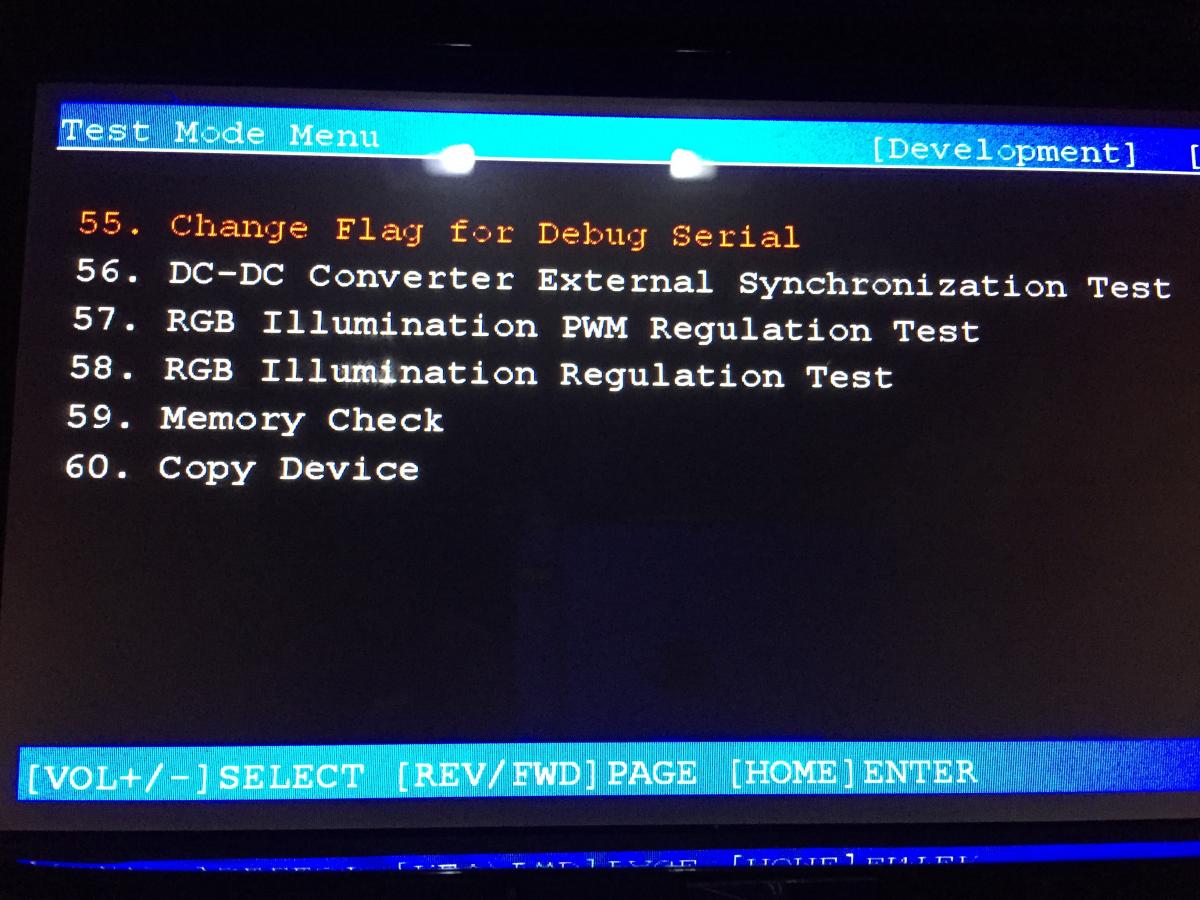
So here is the interesting part, with the XXTECHNICALXX mode you have the ability to change the usb port function from Host to Device (Change the USB OTG mode), as well as the ability to set a DEBUG over serial flag to on. I tried both these settings with a USB-A to USB-A cable I bought online, however my computer never detected the device when I swapped the usb port to OTG Device. However it is possible I have the wrong type of cable as its not an actual OTG cable. If anyone has a recommendation on a USB-A to USB-A OTG cable that would be awesome.


This mode also contains a lot more test functions that may provide more insight into the bluetooth issue, I will cross upgrade my deck tomorrow and renter the modes to see if the extra tests provide more insight.


post-116652-0-82682400-1437975004_thumb.jpg


post-116652-0-69920100-1437975035_thumb.jpg


post-116652-0-94409400-1437974978_thumb.jpg

Edited Jul 27, 2015 by bass_rock
Posted Jul 27, 2015 · 07:42 UTC#428

[deleted post]

Edited Aug 05, 2015 by whatisbypass
Posted Jul 27, 2015 · 07:56 UTC#429

[deleted post]

Edited Aug 05, 2015 by whatisbypass
Posted Jul 27, 2015 · 10:10 UTC#430

[deleted post]

Edited Aug 05, 2015 by whatisbypass
Posted Jul 27, 2015 · 11:03 UTC#431

...


So here is the interesting part, with the XXTECHNICALXX mode you have the ability to change the usb port function from Host to Device (Change the USB OTG mode), as well as the ability to set a DEBUG over serial flag to on. I tried both these settings with a USB-A to USB-A cable I bought online, however my computer never detected the device when I swapped the usb port to OTG Device. However it is possible I have the wrong type of cable as its not an actual OTG cable. If anyone has a recommendation on a USB-A to USB-A OTG cable that would be awesome.


...


Generally, in order to use USB-OTG, the pin #4 or X must be grounded for the USB hardware controller to understand that it is supposed to receive and supply power.


A standard USB port has just 4 pins while a device has 5 to designate charging/otg. You may need to locate hardware test points.

Posted Jul 27, 2015 · 11:32 UTC#432

[deleted post]

Edited Aug 05, 2015 by whatisbypass
Posted Jul 27, 2015 · 14:21 UTC#433

[deleted post]

Edited Aug 05, 2015 by whatisbypass
Posted Jul 27, 2015 · 15:02 UTC#434

Great news. Using XXTECHNICALXX testmode you can do anything, including copy files and directories. testmode contains fully-functional file manager, you can even recursive copy full directories. Also, it is possible to run scripts and write whole partitions. There is copy-device mode to copy everything to sd/usb and so on.


@bass_rock Where did you get this information about XXTECHNICALXX? It is not in the public domain.

Awesome! Let's get a script with the outputs of dmesg, logcat, and id ported to a file on the SDCard.


Next we will want to install apps and execute them. We need a live terminal active on the device.


Good work guys! You've just busted through gaining access all the way through to maintaining access.


Stages of ethical hacking

1.Reconnaissance

2.Scanning & Enumeration

3.Gaining Access [Escalation of privileges]

4.Maintaining Access

5.Covering Tracks


Now we bounce around between 1-4 for a while until we are able to create a full update. But the important thing is that we have penetrated and have some level of access!

Edited Jul 27, 2015 by AdamOutler
Posted Jul 27, 2015 · 15:05 UTC#435

BTW.. I noticed yesterday, each partition appears to be signed. An Android boot.img starts with "ANDROID!". These images on the SD start with a header. Now we need to figure out how to sign an SD Image. The SD has a series of 00's instead of FF's. This is as far as I got yesterday in that area. I began looking for methods of executing files which you have found.


Now the single, final task is to figure out the partition headers on the SD.

Edited Jul 27, 2015 by AdamOutler
Posted Jul 27, 2015 · 15:08 UTC#436

[deleted post]

Edited Aug 05, 2015 by whatisbypass
Posted Jul 27, 2015 · 15:10 UTC#437

No need to sign this. You can just insert sd/usb card with files and copy files you need directly to device.

Does it sign on its own? Every time we have tried to modify them, we get an error on the boot.img. There is more work left.

Posted Jul 27, 2015 · 15:14 UTC#438

[deleted post]

Edited Aug 05, 2015 by whatisbypass
Posted Jul 27, 2015 · 15:54 UTC#439

I'm sorry, as you noticed, English is not my native language :)


I mean that instead of patching firmware *.prg files (to make firmware modifications) and flash this modified firmware you can just change source files directly on device filesystem using shell scripts and file manager from testmode.

The boot.img is a raw-partition, header'd image on the internal SDCard. It consists of a ramdisk, kernel and parameters. The ramdisk is the root filesystem of the device and is loaded directly from this file. Any changes to this filesystem will not persist.


The way Android works, in contrast to other Linux systems, is the initrd remains mounted instead of being replaced by a physical disk after drivers are loaded. The system can be modified, but the kernel/ramdisk cannot.


The solutions are:

1. Figure out how to re-header the boot.img after modification to the ramdisk inside.

2. Utilize kexec to reinitialize the entire system and run a custom init.. Which will double the boot time.

Edited Jul 27, 2015 by AdamOutler
Posted Jul 27, 2015 · 17:34 UTC#440

@bass_rock great news! Thank you! Where did you find this new keys like XXTECHNICALXX? How to exit this XXTECHNICALXX mode? As I understand, this modes are registered in TST_MainThread::CreateStartupInfo() function and this function contains following modes list:

XXTECHNICALXX
AUTO
PRODUCT
SERVICE
DIRECT
NANDUP

Also, there is TST_KeyFileInfo::DecodeKeyFile() with testmode files decode functions, sample code from this function:

 while ( 1 )
  {
    source_char_tmp = *(_BYTE *)(source_string++ + 1);
    source_char = source_char_tmp;
    if ( !source_char_tmp )
      break;
    if ( (char)source_char > 51 )
      destination_char = source_char - 20;
    else
      destination_char = source_char + 76;
    destination_string[v2++] = destination_char;
}

Take attention, our perl script 0x14 is decimal 20 as in this function, so this two lines is equivalent:

$byte = ord($byte) - 0x14; // from perl
destination_char = source_char - 20; // from disassembled library

So, maybe, correct perl code may be should look like this:

#!/usr/bin/perl
# usage perl decode.pl TEST.KEY

my $filename = (shift);

open(my $fh, $filename) or die $!;

binmode($fh);

my $cnt = 0;

my $encodeString = "";
my $otherString = "";

while (read($fh, my $byte, 1))
{
	if ($cnt % 2 == 1)
	{
		if (ord($byte) > 51)
		{
			$byte = ord($byte) - 20;
		}
		else
		{
			$byte = ord($byte) + 76;
		}
		$encodeString = $encodeString.chr($byte);
	} else {
		if (ord($byte) > 51)
		{
			$byte = ord($byte) - 20;
		}
		else
		{
			$byte = ord($byte) + 76;
		}
		$otherString = chr($byte).$otherString;
	}
	$cnt++;
}

print $encodeString.$otherString;
print "\n";

close $fh;

About USB-OTG - maybe it starts to work after reboot/poweroff?


Yep thats probably correct, although I am not sure if any of the current test mode strings we have ever it the +76.


Great news. Using XXTECHNICALXX testmode you can do anything, including copy files and directories. testmode contains fully-functional file manager, you can even do recursive copy of full directories. Also, it is possible to run scripts and write whole partitions. There is copy-device mode to copy everything to sd/usb and so on. Also, you can copy system logs and device info into sd/usb. There is a lot of information in logs.


@bass_rock Where did you get this information about XXTECHNICALXX? It is not in the public domain.

I did a strings terminal command on the libTestMode.so and that stuck out to me as it was next to SERVICE, PRODUCT and more, and that thread that talks about the TestMode keys mentioned those so I tried it.


Awesome! Let's get a script with the outputs of dmesg, logcat, and id ported to a file on the SDCard.


Next we will want to install apps and execute them. We need a live terminal active on the device.


Good work guys! You've just busted through gaining access all the way through to maintaining access.


Stages of ethical hacking

1.Reconnaissance

2.Scanning & Enumeration

3.Gaining Access [Escalation of privileges]

4.Maintaining Access

5.Covering Tracks


Now we bounce around between 1-4 for a while until we are able to create a full update. But the important thing is that we have penetrated and have some level of access!


If you can provide me with a script that dumps out what we need I can run it on my device later today.

Posted Jul 27, 2015 · 19:00 UTC#441

bass_rock, here is the script.

#! /system/bin/sh
out="/sdcard/log.txt"
echo "--id--">$out
id  2>&1 >>$out
echo "--mount--">>$out
mount 2>&1 >>$out
echo "--proc/mounts--">>$out
cat /proc/mounts >>$out
echo "--netstat--">>$out
netstat -Af>>$out
netstat -r>>$out
echo "--dmesg--">>$out
dmesg 2>&1 >>$out
echo "--logcat--" >>$out
logcat 2>&1 >>$out
echo "--ifconfig--" >>$out
ifconfig 2>&1 >>$out

paste the contents from /sdcard/log.txt


if /sdcard/ isn't proper, I have notes at home about the locations of each partition I'd need to review.  /sdcard/ may be the internal SD partition. 

Edited Jul 27, 2015 by AdamOutler
Posted Jul 27, 2015 · 19:12 UTC#442

[deleted post]

Edited Aug 05, 2015 by whatisbypass
Posted Jul 27, 2015 · 19:18 UTC#443

Proper locations can be viewed using testmode file browser.


AFAIR, right location of usb (not sd) is something /mnt/udisk and /mnt/udisk1 for usb1 and usb2.


Is /system/bin/sh right location of shell interpreter?

Awesome. Bass, please take note of this and change that out variable accordingly.


Yes. /system/bin/sh is usually where Android's sh is kept. There is no /bin and /sbin is just some crash handling bs. In a rare case I saw /system/xbin/sh, and while I'm not at my computer now, I'd say /system/bin/sh is where its located.


Do you have reason to doubt that?

Posted Jul 27, 2015 · 20:00 UTC#444

[deleted post]

Edited Aug 05, 2015 by whatisbypass
Posted Jul 27, 2015 · 21:38 UTC#445

@AdamOutler thanks! I will get it to trying that tonight.


Also @AdamOutler since you are big on XDA, is it possible to get an admin to open a forum there, or do you have a good place to wiki dump this knowledge so we don't have to go digging through 30+ forum pages?

Posted Jul 27, 2015 · 23:10 UTC#446

any chance to update firmware?
i'm working in Igo NextGen app
because i need to put inside it new maps from brazil (2015.q1) and speedcam alerts


Great work guys...
 

Posted Jul 27, 2015 · 23:16 UTC#447

@AdamOutler thanks! I will get it to trying that tonight.


Also @AdamOutler since you are big on XDA, is it possible to get an admin to open a forum there, or do you have a good place to wiki dump this knowledge so we don't have to go digging through 30+ forum pages?

I'm actually a nobody on XDA now. I used to be very involved with the forums, an XDATV Host, a newswriter, an Elite Recognized Developer, and I ran my own contracting firm at casual-dev. I had to retire because I took a job with TracFone as an embedded systems security engineer, and they paid me well enough to give it all up. I could ask just as well as you could, but moving to XDA-Developers would sorta exclude me due to contractual obligations.

Posted Jul 27, 2015 · 23:35 UTC#448

bass_rock, I've added in a listing here so we know what partitions to pull to make a FULL sdcard backup

bass_rock, here is the script.

#! /system/bin/sh
out="/sdcard/log.txt"
echo "--id--">$out
id  2>&1 >>$out
echo "--mount--">>$out
mount 2>&1 >>$out
echo "--proc/mounts--">>$out
cat /proc/mounts >>$out
echo "--dev/block--">>$out
ls -alR /dev/block >>$out
ls -alr /dev/block >>$out
echo "--netstat--">>$out
netstat -Af>>$out
netstat -r>>$out
echo "--dmesg--">>$out
dmesg 2>&1 >>$out
echo "--logcat--" >>$out
logcat 2>&1 >>$out
echo "--ifconfig--" >>$out
ifconfig 2>&1 >>$out

paste the contents from /sdcard/log.txt


if /sdcard/ isn't proper, I have notes at home about the locations of each partition I'd need to review. /sdcard/ may be the internal SD partition.

I added in

"ls -alR /dev/block >>$out" and "ls -alr /dev/block >>$out" because sometimes ls requires lower case and sometimes upper case. but, once we know the partition layout we can get an actual living SDCard from your device using "dd if=/path/to/sdcard0 of=usb2/pioneer-avic5000-sdcard.img"


If this works, we just need someone with an x1xx unit to help me get my deck unbricked.

Edited Jul 27, 2015 by AdamOutler
Posted Jul 28, 2015 · 00:08 UTC#449

I'm actually a nobody on XDA now. I used to be very involved with the forums, an XDATV Host, a newswriter, an Elite Recognized Developer, and I ran my own contracting firm at casual-dev. I had to retire because I took a job with TracFone as an embedded systems security engineer, and they paid me well enough to give it all up. I could ask just as well as you could, but moving to XDA-Developers would sorta exclude me due to contractual obligations.


Ah ok. Never mind then, do you have a good spot for a wiki for this useful information then?


bass_rock, I've added in a listing here so we know what partitions to pull to make a FULL sdcard backup

I added in

"ls -alR /dev/block >>$out" and "ls -alr /dev/block >>$out" because sometimes ls requires lower case and sometimes upper case. but, once we know the partition layout we can get an actual living SDCard from your device using "dd if=/path/to/sdcard0 of=usb2/pioneer-avic5000-sdcard.img"


If this works, we just need someone with an x1xx unit to help me get my deck unbricked.


Ok that sounds really awesome. I will start small tonight and give it a shot. (Of course after I threw my deck back in my car right after we cracked the test mode keys.)


So for the script though, Does it look like I have to put the script on the device and run it from the TestMode, or do I use a test mode key with the command to run it?

Posted Jul 28, 2015 · 00:14 UTC#450

Ah ok. Never mind then, do you have a good spot for a wiki for this useful information then?


Ok that sounds really awesome. I will start small tonight and give it a shot. (Of course after I threw my deck back in my car right after we cracked the test mode keys.)


So for the script though, Does it look like I have to put the script on the device and run it from the TestMode, or do I use a test mode key with the command to run it?

I believe github has wikis available. I know googlecode does, but they are shutting down soon.


As for execution... "put Copy_Script.sh into root dir of USB1 and test XXTECHNICALXX mode using ProgramFunction => CopyShellUpdate"

Is what was said on the previous page. I'd like a copy of said key.

Edited Jul 28, 2015 by AdamOutler
Page 18 of 25