Just saw it tonight, but haven't had time to update. Anyone try it yet?
Posted Jul 16, 2015 · 01:25 UTC#1
Just saw it tonight, but haven't had time to update. Anyone try it yet?
You know... They may not give us users with the old units new features that they probably can actually handle, but when the AppRadio 1 stopped working after some random apple update Pioneer fixed the old appradios. That's a hell of a lot better support than I've seen from any of the other guys. Looking at you Alpine and Kenwood.
Thank you Pioneer for supporting your product. I'll update it now and let everyone know how my unit runs. Especially interested to see if I can control my iPhone from the built in media player again.
I found 1.09 for my 4000NEX. It doesn't look like it does anything new. Maybe I read it wrong.
The 1.10 letter and instructions have "Maestro FW" in the filename.
Ok, so updates installed. There is both a firmware and a bluetooth update. I don't use bluetooth (carplay) but I installed them both. Boot up is faster. Built in iPod controller can once again control phones now with the new music app. No significant changes that I saw for how the music app operates but at least now it OPERATES. So I'm happy with that.
Pioneer says it's a bug fix update. My device is booting faster, and my built in music app works again. I'm happy.
Still no AVICSYNC?
Still no AVICSYNC?
I have a 4000 NEX. I wouldn't get AvicSync regardless. I'm pretty sure you're out of luck though.
Honestly I doubt AvicSync will ever show.
Did you install 1.09 or 1.10?Ok, so updates installed. There is both a firmware and a bluetooth update. I don't use bluetooth (carplay) but I installed them both. Boot up is faster. Built in iPod controller can once again control phones now with the new music app. No significant changes that I saw for how the music app operates but at least now it OPERATES. So I'm happy with that.
Pioneer says it's a bug fix update. My device is booting faster, and my built in music app works again. I'm happy.
Anyone have other observations on the 1.10 firmware update?
Downloading 1.10 now will install shortly and post my thoughts. 1.09 running now on a 5000.
I'd like to install this if it speeds up the boot time, but I'm also wondering what this update might break that wasn't broken.
I'd like to install this if it speeds up the boot time, but I'm also wondering what this update might break that wasn't broken.
Excellent point Pjrm68, I've been burnt a few times before, looking forward to hear more about this update.
I have the 8100NEX and this 1.10 update doesn't seem to apply for my unit, but the "Bug fixes for iDatalink Maestro" mention is intriguing as some features supported by the Maestro module are currently missing in my 2013 VW Passat, most notably the nav and phone info on the MFI in the dash.
So it looks like this is to fix issues with iOS 8.4's new music app? anything else?
And I'm hoping the bypass will continue to work as old firmware updates have.
Is there a way to backup my GPS settings prior to the upgrade? I hate that it whacks your customizations and saved locations 
...Is there a way to backup my GPS settings prior to the upgrade? I hate that it whacks your customizations and saved locations
IDK as I haven't tried it, but perhaps backup and restore through Naviextras Toolbox???
https://www.naviextras.com/shop/portal/p2howto-guide?guide=Toolbox&topic=Backup
Well, I just took the plunge and updated. The update went fine and, so far, I notice absolutely zero difference. Boot time seems exactly the same. But, I guess it's good to be current.
Well, I just took the plunge and updated. The update went fine and, so far, I notice absolutely zero difference. Boot time seems exactly the same. But, I guess it's good to be current.
Would you mind confirming your GPS was reset back to factory?
Also, did you have the bypass enabled before / or if not, does it still work now?
I'd like to give it a try this afternoon.
IDK as I haven't tried it, but perhaps backup and restore through Naviextras Toolbox???
https://www.naviextras.com/shop/portal/p2howto-guide?guide=Toolbox&topic=Backup
Interesting, never saw that toolset before.
I don't have GPS (it's the 4000NEX). But my bypass still works fine.Would you mind confirming your GPS was reset back to factory?
Also, did you have the bypass enabled before / or if not, does it still work now?
I'd like to give it a try this afternoon.
So this update can be found on the pioneer website?
The website states that the update is strictly for the 8000NEX. Has anyone tried it for the 4000NEX thru 7000NEX models? If so, what were the results?
Actually, I'm pretty sure the update (1.09) is only for the 4000NEX. Is there one for the 8000 too?The website states that the update is strictly for the 8000NEX. Has anyone tried it for the 4000NEX thru 7000NEX models? If so, what were the results?
The website states that the update is strictly for the 8000NEX. Has anyone tried it for the 4000NEX thru 7000NEX models? If so, what were the results?
I'm not sure exactly where you read that, but when I looked up my 6000NEX, that's the firmware that shows up for it. I'm hoping to try it out later this evening.
here's the current updates for NEX models:
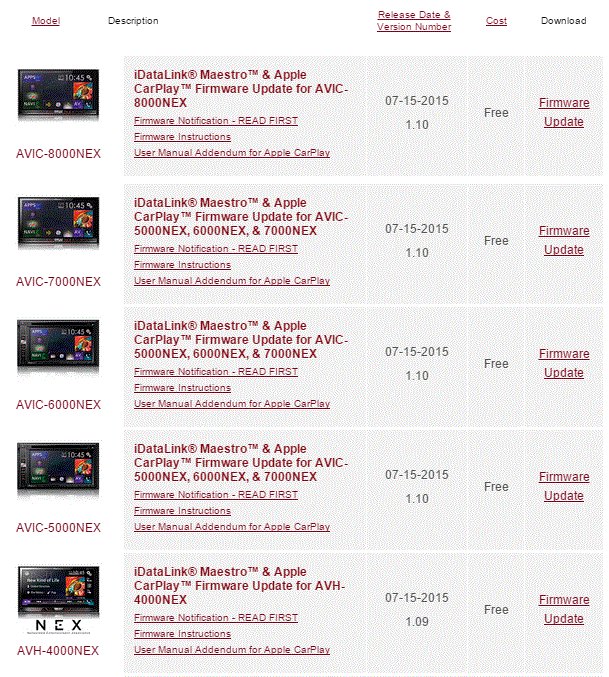
5000 device here. Update went smoothly, took about 10 minutes for the firmware and another 7/8 minutes for the BT update.
So far I've noticed faster loading times when car is turned on. Also: yes it did reset my GPS settings, no biggies.
Music: haven't tried it yet.
Went from v1.06 to v1.10 with this update.