Search Archive

Uploading Background Images

By Archangel · Apr 25, 2006in Problems/Troubleshooting💬 52 posts👁️ 17,242 views
Page 1 of 3
Posted Apr 25, 2006 · 13:22 UTC#1
I've made numerous attempts and still cannot upload a background image. I have followed the instructions step by step each time. jpg's in a folder marked Pictures along with another folder filled with 100 MB of images. The unit recognizes that a CD-Rom is in the drive, but the button for uploading images never becomes active. Does anyone have any advice on this?
Posted Apr 26, 2006 · 06:10 UTC#2
I have been having the exact same problem.
Posted May 01, 2006 · 22:25 UTC#3
Me too
Posted May 02, 2006 · 13:10 UTC#4
Its a bitch, everything has to be exactly like it says in the manual. I never could get a disc that it would recognize burnt using Roxio on my laptop, I ended up using my ancient desktop with nero and it worked...
Posted May 02, 2006 · 13:17 UTC#5
On a related note, does anybody know what size image is needed to fill the entire screen on the Z1?
Posted May 03, 2006 · 03:12 UTC#6
Thanks 03Vic-HPP, I used Nero this time and it worked. However, I'm having the same problem as you as far as filling up the screen. I did the maximum resolution Pioneer says it supports and it still has black bars on the sides.
Posted May 03, 2006 · 12:18 UTC#7
The resolution size is 500x240. I've uploaded two background pictures and a startup picture at this resolution and they fit the screen completely. Only put a few pictures in the BG folder, and just put other data junk on the disc. Dont put any music on it. Also make sure the names of your pictures contain only letters and numbers. Also, when I made my disc, I completely filled it up with junk (if that matters).
Posted May 03, 2006 · 13:18 UTC#8
justiz said:
The resolution size is 500x240. I've uploaded two background pictures and a startup picture at this resolution and they fit the screen completely. Only put a few pictures in the BG folder, and just put other data junk on the disc. Dont put any music on it. Also make sure the names of your pictures contain only letters and numbers. Also, when I made my disc, I completely filled it up with junk (if that matters).


You changed the start-up pic on a Z1?? How??
Posted May 04, 2006 · 16:34 UTC#9
htrdlnc said:
You changed the start-up pic on a Z1?? How??


I'm sorry, I thought this was in the n1/2/3 section. I have an avic-n2. I would assume changing the startup picture on the z1 is similar to the n, if it is possible at all.
Posted May 06, 2006 · 23:51 UTC#10
So has anybody figured out what size pic you need to fill the entire screen on the Z1? I dont want to waste any more discs till I know lol
Posted May 08, 2006 · 18:15 UTC#11
03Vic-HPP said:
So has anybody figured out what size pic you need to fill the entire screen on the Z1? I dont want to waste any more discs till I know lol


You should be able to use a CDR/W. Thats what I use to move music into it so I know it can read them.
Posted May 08, 2006 · 23:55 UTC#12
Ummm thats not what I asked
Posted May 10, 2006 · 19:25 UTC#13
read 3 posts above your's.


03Vic-HPP said:
So has anybody figured out what size pic you need to fill the entire screen on the Z1? I dont want to waste any more discs till I know lol
Posted May 10, 2006 · 19:41 UTC#14
All the units use 500x240.
Posted May 11, 2006 · 16:17 UTC#15
JasonH said:
All the units use 500x240.


Are you sure, beacause the Z1 is the only one with a 7" screen.
Posted May 11, 2006 · 16:25 UTC#16
JasonH said:
All the units use 500x240.


Are you sure, beacause the Z1 is the only one with a 7" screen.
Posted May 11, 2006 · 17:10 UTC#17
htrdlnc said:
JasonH said:
All the units use 500x240.


Are you sure, beacause the Z1 is the only one with a 7" screen.


I wouldn't be surprised. It's not uncommon for one device to have a 6.5 inch screen and one to have a 7 inch screen and both have the same resolution.

That happened with me and a camera, my mom has the cannon SD400 with the 2 inch screen and I got the SD550 with the 2.5 inch screen (both situations are 0.5 inch difference but with the digital camera going from 2 to 2.5 inches is a much bigger % difference). And both screens were the exact same resolution. You couldn't fit more on the screen, they just made the dots bigger.

I'm not saying this is what pioneer is doing, but just a 7.2% difference in screen size doesn't mean they changed the resolution. It could be the same as the 6.5 inch screens.
Posted May 11, 2006 · 18:13 UTC#18
I finally got it to work using Nero. I made several sized images and the one that went to all edges of the screen for me measured 2592 (width) by 1305 (height) pixels with a resolution of 300 PPI.
Posted May 11, 2006 · 18:56 UTC#19
Archangel said:
I finally got it to work using Nero. I made several sized images and the one that went to all edges of the screen for me measured 2592 (width) by 1305 (height) pixels with a resolution of 300 PPI.


Why don't you post some of those pictures up here for us for us to use as templates or something so we get an idea of what works.
Posted May 14, 2006 · 21:25 UTC#20
Yep, the 2592x1305 did it, this is the image Im using for AV bacground...

User image
Posted May 14, 2006 · 23:35 UTC#21
03Vic-HPP said:
Yep, the 2592x1305 did it, this is the image Im using for AV bacground...

User image


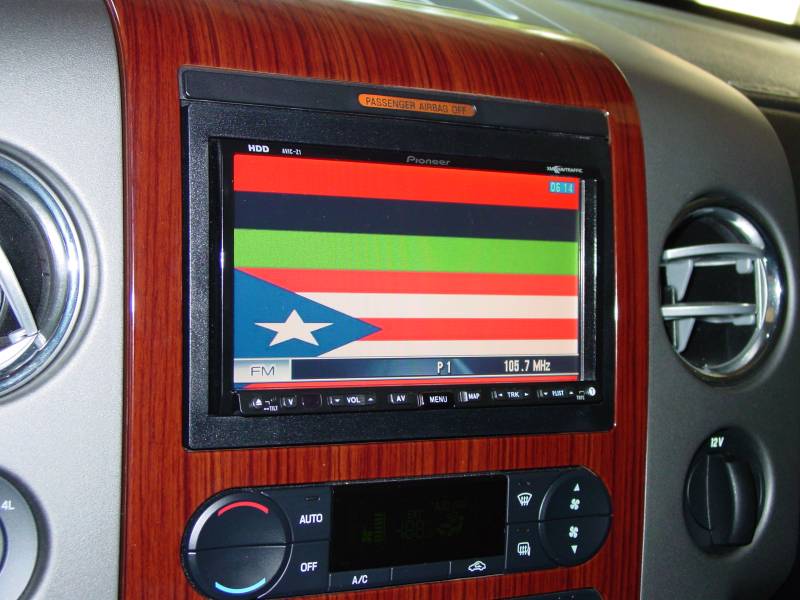
I used the above settings (2592x1305) and it worked great. Thanks for the information guys. I've attached a pic of my Z1.
Attached Files (1)
DSC00280.JPG
DSC00280.JPG
Posted May 16, 2006 · 00:07 UTC#22
Is there a Max file size???

~WW
Posted May 16, 2006 · 02:27 UTC#23
User image
Posted May 16, 2006 · 02:29 UTC#24
User image
Posted May 16, 2006 · 02:30 UTC#25
User image
Page 1 of 3