Search Archive

Recent Install Avic D3 in My Porsche 2000 Boxster

By trieullionaire · Mar 19, 2008in General💬 37 posts👁️ 8,999 views
Page 1 of 2
Posted Mar 19, 2008 · 03:29 UTC#1

I recently installed the Avic D3 Navigation with rear view camera in my 2000 Boxster. Still have a few interior upgrades to do but the navigation system install was a success and really made the interior look phenomenal and updated.


What was needed for the job:


T20 Torx Screwdriver

Phillips Screwdriver

A dremel with cutting wheel

A file to sand down rough edges

Electrical tape & Wiring Caps

Wire Stripper


Double Din Kit Includes:


Precision cut fascia (trim) piece in Piano Finish to match Pioneer System

Double Din Housing & Brackets

Double Din Custom Support Bracket for Porsche

Heat Shield, Complete Wiring Harnesses, Antenna Adapter & Radio Removal Keys


Some of the things I really like about my new system is that I know that the install is solid. One of the challenges I noticed other folks had was the weight of the system, and so they elected to have it sit low as possible on the dash. Using the custom support bracket to support the back end of the navigation, and also choosing to mount the double din housing as high up as possible, I was able to keep most of the gap below the system as oppose to the top. And to make sure my stereo stays relatively unaffected by the heat from the climate duct system, I installed a heat shield between the duct and navigation.


The other challenge was that most standard double din navigation systems are a lot smaller than the size of my boxster's opening, so regardless of what I install it was going to make the system appear smaller. Didn't like that look too much, so instead of trying to match up the fascia piece to my car, I went with the piano black fascia piece instead to match it up to the Pioneer system. I think going this route made the fascia piece look like its part of the stereo which gives the illusion that the system is a bit bigger.


Anyways, I posted some of the pics below for everyone to check out!

post-16999-12872753888646_thumb.jpg

post-16999-12872753889419_thumb.jpg

post-16999-12872753890104_thumb.jpg

post-16999-12872753890697_thumb.jpg

post-16999-12872753891412_thumb.jpg

post-16999-12872753892128_thumb.jpg

Posted Mar 19, 2008 · 03:45 UTC#2

looking good and like it came with the car from day 1.


Paul

Posted Mar 19, 2008 · 04:24 UTC#3

The D3 really enhanced the look of your interior.The trim is perfect.I think I'm jealous. :wink: Excellent !!

Posted Mar 20, 2008 · 03:17 UTC#4

Step by step instructions with photos on the way. Included will be the vss wiring & parking brake bypass. Very easy to install AVIC, professional installers make it seem complicated but it's not true. Stay tuned...

Posted Mar 21, 2008 · 10:26 UTC#5

That looks awesome! Congrats.

Posted Mar 21, 2008 · 13:15 UTC#6

Thank you, I love my AVIC! Been trying to find a reason just to drive somewhere, crazy I know.

Posted Mar 21, 2008 · 18:42 UTC#7

Man thats looks incredible! Like Porsche factory installed them!

Posted Mar 21, 2008 · 22:10 UTC#8

We installed a backup camera as well, with infrared night vision! When would I ever need it? NEVER, but it sounds cool though. Happy Easter everyone!

Posted Mar 21, 2008 · 22:21 UTC#9

looks factory

Posted Mar 22, 2008 · 19:55 UTC#11

nice dude

Posted Mar 23, 2008 · 16:00 UTC#12

nice

Posted Mar 25, 2008 · 03:04 UTC#13

Here are images of the kit (2-Din housing & brackets, Porsche 986 wire harnesses, antenna adapter, radio removal keys, screws, wire nuts, custom support bracket, heat shield, fascia or faceplate). I'm almost finish with the photo instructions, just adding as much pertinent information on there as possible. Hopefully I will uploaded tomorrow for everyone, depending on how late I stay up tonight.

post-16999-12872753966378_thumb.jpg

post-16999-12872753967471_thumb.jpg

post-16999-12872753968345_thumb.jpg

post-16999-12872753969137_thumb.jpg

post-16999-12872753970126_thumb.jpg

Posted Mar 25, 2008 · 11:23 UTC#14

Wow, looks awesome! Congrats!

Posted Mar 25, 2008 · 11:42 UTC#15

Nice, very neat and organized !

Posted Mar 25, 2008 · 12:12 UTC#16

Yeah, as you can see from the pics, my brother has some issues.

Posted Mar 25, 2008 · 12:23 UTC#17

Funny you said that. My brother is the same way ! Seriously !!

Posted Mar 26, 2008 · 12:51 UTC#19

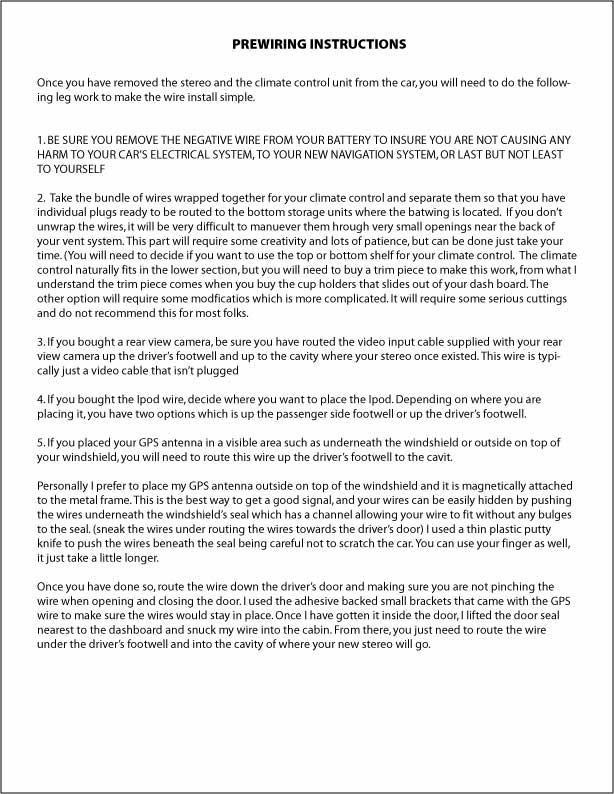
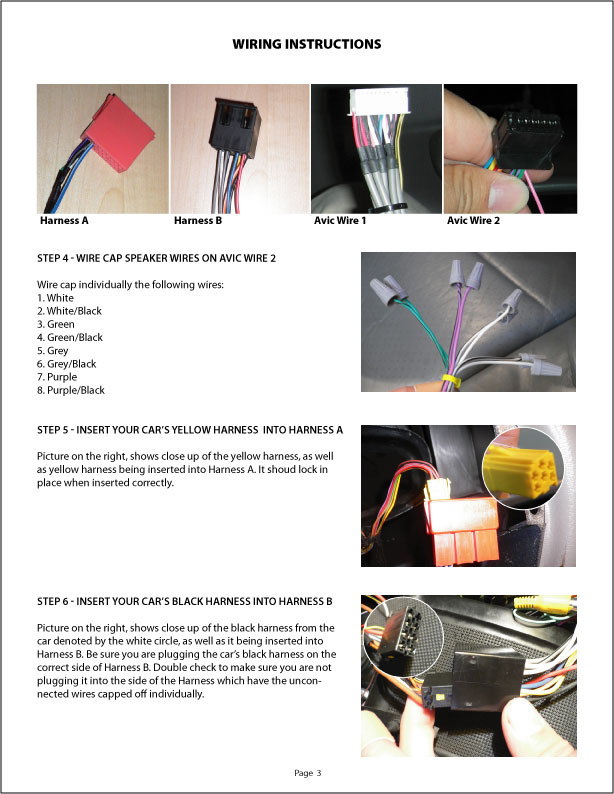
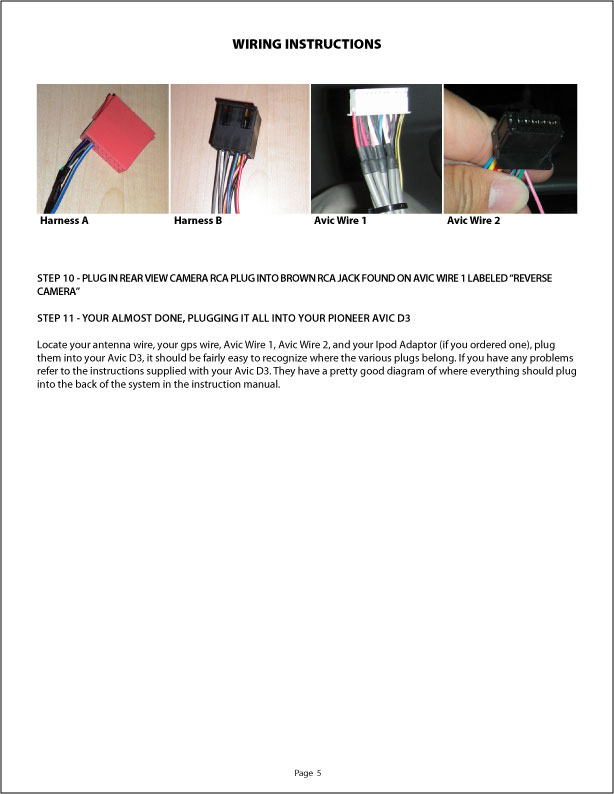
Here's the DIY wiring for AVIC D3...

post-16999-12872753971035_thumb.jpg

post-16999-12872753972283_thumb.jpg

post-16999-12872753973412_thumb.jpg

post-16999-12872753974353_thumb.jpg

post-16999-12872753975531_thumb.jpg

post-16999-12872753976498_thumb.jpg

Posted Mar 26, 2008 · 13:35 UTC#20

Let me know how you like the nav side of the D3.I've heard some horror stories.Pick a familiar route you know then program the nav to find that same destination and see how accurate it is.I don't expect it to plot the exact street you use but it shouldn't be 20 miles off. Thanks !

Posted Mar 26, 2008 · 13:55 UTC#21

The GPS sensor has a powerful magnet on the back of it, so what we did was placed it on the outside of the car (above the windshield) for maximum sensitivity. The system is incredible accurate for me. Custom stereo shops will just let it sit behind the AVIC & stick it onto the metal structure of the vehicle. The route I took for the installation takes 10 minutes longer to install but the results is resounding.


The VSS, vehicle speed sensor was hooked up as well to "pin" the car's location. Even if the satellite(s) losses your position momentarily, this is where VSS assist in locking in your location. Hope I was able to help...

Posted Mar 26, 2008 · 15:38 UTC#22

Wire instructions completed, what are your thoughts? The rest of the instructions for entire install coming tonight.

Posted Mar 26, 2008 · 22:03 UTC#23

The only problem I see is wire caps.I soldered and heat shrunk wrapped mine or used taps in a few places.Sometimes caps will fall off especially in the enviorment of a car shakes and bumps.

Posted Mar 26, 2008 · 22:23 UTC#24

Julius,


I hear ya, I solder most of the wiring jobs I do as well. I decided to go with very small wiring caps for this application due to the size of the wirings, plus it was quick & easy. Wrap some electrical tape around that & you're good to go. But is the instructions easy to understand?


Trieullionaire

Posted Mar 26, 2008 · 22:27 UTC#25

I had no problem at all understanding it.Did you cut and paste some because its well written?

Page 1 of 2