Search Archive

GEX-P7000TV tuner

By GnatGoSplat · Aug 09, 2006in General💬 36 posts👁️ 14,432 views
Page 1 of 2
Posted Aug 09, 2006 · 04:40 UTC#1
Does the older GEX-P7000TV work with the D1/D2?
Posted Aug 09, 2006 · 15:21 UTC#2
No, it won't work, unless you set it up as a stand alone unit, meaning you would need the remote eye and controller for the GEX-P7000tv and pull it in through the AVIC's AV input. You won't be able to control the tuner through the AVIC, only through the remote for the tv tuner.
Posted Aug 09, 2006 · 15:44 UTC#3
Ugh, that sucks. I saw "IP-Bus control" and pulled the trigger. I guess I jumped the gun. Oh well.
The TV tuners that work with the D1/D2 are WAY too expensive for just a tuner.
Posted Aug 11, 2006 · 20:20 UTC#4
I agree - they are a little stiff in price, but the GEX -P7000TV didn't come with the antennas, like the current GEX-P5700TV does. When that -P7000 was new, the antennas were $100.00 for the set. One of the better TV tuners around though - I knew a guy with a F-250 ext cab that just had the antennas laying on the floor behind the back seat & was picking up viewable TV stations from 60+ miles away... Remember , the Pioneer is a 4 antenna diversity tuner - looks for the best signal thru 4 inputs - a lot harder to do than just having a single antenna input.
Posted Aug 16, 2006 · 01:40 UTC#5
I got the GEX-P7000TV today. Obviously it won't work because it doesn't have an AV-BUS connector. Instead, it has an RGB connector. I guess it's what they used before AV-BUS.

Anyhow, just for the heck of it, I hooked it up to my D1 and the D1 can fully control it! It'll do channel scans and even finds a few local channels without any antenna hooked up. So it looks like the only reason it won't work is lack of AV-BUS. If it were possible to translate RGB to AV-BUS, it would work! I'm guessing there's nothing but audio and video on that bus, and it wouldn't surprise me if it's analog. If that's the case, translating the signal should be possible.

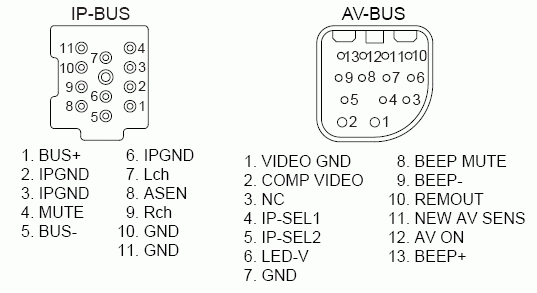
Anyone have pinouts for the AV-BUS?
I found pinouts for the 7000TV via Google but nothing on AV-BUS.
Posted Aug 16, 2006 · 14:52 UTC#6
hmm i dont really understand what you're saying.

You just said you can fully control it with your d1.
Then you say it doesnt work because of the av-bus

how did you connect it to the d1? through the rca inputs?

Also, i would like to know how many channels can you get, and how clear are they in the screen?

i used to have a dvd with build-in tv tuner with 1 antenna, and the channels were not watchable. Lots of snow and the screen was moving.

what do you think of those tv tuner at:
http://www.mp3playerstore.com/stuff_you ... ex.html#TV

btw that's where i bought my dvd with build in tuner.
They have a seperate tv tuner with 4 diversity antenna, Do you think it is worth trying it?
Posted Aug 16, 2006 · 15:05 UTC#7
Yes, AV-BUS is the problem.

The D1/D2 controls the tuner through IP-BUS. That's how the D1/D2 can change channels, store/retrieve presets, etc. on the tuner. However, it receives video and sound via AV-BUS.

On the newer TV tuners (GEX-P6400TV or GEX-P5700TV), there is both IP-BUS and AV-BUS. The GEX-P7000TV is too old, it only has IP-BUS and RGB output with a proprietary connector. The IP-BUS part works great, the D1/D2 can control it, change channels, change bands, store/retrieve presets. However, without hooking up the AV-BUS, there is no video and no sound. I think the 7000 only has RGB video outputs. There are other RCA-type video plugs, but I think they are only inputs.

If I could convert the RGB to AV-BUS, then it would work. Only thing is I can't find AV-BUS pinouts to know if this is even possible. So right now, without AV-BUS hooked up, I get no picture and no sound.

Anyway, I couldn't tell you how clear the channels come in until I can build or wire up something to convert RGB to AV-BUS. Maybe Pioneer already has a cable for this, but I can't find it.

The price on those tuners you linked to looks good, but I personally really wanted something the HU could control and $200+ for a GEX-P5700TV wasn't worth it.
Posted Aug 16, 2006 · 15:40 UTC#8
ahh i got confused with av-bus and ip-bus

what's av-bus?? you mean the rca cable(yellow, red, white)?

i'm sure there is a way to convert the rgb signal.
gotta google search, or do some trial

that's what i did with my s-video to rca cable. I just tried any combination of wire randomly until something shows up in the screen.
Posted Aug 16, 2006 · 15:50 UTC#9
AV-Bus is Pioneer's current audio/video bus. It resembles an IP-Bus connector but I think it only has audio/video on it.

Yeah, I thought about trying to figure out the AV-Bus through trial & error, but there's quite a few wires in that connector. Hopefully someone has the pinouts for it. I searched Google but came up with nothing. If it's an analog bus, then I'm sure it can be made to work.
Posted Aug 16, 2006 · 16:08 UTC#10
why dont you use the rca input?

does the GEX-P7000TV have an rca output
Posted Aug 16, 2006 · 16:13 UTC#11
I don't think the D1/D2 can use the RCA inputs when the function is set to TV. I think it HAS to use the AV-Bus, but I'll check setup options and find out for sure.

I don't think the 7000 has RCA outputs. It's possible to convert RGB to RCA (composite) I think, but I'll only explore that possibility if I find a way to get the D1 to use RCA's instead of AV-Bus for the TV tuner.
Posted Aug 16, 2006 · 16:24 UTC#12
i just checked pioneer website
http://www.pioneerelectronics.com/pna/p ... lComponent

yes you have rca output, and it should even come with remote.

so i'm sure you can use the rca input, and worst case, you use the remote to change channel instead of the d1 menu
Posted Aug 16, 2006 · 16:31 UTC#13
Oh yeah, I forgot about the rear video outputs which are RCA's.

I didn't get the remote with mine since I bought it used from eBay. It think a special IR sensor is required to use the remote. I don't know if it originally came with it, but mine doesn't have the IR sensor either.

I'm going to try to get it to work with IP-Bus control though. Without it pretty much defeats the purpose of buying a Pioneer TV tuner.
Posted Aug 16, 2006 · 16:55 UTC#14
let us know how it works out with the rca input

i'm interested in buying one of those, otherwise i will go with the noname brand
Posted Aug 16, 2006 · 23:51 UTC#15
I went into setup and you CANNOT use RCA inputs for the TV. :( You can use the 7000 as a generic video device through the RCA's, but then the D1 can't control it.

D1/D2 only allows M-DVD and VIDEO to use the RCA's. IP-Bus controlled TV tuner MUST use AV-Bus. So I guess you might as well get a noname brand tuner, but I'm very determined to get the GEX-P7000TV to work! Just gotta find some kind person to look up AV-Bus pinouts in any recent Pioneer HU service manual.
Posted Aug 20, 2006 · 04:28 UTC#16
Woohoo! I got it working! My GEX-P7000TV works great with the AVIC-D1 (and D2, because my D1 has been upgraded to a D2).

I got a service manual for the D1/D2 and got pinouts for the AV-Bus. Turns out the AV-Bus is just a composite video input with a handful of other inputs. It seems Pioneer has gotten kind of cheap since the RGB input from the older models would have been higher video quality, but anyway...

On the AV-Bus, we need to use 3-pins.
Pin 1 = Video Ground
Pin 2 = Composite Input
Pin 12 = AV ON INPUT

Pin 12 needs to go to +12V. The 12V input tells the AVIC to turn on the AV-Bus input.

On the GEX-P7000TV, I discovered via trial & error (no manual) that the video output is on the yellow RCA labeled "OSD". Connect the OSD center pin to AV-Bus Pin 2, and its shield ground to AV-Bus Pin 1. It is also necessary to ground DSEN (pin 12) in the green RGB connector of the 7000TV. This is most easily done by connecting pin 12 to pin 20 in the green connector. It was only after grounding DSEN that I finally got picture and sound on the AVIC! The audio is in the IP-Bus so no worries there. Everything works great, and my 7000TV was less than 1/4th the price of the 5700TV. :)

I still need to buy some antennas and find a place to mount this huge tuner (that is one benefit of the newer tuners is that they're much smaller). I also need to get an AV-Bus cable to cut up. After that, I'll be sure to get pics and make a detailed write up.
Posted Aug 25, 2006 · 20:54 UTC#17
Shawn-

I was just looking at the pinouts for the RGB connector, and pin 17 in the green connector gets 12V+ when the unit is on, so can't you just connect pin 12 in the AV Bus to that pin?
Posted Aug 26, 2006 · 01:05 UTC#18
Yes, you can get the +12V there. It's possible that might even be a better place to get the +12V, hard to say really. I didn't check to see if it's hot all the time, hot only if the tuner is on, or hot the whole time the D1 is on. I didn't notice any negative side-effects from using the switched ACC wire to get the +12V though. One big reason NOT to get the +12V from the green connector: it would require hacking up a really expensive, discontinued, virtually impossible to find, 20-pin RGB cable!
Posted Aug 26, 2006 · 01:39 UTC#19
One big reason NOT to get the +12V from the green connector: it would require hacking up a really expensive, discontinued, virtually impossible to find, 20-pin RGB cable!


Thats true, but what I was thinking about doing was getting a connector that would fit in there and just hooking up wires to the necessary pins. The only thing would be finding a connector that fits in there :?
Posted Aug 27, 2006 · 00:21 UTC#20
I think you would have a hard time to find a connector that fits in there. The actual connector you'd need is a Mitsumi IAM-C26, but I haven't found any source for those. I rigged something up using a couple of edge-card connectors that I cut off a circuit board using a Dremel.

I did verify today that the +12V output on the green connector is only hot when the source is TV. That means it's probably the proper wire to use for turning on the AV-BUS. I don't know what the possible side-effects could be by leaving the AV-BUS turned on in other source modes though. I didn't notice any side-effects in my experimenting, but I'll probably use the green connectors +12V output just in case.
Posted Sep 07, 2006 · 15:11 UTC#21
that's great news, let us know how it turns out.

and i would like to know if you get good reception and if the channels are crisp and clear.
Posted Sep 07, 2006 · 20:12 UTC#22
GnatGoSplat said:
I think you would have a hard time to find a connector that fits in there. The actual connector you'd need is a Mitsumi IAM-C26, but I haven't found any source for those.


Try calling them up for the IAM-C26!

http://www.mitsumi.com/indexusa.html

Item Number is: C26-020-2420-A

Good Luck :)
Posted Dec 06, 2006 · 19:12 UTC#23
I have the p7000 tv tuner from my last system and I was just going to put it on ebay to help buy a 5700 tv tuner. Fortunately, after reading this topic I think i want to try to modify it and same some money in the process.

I hooked it up to my N2 and the system recognizes it because I'm able to change the channels with the headunit. The problem is that I can't get the audio or video to work.

My question is what are the steps to modify this tuner? I have all the cables that came with this unit and a few extra one laying around.

Thanks in advance
Posted Dec 06, 2006 · 19:30 UTC#24
I think everything you need to know is on the top of page 2 of this thread.

The reason for the no sound is you need to ground pin 12 in the RGB connector.

Pin 12 in the AV-Bus connector needs to be set to +12V to enable the AV-Bus input. The OSD cable from the 7000 needs to connect to pin 1 (GND) and pin 2 (composite input).

I never got around to taking pics of mine because 3 months later I'm still fighting the company I bought my antennas from. :evil: :cry:
Posted Feb 12, 2007 · 04:57 UTC#25
I was just referring this post to someone when I realized that the AV-Bus pinouts were never posted, which makes it much harder to find the correct wires. Here they are, thanks for GnatGoSplat.
Attached Files (1)
ipbus_avbus_pinouts.gif
Page 1 of 2