in case anyone hasnt pointed it out, hibernation needs the amount of non-volatile memory equal to what is currently in-use in the system. Hibernate (or sleep) works by pausing the OS to save anything loaded in resident memory to the harddrive. When it unhibernates, all this is read, put back into memory and then unpaused. This means that the AVICs would need to come out with another flash or some other non-volatile storage device to keep the hibernation image. I doubt they have enough flash storage available to do something like this.
Defeating the boot time for "short" stops..Ideas?
in case anyone hasnt pointed it out, hibernation needs the amount of non-volatile memory equal to what is currently in-use in the system. Hibernate (or sleep) works by pausing the OS to save anything loaded in resident memory to the harddrive. When it unhibernates, all this is read, put back into memory and then unpaused. This means that the AVICs would need to come out with another flash or some other non-volatile storage device to keep the hibernation image. I doubt they have enough flash storage available to do something like this.
you think they are going to need over a gig for this? i doubt it...
They could just let you use an SD card for that. OR even enable it via external storage. Say if you want to use a USB hub and a spare Flash stick to store that with. Just hide it away and there you go. you can hibernate with the SD stick, and or USB flash stick. Or even make it work with an iPod (which has tons of storage).
I am sure there is a way to make it work, just need to have them do it.
They could also skip 'hibernation' entirely and just use 'sleep' mode instead. Then you don't need to find nonvolatile storage space to save a RAM image, and you don't need the time it takes to write or read the RAM image. Just don't power-off the RAM. It probably only uses 1.5v and you can keep the CPU powered too but throttled down to 0MHz, cut power only to the peripherals (display, touch panel, audio circuits, RF tuners, BT, etc).
My laptop uses sleep mode (for that matter, so does my desktop) and it takes less than a second to 'shut down' into sleep, and less than a second to wake up from sleep. Granted, it will use some battery power while sleeping, but it's negligible. Unless you were going to park your vehicle for a few weeks/months.
which in that event after lets say 2 days, it could just shut down. Even if it just asked you "SLEEP" or "SHUT DOWN" as you turn your car off would be perfect. ![]()
which in that event after lets say 2 days, it could just shut down. Even if it just asked you "SLEEP" or "SHUT DOWN" as you turn your car off would be perfect.
That would be perfect. They could even make it a system preference, so rather than ask every time you shut off, you could just set it in preferences and then not worry about it. 'Shutdown or Sleep'. Default it to shutdown if they want to play safe.
Just don't power-off the RAM. It probably only uses 1.5v and you can keep the CPU powered too but throttled down to 0MHz, cut power only to the peripherals (display, touch panel, audio circuits, RF tuners, BT, etc).
wouldnt this require a hardware modification? like getting a wire from the constant to the RAM with a resistor on it? or im a noob and its strictly software ![]()
i bet that this box has lots of unused space inside so may be a hardware hack and install a small battery in the box for only keeping the ram alive? and then the possibly of shutdown or sleep in the software? so when in sleep mode that build in battery is used. i think it has only 64mb ram on 1.5v so that isn't much... ideas ideas ![]()
not sure but if any one can get his hands on the electrical schema of the f series ![]()
i have done lots of electronic mods in the past and my solder kit is always standby ![]()
which in that event after lets say 2 days, it could just shut down. Even if it just asked you "SLEEP" or "SHUT DOWN" as you turn your car off would be perfect.
that should be wonderful, but when in wince mode i didn't see any shutdown possibility at the start menu. but i have to admit that i'm not very familiar with wince. i`m more a linux guy but knows microsoft products from the beginning... (ms-dos with no directories
)
the wince on the headunit doesnt have the shutdown.exe :/ i guess pioneer didnt care about shutting it down
so isnt that like shutting the computer down manually?
I do not think a hardware-only hack will work. Just supplying power to the RAM with everything else remaining the same, will not help and might even hurt. A sleep-mode or hibernation-mode would have to be feasable in the software first. The OS, the applications, would need to 'know' that they have a sleep / hibernate state. Otherwise, on car power up, the thing's not going to refer to the ram, it's going to go through whatever it does now, i.e. a boot up.
It's dissapointing that Pioneer didn't see fit to include the parts of WinCE that control the shutdown behavior... any WinCE experts know, could we add the shutdown.exe and whatever libraries are required?
Come on people Ur all getting close to figuring this out, someones got to get it.
I emailed Pioneer two weeks ago about a standby, or hibernate mode....
No response ![]()
Sux cuz this is the only thing (besides the nav boxes) stopping me from buying the f700. I really don't want to buy the JVC 7000.
i'm not really thinking about how we can keep the unit on or sleeping but how can we speed up the boot cycle
theres gotta be some things we can make quicker, i need to research wince more ![]()
Well if you want to speed it up, maybe some of this will help::
Registry:: Boot Sequence
[HKEY_LOCAL_MACHINE\init]"Depend100"=hex:1e,00
"Launch100"="Gpsmc.exe"
"Depend105"=hex:14,00,1e,00
"Launch105"="\\windows\\shell.exe"
"Depend95"=hex:14,00,1e,00
"Launch95"="dw.exe"
"Depend60"=hex:14,00
"Launch60"="services.exe"
"Depend30"=hex:14,00
"Launch30"="gwes.exe"
"Launch20"="device.exe"
Registry::Overclock the processor
[HKEY_LOCAL_MACHINE\System\CurrentControlSet\Control\Performance]"CoreClockMin"=dword:0000000c
"CoreClockMax"=dword:000001f4
Can someone who has installed the firmware update, host a copy of the new registry. I'd like to compare the two.
is regedit in the headunit? i dont think i tried that yet
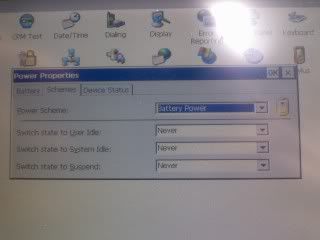
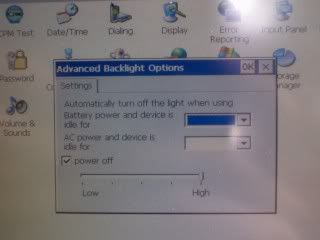
Anybody look into these options in the control panel?


i have, but i didn't know what to make of it... i've heard its possible to overclock the processor... and i mentioned in a thread a while ago about possibly changing the boot sequence... like starting GPS last or something... im sure that would really help
in case anyone hasnt pointed it out, hibernation needs the amount of non-volatile memory equal to what is currently in-use in the system. Hibernate (or sleep) works by pausing the OS to save anything loaded in resident memory to the harddrive. When it unhibernates, all this is read, put back into memory and then unpaused. This means that the AVICs would need to come out with another flash or some other non-volatile storage device to keep the hibernation image. I doubt they have enough flash storage available to do something like this.
It's important to reiterate the difference between Hibernate and sleep since the words are confused in several places on the forums. Sleep is a low power consumption state where the hardware is still running. Hibernate is a dump of RAM to Long-term storage and then all hardware is shut off. The difference is basically speed of reinitialize. Hibernate would do almost nothing for start up time while sleep could make all the difference.
A Possible Soultion for Stops
Could a smaller 12v Battery (Say a marine battery) be wired in parallel with a toggle switch to the power input of the AVIC? Then before turning off the car simply toggle the switch "on" ensuring the AVIC doesn't realize the car has turned off and continues to draw power from the backup battery. When the car is running the backup battery will be charged by the alternator just like the main battery and when the unit needs to be turned off for long periods just flip the switch. It's also possible to turn off the screen to increase the battery time of the backup battery through the built in "System Settings"1 menu.
1) PG 138 English f90bt manual