Search Archive

Possible Fix For North Up in 2D Mode?

By skicrave · Aug 27, 2008in Hacks/Mods💬 30 posts👁️ 8,633 views
Page 1 of 2
Posted Aug 27, 2008 · 17:59 UTC#1

I thought I would start this topic as a means of discussing the fact that north is always facing up in 2D mode. Besides the persistent boxes (fixed) and the long boot time, I think this is the next biggest complaint about the navigation section.


Today, I was playing around with the zoom in 3D mode and realized that if you bring up the pan & scan controls, you can "tilt" the display so you're looking straight down. That effectively makes it a 2D view, but the map continues to track with the direction of travel. The only issue is that it reverts back to the default view as soon as you press the map button, but I think there's a way around that using pioneer.ini.


I'll post more information as I have it.

Posted Aug 27, 2008 · 20:15 UTC#2

Yeah, I guess if you could find a way for the 3D view to remain flat, it would operate just (or somewhat) like the 2D view, except be heading up instead of north up.

Posted Aug 27, 2008 · 21:42 UTC#3

Man if this could be corrected, that ends the majority of people's complaints with the nav. I'm going to start playing around and see what I can find.

Posted Aug 28, 2008 · 06:27 UTC#4

if you take the ezrider.exe file and load it up into notepad (yes but dont edit ANYTHING). YOu can scan through it and find the options for the strings for the pioneer.ini file... one of them is north_lock


when you look into this the ones that are not double spaced are the ones that are already off, the ones that are readable ie the one we are trying to change is turned on (north_lock != n o r t h _ l o c k) see what i am saying....

Posted Sep 07, 2008 · 14:39 UTC#5

is there an solution for this anoying error? I want to use 2D with cours up instead of north up.

Posted Sep 09, 2008 · 02:46 UTC#6

Not yet, but we're working on it. There are two possible solutions, either unlock 2D mode so that it doesn't have to be North up, or figure out a way to keep 3D mode zoomed out and panned up.


So far neither have resulted in a solution.

Posted Sep 09, 2008 · 04:03 UTC#7

As far as I could find, iGO8 simply does not have "direction up" option for 2D map mode. May be if they update it, but not currently.


Map tilt levels for 3D however can be set in SYS.TXT and/or pioneer.ini file...

Posted Sep 09, 2008 · 04:22 UTC#8

Can the tilt angle be "locked" in one place through the config files? I tried that, but was unsuccessful (although I may have been using the wrong variable).

Posted Sep 09, 2008 · 04:49 UTC#9
Can the tilt angle be "locked" in one place through the config files? I tried that, but was unsuccessful (although I may have been using the wrong variable).


In pioneer_ini there is this section:


[map]

3d_max_tiltlevel=6800


I believe 3d_min_tiltlevel is also a valid variable.


The problem will be determining which way to change the value...

Posted Dec 06, 2008 · 02:09 UTC#10

if you can find a code association with the button in the 3D mode, possibly the same button will have another function in 2D mode. I think we have to look into some dll's provided not the exe file

Posted Jan 23, 2009 · 12:37 UTC#11

did anyone find a mod for this yet?

Posted Jan 24, 2009 · 18:32 UTC#12

subscribed - im VERY interested in a fix for this pretty annoying "error" in feature-selecting judgment

Posted Jan 25, 2009 · 16:28 UTC#13

It's easy:


Add or replace these lines to the section [map] in "DATA.ZIP\project_config\pioneer.ini"


3d_max_tiltlevel=0

3d_min_tiltlevel=0


so the 3D-Mode will stay orthogonal to the ground. (But it will always stay there)

Posted Jan 26, 2009 · 01:11 UTC#14

Navi, have you confirmed that is this does work? Does the arrow change it's size at all? The 3D arrow is much too big for a 2D view.

Posted Jan 26, 2009 · 01:30 UTC#15
Navi, have you confirmed that is this does work? Does the arrow change it's size at all? The 3D arrow is much too big for a 2D view.


There's a SYS.TXT setting for arrow size, too...

Posted Jan 26, 2009 · 09:01 UTC#16

This is what mine looks like :) turned off "smart zoom" so you can tilt to make it look "flat" as well as adjust the zoom. Then I changed the arrow to be much smaller (the 3D one is huge), looks classier too. This is all in 3D mode
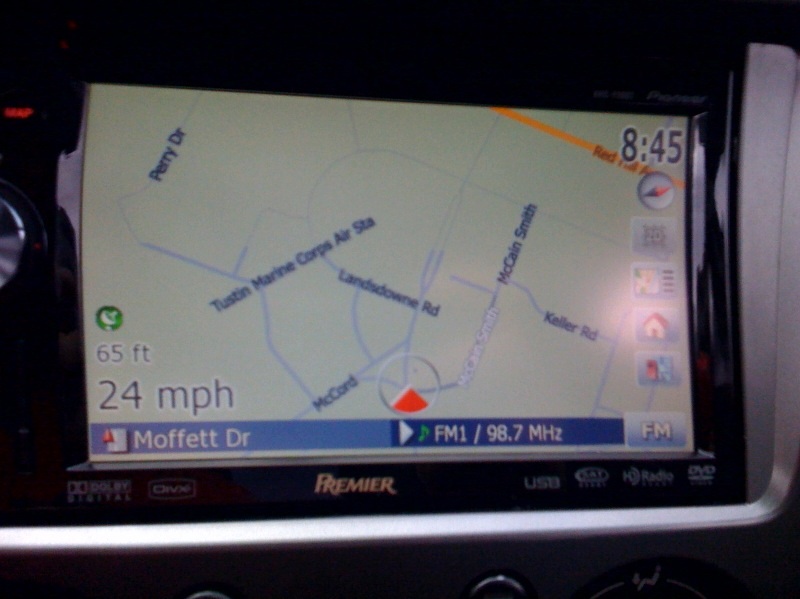
post-25741-12872756850733_thumb.jpg

Posted Jan 26, 2009 · 23:13 UTC#17

If you make the ini-changes, you can still have smart-zoom, it will work!

Posted Jan 26, 2009 · 23:17 UTC#18

How about centering the cursor a bit more? Possible?

Posted Jan 26, 2009 · 23:27 UTC#19
How about centering the cursor a bit more? Possible?


In navigatemap files look for map.SETCARPOSITION aaa bbb lines.

First number controls where the car cursor is horizintally in percents of screen width. Second one where it is vertically in percent of screen height.


I.e. map.SETCARPOSITION 50 50 will center the arrow on screen and map.SETCARPOSITION 50 75 will position it 3/4 of a way down...

Posted Feb 21, 2009 · 23:17 UTC#20

This works great! in the DATA.ZIP\project_config\pioneer.ini

under [map]

i changed the

3d_max_tiltlevel=6800

to

3d_max_tiltlevel=1000

then i turned Smart Zoom ON and this (for me) works just like "2d track up"

the map zooms in and out according to my speed and i can hit the map button to get rid of the evil red cursor and it stays in this view.


you will want to shrink the arrow and adjust the max and min zoom settings under smart zoom to your taste.


now if i could just get the arrow to be blue or green, i would be set. but for now i will be happy with gray

Posted Feb 22, 2009 · 13:06 UTC#21
How about centering the cursor a bit more? Possible?


In navigatemap files look for map.SETCARPOSITION aaa bbb lines.

First number controls where the car cursor is horizintally in percents of screen width. Second one where it is vertically in percent of screen height.


I.e. map.SETCARPOSITION 50 50 will center the arrow on screen and map.SETCARPOSITION 50 75 will position it 3/4 of a way down...


Hi Boris, sorry but where is the location of the navigatemap files i would like to try this mod, Thank you

Posted Feb 22, 2009 · 14:20 UTC#22

I found It

Posted Apr 09, 2009 · 22:32 UTC#23

Any possible fixes to this that a total noob could make happen? Every navigation system I have ever used follows the direction you are heading... What were they thinking!?!?

Posted Apr 10, 2009 · 14:28 UTC#24
Then I changed the arrow to be much smaller


Looks like you used the arrow from the Lexus navi system, eh?

Posted Apr 26, 2009 · 22:14 UTC#25

how far has anyone got to scripting something to fix the 2d north up issue? i'm browsing through igo 8.3 ui's and found some interesting scripts regarding 2d head up, i just want to know if anyone has looked into it before i start trying to incorporate them in our ui's, anyone?

Page 1 of 2