Search Archive

They all seem to run the same software...

By Stephanie · Sep 08, 2008in Hacks/Mods💬 29 posts👁️ 5,595 views
Page 1 of 2
Posted Sep 08, 2008 · 01:04 UTC#1

I've been digging through the scripts some more, trying to find some settings that seemed to have been 'missing', and have uncovered some interesting stuff.


Anyone who's looked into the data.zip file has seen lots of filenames starting with 746... and there's been a few references to the number 749 as well.


I'm pretty certain now that #746 is the F700, #747 is the F900 and F90, and while #749 is the F500. The software on my F700 appears to have all the components necessary for any/all four of these units. For example, my F700 contains the software to run MSN Direct, and contains the software decoder for playing DVDs / DIVX files.


What is determining the functionality you see on the screen, is two variables: vBeta and vBetaMode. These variables are set based on the unit's internal reference which is probably burned into ROM. See this example:

runif vBeta "0" 'state st_advMenu_UC'
runif vBeta "1" 'state st_advMenu_EW'
runif vBeta "2" 'state st_advMenu_AU'
runif vBeta "3" 'state st_advMenu_RE'
runif vBeta "5" 'state st_advMenu_UC, btnAMM_Msnd.hide'

This sets up which "Destination Menu" you will see based on what the vBeta is set to:

0 is the US/Canada menu for the F90, F900, F500. 1 is for Europe (Western maybe?). 2 Is Australia I think. I don't know what 3 / RE is, rest of Europe mabe? and 5 is for the US/Canada F700.


Then there's all this code:


These scripts seem to be the ones that set the Beta and BetaMode variables, based on the internal part number in the machine.


So anyways, what's the use of this knowledge? Well let's say there's some function or feature that you want, which is software-dependent, that is not available on your unit? I'm quite positive now that the software is all there, but the units are set to only display stuff based on the part number in ROM. So, to some extent, it should be possible to get at some of these things and access them.


Of course, hardware-dependant functions cannot be 'activated' since the hardware won't be there. Still...should one end up hacking the hardware, at least we know that the software is already in place.


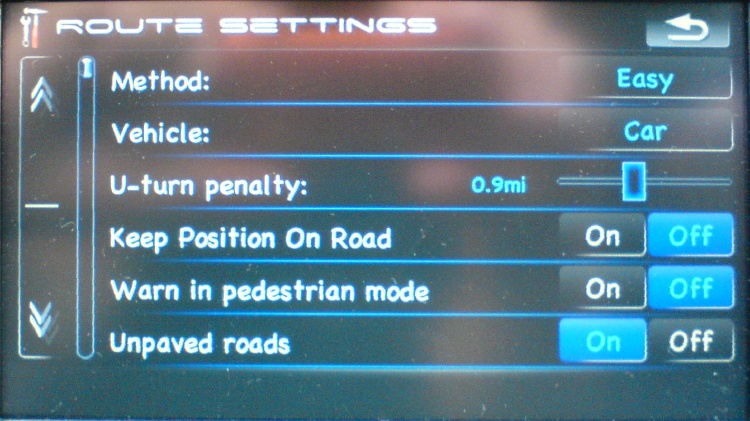
For me? I've just enabled some of the settings formerly available only to the F500 - I want to be able to toggle the snap-to-road function because sometimes, I'm not on the road. :D


Cheers!


p.s. just a word of cautious pessimism - don't get hopes up too high yet, since this is pretty early in. Its only the last hour or so that I've been investigating this aspect of the software, and I don't know what other checks and balances they may have put into place to thwart us.

Posted Sep 08, 2008 · 01:08 UTC#2

According to SYS.TXT on mine, 746 is F90-bt.


Check in IGO's directory, it has both sys.txt and model-specific sys_7XX.txt files.

Posted Sep 08, 2008 · 01:11 UTC#3

I had seen that, but I believe the sys.txt is over-ridden in the scripts in this case.

Posted Sep 08, 2008 · 01:15 UTC#4
I had seen that, but I believe the sys.txt is over-ridden in the scripts in this case.


If you have something other than F90, can you check what your SYS.TXT says?


I imagine that pioneer.ini file in project_config can have some overrides, too...

Posted Sep 08, 2008 · 01:19 UTC#5

I have the F700 and it also says 746:

type="PIONEER746UC"


From following the scripting code, I can see that a type 746uc does not have access to msnd whereas a 747uc or 749uc do have access to msnd.


Further research shows that the 746 and 747 share the same 'route settings' screen but the 749 'route settings' screen is different. I downloaded the F500 manual and compared, and the 749 'route settings' menu matches what's in the F500 manual.


Hence my belief that the 746 is the F700, 747 is the F900 & F90, and 749 is the F500.


Edited for typos.

Posted Sep 08, 2008 · 06:04 UTC#6
I have the F700 and it also says 746:

type="PIONEER746UC"


...

Hence my belief that the 746 is the F700, 747 is the F900 & F90, and 749 is the F500.


Edited for typos.


That's strange... I have an F90, MSN is working, but my SYS.TXT says:

[device]

type="PIONEER746UC"


I also have SYS_746UC.TXT file (same device type)...

Posted Sep 08, 2008 · 06:58 UTC#7

So does this mean that potentially a UK F900BT could have voice activation or is that to do with hardware?


PS read your disclaimer Stephanie for all the work you ve done your welcome to crash at my pad if your ever in the UK

Posted Sep 08, 2008 · 11:38 UTC#8

Potentially, yes. If you are comfortable booting your F900 into testmode, you could have a look and confirm that the software is actually there. Look in My Flash Drive\APL2\VBT and see what all is in there. If you find all the software and related files in there, then that would support my belief that the units all share identical software.


The question then becomes, how exactly do we activate or access it -- without messing up other things.

Posted Sep 08, 2008 · 12:14 UTC#9

BorisM, I started sorting .bmp files out based on my F700BT. Click the link and you'll see that they're all 746 so far:

http://www.avic411.com/forum/viewtopic.php?t=17450


Stephanie, you're on fire. Does this mean The 700 can be MSN Direct / DivX accessible? I did find the .bmp icons for the MSN tools, and I also found the MSN direct button inside that same directory.

Posted Sep 08, 2008 · 13:12 UTC#10
BorisM, I started sorting .bmp files out based on my F700BT. Click the link and you'll see that they're all 746 so far:

http://www.avic411.com/forum/viewtopic.php?t=17450


Stephanie, you're on fire. Does this mean The 700 can be MSN Direct / DivX accessible? I did find the .bmp icons for the MSN tools, and I also found the MSN direct button inside that same directory.


Stranger and stranger... if you look in CONFIG folder in DATA.ZIP, there is devices subfolder that has PIONEER746xx and PIONEER749xx INI files. Which look almost identical except for some sound settings.


I would agree with Stephanie that 749 is the F500, and Pioneer reuses BMPs and scripts among all the in-dash units and determines what features are available by the actual hardware present...

Posted Sep 08, 2008 · 14:25 UTC#11

I 'enabled' MSND on my F700 and it came up on the screen without errors. I went into the MSND Status screen, and I got the 'Connecting to MSN Direct' box. After about 5 minutes I gave up and closed it. I've read that it can take 5 or 10 minutes for that screen to actually connect, but to be honest I don't know if it'd actually work.


From what I understand, there is some hardware required in order to make MSND function and if that's the case, the F700 probably isn't capable. I can't see them adding hardware that's not going to be used. What's odd (to me) is that the thing didn't come back with an error -- you'd think if it was making calls to hardware that didn't exist, there'd be some kind of reaction. On the other hand, the software might not even check to see that the hardware exists - they might just assume that if you're running the software, the hardware has to be there.


Ah well.


I did successfully get my navi to disable the 'snap to road' function. The main difference now is that when I make turns, instead of snapping suddenly from one road to the next, it actually gradually turns. If I go into a big parking lot, it doesn't desperately snap me to all the surrounding roads trying to figure out where I am (which really bugged me). However, every time I stop, it spins me around to face north. Makes sense I guess, as it can't tell where you're pointing unless you're moving.

Posted Sep 08, 2008 · 20:44 UTC#12
I did successfully get my navi to disable the 'snap to road' function. The main difference now is that when I make turns, instead of snapping suddenly from one road to the next, it actually gradually turns. If I go into a big parking lot, it doesn't desperately snap me to all the surrounding roads trying to figure out where I am (which really bugged me). However, every time I stop, it spins me around to face north. Makes sense I guess, as it can't tell where you're pointing unless you're moving.


Great investigative work that you've been doing Stephanie!!! So how do you disable the 'snap to road' function? I like to drive off-road every now and then! :lol:

Posted Sep 08, 2008 · 21:40 UTC#13

Stephanie,


do you think its possible to add XM/Sirius radio to the AVIC-500BT.?Or would the hardware components be required for that?


When looking at the 500Bt's files I saw xm radio icons in the file. It made me think this might be possible.

Posted Sep 08, 2008 · 22:13 UTC#14

An add-on hardware tuner is required for either XM or Sirius on all Pioneer products. As the F500 doesn't support IP-Bus (my understanding), it's not possible to connect the external tuner.

Posted Sep 08, 2008 · 22:22 UTC#15

pancho: The XM, HD, and Sirius stuff all seems to connect through the IP Bus cable. Does the F500 have an IP Bus port? That'd be the first thing to look into, if it has the port then it might be feasable. Please note though that so far most of the success has been in the navigation software, the AV stuff remains fairly closed to us.


Vorian: To gain access to that function, I had to override the route settings screen and force the unit to give the F500's setting screen. If you edit data.zip\ui_pioneer\common\ui\settings.ui do a search through it for these lines:

;---746 or 749?
runif vBetaMode "0" sc_rs_746init
else_run sc_rs_749init


You need to comment those lines out and add one below them, so it now looks like this:

;---746 or 749?
;runif vBetaMode "0" sc_rs_746init
;else_run sc_rs_749init
run sc_rs_749init


That will force the route settings screen into the F500 mode, then you will have the option to disable the snap-to-road function.


One word of caution - I was not able to successfully edit settings.ui in windows notepad. The file is 92kB and I suspect that notepad was doing something unusual with it. Every attempt I made to edit the file resulted in my nav unit failing to boot. If you have some other way of editing text files, use that instead. I edited that one in Textwrangler on the Macintosh then transfered it into windows and into the data.zip and it worked fine, so the problem is definately with notepad.

post-21587-12872755351766_thumb.jpg

post-21587-12872755353488_thumb.jpg

Posted Sep 08, 2008 · 22:58 UTC#16
One word of caution - I was not able to successfully edit settings.ui in windows notepad. The file is 92kB and I suspect that notepad was doing something unusual with it. Every attempt I made to edit the file resulted in my nav unit failing to boot. If you have some other way of editing text files, use that instead. I edited that one in Textwrangler on the Macintosh then transfered it into windows and into the data.zip and it worked fine, so the problem is definately with notepad.


Stephanie, I use EditPad Lite for all of the txt editing I've been doing. Check it out... http://www.editpadpro.com/editpadlite.html

It's a very useful txt editor for Windows.

Posted Sep 08, 2008 · 23:01 UTC#17

Also... what exactly does that 'Warn in pedestrian mode' mean?

Posted Sep 08, 2008 · 23:24 UTC#18

yeah, I dont have an IP bus port on the unit but I do have an extra auxillary port from my car.

Posted Sep 09, 2008 · 02:26 UTC#19
You need to comment those lines out and add one below them, so it now looks like this:
;---746 or 749?
;runif vBetaMode "0" sc_rs_746init
;else_run sc_rs_749init
run sc_rs_749init


That will force the route settings screen into the F500 mode, then you will have the option to disable the snap-to-road function.


I would think it would be more interesting to have 700-900 models also show options available in 500 as well. The major (only) difference in scripts that are called to init here is that 749 brings up ui_SettingRoute2 layer from setting_800_480.ui file, and 746 brings ui_SettingRoute layer instead.


I can't test it in the car right now (too rainy ;) but adding these lines:


to ui_SettingRoute layer (and possibly adjusting positions of other control elements) should allos 746 models to turn snap-to-road off.

Posted Sep 09, 2008 · 04:34 UTC#20

Hey Stephanie for the msnd if you can get a serial number i think 16 digit for it then you can try and register it and see if it works. i beleive that part would be all coded in the unit but the actual dvd player function i think the reading lense would be different. I would be kinda pissed off if that function worked in the 700 because i payed extra for that function in the 900 haha.

Posted Sep 09, 2008 · 04:47 UTC#21
I would think it would be more interesting to have 700-900 models also show options available in 500 as well. The major (only) difference in scripts that are called to init here is that 749 brings up ui_SettingRoute2 layer from setting_800_480.ui file, and 746 brings ui_SettingRoute layer instead.


Looking further in the setting file... Looks like our scripting friends commented out but did not remove quite a few extra setting options (that would've at least made sense if they wanted to save memory).


There are settings there for building visibility (in addition to landmarks), Speedcamera warnings (I think this was requested here many times), extra MSN settings, Car Type selection etc.


I'm going to see if I can hack some of these in tomorrow... but if anyone gets them in before me, I'm all ears... :)

Posted Sep 09, 2008 · 04:57 UTC#22

any progress on divx playback on 700?

I have to decide which f I'm gona get I want to buy f700 of course if it only play divx files..

Posted Sep 10, 2008 · 00:40 UTC#23

Stephanie, I got the Keep Position On Road to show up, but its greyed out (the default shows ON). I have the F90. Do you think I should change the 749 numbers to 747?

Posted Sep 10, 2008 · 00:59 UTC#24

Sorry - I forgot there were 3 more lines to comment out:

;runif nVehicle 5 'rdkeepposon.enable, rdkeepposoff.enable'
;else_runif nVehicle 6 'rdkeepposon.enable, rdkeepposoff.enable'
;else_run 'rdkeepposon.disable, rdkeepposoff.disable'


When those lines are not commented, they disable the keep gps on road unless your vehicle is a bike or pedestrian. Comment them out to enable the buttons for all vehicles.

Posted Oct 26, 2008 · 05:18 UTC#25

Has anyone figured out how to activate Divx on te F700?

Page 1 of 2