How do i make a back up of the unit.
Posted Sep 22, 2008 · 12:27 UTC#1
How do i make a back up of the unit.
Copy the flash disk onto an SD card.
wear do i find the flash disk
It's in your unit. You have to get into testmode and copy it onto an SD Card.
I am very sorry.how do i do that .
It's fine. First you need an SD Card and SD card reader if your computer doesn't have one. Then you need to download the file posted in this thread:
http://avic411.com/forum/viewtopic.php? ... boot+files
This is called the Testmode.zip. It's what gets us into the internals of the unit to make hacks. What you need to do is unzip the Testmode.zip, and open it to the 2 folders inside. They are "Testmode" and "MiTACAP". Drag those files into your SD card, and DO NOT touch them after this point. Next, load the SD card into the unit, and turn the car on. The splash screen will come up, and then the screen will turn white with a bright green box in the middle. When it finishes loading, use your stylus pen that came with the unit, or something with a fine point to press those small buttons...
1. Press the X in the top right corner
2. You are now in Windows Mode. Press Start in the bottom left.
3. Scroll up to Programs
4. Press Windows Explorer
5. Select My Flash Disk, press edit up top and copy.
6. select Storage Card, press file up top and Open
7. Press Edit, then Paste. Should take 10 minutes roughly.
When it's done pasting, turn the car off and pull out the SD card, load the SD card onto your computer, and drag the Flash Disk onto your desktop.
I recommend Calibrating your screen first in system settings. My fiance's wasn't calibrated right and it took a frustrating 10 minutes of trying to press edit before I realized that it had to be calibrated.
Thank you very much.now i can change things and download it back t the unit the same way right
Yes and no. First off don't bite off more than you can chew. Messing up these hacks can result in a bricked unit and then you're screwed. I was changing .bmp files and forgot to rename it and I lost my whole AV interface until I made the correction.
If you know what your doing, what you do is you make the changes and then copy that folder or file you edited and paste it onto the root of your SD card. Let's use Data.zip for an example. You want to make sure the unit is still compressed into a .zip file and none of the inner files have been renamed. Then go back into windows mode, go into Storage card, select your modified data foler and edit copy. find the orignal Data.zip (APL2  iGo), and in the bottom right corner, open up the keyboard. rename the data.zip "DATA-bak". Now paste your modified folder and rename it DATA. now your unit will read your modified version instead of the original. Keep in mind this applies to any folder, as long as you create a '-bak' version and rename your modded version after the original, and it's in the right format.
It's fine. First you need an SD Card and1. Press the X in the top right corner
2. You are now in Windows Mode. Press Start in the bottom left.
3. Scroll up to Programs
4. Press Windows Explorer
5. Select My Flash Disk, press edit up top and copy.
6. select Storage Card, press file up top and Open
7. Press Edit, then Paste. Should take 10 minutes roughly.
When it's done pasting, turn the car off and pull out the SD card, load the SD card onto your computer, and drag the Flash Disk onto your desktop.
This actually doesn't work well for me at all. after trying to copy some of the files (from the windows directory I believe) it craps out at a point saying that you cant copy files from ROM (wtf?)
That's odd, I have my whole disk drive on my desktop.
I had another issue. With mine i would copy the flash to my card and it would say there was not enough space on the SD card WTF its a 4gb card also tried it on a 2gb card same thing
I finally copied it file by file and found that when i came to the My Flash/User/user/UserData/Setup It would give me the "Not enough space" message. even on a empty 4gb card
Any thoughts on that one?
How did you get into Test Mode if the SD card was empty? 
But seriously..I've gotten that message too, and I have a 4gb SD as well, and as you can see..
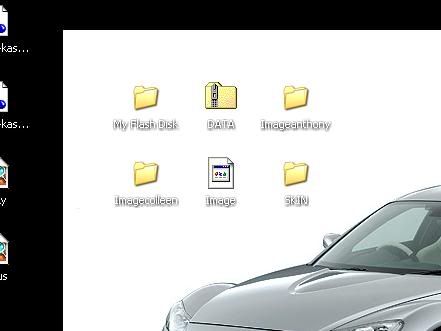
I have my flash disk on my comp along with my image.res and other projects. The size of the flash disk says 65MB which is nowhere near 4gb. The only solution I can think of is erasing the entire sd card, redownloading the testmode and try again. I honestly have no idea why it would do that.
I bet if you look at the file in the /user/UserData/Setup DIR on the F and compare them to the File on you desktop you will find they will be missing some stuff.
But it might just be me
you do, but I personally haven't come across anything missing thats been proven valuable for the hacks. I'm sorry, I forgot to mention some things do not transfer the first time, you have to manually drag them into their respected folders.
I had another issue. With mine i would copy the flash to my card and it would say there was not enough space on the SD card WTF its a 4gb card also tried it on a 2gb card same thing
I finally copied it file by file and found that when i came to the My Flash/User/user/UserData/Setup It would give me the "Not enough space" message. even on a empty 4gb card
Any thoughts on that one?
It's an sdhc(anything greater than 2 gigs) card, and the unit only supports sd(up to 2 gigs).
It's an sdhc(anything greater than 2 gigs) card, and the unit only supports sd(up to 2 gigs).
And what does that have to do with backing up the Flash Disk?
It's an sdhc(anything greater than 2 gigs) card, and the unit only supports sd(up to 2 gigs).
And what does that have to do with backing up the Flash Disk?
the unit doesnt recognize the destination drive properly.
I get the same issue if i try to put an sdhc card into an older dslr.
I have a 4GB SDHC card and I have no problems at all.
I did this hack today with a 4gb SDHC card and it worked great, but I forgot to calibrate the unit before I did it, so I could not touch the edit button. But I found another way to fix this without have to turn your car off and editing the calibration. Once you complete up to step 4, on the very bottom right there is a button which is a small touch keyboard. If you click it, it will open. And then you can do steps 5, 6 and 7
5. Select My Flash Disk, press edit up top and copy. Select “my flash disk†and then use the keyboard and tap the control button “Ctrl†and then tap the “C†button. By doing this it has now copied the selected data
6. Select Storage Card, press file up top and Open. Select the storage card and then use the keyboard and tap the control button “Ctrl†and then tap the “O†button. By doing this it has now opened the selected data
7. Press Edit, then Paste. Should take 10 minutes roughly. Now that you have opened the file use the keyboard and tap the control button “Ctrl†and then tap the “V†button. Now the data has been pasted in the file and should bring up a loading screen which should take about 10 minutes
I had another issue. With mine i would copy the flash to my card and it would say there was not enough space on the SD card WTF its a 4gb card also tried it on a 2gb card same thing
I finally copied it file by file and found that when i came to the My Flash/User/user/UserData/Setup It would give me the "Not enough space" message. even on a empty 4gb card
Any thoughts on that one?
i have the same issue , iv tried re-formating the SD .re-downloading the Testmode file and keep get the same "Not enough space" PoPup. This is on a 1.0GB SD(967mb free) and running 2.0firmware .
For a full backup, you definately need a 2gb card minimum. it is a little less than 1.7 gb.
For a full backup, you definately need a 2gb card minimum. it is a little less than 1.7 gb.
The flashdisk is 1.7gb? I thought it was only a little under 100mb .
well I guess I'll head to walmart and get a 2gb.
Thanks
Internal Flash drive is 2GB, with a bit of free space left...
ok i went out to the store bought my self a 2gb sd and tryed it out .... SAME ISSUE . i redownload ,reformat and still same pop box.
i also tryed a 4gb sdhc , and NOTHING.
anyone one whats going one .im i doing something wrong ?, i followed all the steps .
Not sure if this would work for you but, I had the same issue. And I think my Windows desktop wasn't formatting the card right. I used my MacBook Pro to format it and it worked. Maybe try another computer if you can?