Search Archive

XM channel logos stored on unit, can you update them?

By cranbers · Nov 12, 2008in Hacks/Mods💬 44 posts👁️ 7,088 views
Page 1 of 2
Posted Nov 12, 2008 · 14:50 UTC#1

I figure you guys would know, with the recent channel lineup change for XM, a lot of the channel logos change into a default one since there is nothing for the new channel in memory.


Is there a way to fix this? I know with the d series it came on the nav dvd, with this unit though its obviously on internal flash memory.


I wonder if a new map update in the future would bring updates to the logos.


Amazing how nice the logos are when you have them.

Posted Nov 12, 2008 · 15:18 UTC#2

I'm working on them right now. Lot of Photoshop work. I'll post up my update Xm folder this weekend, when/if I get to finish.

Posted Nov 12, 2008 · 15:59 UTC#3
I'm working on them right now. Lot of Photoshop work. I'll post up my update Xm folder this weekend, when/if I get to finish.


Awesome... I will look forward to them. 8)

Posted Nov 12, 2008 · 16:01 UTC#4

Can you make sure to put them in the XM section here so other people will see them there? It affects all Pioneer Series radios. Z, D N and now F....

Posted Nov 12, 2008 · 16:19 UTC#5

how about getting or hacking new logos for the d 3?

Posted Nov 12, 2008 · 19:45 UTC#6
I'm working on them right now. Lot of Photoshop work. I'll post up my update Xm folder this weekend, when/if I get to finish.


THANK YOU Very much.

Posted Nov 12, 2008 · 19:53 UTC#7

Right now, I'm working on editing the Imagetbl.dat File. I understand that the first bit is the logo pointer, the second one is the number of characters in the channel name, and the 3rd one is the channel number, and the 4th through 20th bits are the channel name. I tested this out with a "Holly" icon I created for XM35 Holly and no luck getting it to show up yet. I'll update later today when/if I get that to work. Once I do, I will continue on with the rest of the channels.


Right now, I am taking the icons straight from their respective XM channel pages and all are the same size (138x50) on a white background. I'm trying to decide if I should take the time to edit all of the XM logos to have a gray background like they do on the F series. Also, these icons that I am making for the F series will have to be shrunk down and reformatted to work on the D/Z/N series as they use a much lower resolution icon and a different extension for the images.


If anyone knows anything at all about imagetbl.dat file editing and how to get custom icons to work EVERYTIME, let me know. Any help is greatly appreciated here.

Posted Nov 13, 2008 · 00:33 UTC#8

Update:


I can not for the life of me get XM35 Holly's Icon to work. I DID however get the 40s on 4 icon to work and presumably any other channel number that are there normally. Just wish I could get Holly and probably any other new channel numbers to work. I will however continue working on the icons.

Posted Nov 13, 2008 · 01:06 UTC#9

I have no idea if it will be fruitless or not, but I just sent a question to XM themselves detailing this situation and asked if they can/will be doing anything from their end about this.


Seems to me that if the logos that USED to be there aren't any longer, wouldn't they be able to put the new ones up once they have them situated?


Or am I missing the boat completely here? I'll let everyone know what they say when they reply.


Cheers,

Kev

Posted Nov 13, 2008 · 18:05 UTC#10

I just got off the phone with Pioneer and they said that the station logos are updated through the Map Update discs. The next map update won't arrive until April '09! Lazy *** Pioneer . Take several hours to fix this and make your customers happy.


I'd be willing to pay someone on here, that has the skills to fix the station logos, $20 for their service


Well, I say that everyone should either:

1) Call them at 800.421.1404 (opt 2, 3, 2, 2, 1, 1) and let your voice be heard, or

2) email the message below to Pioneer at [email protected] :wink:.


** Please forward this to the head (Manager) of Customer Service **


As you may or may not know, yesterday XM and Sirius completed their merger and changed the station lineup for their service. As a result, most all of the station logos displayed on your navigation units are missing. So, last night I emailed your department to ask about a fix.


Well, I just got off the phone with your customer service department and was told that the XM/Sirius station logos on all Pioneer units will be updated with the next Map Update due out in April. You are doing a disservice to your image when you're going to make ALL your customers that own a navigation display (Z-series, D-series, N-series & F-series) wait 6+ months to have their displays corrected.


Normally I could understand the wait...if XM or Sirius makes a slight changes to their station lineup. BUT, they just merged and more than 2/3 of the stations (and logos) have changed.


I'm not the only one venting my frustration. A browse at the AVIC411.com forums will show other customers that would like this resolved:


http://www.avic411.com/forum/viewtopic.php?t=19377

http://avic411.com/forum/viewtopic.php?t=19359

http://www.avic411.com/forum/viewtopic.php?t=19365


Please don't make your loyal customers wait 6+ months and spend $120 to fix their displays.


S**** W.

Posted Nov 13, 2008 · 20:12 UTC#12

I'm working on the Imagetbl.dat file right now. Once I can establish that I can get the proper station names in that file along with their file pointers/channel numbers and get some kind of logo on all/most of the channels, then I'll continue going through and updating the channel images. I will have the imagetbl.dat file done hopefully tomorrow and then get crackin on the logos.


Note: I also found that the channel number bit in the imagetbl.dat doesn't really matter. If you notice, the Broadway channel, and Cinemagic have moved into the 70s now, from the upper 20s, but the logo remains. So all that appears to matter now is that station name length, the name itself, and the file pointer for the logo. Also, some stations have the same channel/name but have lost the logo. The Heat (ch 68 ) is the exact same name and location, but there's no logo showing up. There's something else at play here.

Posted Nov 13, 2008 · 20:42 UTC#13
I'm working on the Imagetbl.dat file right now. Once I can establish that I can get the proper station names in that file along with their file pointers/channel numbers and get some kind of logo on all/most of the channels, then I'll continue going through and updating the channel images. I will have the imagetbl.dat file done hopefully tomorrow and then get crackin on the logos.


Note: I also found that the channel number bit in the imagetbl.dat doesn't really matter. If you notice, the Broadway channel, and Cinemagic have moved into the 70s now, from the upper 20s, but the logo remains. So all that appears to matter now is that station name length, the name itself, and the file pointer for the logo. Also, some stations have the same channel/name but have lost the logo. The Heat (ch 68 ) is the exact same name and location, but there's no logo showing up. There's something else at play here.


I've been working at this also... it appears that each station has an internal broadcast index which is different from the displayed station number. The first 5100 bytes of the table file are 20 byte descriptors for each station ordered by that internal index from 0 to 254. Assuming this is the case it means that not only must the name strings match, but all the descriptor blocks need to be at the proper offsets in the table file as well. Also the second byte before the start of the station name string in each descriptor must be set to the length of the actual station name string or the AVIC won't be able to verify the station name correctly and thus will not show the assigned logo.

Posted Nov 14, 2008 · 03:44 UTC#14

I also don't have the complete answer but I have changed some logos/channels but not others so the offset might be the problem. I think the only ones I've been successful with are ones that were already in the file. I haven't figured out how to add new ones. For example, channel 54 had an entry, then there are 100 null bytes, then channel 60 has an entry. The spacing is correct (5 channels * 20 bytes each = 100 bytes) but adding channels following the same format as the others doesn't work. The 3rd byte (which I thought was the channel number) may be the key (but I haven't figured out how to unlock the door':D')


I agree that the channel spelling and character count (2nd byte) has to be correct for the channels but that doesn't seem to be the case for the categories. For "Family& Health" I just put in "Family" with a "06" in the 2nd byte.

I now have category logos displaying for all categories. In some cases I used the same existing logo (the Jukebox for "Pop" & "More Music" and the cross for "Christian" & "Religion"). For "Best of Sirius" & "Holiday" I made new logos.


Tom

Posted Nov 14, 2008 · 03:49 UTC#15

I did the same thing for my categories. I made a Christmas tree for Holiday. Came out looking pretty factory.


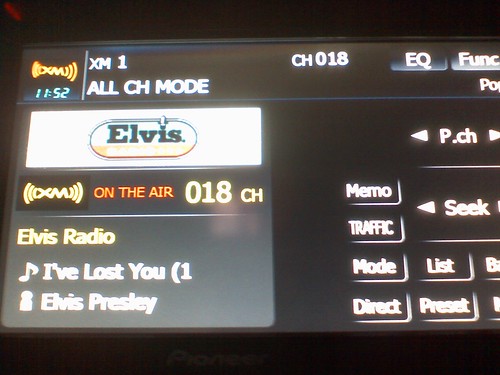
UPDATE: I got the icon for the new Elvis channel working, that was one channel that was a line pure zeros in the original imagetbl.dat and I added all of the parameters and made an icon for it and bam, it showed up. There has never been anything on XM channel 18 before. So for whatever reason, this works, but doing the same for Holly does not work. The only possible thing I can think of is maybe they are broadcasting a space at the end of the channel name that we are not seeing and needs to be added to the name string in the imagetbl.dat along with a correct character count. This WOULD explain why Boneyard and XM Cafe never worked before merger the other day. The channel names were correct but the factory icons would just not show up for several channels. Which means XM must be changing the name somehow by adding white space to the ends of the channels. It's the only thing I can think of.


3028412057_f59c6e95cd.jpg

post-10185-12872756202112_thumb.gif

Posted Nov 14, 2008 · 05:23 UTC#16

Mike, I sent you a PM

Posted Nov 14, 2008 · 05:29 UTC#17

Thank you Mike.. I am working on updating PIM's too but I envy you F series guys... I gotta burn DL DVD's and do my testing... not very cost effective..

Posted Nov 14, 2008 · 05:42 UTC#18

I edited up to Channel 56 (Jam_ON) to be ready for their logos. I'm sure you are able to tell that from looking. I've got to finish the rest tomorrow. Unless of course you decide to go ahead and change the rest and send me your file. That would be cool too, lol. There's not too many more that need to be changed, most are done in that file so that right now the channels have their old logos working, so all we have to do is create new logos for them and swap in the BMP files, or in your case the PIMs.


Yeah, it is nice being able to just run in and out of the house and try new files with the SD card. Though my neighbors are beginning to get suspicious. Tomorrow I will play around with adding white space to the end of "Holly" and maybe I'll get it to work. It is the only thing that can matter at this point. The first bit is DEFINITELY the file pointer since I made a file/channel that was never there before and now it shows up. The third bit is the channel pointer, which does NOT matter since Cinemagic, Broadway and several other channels still have their proper icons and yet have moved up 50 channels, so the channel number doesn't matter for the logo to show up. The only thing that I have seen that will break the channel logo is the Name string and the name length bit. So it has, has, HAS to be something up with the name. The only thing it can be is some kind of invisible character/white space at the end. I'll post my findings tomorrow.

Posted Nov 14, 2008 · 05:46 UTC#19

If you can test for me (and make sure that file is working) I will create PIM's when you are done... Instead of me wasting $5 DL DVD's...


a few errors....


"The Highway" = 11 Chars... you have "A" = 10...


that should read "B" Or does that work for you?'


Same thing with Classic Vinyl... Can you confirm if these show the TOP TRAKCs or Highway 16 logo?


and the F series has BMPs? Im about to go buy a F Series now

Posted Nov 14, 2008 · 06:03 UTC#20

Yep, just went out and checked, The Highway has the Highway 16 logo, Top Tracks, Big Tracks, everything shows up. So we have come to the conclusion that the name length does NOT matter in this case.


Also, I added a space to the end of Holly's name and no dice, can't figure this one out. Also, I noticed that the categories for Latin and World are merged into "Latin/World" now, and that category automatically took on the icon for "Latin" without having to be modded to do so. So I am thinking that the channel name in the imagetbl.dat only has to be long and correct enough for the first word and then it will show up. Like the "Miami/Ft. Lauderdale" traffic channel, the name of it in imagetbl is just "Miami" and it still shows up. There may be something at the beginning of Holly that we can not see that is making the icon not show up.

Posted Nov 14, 2008 · 06:07 UTC#21

hahaha it kinda makes you laugh, thats 2 wasted bits... for each label...


I will email you a few BMP's (For "the highway" and such) Just as tests... would you mind (when you have time) testing them for me?


I will try burning a few of my tests tomorrow with your DAT

Posted Nov 14, 2008 · 06:09 UTC#22

Mind you the BMPs for the Avic channels have to be 360x90 for the big ones and 90x30 for the list ones. These are considerably larger than the ones for the Z (IIRC 138x96 or something). Also, bit depth does not seem to matter on the F. 16 and 32 bit BMPs all show up just fine.

Posted Nov 14, 2008 · 06:11 UTC#23
Mind you the BMPs for the Avic channels have to be 360x90 for the big ones and 90x30 for the list ones. These are considerably larger than the ones for the Z (IIRC 138x96 or something). Also, bit depth does not seem to matter on the F. 16 and 32 bit BMPs all show up just fine.


360x90 for D3's?


I got one working at 136x40 earlier today...


what size for the F Series... I have a batch image converter... so size wont be a huge issue...

Posted Nov 14, 2008 · 06:14 UTC#24

360*96 for the F series, I don't know what the D3 uses, probably the same size as the Z. The F uses higher res than any of the previous models since it's got such a high res screen.


136x40 was the res that I was trying to remember. That would work for your Z no problem of course. I don't know how the F reacts with improperly sized images. Also, more about that batch resizer! I was going to search for something like that to do the list icons once I can get the full size PNGs of the new channel logos extracted from the Channel Line up PDF.

Posted Nov 14, 2008 · 06:18 UTC#25

The one I use is called "Easy Batch Photo"... For Mac...

Page 1 of 2