Search Archive

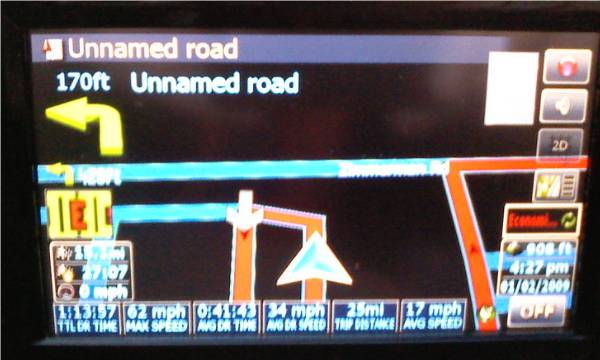
N-S-E-W's version of a trip computer - w/route and w/o route

By N-S-E-W · Jan 02, 2009in Hacks/Mods💬 38 posts👁️ 13,141 views
Page 1 of 2
Posted Jan 02, 2009 · 23:48 UTC#1

Instead of waiting on someone to help me figure out how to make a pop-up window for a trip computer, I decided to see if I could get the features I was looking for to work. I know this looks a little busy, but no one has shown any interest to help. I'm always open to suggestions in figuring out the codes for pop-ups. Nor did anyone answer my request to make a transparent breast cancer research ribbon. Not only am I graphic challenged, but I've seen posts by Boris indicating he's not very good at it either. Bear in mind that up to about six weeks ago I knew absolutely nothing about codes.


It's hard to believe that with as many differant users come in here, hardly any are willing to share their discoveries only requests. It's very apparent by looking at the read totals of some of the topics. You bet you hear from them when something messes up though. I've seen posters list their problem and someone would offer a suggestion of how to possibly fix the issue, then the person doesn't even have the wherewithal to thank the person for helping or let them know if the issue was resolved.


Take the time to show the forum members that have helped so many of us how you set your unit up.


I will try to answer questions the best I could, but will ignore any sarcastic remarks.

post-24694-12872756679965_thumb.jpg

post-24694-12872756680406_thumb.jpg

Posted Jan 02, 2009 · 23:55 UTC#2

holy **** very nice, just what I wanted, now how can I implement this, also does it clear out after turning off the unit or can I clear and start whenever I want?

Posted Jan 03, 2009 · 01:17 UTC#3

Nice mod! Wouldn't fit in right now with my mods but definately creative. As far as giving thanks it definately never hurts to thank some of the talented minds on here. Boris, Maverickster, Keeper, and Catch Me If U Can, have taken the time out to teach me things and made my F900 a great unit. I have thanked them countless times already but wanted to give them credit once again! Everyone should keep up the great work and continually improve these units.

Posted Jan 03, 2009 · 01:37 UTC#4

Great job. I'm not sure what you're talking about when you say pop-up but if you haven't already read it, try reading this simple HOW-TO. It might give you some insight on how to hide your info until you request it.


http://www.avic411.com/forum/viewtopic.php?t=17753

Posted Jan 03, 2009 · 06:08 UTC#5

I've never felt much need for a trip computer screen (I get it from the car itselfr) but this functionality is part of standard iGO skin, so I would start looking at those for code ideas...

Posted Jan 03, 2009 · 06:42 UTC#6

my car only has 2 trip meters, and I keep one for gas and one for monthly usage for tax purposes... I drive a lot for work and kinda want specific amounts without having to spend time counting :P not to mention I forget to look 90% of the time

Posted Jan 03, 2009 · 17:42 UTC#7
holy **** very nice, just what I wanted, now how can I implement this, also does it clear out after turning off the unit or can I clear and start whenever I want?


Thanks


If you have space available you'd need to create a BMP for the background. The subsequent BMP can be used for all the different fields you create. enemulator listed these options as being already enbedded in EZRIDER.exe:

active_trip

tripcomputer

trip_name

trip_paused

speed_total_avg

speed_driving_avg

speed_max

time_total

time_driving

time_stopped

distance_total

max_acceleration

min_elevation

max_elevation

start_date

start_time

prev_trip

next_trip

pause_current

reset_current


I've chosen six of these to display on my unit.


Since you specifically asked about total distance, here's the model I used to create total distance;

               visiblemodel="navigation.distance_to_manuver.valid" USE_SEPARATED_SAFETY_MODE=0>


The BMP I'm using is 100 W X 54 H. 
This particular code is not listing the reset funtion. To reset just add a onrelease command like this - onrelease='other.tripcomputer.reset_current'
before ">" this symbol in any one of the three codes. I choose the middle of three on mine. Here's what it'll look like with a reset function; 

visiblemodel="navigation.distance_to_manuver.valid" USE_SEPARATED_SAFETY_MODE=0>


You only need to add this command once. It'll reset all subsequent trip computer fields. Interchange reset with pause to stop recording the data. Press hte field again to resume.


Let us know how you make out.


edited to add:

Not sure on if the unit remembers from each start up or not. I have the 500 model and the battery really sucks on those. Let us know if it does.


edited yet again to add:

the codes listed above are for when a route is enabled. To show the info with no active route copy and paste your codes, but add this in place of the current visable model for each pasted code. visiblemodel="navigation.distance_to_manuver.valid"


Seeing how long you've been active here, you probably already knew this.

Posted Jan 03, 2009 · 17:45 UTC#8
Nice mod! Wouldn't fit in right now with my mods but definately creative. As far as giving thanks it definately never hurts to thank some of the talented minds on here. Boris, Maverickster, Keeper, and Catch Me If U Can, have taken the time out to teach me things and made my F900 a great unit. I have thanked them countless times already but wanted to give them credit once again! Everyone should keep up the great work and continually improve these units.


Thanks for compliment.

Posted Jan 03, 2009 · 17:55 UTC#9
Great job. I'm not sure what you're talking about when you say pop-up but if you haven't already read it, try reading this simple HOW-TO. It might give you some insight on how to hide your info until you request it.


http://www.avic411.com/forum/viewtopic.php?t=17753


Thanks for the compliments.


Believe me I read these. The particular link you posted I actually have in my "helpful info" file. What I meant by pop-up is like you see when surfing the net. There's a trigger when you visit a site that invokes the pop-up. The pop-up I envisioned is a box that lists all the data in one place. The scripting in the link would require about 72 codes to be written. With my little knowledge, I choose not to even tackle that.

Posted Jan 03, 2009 · 18:13 UTC#10
I've never felt much need for a trip computer screen (I get it from the car itselfr) but this functionality is part of standard iGO skin, so I would start looking at those for code ideas...


Hi Boris - I really don't have have a need for it either. I did this to show others that it's possible. A little hokey if will, but possible.


This is my first navi unit so I'm not sure what options the standard IGO skin provided. I saw what they've done on the i-go8.com forum but didn't see a real trip computer in some of the screen shots.


I consider yourself as one of the original innovators that has allowed us to do what we're doing. Some of the people that I perceived as innovators have left several months ago.


I commend you for all the help provided and the time you've put in here.

Posted Jan 03, 2009 · 18:28 UTC#11

NSEW I willt ry it soon, this is exactly what I need :) thanks! I'll post my results soon and my data file if it works

Posted Jan 03, 2009 · 20:44 UTC#12
Hi Boris - I really don't have have a need for it either. I did this to show others that it's possible. A little hokey if will, but possible.


This is my first navi unit so I'm not sure what options the standard IGO skin provided. I saw what they've done on the i-go8.com forum but didn't see a real trip computer in some of the screen shots.


I consider yourself as one of the original innovators that has allowed us to do what we're doing. Some of the people that I perceived as innovators have left several months ago.


I commend you for all the help provided and the time you've put in here.


Thanks.


Try looking at NavNGo's own site, there should be trip computer screen shots there. i-go8.com lists third party skins and most of those do not bother changing the trip computer, so there are not too many screenshots of it...

Posted Jan 05, 2009 · 23:20 UTC#13
Hi Boris - I really don't have have a need for it either. I did this to show others that it's possible. A little hokey if will, but possible.


This is my first navi unit so I'm not sure what options the standard IGO skin provided. I saw what they've done on the i-go8.com forum but didn't see a real trip computer in some of the screen shots.


I consider yourself as one of the original innovators that has allowed us to do what we're doing. Some of the people that I perceived as innovators have left several months ago.


I commend you for all the help provided and the time you've put in here.


Thanks.


Try looking at NavNGo's own site, there should be trip computer screen shots there. i-go8.com lists third party skins and most of those do not bother changing the trip computer, so there are not too many screenshots of it...


Boris - I searced the NavNGo site as suggested and didn't see any examples of a trip computer. It's possible they're not promoting it at hte moment or I just couldn't find it. Their Limousine model does look cool though.

Posted Jan 05, 2009 · 23:34 UTC#14
holy **** very nice, just what I wanted, now how can I implement this, also does it clear out after turning off the unit or can I clear and start whenever I want?


Thanks


If you have space available you'd need to create a BMP for the background. The subsequent BMP can be used for all the different fields you create. enemulator listed these options as being already enbedded in EZRIDER.exe:

active_trip

tripcomputer

trip_name

trip_paused

speed_total_avg

speed_driving_avg

speed_max

time_total

time_driving

time_stopped

distance_total

max_acceleration

min_elevation

max_elevation

start_date

start_time

prev_trip

next_trip

pause_current

reset_current


I've chosen six of these to display on my unit.


Since you specifically asked about total distance, here's the model I used to create total distance;

               visiblemodel="navigation.distance_to_manuver.valid" USE_SEPARATED_SAFETY_MODE=0>


The BMP I'm using is 100 W X 54 H. 
This particular code is not listing the reset funtion. To reset just add a onrelease command like this - onrelease='other.tripcomputer.reset_current'
before ">" this symbol in any one of the three codes. I choose the middle of three on mine. Here's what it'll look like with a reset function; 

visiblemodel="navigation.distance_to_manuver.valid" USE_SEPARATED_SAFETY_MODE=0>


You only need to add this command once. It'll reset all subsequent trip computer fields. Interchange reset with pause to stop recording the data. Press hte field again to resume.


Let us know how you make out.


edited to add:

Not sure on if the unit remembers from each start up or not. I have the 500 model and the battery really sucks on those. Let us know if it does.


edited yet again to add:

the codes listed above are for when a route is enabled. To show the info with no active route copy and paste your codes, but add this in place of the current visable model for each pasted code. visiblemodel="navigation.distance_to_manuver.valid"


Seeing how long you've been active here, you probably already knew this.


kerosene - I'm sorry to report that the trip computer I'm using does not have a memory. I purposely left data on the unit when I shut it off, when I turned it on after work the data reset back to zero.


Now all this running with no scripts. I'm hoping someone can help us out and suggest how we might go about creating a script pertaining to memory. It would also be cool if the data can also be saved in the my data folder and exported to a SD card. The two aforementioned items exceed my capabilities.


It's really interesting the data displayed on the fields. For instance, today my route home today took 1:26:04 of which 1:04:41 was actual moving time. I covered 42 miles with an average drive speed of 38 mph. The overall speed average which includes stop and drive time was 29 mph. I'd love to be able to log all this for a week straight.

Posted Jan 05, 2009 · 23:39 UTC#15

Yeah, it doesn't seem to be there right now. You could check, say, Gurjon's site. He has a customized trip computer of sorts on the screenshots page... And if you can find original data.zip there will be trip computer UI files there...

Posted Jan 06, 2009 · 00:00 UTC#16
Yeah, it doesn't seem to be there right now. You could check, say, Gurjon's site. He has a customized trip computer of sorts on the screenshots page... And if you can find original data.zip there will be trip computer UI files there...


Thanks for the suggestion I'll see what I can make out of it. I am using his recalculate route and bluetooth BMP currently.

Posted Jan 06, 2009 · 01:03 UTC#17

We probably could just use the entire trip computer screen. I have seen a program somewhere that converts iGO UI files betweren different resolutions, so we could get, say, 400*240 trip computer screen from Gurjon and convert it to ours. Then just make a button on the map that switches to trip computer, and you're all done...

Posted Jan 06, 2009 · 01:33 UTC#18
We probably could just use the entire trip computer screen. I have seen a program somewhere that converts iGO UI files betweren different resolutions, so we could get, say, 400*240 trip computer screen from Gurjon and convert it to ours. Then just make a button on the map that switches to trip computer, and you're all done...


That would be awesome if we can incorporate it into our units. I found two files that have a tripcomputerxxx_xxxui file. I don't think it's appropiate to post them here. One is Gurjon's gj5.3 datazip from the Gurjon website and the other from i-go8's website listed as kikker v1_0.zip. There appears to be something different between the two, but I'm not sure.


If you can compare with your program and let us know if we can somehow get them incorporated that would be great.


At first I didn't really think the trip computer to be of much use, but the short time I have been using mine I find the data it can interesting.


Even with what I have now I'll exactly how much time was just sitting in traffic or waiting for traffic signals.


Anything you could do is greatly appreciated.

Posted Jan 06, 2009 · 02:51 UTC#19

AFAIK Gurjon and others do not mind if people reuse their code for their own skins.


It's too cold for me to run back and forth to the car right now :D but chances are the UI file could be used as is (just display won't look right). If it complains about things, we can look at error messages and fix it up...

Posted Jan 06, 2009 · 03:09 UTC#20

Other than the tripcomputer ui files, I noticed other references of trip computer in some other files. I suppose I'll need to add those in in the same files we use? Several of the codes are referencing a template file, yet there's no template ui file in either zips. Wouldn't that omission prevent it from loading and enlarge my current crash file even more.


Speaking of crash file, what kind of info is in there that can help us? I probably have about a dozen crash logs within the file. I also assume that it's safe too just delete it.


Being that it's currently only 18 degrees northwest of you, I don't blame you for not wanting to go outside. I thought you had a program that you plugged the data in. Heatwave is coming tomorrow - we should be in the low 30's. That's not super bad if the sun is out like it was this afternoon.

Posted Jan 06, 2009 · 04:18 UTC#21

Hey guys what Gurjon is similar to what I'm looking for, except with a way to save and delete the distances...

Posted Jan 06, 2009 · 16:12 UTC#22
Other than the tripcomputer ui files, I noticed other references of trip computer in some other files. I suppose I'll need to add those in in the same files we use? Several of the codes are referencing a template file, yet there's no template ui file in either zips. Wouldn't that omission prevent it from loading and enlarge my current crash file even more.


Speaking of crash file, what kind of info is in there that can help us? I probably have about a dozen crash logs within the file. I also assume that it's safe too just delete it.


Being that it's currently only 18 degrees northwest of you, I don't blame you for not wanting to go outside. I thought you had a program that you plugged the data in. Heatwave is coming tomorrow - we should be in the low 30's. That's not super bad if the sun is out like it was this afternoon.


Crash files might say which ui file and or state or script it crashed in, so at least you know where to debug.


Templates should be compressed somewhere in iGO folders themselves.


I have a build of iGO that runs on a PC in is 800*480 but because it has an entoirely different DATA.ZIP it's OK for positioning things and testing ideas, not necessarily designing a whole new screen from scratch...

Posted Jan 07, 2009 · 01:55 UTC#23

Okay, I placed the tripcomputer UI file in my datazip and it doesn't boot past the start up screen. I did change the file name to 800_480 and commented out the trip computer I created just to be sure they didn't conflict with each other.


I'm going to remove it and get it back up for now.


I had my 2 hour trip home today. Here's the data:


42 miles 2:01:30 total time, 1:19:16 moving time, 31 mph avg driving speed, 20 mph total drive and sitting speed combined. Top speed 68 mph

Posted Jan 07, 2009 · 03:05 UTC#24
Okay, I placed the tripcomputer UI file in my datazip and it doesn't boot past the start up screen. I did change the file name to 800_480 and commented out the trip computer I created just to be sure they didn't conflict with each other.


I would think there should be 2 files:

tripcomputer.ui <- goes into COMMON folder

tripcomputer_800_480.ui <- goes into 800_480 folder.


That should get it father along...

Posted Jan 07, 2009 · 03:54 UTC#25
Okay, I placed the tripcomputer UI file in my datazip and it doesn't boot past the start up screen. I did change the file name to 800_480 and commented out the trip computer I created just to be sure they didn't conflict with each other.


I would think there should be 2 files:

tripcomputer.ui <- goes into COMMON folder

tripcomputer_800_480.ui <- goes into 800_480 folder.


That should get it father along...


Neither the Gurjon or kiker zips had common tripcomputer ui's. I found another on that did have both. Installed both and can't get past the start up screen.


Do you want me to PM the two files to you or post them here?

Page 1 of 2