I'm sure this question had been asked more than a few times, but I've had no luck finding an answer after using the search feature in this forum, so here its goes. can anyone provide me with step by step instruction to change the BG picture in the menu screen (not the splash screen). thanks
F900BT How to change menu background picture?
My Flash Disk
APL
Image.res
Common
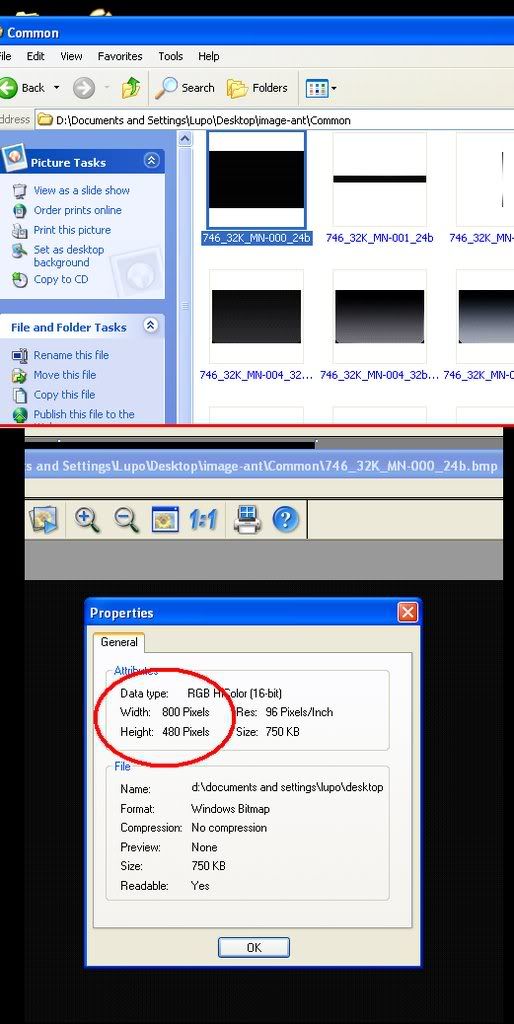
It's the very first .bmp image.
thanks for the reply
but image.res is not a directory? what do i do with this file?
No, It's a .res file with folders inside it. Trust what I'm telling you, I've done it before. Download 7zip and decompress the file.
My Flash DiskAPL
Image.res
Common
It's the very first .bmp image.
are you certain of this? because i from what i can tell the first image in the /common folder is 746_32K_MN-001_24b.bmp an 800x56 image. i've edited this one and it appears to be the bar on the main menu at the bottom of the screen between "phone" and "settings". i have yet to find a .bmp anywhere in the image.res that would be of appropriate size (roughly 800x425) to be the background for the main menu . if you have found a way to change it, could you please post the name of the .bmp
Wrong. the first file is 746_32K_MN-000_24b.bmp. Check again or re-upload your image.res:

And for the record faelok, 800x425 is not the appropriate size. 800x480 is what you want.
wierd! i totally do not have that file. i opened my origional image.res and image.res backups it's not there. mine came with 2.0 pre-installed (don't know if that has anything to do with it)
thx for posting the image name. could u maybe upload it for me? or i guess i could try to create it ![]()
I don't have that file neither,
my first file is:
746_32K_MN-001_24b.bmp
and the last one:
746_32K_MN-952_24b.bmp
I just copied my own image to the common folder, renamed it 746_32K_MN-000_24b.bmp, rezip to image.res, and copied it back to the F900BT, everything works fine but the new image is not showing as BG image for the menu, i guess pioneer must have moved things around a little bit
I would like to know this as well. Has anyone been able to figure this out? Thanks.
Same problem. My first file is 746_32K_MN-001_24b.bmp
Does anyone know what i can do to change my background image?
I don't know if it will work, but you can find 746_32K_MN-000_24b.bmp in data.zip
ui_pioneer
800_480
its in the Image\Common\
the files are call 746_32K_MN-640_32b_normal.bmp
746_32K_MN-640_32b_push.bmp etc...
My Flash DiskAPL
Image.res
Common
It's the very first .bmp image.
Please forgive my ignorance... I just bought the 90BT and had it installed over the weekend. How do you access the files on the device to change the background? I'm pretty savvy on the programming side but have never worked with units like these. If someone could just get me started with that tid bit I can figure out the rest.
Thanks!
Snork11z
Check the sticky FAQ thread in this forum and look for Testmode... Actually, just go through the entire hacking FAQ thread. It'll save you time later ![]()
Check the sticky FAQ thread in this forum and look for Testmode... Actually, just go through the entire hacking FAQ thread. It'll save you time later
Thanks!
will someone post a picture of what it looks like with a custom background?
There is a whole thread with lots of pics here.
will someone post a picture of what it looks like with a custom background?There is a whole thread with lots of pics here.
Uh, no they don't. They show a pic of what would be the background pic but not the unit working with the pic as a background. They also do not have anything to show you how to use the pic as a background.
will someone post a picture of what it looks like with a custom background?There is a whole thread with lots of pics here.
Uh, no they don't. They show a pic of what would be the background pic but not the unit working with the pic as a background. They also do not have anything to show you how to use the pic as a background.
You didn't look hard enough.
Uh, no they don't. They show a pic of what would be the background pic but not the unit working with the pic as a background. They also do not have anything to show you how to use the pic as a background.
You didn't look hard enough.
What? You need to be more specific. Are you talking about instructions or the pics?
Uh, no they don't. They show a pic of what would be the background pic but not the unit working with the pic as a background. They also do not have anything to show you how to use the pic as a background.
You didn't look hard enough.
What? You need to be more specific. Are you talking about instructions or the pics?
If you are talking about the startup logo, it is in the manual on how to change it. READ the hacks threads. That is all I am gonna say. If you can't figure it out then leave it alone.
Read the thread and you will see that this has nothing to do with the splash screen. Did you even read the thread subject? It says MENU BACKGROUND. I don't know how you confuse that with splash screen. READ the thread. That is all I am going to say. If you can't read, don't comment.
If you are talking about the startup logo, it is in the manual on how to change it. READ the hacks threads. That is all I am gonna say. If you can't figure it out then leave it alone.
Read the thread and you will see that this has nothing to do with the splash screen. Did you even read the thread subject? It says MENU BACKGROUND. I don't know how you confuse that with splash screen. READ the thread. That is all I am going to say. If you can't read, don't comment.
Read this and stop bugging people on how to do things when it is there in black and white.
If you are talking about the startup logo, it is in the manual on how to change it. READ the hacks threads. That is all I am gonna say. If you can't figure it out then leave it alone.
Read the thread and you will see that this has nothing to do with the splash screen. Did you even read the thread subject? It says MENU BACKGROUND. I don't know how you confuse that with splash screen. READ the thread. That is all I am going to say. If you can't read, don't comment.
Read this and stop bugging people on how to do things when it is there in black and white.
Wow thanks jerk off!! That is really UNHELPFUL! It actually is not there black and white and it seems that you had to look up the guys post by his name in order to find it so it seems pretty outragous to expect others to automatically know what to search. Instead of being the jerk you have been so far all you had/have to do is make a constructive contribution to this thread and then later when someone else who is wondering the same thing as the rest of us all they have to search is "menu background" and not "GUGA" to find a convoluted answer. ![]()