Search Archive

New Unit Theme by GUGA - Version 2.0

By ggarcez · Feb 16, 2009in Hacks/Mods💬 186 posts👁️ 37,899 views
Page 8 of 8
Posted Jul 03, 2009 · 20:19 UTC#176

Success! Thanks.. Curious though, I was under impression that the theme also updated the look of the Maps displays? i.e. after pressing the Map button. And also the Radio (FM/AM) displays (specifically the screen displayed when tapping the "Preset" button on screen. Am I mistaken? If so can anyone suggest other themes that update these screens?

Posted Jul 04, 2009 · 00:35 UTC#177
Success! Thanks.. Curious though, I was under impression that the theme also updated the look of the Maps displays? i.e. after pressing the Map button. And also the Radio (FM/AM) displays (specifically the screen displayed when tapping the "Preset" button on screen. Am I mistaken? If so can anyone suggest other themes that update these screens?

Superman has a theme that you change to red. Just look for his posts.

Posted Jul 05, 2009 · 18:14 UTC#178

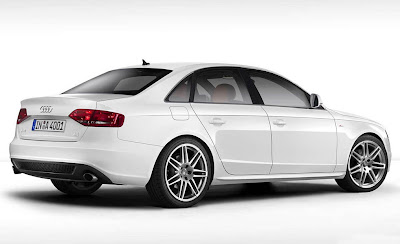
Favor... would like the Navigation icon to have my car incorporated, tried PS'ing it but it came out looking as bad as my PS skills are... :P


2008-audi-a4-32-sline.jpg


Issue is the image is tilted a bit, not sure how that would look...


Maybe this one would work better, I actually like it better anyway...


Audi+A4+S-Line+2.jpg


THANKS!


While I am at it, anyone have the "Contacts" and "AV" icons with an iPhone?


Also, what is the image file name that in the "generic" version of the GUGA files has the "Pioneer" logo at the bottom middle between "Phone" and "Settings"? Want to change it so it says either "Audi" or has the Audi logo. Searched all the images and could not fine it...


THANKS!

Posted Jul 06, 2009 · 02:51 UTC#179

Bump.. anyone able to do the PS below for me? Can pay you for your trouble if need be!


Also, found an Audi logo for the middle section at audi-logo-meaning.jpg


If so just let me know your paypal address!


THANKS!


Favor... would like the Navigation icon to have my car incorporated, tried PS'ing it but it came out looking as bad as my PS skills are... :P


2008-audi-a4-32-sline.jpg


Issue is the image is tilted a bit, not sure how that would look...


Maybe this one would work better, I actually like it better anyway...


Audi+A4+S-Line+2.jpg


THANKS!


While I am at it, anyone have the "Contacts" and "AV" icons with an iPhone?


Also, what is the image file name that in the "generic" version of the GUGA files has the "Pioneer" logo at the bottom middle between "Phone" and "Settings"? Want to change it so it says either "Audi" or has the Audi logo. Searched all the images and could not fine it...


THANKS!

Posted Jul 16, 2009 · 07:53 UTC#180

Hello,


Please can help me!!!


Can you make a Bmp with my car with Compass (Honda Civic Type S in black 2009) and a ' Type S´ logo in the bottom middle ?


Thanks very much


Schany


Sent to PN or [email protected]


:D:D:D:D:D:D:D:D:D

Posted Jul 16, 2009 · 22:26 UTC#181

GuGa!


Looks like finally I'm going to get the F90BT... It should be in my hands by saturday....


In meanwhile, could you help me to make sure I don't mess up my new unit?

I have some questions for you:


1) All mods are done with the SD card right? Can I save the SD content in some PC to make a backup in case things goes wrong?


2) To modify the Icons all I need to do is to change the image.res, unzip it with the 7-zip, make my changes, zip it back, put in the APL folder and reload it in the unit? Is that correct? Is there any parameter about the resolution of the BMP image?


3) Where did you find the Brazilian Maps? Again, all I need to do is to put the maps in the right folder right? Which folder should that be?


Valeu! Abraço!

Posted Jul 17, 2009 · 14:08 UTC#182
GuGa!


Looks like finally I'm going to get the F90BT... It should be in my hands by saturday....


In meanwhile, could you help me to make sure I don't mess up my new unit?

I have some questions for you:


1) All mods are done with the SD card right? Can I save the SD content in some PC to make a backup in case things goes wrong?


2) To modify the Icons all I need to do is to change the image.res, unzip it with the 7-zip, make my changes, zip it back, put in the APL folder and reload it in the unit? Is that correct? Is there any parameter about the resolution of the BMP image?


3) Where did you find the Brazilian Maps? Again, all I need to do is to put the maps in the right folder right? Which folder should that be?


Valeu! Abraço!


1. Personally all i use is the SD slot, but you can also use a USB stick. And the first thing you should do when you get it is load up testmode and make an entire backup of your unit.


2.Yes all you need to do is modify image.res, as for the parameters, I would stick to the resolution and format that whatever Icon's you modify use(I have not modified images res myself but i have used GUGA's theme and it works great)


3. sorry i can't help with the brazillion maps, though you could checkout the igo forums.


anyhoo, goodluck with the install and future modding

Posted Jul 18, 2009 · 14:24 UTC#183

thanks DarkMaster.... can't wait to start the mods

about the BR maps: actually I've already downloaded a map for the iGo, but I have no idea how to proceed.... of course once I have the unit in my hands that should be a little easier, since I'm just imagining things....


Let's wait for Guga to tell me about the maps... he has it installed so he should know better what to do...


Thanks all

Posted Jul 20, 2009 · 03:16 UTC#184
thanks DarkMaster.... can't wait to start the mods

about the BR maps: actually I've already downloaded a map for the iGo, but I have no idea how to proceed.... of course once I have the unit in my hands that should be a little easier, since I'm just imagining things....


Let's wait for Guga to tell me about the maps... he has it installed so he should know better what to do...


Thanks all


Hi Japinha,


You need to copy the hacked ezrider.exe and the worldwide license to your igo directory....there's a bunch of topics here explaning how to do it, just make sure you use the correct hack. I'm running version 2.0 so I use this hack http://avic411.com/forum/viewtopic.php? ... zrider+exe .


Make sure you have the correct map version (igo 8.0).


Backup all you files before doing any mods.


Regards,


GUGA

Posted Aug 04, 2009 · 06:49 UTC#185

riddle me this, I want the apple theme but I work with only mac computers so this zipping and unzipping doesn't work for me. I want the generic layout you made. I downloaded your "generic destination" rapidshare link. If I don't want to make any changes to what you've already created, ie iphone ipod safari map images. can I just copy the zip over to the sd and copy it to my f90 as is? and what folder do I copy it to?


David

Posted Aug 04, 2009 · 07:11 UTC#186

Never mind, I was over thinking it. I have the new icons and I LOVE THEM. I would love to have my car (black tiburon) on the map but beggar's can't be choosers lol!!!

Page 8 of 8