Search Archive

Red Theme Download?

By JLEA · May 08, 2009in Hacks/Mods💬 131 posts👁️ 16,183 views
Page 2 of 6
Posted May 14, 2009 · 20:35 UTC#26

Can we get another mirror?


This file is neither allocated to a Premium Account, or a Collector's Account, and can therefore only be downloaded 10 times.


This limit is reached.


To download this file, the uploader either needs to transfer this file into his/her Collector's Account, or upload the file again. The file can later be moved to a Collector's Account. The uploader just needs to click the delete link of the file to get further information.

 

Posted May 14, 2009 · 23:22 UTC#27

If I get the file I have some hosting space I can mirror it on

Posted May 15, 2009 · 00:42 UTC#28

So the Data.zip file has not been modified then. This will not affect current mods done for my navigation part of the system?


Can you say where the Main Menu icons are at? I would like to keep the ones that I have currently on my system. And the voice recognition menu, where is that picture located? I would like to put a different one in there as well.


Thanks, the mod looks great.

Posted May 15, 2009 · 00:49 UTC#29
So the Data.zip file has not been modified then. This will not affect current mods done for my navigation part of the system?


Can you say where the Main Menu icons are at? I would like to keep the ones that I have currently on my system. And the voice recognition menu, where is that picture located? I would like to put a different one in there as well.


Thanks, the mod looks great.

the vr is in the contents folder

Posted May 15, 2009 · 01:00 UTC#30
So the Data.zip file has not been modified then. This will not affect current mods done for my navigation part of the system?


Can you say where the Main Menu icons are at? I would like to keep the ones that I have currently on my system. And the voice recognition menu, where is that picture located? I would like to put a different one in there as well.


Thanks, the mod looks great.

the vr is in the contents folder


Is that the "my flash disk\APL2\iGO\Content\?? Folder? It looks like navigation information.

or the "my flash disk\APL2\iGo\ScanSoft\RealSpeakSolo\SPEECH\components? Which file?


Thank you

Posted May 15, 2009 · 01:23 UTC#31
So the Data.zip file has not been modified then. This will not affect current mods done for my navigation part of the system?


Can you say where the Main Menu icons are at? I would like to keep the ones that I have currently on my system. And the voice recognition menu, where is that picture located? I would like to put a different one in there as well.


Thanks, the mod looks great.

the vr is in the contents folder


Is that the "my flash disk\APL2\iGO\Content\?? Folder? It looks like navigation information.

or the "my flash disk\APL2\iGo\ScanSoft\RealSpeakSolo\SPEECH\components? Which file?


Thank you

the first one, inside skin folder,

Posted May 15, 2009 · 03:11 UTC#32
So the Data.zip file has not been modified then. This will not affect current mods done for my navigation part of the system?


Can you say where the Main Menu icons are at? I would like to keep the ones that I have currently on my system. And the voice recognition menu, where is that picture located? I would like to put a different one in there as well.


Thanks, the mod looks great.


CORRECT if I messed with the DATA.ZIP folder and posted that up for you guys... then yeah it will affect the navigation part. unless you take files and copy and paste ONLY the pictures and leave the navi files on then it will be fine. I will try to collaborate with BasketCase on that.

Posted May 15, 2009 · 04:04 UTC#33

A collaboration would be great. I am definitely loving the ::mostly:: red theme, and the navigation aspect is the only thing that isn't red.


Thanks Superman, and all who helped. Hopefully we can see a totally red theme in the future.

Posted May 15, 2009 · 09:32 UTC#34

hey 2002bluewrsx, that theme did you download anyways?


*EDIT* expired download links removed*

Posted May 15, 2009 · 13:43 UTC#35

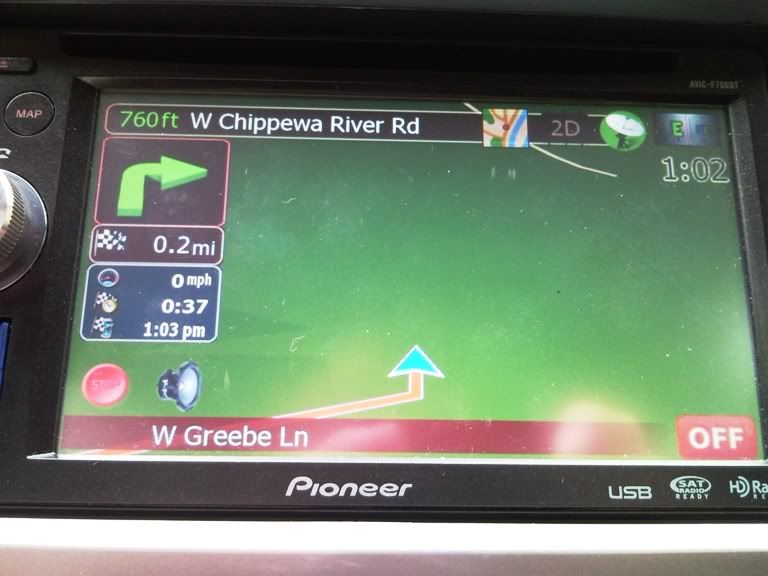
hey superman, the theme looks great i haven't seen it on the unit yet but hopefully by the time i get to that it will all be worked out. i have one thing that i was wondering if you could change, the green arrows in the nav boxes. they are such an eyesore and not just with the red theme, it looks bad with most of the themes i have seen. maybe the they can be changed to white arrows instead of green? let me know. Thanks

Posted May 15, 2009 · 15:22 UTC#36

I downloaded the Apple Menu version and then changed my home screen icons to Windows images. :lol:

Posted May 15, 2009 · 17:43 UTC#37

Okay I just went ahead and changed Cmh928's data.zip to red. Just one problem... I can't find the blue box that is behind the speed, arrival time, etc while navigating?!


Almost everything else was in DATA\ui_pioneer\800_480


Quick phone shot:

SNC00023.jpg

Posted May 15, 2009 · 19:59 UTC#38
Okay I just went ahead and changed Cmh928's data.zip to red. Just one problem... I can't find the blue box that is behind the speed, arrival time, etc while navigating?!


Almost everything else was in DATA\ui_pioneer\800_480


Quick phone shot:

SNC00023.jpg

info_bg.bmp inside 800_480 folder

Posted May 15, 2009 · 23:42 UTC#39

Oh nice, thank you very much. Now I've just got to figure out how to open the bmp file. Even Photoshop won't open it, "The file-format module cannot parse the file."

Posted May 15, 2009 · 23:44 UTC#40

did you extract it to the desktop first?

Posted May 16, 2009 · 01:03 UTC#41

Just installed the theme, looks great! One question, and sorry if this has been asked, can I ditch the disc on the HD radio screen and instead just have a gray box like on the regular AM/FM modes?

Posted May 16, 2009 · 01:09 UTC#42
did you extract it to the desktop first?


Yeah, I used winzip. I'll try it again with 7zip just to make sure... if anybody has a readable copy of this file could you please PM me.


Thanks.

Posted May 16, 2009 · 01:52 UTC#43

I'm uploading the stock menu one to my host right now. Its just a free godaddy host with 10gb space, should work fine i think :)

Posted May 16, 2009 · 03:18 UTC#44

MIRRORS


-- Removed --

Posted May 16, 2009 · 13:23 UTC#45
hey superman, the theme looks great i haven't seen it on the unit yet but hopefully by the time i get to that it will all be worked out. i have one thing that i was wondering if you could change, the green arrows in the nav boxes. they are such an eyesore and not just with the red theme, it looks bad with most of the themes i have seen. maybe the they can be changed to white arrows instead of green? let me know. Thanks


you guys are gonna hate me... i spoke too soon, but there is a folder that i over looked. Im gonna have to post up a 2.2 soon =(


Also 20002blueWRSX, im not sure if you wanted an all red theme in the navi unit or not. you brought it up and yeah, i tackled that already. http://avic411.com/forum/viewtopic.php?f=34&t=24265


Also for those turn arrows, you mean the big ones on the top left right? I cannot find them, I ask CMH but i dont think he knows where they are either. I wanna change that so bad because the u-turn arrow looks horrid.

Posted May 16, 2009 · 15:54 UTC#46

Nice work superman. The reason I tackled the navi screen color change as well is because I read that you use GTI_Matt's mod and I use Cmh928's mix. So rather than ask you to convert something you don't even use I figured I'd give it a go. I was successful other than that info_bg.bmp. I did download your GTI_matt red version and I think I am going to just use your info_bg.bmp.


Another question, how do you get the red arrow vs. my blue/teal looking arrow (car cursor thing)


Thanks again.

Posted May 16, 2009 · 16:32 UTC#47
Nice work superman. The reason I tackled the navi screen color change as well is because I read that you use GTI_Matt's mod and I use Cmh928's mix. So rather than ask you to convert something you don't even use I figured I'd give it a go. I was successful other than that info_bg.bmp. I did download your GTI_matt red version and I think I am going to just use your info_bg.bmp.


Another question, how do you get the red arrow vs. my blue/teal looking arrow (car cursor thing)


Thanks again.


Is yours transparent though? careful with that cause alpha channels are tricky.


Ha... you saw through that too huh? yeah i took that teal looking thing out by changing the color of the arrow in DATA.zip. Its one of the notepad files. I'll look for it and post it up tonight, you gotta change the color by html colors code. I even edited the size to make it about 20% smaller too since it really consumes the screen up.

Posted May 17, 2009 · 01:53 UTC#49
MIRRORS


Red Theme - Stock Menu - v2.1[/quote


Linky doesn't work.


Hey dont even worry about it, im working on the final one. The show all artist screen for the ipod is a blue box that looks like the VR screen... i want to remove that and put in something more classy.

Posted May 17, 2009 · 10:36 UTC#50

kdk_0090.jpg


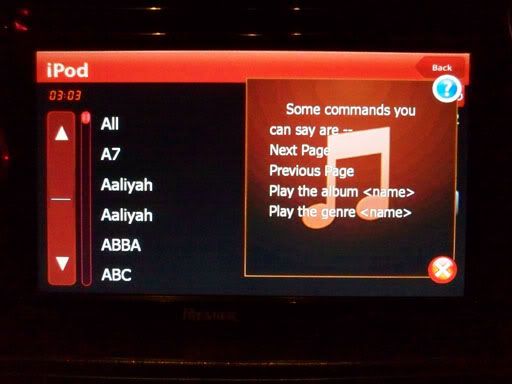
This is the screen i was talking about. when you go to the VR screen... and say SHOW ALL ARTIST. this pops up. but i dont think Euro models have voice command so it shouldnt matter for them. Notice that i removed that ugly PACman thing on the let side (alpha channels... pain staking alpha channels)


Yettavr6, I hope you get this so you can post a mirror up.

2002blueWRSX, I forgot how to do that car-arrow color change and its killing me.

JLEA, I found where the arrows on the top left side now. i'll edit and post pics to make you jealous


This is the AV settings red theme in its final form (i know i know i said that for 2.1). But seriously, this is final, there will be no more mods to red. I promise.


So here is 2.2. (FIXED VR [show all artist] ) This is compatible with USA and EURO Avic models (I got a guy from Sweden using this theme).


http://rapidshare.com/files/233956886/Image.res.html

Page 2 of 6