hey superman, i feel better knowing you don't like the green arrows either, i have no idea what file it it but i will search around, everything else looks good though. which version should i put on the radio 2.2 the last download? because now i have three?
Red Theme Download?
superman another question can i use this with cmh's all in one mod?
JLEA, YES i found the file diricon.bmp in data zip and i changed it to yellow.
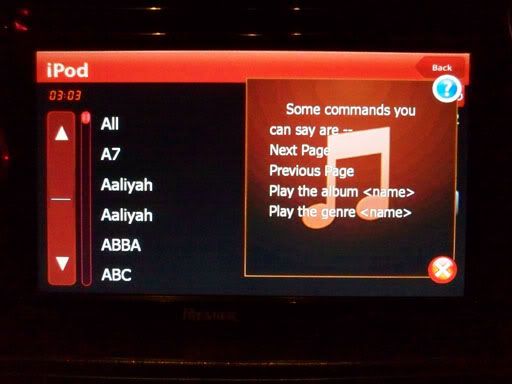
first off, i should apologize for version 2.1... everything on that will show up perfectly cause i pretty much looked at every screen carefully. version 2.2 is the final evolution I promise that. so delete the other 2 now. this has an updated vr screen when your in voice command and say "show all artist".
This will work with CMH or any other mods no problem. All you are doing is replacing the skin of the stock unit. It will work exactly the same as before, so whatever settings you may have it will work exactly same, just a different skin. have fun.
This is the screen i was talking about. when you go to the VR screen... and say SHOW ALL ARTIST. this pops up. but i dont think Euro models have voice command so it shouldnt matter for them. Notice that i removed that ugly PACman thing on the let side (alpha channels... pain staking alpha channels)
Yettavr6, I hope you get this so you can post a mirror up.
2002blueWRSX, I forgot how to do that car-arrow color change and its killing me.
JLEA, I found where the arrows on the top left side now. i'll edit and post pics to make you jealous
This is the AV settings red theme in its final form (i know i know i said that for 2.1). But seriously, this is final, there will be no more mods to red. I promise.
So here is 2.2. (FIXED VR [show all artist] ) This is compatible with USA and EURO Avic models (I got a guy from Sweden using this theme).
Does this have the Apple Theme or the stock? Doesn't really matter too much to me, but just thought I would ask. Thanks
this particular theme has the stock menu. let me know if you want apple menu and ill post that up too.
I am currently using cmh's latest mod with big clock. Also using Guga's latest theme. That one would be cool.
MIRROR
-- removed, see page 7 --
MIRROR
LOL yep, hes on it. Thats the final form yetta. Can you edit your other post and remove the 2.1?
and thanks man, whatever theme you choose... i hope it works with you and have fun with it.
this particular theme has the stock menu. let me know if you want apple menu and ill post that up too.
Can you make this one?
http://www.avic411.com/forum/viewtopic. ... hilit=guga
Version 2.0 Generic Destination icon.
Thanks
MIRROR
LOL yep, hes on it. Thats the final form yetta. Can you edit your other post and remove the 2.1?
and thanks man, whatever theme you choose... i hope it works with you and have fun with it.
lol, done. Feel free to use the mirror if you want to start your own thread in the themes section
Ok, I just changed my unit to red. Am I overlooking something? My map outline is still blue. Do I still need to change something in the DATA.zip > ui_pioneer > 800_400 folder?
Yes, the map screen is a separate download. Look for superman's Red GTIMatt thread.
He says I can't use his with anybody elses mod.
Quote "THESE PICTURES ARE DESIGNED TO WORK ONLY WITH GTI MATT's MODs, DO NOT TRY THIS ON ANYTHING OTHER THEN GTI MATT's. ONLY DO THIS MOD IF YOU ARE COMFORTABLE WITH DRAG AND DROPPING FILES (the smaller icons on the side are okay to use with others, but not the big boxes!)
Please forgive me if this is answered elsewhere. I have read and searched but came up empty.
Anyhow I have seen "superman8262" talk about "his templet" but I have not seen it for download anywhere. I have figured out some of the images just but trial and error, lots of error! LOL
The biggest issue I am having is I use a Macbook with windows xp loaded via Parallels. So some work on the mods are on the Mac and some in XP. this system works fine but I use Photoshop CS4 in My Mac. Once I load my mods on my AVIC F700BT some of my edited images show up and others will not. I figure I am not saving the file in a proper BMP format of some sort.
So after my long explanation, What file format should I be saving the BMP images in for both the Image.res and the data.zip files? What image editor are you guys using? Something besides Photoshop I am thinking.
Oh many thanks to just about all of your guys here. I have mods from just about all the major players on this forum in my modded files.
I use photoshop edit my images and when I first started to edit these images, they wouldn't show up on my F90BT. Then I figured out that they bmp's had to be saved as 24 bit images. After I figured that out, they showed up. So maybe double check and make sure you're saving them as 24 bit images. Hope that helps a little bit.
-Brian
wow wow i got a lot of questions to answer.
lets see here...
crilleym-
1. are you using my zip and the latest one? version 2.2? because those black boxes are not suppose to be there. IF you are then i think i might have to make a 2.3 soon LOL, I have NEVER seen the Sirius screen before but it looks good though. Considering what it looked like before.
2. And yes i actually think you can use my red transparent outlines for the navi map actually, not that im looking at it, they use the same boxes! on top of that, the red buttons on the side are not even used so it shouldnt even matter. So I think its okay but i will have to make you a custom zip to make sure.
Drunkenweasel
1.The template i basically used was using Basketcase's work and reverse programming it. what you are looking at in my file is over 2 months of of trial and error. If its the VR screen you want, i know exactly how to fix that too.
2. I use paint and photoshop cs2. Paint and ipax help saves the alpha channels.
superman have to say great work i love it! unfortunately the download link expired, would you be able to post it again? i guess i wasn't fast enough and everyone else seems to love it too. the stock icon one is good with me. thanks
hey JLEA, i gonna have to make 1 more version cause crilleym's picture showed me something i overlooked... and its the SIRIUS sat radio settings. I dont have sat radio, thats why I didnt catch it. But the old basketcase files wouldnt have caught it either.
so there will be a new version. and im pretty sure it will be the last one (yadda yadda i know)
http://rapidshare.com/files/234439497/Image.res.html
crilleym, download this and take another pic, tell me if the black boxes are still there. thanks.
this newest one has the red SIRIUS picture instead of white because that just sticks out a little too much for me.
this should be the final one. and its stock menu.
lol... k no problem.
Here ya go. This is what it looks like now....
HA! what do you think? perfect now? I got rid of the black boxes and i took off the white background.
Here ya go. This is what it looks like now....
HA! what do you think? perfect now? I got rid of the black boxes and i took off the white background.
I like it. It does take away some glare when driving down the road when I don't have GPS on.
My unit did restart on me today. I am not sure if it was the image file or my hacked Samtts. I put back the stock samtts file and now your new image and I we'll see what happens. Thanks a bunch!!
Here ya go. This is what it looks like now....
HA! what do you think? perfect now? I got rid of the black boxes and i took off the white background.
I like it. It does take away some glare when driving down the road when I don't have GPS on.
your right about the reduction of glare at night, in WWII, American dog fighter planes at night picked red exclusively to light their instrument panels.
My unit did restart on me today. I am not sure if it was the image file or my hacked Samtts. I put back the stock samtts file and now your new image and I we'll see what happens. Thanks a bunch!!
I think the restarts are normal. it happened to me before but with stock factory images. Could be the data.zip if you putted a new one in. The image files should not affect your unit at all since they are only pictures, they have no affect on the functions of the machine (trust me i know, i drove it without ANY pictures before when i improperly zipped the files).
wow wow i got a lot of questions to answer.
Drunkenweasel
1.The template i basically used was using Basketcase's work and reverse programming it. what you are looking at in my file is over 2 months of of trial and error. If its the VR screen you want, i know exactly how to fix that too.
2. I use paint and photoshop cs2. Paint and ipax help saves the alpha channels.
So it sounds like I need to save the bmp with alpha channels and in 24 bit mode. I totally understand the trial and error thing. it is sort of what I have been doing. I am getting sick of running out to the car to see what I messed up in the latest mods. I am thinking of pulling the unit and bringing it in the house by the computer and power it with a 12 volt adapter.
wow wow i got a lot of questions to answer.
Drunkenweasel
1.The template i basically used was using Basketcase's work and reverse programming it. what you are looking at in my file is over 2 months of of trial and error. If its the VR screen you want, i know exactly how to fix that too.
2. I use paint and photoshop cs2. Paint and ipax help saves the alpha channels.
So it sounds like I need to save the bmp with alpha channels and in 24 bit mode. I totally understand the trial and error thing. it is sort of what I have been doing. I am getting sick of running out to the car to see what I messed up in the latest mods. I am thinking of pulling the unit and bringing it in the house by the computer and power it with a 12 volt adapter.
what are you trying to do exactly?
and alpha channels are hard to do, very unforgiving. Dont take out your unit. thats a pain in the butt too.
good cardiovascular exercise =)
